
clarity高麦色谱操作软件使用方法
- 格式:ppt
- 大小:3.52 MB
- 文档页数:56



Colorimetric Aldehyde Assay Kit Catalog Number MAK139Storage Temperature –20 °CTECHNICAL BULLETINProduct DescriptionAldehydes are highly reactive molecules, which play a role in many physiological, pathological and commercial processes. They have been implicated asenvironmental pollutants, and in neurodegeneration and DNA damage. A method for rapid and accurate measurement of aldehydes is an important tool forbiological and chemical research, the food industry, and environmental pollution surveillance.The Colorimetric Aldehyde Assay Kit provides a simple and direct procedure for measuring aldehydes in a variety of samples. Aldehydes reacts with a dye, resulting in a colorimetric (405 or 550 nm) product proportional to the amount of aldehyde present. The Colorimetric Aldehyde Assay Kit has a lower limit of detection of 1 nanomole of aldehyde in a 100 µL assay volume. This kit has been used for monitoring activities of oxidases that convert an amino group to an aldehyde group.ComponentsThe kit is sufficient for 200 assays in 96 well plates.Aldehyde Detection Reagent2 ea Catalog Number MAK139A Assay Solution10 mL Catalog Number MAK139B Aldehyde Standard1 vl Catalog Number MAK139C Dilution Buffer20 mLCatalog Number MAK139DReagents and Equipment Required but Not Provided.• 96 well flat-bottom plate –It is recommended to useclear plates or white plates with clear bottoms for colorimetric assays.• Spectrophotometric multiwell plate reader Precautions and DisclaimerThis product is for R&D use only, not for drug,household, or other uses. Please consult the Material Safety Data Sheet for information regarding hazards and safe handling practices.Preparation InstructionsBriefly centrifuge vials before opening. Use ultrapure water for the preparation of reagents. To maintain reagent integrity, avoid repeated freeze/thaw cycles.Aldehyde Detection Reagent, Assay Solution, DilutionBuffer –Allow them to come to room temperature before use.Aldehyde Standard –Reconstitute with 1 mL of DilutionBuffer to generate a 10 mM Aldehyde Standard stock solution. Mix well by pipetting, then aliquot and store at –20 °C. Storage/StabilityThe kit is shipped under ambient conditions and storage at –20 °C, protected from light, is recommended.ProcedureAldehyde Standards for Colorimetric Detection Dilute 100 µl of the 10 mM Standard with 900 µl of Assay Buffer to prepare a 1,000 µM standard solution. Further dilute the 1,000 µM standard solution by 10-fold and 3-fold serial dilutions with Dilution Buffer. Add 50 µL of the diluted standard solutions into a 96 well plate, generating 0 (blank), 1, 3.3,10, 33, 100, 333, and 1,000 µM standards.2Sample PreparationAdd 0–50 µL of samples into wells. For unknown samples, it is suggested to test several sample dilutions to ensure the readings are within the linear range of the standard curve. If analyzing enzyme reactions, for example, fructose-1,6-biphosphate aldolase and fructose-1,6-biphosphate, prepare a 50 µL of enzyme reaction and incubate the enzyme reaction at 37 °C for at least one hour.Note: Samples from enzyme reactions may need to be optimized in regards to the components of the reaction (for example, buffer solution). Both BSA (>0.001%) and TWEEN®20 (>0.01%) will interfere with the assay and should be avoided during sample preparation. For most reactions, the Dilution Buffer can also be used for running enzyme reactions.Assay Reaction for One 96 well Plate1.Set up the Master Reaction Mix by adding 5 mL ofAssay Solution to 1 bottle of Aldehyde DetectionReagent. 50 µL of the Master Reaction Mix isrequired for each reaction (well).Note:The Master Reaction Mix is enough for oneplate. The Master Reaction Mix is not stable andbest used within 2 hours.2.Add 50 µL of the Master Reaction Mix to each ofthe standard, blank control, and sample wells. Mix well using a horizontal shaker or by pipetting, andincubate the reaction for 30–60 minutes at roomtemperature. Protect the plate from light during the incubation.3.Measure the absorbance at either 405 or 550 nm.Note: Samples with lower aldehyde concentrations should be read at 405 nm while samples withhigher concentrations should be read at 550 nm.ResultsCalculationsThe background for the assay is the value obtained for the 0 (blank) Aldehyde standard. Correct for the background by subtracting the blank value from all readings. Background values can be significant and must be subtracted from all readings.Use the values obtained from the appropriate Aldehyde standards to plot a standard curve.Note: A new standard curve must be set up each time the assay is run.Using the corrected measurement, the concentration of aldehyde present in the samples may be determined from the standard curve.3TWEEN is a registered trademark of Croda International PLC.LS,MAM 03/14-1©2014 Sigma-Aldrich Co. LLC. All rights reserved. SIGMA-ALDRICH is a trademark of Sigma-Aldrich Co. LLC, registered in the US and other countries. Sigma brand products are sold through Sigma-Aldrich, Inc. Purchaser must determine the suitability of the product(s) for their particular use. Additional terms and conditions may apply. Please see product information on the Sigma-Aldrich website at and/or on the reverse side of the invoice or packing slip.。
9 色谱软件系统9.1概述气体检测系统是综合录井系统一个非常重要的组成部分,是油气勘探开发中的占有重要的地位。
SW-2.0综合录井气体检测系统目前采用了高精度的日本岛津公司生产的GC-8A 色谱、30S 的GC-8A 快速色谱以及上海神开公司生产的3Q04色谱。
SW-5型综合录井仪器目前使用的色谱主要为GC-8A 色谱,3Q04色谱使用较少(具体见3Q04色谱的使用说明);因此用户手册只介绍GC-8A 色谱的使用方法。
SW-1.0软件手册中没有介绍色谱软件的使用和操作方法,这里将编写色谱软件的操作手册主要为SW-2.0用户更好熟悉和使用GC-8A 色谱。
9.5 色谱软件(GAS )的启动和退出(1)启动(色谱软件GAS )进入GAS-CT 文件夹,用鼠标双击Gas.exe 图标,即可进入色谱联机测量系统。
每次进入时会要求输入口令,缺省值为空,直接用鼠标点击确认按钮进入系统。
进入系统后会检测FID 板是否存在并设置好,如果没有,则会给出提示窗口“没有发现FID 卡!”用鼠标点击确认按钮整个系统退出。
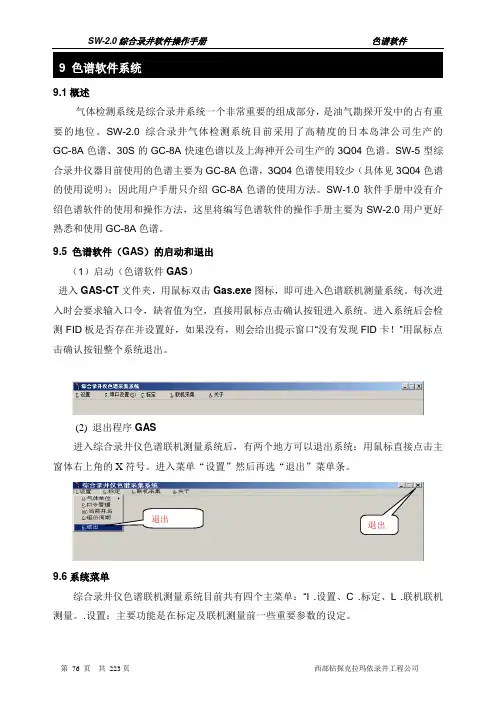
(2) 退出程序GAS进入综合录井仪色谱联机测量系统后,有两个地方可以退出系统:用鼠标直接点击主窗体右上角的X 符号。
进入菜单“设置”然后再选“退出”菜单条。
9.6系统菜单综合录井仪色谱联机测量系统目前共有四个主菜单:“I .设置、C .标定、L .联机联机测量。
.设置:主要功能是在标定及联机测量前一些重要参数的设定。
退出 退出9.6.1设置气体单位:气体单位确定在标定和联机测量时所使用的显示单位,可以选择“%”、“ppm”,以及用户自定义的单位,无论你选择什么显示单位,气体检测系统在存盘时统一按国际标准气体单位“%”的值存盘。
见右图。
9.6.2 口令管理:用于输入新口令和修改旧口令,第一次进本系统时口令为空,在此可以输入新口令防止非法用户启动本系统,或进入联机测量后非法停止联机测量。
9.6.3当前井名:输入当前正在录井的井名,它的主要作用在于井名作为存盘文件名的一部分,用来区别同一文件夹中,不同井的气测资料。

CS-Light 色谱工作站的操作昆明科维科教仪器设备有限公司(云南分析仪器技术中心)操作主要步骤一、参数的设置1.软件安装完毕后,启动适时分析(在线分析)“CS light Real Time Analysis”2.点击系统配置3.单击仪器14.选择 RS232C 和通讯接口(如COM1)5.单击设置听得CBM-102有蜂鸣声则说明设置正确,联机已成功二、色谱图的采集1.启动或处于适时(在线)分析状态。
打开方法文件或设置各分析参数并将方法保存为“★★★数据采集”2.当基线平直后,单击3.点击进行样品登记。
如:“样品名称”、“样品信息”、色谱图数据文件名及要保存的路径等(需保留扩展名.gcd)。
4.“确认”所填写的内容,单击,进样并启动采集计时触发,色谱图会自动保存到指定的文件夹中(采集过程中可单击来中止采集数据)。
三、数据分析方法的建立(即校正曲线的制作)1.启动数据分析(离线分析)“CS light Postrun Analysis”并选择“数据分析”2.打开色谱数据文件,并调节窗口至最佳3.点击方法-峰值综合参数逐一编辑设置积分定量组分分组性能4.设置好各参数后,及时将当前分析方法以文件名为“★★★数据分析”,用另存方式保存到指定的文件夹中(如果文件已经存在,可覆盖更新)至此,分析方法文件(“★★★”)已经包含了所需的各分析参数,如分析方式(面积内标法或外标法)、各积分参数以及含有定性定量参数的组分表等,下面只要进一步完善校正曲线就行了。
5、单击选择6、打开上面已存的分析方法文件“★★★”7.在级别处单击右键,依次添加要校正的标准品色谱数据文件,每添加一数据文件就可得到相应的校正曲线和结果8.再次将当前校正完毕的分析方法以文件名为“★★★数据分析”,用另存方式保存到指定的文件夹中至此,我们就得到了一个完善的包含了校正曲线在内的各分析参数的分析方法“★★★”。
四、色谱数据的处理1.启动数据分析(离线分析)“CS light Postrun Analysis”并选择“数据分析”2.单击“编辑批处理”,填写分析批处理表。