网络配置基础实验
- 格式:doc
- 大小:355.00 KB
- 文档页数:44
1
目 录
实验一、配置STP与VTP ................................. 2
实验二、静态路由 ..................................... 10
实验三、RIP路由协议 .................................. 13
实验四、RIPv1与EIGRP在不连续网络下的比较 ............ 20
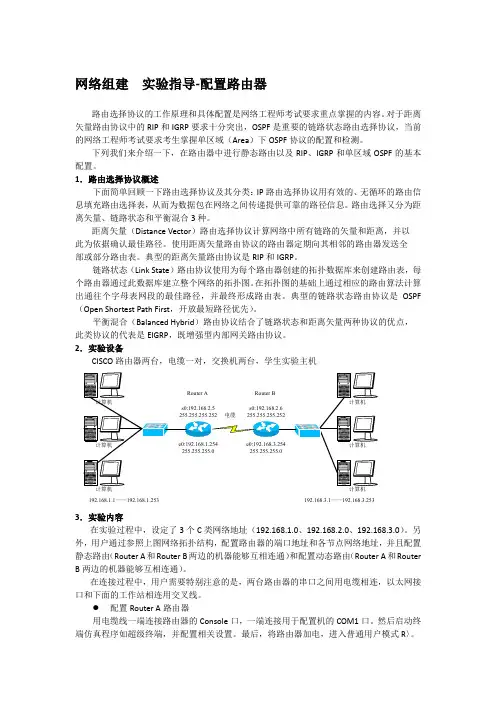
实验五、访问列表与telnet访问控制 ..................... 26
实验六、静态、动态NAT与PAT .......................... 30
实验七、帧中继链路上运行EIGRP ........................ 34
实验八、背靠背帧中继.................................. 39
实验九、配置ISDN DDR ................................. 43
2
实验一、配置STP与VTP
环境:三台交换机,形成一个全互连结构,sw3为2950,sw1和sw2为2900xl;
要求:设置sw3为VTP server,设置sw1和sw2为VTP client,域名为cisco,密码为:cisco,在server创建vlan 10(name:aa)和vlan20(name:bb);设置sw3为vlan1的根桥,sw1为vlan10的根桥,sw2为vlan20的根桥;
初始化配置:
Sw#show vlan 查看vlan信息
Sw#Delete vlan.dat 用此命令将vlan删除
Sw#show startup-config 查看一下NVRAM是否保存了配置
Sw#erase startup-config 清空配置文件
Sw#reload 重新启动交换机
sw>enable
sw#config terminal
sw(config)#hostname sw1
sw1(config)#no ip domain-lookup 关闭域名查找
sw1(config)#line console 0
sw1(config-line)#logging synchronous 命令输入达到同步
sw1(config-line)#exec-timeout 0 0 设置永不超时
sw1(config-line)#exit
步骤一、配置VTP
sw3的配置:
sw3(config)#vtp mode server 在sw3上启用vtp server
Device mode already VTP SERVER.
sw3(config)#vtp domain cisco 设置域名
Changing VTP domain name from NULL to cisco 3 sw3(config)#vtp password cisco 设置密码
Setting device VLAN database password to cisco
sw1的配置:
sw1#vlan database 进入vlan数据库
sw1(vlan)#vtp client 启用VTP client模式
Setting device to VTP CLIENT mode.
sw1(vlan)#vtp domain cisco 作用到cisco域中
Changing VTP domain name from NULL to cisco
sw1(vlan)#vtp password cisco 设置密码与server端相同
Setting device VLAN database password to cisco.
sw1(vlan)#exit 使配置生效
In CLIENT state, no apply attempted.
Exiting....
sw2的配置:
sw2#vlan database
sw2(vlan)#vtp client
Setting device to VTP CLIENT mode.
sw2(vlan)#vtp domain cisco
Changing VTP domain name from NULL to cisco
sw2(vlan)#vtp password cisco
Setting device VLAN database password to cisco.
sw2(vlan)#exit
sw2#
步骤二、启用干道端口
sw3的配置:
sw3(config)#interface fa0/23
sw3(config-if)#switchport mode trunk 启用trunk端口
sw3(config-if)#interface fa0/24
sw3(config-if)#switchport mode trunk
sw1的配置:
sw1(config)#interface fa0/23
sw1(config-if)#switchport trunk encapsulation dot1q 封装干道协议
sw1(config-if)#switchport mode trunk 启用trunk模式
sw1(config-if)#
sw1(config)#interface fa0/24
sw1(config-if)#switchport trunk encapsulation dot1q
sw1(config-if)#switchport mode trunk
sw2的配置: 4 sw2(config)#interface fa0/23
sw2(config-if)#switchport trunk encapsulation dot1q
sw2(config-if)#switchport mode trunk
sw2(config)#interface fa0/24
sw2(config-if)#switchport trunk encapsulation dot1q
sw2(config-if)#switchport mode trunk
步骤三、测试vtp状态及创建vlan
sw3的状态:
sw3#show vtp status 显示vtp状态
VTP Version : 2
Configuration Revision : 0 配置修订号
Maximum VLANs supported locally : 254
Number of existing VLANs : 5
VTP Operating Mode : server vtp模式
VTP Domain Name : cisco vtp域名
VTP Pruning Mode : Disabled
VTP V2 Mode : Disabled
VTP Traps Generation : Disabled
MD5 digest : 0x3F 0x17 0xC8 0xB8 0x5A 0xE3 0x01 0x66
Configuration last modified by 0.0.0.0 at 0-0-00 00:00:00
创建vlan:
sw3(config)#vlan 10 创建VLAN10
sw3(config-vlan)#name aa 命名为aa
sw3(config-vlan)#exit 应用配置
sw3(config)#vlan 20 创建VLAN20
sw3(config-vlan)#name bb 命名为bb
sw3(config-vlan)#exit
sw3(config)#
sw3的状态:
sw3#show vtp status 在sw3显示vtp的状态
VTP Version : 2
Configuration Revision : 2 server的修订号
Maximum VLANs supported locally : 254
Number of existing VLANs : 7 vlan也已经增加
VTP Operating Mode : server
VTP Domain Name : cisco
VTP Pruning Mode : Disabled
VTP V2 Mode : Disabled
VTP Traps Generation : Disabled 5 MD5 digest : 0x98 0x31 0xCF 0xA0 0xA7 0x17 0x73
0x66
Configuration last modified by 0.0.0.0 at 3-1-93 00:52:05
sw2的状态:
sw2#show vtp status
VTP Version : 2
Configuration Revision : 2 已经同步了server
Maximum VLANs supported locally : 254
Number of existing VLANs : 7
VTP Operating Mode : Client
VTP Domain Name : cisco
VTP Pruning Mode : Disabled
VTP V2 Mode : Disabled
VTP Traps Generation : Disabled
MD5 digest : 0x98 0x31 0xCF 0xA0 0xA7 0x17 0x73
0x66
Configuration last modified by 0.0.0.0 at 3-1-93 00:52:05