
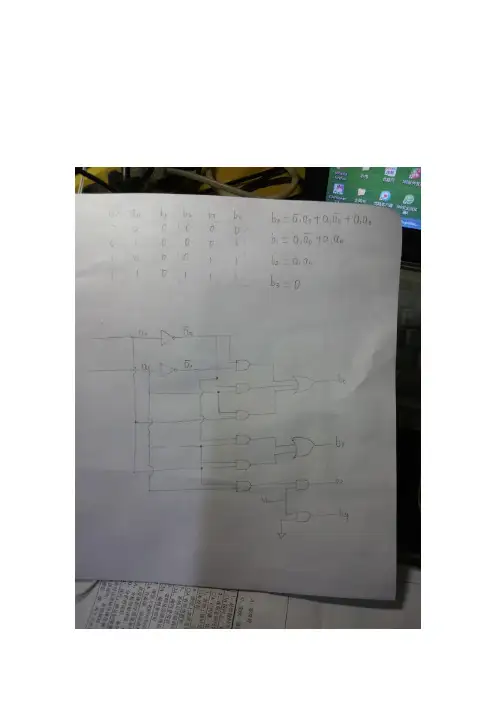
温度计编码(thermometer decoder)2-4
- 格式:doc
- 大小:2.41 MB
- 文档页数:2
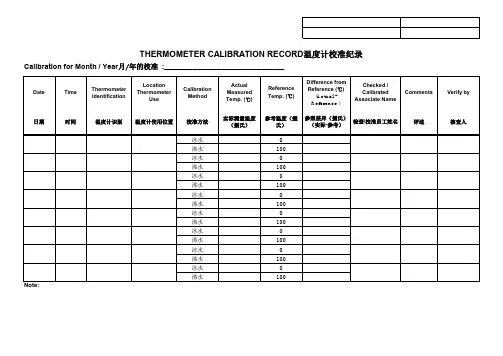
DateTime Thermometer IdentificationLocation ThermometerUseCalibration MethodActual Measured Temp. (℃)Reference Temp. (℃)Difference from Reference (℃)(Actual -Reference )Checked /Calibrated Associate NameComments Verify by日期时间温度计识别温度计使用位置校准方法实际测量温度(摄氏)参考温度(摄氏)参照差异(摄氏)(实际-参考)检查/校准员工姓名评述核查人冰水0沸水100冰水0沸水100冰水0沸水100冰水0沸水100冰水0沸水100冰水0沸水100冰水0沸水100冰水0沸水1001. Calibration to be done to both Ice water point (0˚C) and Boiling water point (100˚C).将冰点校准到 0˚C,将沸点校准到100˚C。
2. Calibration frequency is on monthly basis.每月进行一次校准。
3. Maximum deviation (Difference from Reference) allowable is < + 1˚C 最大偏差(实际温度与参考温度差)不得超过 1˚C。
4. Re-calibrate when deviation of reading is > 1˚C 当偏差值大于 1˚C时,重新校准。
Calibration for Month / Year 月/年的校准 :______________________________THERMOMETER CALIBRATION RECORD 温度计校准纪录。

THD2FE Non-contact Forehead Thermometer⇔The device setting with buzzer is on, you can set buzzer on/off under Mute mode.beep sounds. You can also use the same process to turn off the Mute function.Use of the thermometerNote: If there is any temperature difference between the places where the device is stored and where you are going to measure, subject and the device should stay in the same room for at least 15 minutes before measurement.1. Always make sure the probe lens is clean without any damage and the forehead is clean. Warning: Choking from swallowing small parts and batteries by children or pets is possible, please keep small parts and batteries at places wherechildren and pets can’t reach.2. Power on:Press the “ON/MEM ” button (see figure 1).3. Measuring body temperature on the forehead:Indications for use: The Non-contact Clinical Thermometer, Model THD2FE is an infrared thermometer intended for the intermittent measurement of human body temperature in people of all ages.Ref No.:032020Press the “ON/MEM” button to power on the device. Forehead mode is the default mode. You can see the icon on the screenand hear two beep sounds (see figure 1). In this mode, you can hold the thermometer within 1.5 inch from the central forehead (Fig. 2) andpressthe "START" button to get the forehead measurement. The time consuming for measurement might be 1 second. After each foreheadmeasurement, wait icon stop flashing to be ready for next measurement.Figure 2 Points for attention:a. Forehead temperature is displayed in oral mode. This mode converts the forehead temperature to display its “oral-equivalent” value.b. Before the measurement, the subject should stay in a stable environment for 5 minutes and avoid exercise, bath for 30mins.c. Remember to keep the forehead area clean and away from sweat, cosmetics and scar while taking temperature.d. The “Clinical Bias” is -2.5 ~ -3.1°F (-1.4 ~ -1.7°C).e. The “Limits of Agreement” is 0.98.f. The "Repeatability" is 0.36°F (0.20°C)4. Measuring surface temperature:4.1 After power on, press and hold the “ON/MEM” button, and press the “START” button one time for “Infrared thermometer” mode to see icon on your LCDdisplay. In this mode, you can get the target surface temperature.4.2 When you press the “START” button, you will get the real time temperature immediately. If you press and hold the “START” button, the reading of measurement willbe continuously updated.4.3 Applications include temperature measurements for water, milk, cloth, skin or other objects.* Note: This mode shows the actual and unadjusted surface temperature which is different from the body temperature.5. Power off:5.1 Device will automatically shut off if left idle for more than 1 minute to extend battery life.ProblemWarranty:Warranty: 12 monthsManufacture Date: as the serial number (please open the battery cover, it is shown on the inside of the device.)Ex.SN:E512A000001, the first “E” is External, the second number “5” is the last number of manufacture year, the third and the fourth number “12” is the manufacture Note: The thermometer is calibrated at the time of manufacture. If you question calibration mode, the accuracy of temperature measurements or unexpected events at any time, please contact the dealers or nearest service address.Warning: No modification of this equipment is allowed.Please read the instructions for use BF type applied partMetris instrument east, IIcAdd: 25 Long Meadow PlaceSouth Setauket, NY USA 11720Figure 1 Figure 2 Figure 3IP220,120,23 FM c)±5 kHz deviation1 kHz sine。

HH11CDIGITAL THERMOMETERServicing North America:U.S.A. Omega Engineering, Inc.Headquarters: Toll-Free: 1-800-826-6342 (USA & Canada only) Customer Service: 1-800-622-2378 (USA & Canada only) Engineering Service: 1-800-872-9436 (USA & Canada only) Tel: (203) 359-1660 Fax: (203) 359-7700 e-mail:**************For Other Locations Visit /worldwideIt is the policy of OMEGA Engineering, Inc. to comply with all worldwide safety and EMC/EMI regulations that apply. OMEGA is constantly pursuing certification of its products to theEuropean New Approach Directives. OMEGA will add the CE mark to every appropriate device upon certification.The information contained in this document is believed to be correct, but OMEGA accepts no liability for any errors itcontains, and reserves the right to alter specifications without notice.WARNING: These products are not designed for use in, and should not be used for, human applications.INTRODUCTIONThis instrument is a portable 4½ digit, compact-sized digital thermometer designed to use external K-type thermocouples as temperature sensor. Temperature indication follows National Bureau of Standards and IEC 584 tem-perature/voltage tables for K-type thermocouples. One K-type thermocouple is supplied with the thermometer.SAFETY INFORMATIONIt is recommended that you read the safety and operation instructions before using this t hermometer.WARNINGTo avoid electrical shock, do not use this instrument when working voltages at the measurement surface over 24V AC or 60V DC.WARNINGTo avoid damage or burns, do not make temperaturemeasurement in microwave ovens.CAUTIONRepeated sharp flexing can break the thermocouple leads. To prolong lead life, avoid sharp bends in theleads, especially near the connector.Thesymbol on the instrument indicates that the operator must refer to an explanation in this manual.SPECIFICATIONSELECTRICALTemperature Scale: Celsius or Fahrenheit user-selectable Measurement Range:-200°C to 1372°C, -328°F to 2501°F Auto range: 0.1°C/1°C, 0.1°F/1°FAccuracy:Accuracy is specified for operating tempera-tures over the range of 18°C to 28°C (64°F to 82°F), for 1 year, not including thermocouple error. ±(0.1%rdg+0.5°C) on -60°C to 1372°C ±(0.1%rdg+2°C) on -60°C to -200°C ±(0.1%rdg+1°F) on -76°F to 2501°F ±(0.1%rdg+4°F) on -76°F to -328°F Temperature Coefficient:0.1 times the applicable accuracy specification per °C from 0°C to 18°C and 28°C to 50°C (32°F to 64°F and 82°F to122°F). Input Protection:60V dc or 24V ac rms maximum input voltage on any combination of input pins. Input Connector:Accepts standard miniature thermocouple connectors (flat blades spaced 7.9mm, center to center). ENVIRONMENTALAmbient Operating Ranges: 0°C to 50°C (32°F to 122°F) Storage Temperature:-20°C to 60°C (-4°F to 140°F)GENERALDisplay: 4½ digit liquid crystal display (LCD) with max-imum reading of 19999.Low battery indication: The “ ” is displayed when the battery voltage drops below the operating level. Measurement rate: 1 time/second.Operating environment: 0°C to 50°C at<70% R.H.Storage temperature: -20°C to 60°C, 0 to 80% R.H. with battery removed from meter.Accuracy: Stated accuracy at 23°C±5°C, <75% R.H. Battery: Standard 9V battery (NEDA 1604, IEC 6F22). Battery Life: 100 hours typical with carbon zinc battery. Dimensions: 210mm(H) x 65mm(W) x 35mm(D). Weight: approx. 282g including battery.Supplied Wire: 4 feet type “K” thermocouple bead wire (PTFE tape insulated). Maximum insulation tempera-ture 260°C (500°F). Wire accuracy ±2.2°C or ±0.75% of reading (whichever is greater) from 0°C to 800°C.OPERATING INSTRUCTIONS1.“°C/°F” Button: Selecting the Temperature ScaleReadings are displayed in either degrees Celsius(°C) or degrees Fahrenheit(°F). When the thermometer is turned on, it is set to the temperature scale that was in use when the thermometer was last turned off. To change the temperature scale, hold down for 2 seconds “APO >2S°C/°F” key.2.“HOLD” ButtonPress the “HOLD” key to enter the Data Hold mode, the “HOLD” annunciator is displayed. When HOLD mode is selected, the thermometer held the present readings and stops all further measurements. Press the “HOLD” key again cancels HOLD mode, causing the thermometer to resume taking measurements.3.“REL” ButtonPress “REL” key to enter Relative mode, zero the display, and store the displayed reading as a reference value and annunciator REL is displayed. Pressing “REL” key over 2 seconds to exit the relative mode.4.“APO” ButtonPressing “APO >2S °C/°F” key to trigger on or off APO mode, and then APO annunciator will appear or disappear on the display. Power is automatically turn off, if no operation for a period of time, and “APO”annunciator is displayed at upper-left corner when APO function is enabled.5.“MIN/MAX” ButtonPress “MIN/MAX” once to begin recording MIN and MAX. Press “MIN/MAX” to select MIN or MAX or MAX-MIN or A VG. Hold down for 2 seconds to exit MIN/MAX function.In the MIN/MAX record mode can not power off, must leave MIN/MAX record mode then power off.OFFSET ADJUSTMENTThe OFFSET control is set at the factory to allow for the variations found in standard thermocouples. By adjusting the OFFSET control, you can optimize measurement ac-curacy for a particular thermocouple at a particular tem-perature.Adjusting for Accurate Measurements1. Connect the thermocouple to the input connector and turn the thermometer on.2. Place the thermocouple in a known, stable temperature environment at or near the temperature you wish to measure, and allow the readings to stabilize.3. Slowly adjust the OFFSET control so that the thermom-eter reading matches the temperature of the known en-vironment. Leave sufficient time between adjustments to allow for measurement lag.Resetting the OFFSET ControlTo return the OFFSET control to the factory setting without having to recalibrate the thermometer, perform the following procedure:1. Connect a thermocouple that is in good working order to the input that is to be adjusted.2. Place the thermocouple in an ice-water bath and allow the readings to stabilize.3. Slowly adjust the OFFSET control until the thermome-ter reads 0°C (32°F).Probe DetectorThe red LED will be ON when no K-type thermocouple probe is inserted into the TEMP input of the meter, and will be OFF after K-type thermocouple probe is inserted. If the red LED stays ON when thermocouple probe is at-tached, check the thermocouple probe which might be damaged.OPERATOR MAINTENANCEWARNINGTo avoid possible electrical shock, disconnect the thermocouple connectors from the thermometer beforeremoving the cover.Battery Replacement1. Power is supplied by 9V (NEDA 1604, IEC 6F22).2. The “” appears on the LCD display when replace-ment is needed.3. Remove the battery from battery contacts.4. When not use for long time remove battery.5. Don’t keep in place with high Temp, or high humidity. CleaningPeriodically wipe the case with a damp cloth and deter-gent, do not use abrasives or solvents.Where Do I Find Everything I Need forProcess Measurementand Control?OMEGA…Of Course!Shop online at TEMPERATUREThermocouple, RTD & Thermistor Probes,Connectors, Panels & AssembliesWire: Thermocouple, RTD & ThermistorCalibrators & Ice Point ReferencesRecorders, Controllers & Process MonitorsInfrared PyrometersPRESSURE, STRAIN AND FORCETransducers & Strain GagesLoad Cells & Pressure GagesDisplacement TransducersInstrumentation & AccessoriesFLOW/LEVELRotameters, Gas Mass Flowmeters & Flow Com-putersAir Velocity IndicatorsTurbine/Paddlewheel SystemsTotalizers & Batch ControllerspH/CONDUCTIVITYpH Electrodes, Testers & AccessoriesBenchtop/Laboratory MetersControllers, Calibrators, Simulators & PumpsIndustrial pH & Conductivity EquipmentDATA ACQUISITIONData Acquisition & Engineering SoftwareCommunications-Based Acquisition SystemsPlug-in Cards for Apple, IBM & CompatiblesDatalogging SystemsRecorders, Printers & Plo tte rsHEATERSHeating CableCartridge & Strip HeatersImmersion & Band HeatersFlexible HeatersLaboratory HeatersENVIRONMENTALMONITORING AND CONTROLMetering & Control InstrumentationRefractometersPumps & TubingAir, Soil & Water MonitorsIndustrial Water & Wastewater TreatmentpH, Conductivity & Dissolved OxygenInstrumentsMade in Taiwan WARRANTY/DISCLAIMEROMEGA ENGINEERING, INC. warrants this unit to be free of defectsin materials and workmanship for a period of 13 months from dateof purchase. OMEGA’s WARRANTY adds an additional one (1) monthgrace period to the normal one (1) year product warranty to coverhandling and shipping time. This ensures that OMEGA’s customersreceive maximum coverage on each product.If the unit malfunctions, it must be returned to the factory for evalua-tion. OMEGA’s Customer Service Department will issue an AuthorizedReturn (AR) number immediately upon phone or written request.Upon examination by OMEGA, if the unit is found to be defective, itwill be repaired or replaced at no charge. OMEGA’s WARRANTY doesnot apply to defects resulting from any action of the purchaser, includ-ing but not limited to mishandling, improper interfacing, operationoutside of design limits, improper repair, or unauthorized modifica-tion. This WARRANTY is VOID if the unit shows evidence of havingbeen tampered with or shows evidence of having been damaged as aresult of excessive corrosion; or current, heat, moisture or vibration;improper specification; misapplication; misuse or other operatingconditions outside of OMEGA’s control. Components in which wearis not warranted, include but are not limited to contact points, fuses,and triacs.OMEGA is pleased to offer suggestions on the use of its vari-ous products. However, OMEGA neither assumes responsibil-ity for any omissions or errors nor assumes liability for anydamages that result from the use if its products in accordancewith information provided by OMEGA, either verbal or writ-ten. OMEGA warrants only that the parts manufactured bythe company will be as specified and free of defects. OMEGAMAKES NO OTHER WARRANTIES OR REPRESENTATIONS OFANY KIND WHATSOEVER, EXPRESSED OR IMPLIED, EXCEPTTHAT OF TITLE, AND ALL IMPLIED WARRANTIES INCLUDINGANY WARRANTY OF MERCHANTABILITY AND FITNESSFOR A PARTICULAR PURPOSE ARE HEREBY DISCLAIMED.LIMITATION OF LIABILITY: The remedies of purchaser setforth herein are exclusive, and the total liability of OMEGAwith respect to this order, whether based on contract, warran-ty, negligence, indemnification, strict liability or otherwise,shall not exceed the purchase price of the component uponwhich liability is based. In no event shall OMEGA be liable forconsequential, incidental or special damages.CONDITIONS: Equipment sold by OMEGA is not intended to be used,nor shall it be used: (1) as a “Basic Component” under 10 CFR 21 (NRC),used in or with any nuclear installation or activity; or (2) in medical appli-cations or used on humans. Should any Product(s) be used in or withany nuclear installation or activity, medical application, used on humans,or misused in any way, OMEGA assumes no responsibility as set forthin our basic WARRANTY/DISCLAIMER language, and, additionally,purchaser will indemnify OMEGA and hold OMEGA harmless from anyliability or damage whatsoever arising out of the use of the Product(s)in such a manner.RETURN REQUESTS/INQUIRIESDirect all warranty and repair requests/inquiries to the OMEGACustomer Service Department. BEFORE RETURNING ANYPRODUCT(S) TO OMEGA, PURCHASER MUST OBTAIN ANAUTHORIZED RETURN (AR) NUMBER FROM OMEGA’S CUSTOMERSERVICE DEPARTMENT (IN ORDER TO AVOID PROCESSINGDELAYS). The assigned AR number should then be marked on theoutside of the return package and on any correspondence.FOR WARRANTY RETURNS,please have the followinginformation available BEFOREcontacting OMEGA:1. Purchase Order numberunder which the productwas PURCHASED,2. Model and serial number of theproduct under warranty, and3. Repair instructions and/orspecific problems relativeto the product.FOR NON-WARRANTY REPAIRS,consult OMEGA for current repaircharges. Have the followinginformation available BEFOREcontacting OMEGA:1. P urchase Order number to coverthe COST of the repair orcalibration,2. Model and serial number of theproduct, and3. R epair instructions and/or specificproblems relative to the product.OMEGA’s policy is to make running changes, not model changes,whenever an improvement is possible. This affords our customersthe latest in technology and engineering.OMEGA is a registered trademark of OMEGA ENGINEERING, INC.© Copyright 2017 OMEGA ENGINEERING, INC. All rights reserved.This document may not be copied, photocopied, reproduced,translated, or reduced to any electronic medium or machine-readableform, in whole or in part, without the prior written consent of OMEGAENGINEERING, INC.。

e-mail:**************For latest product manuals:User’s GuideOS423HT -LSNon-contactInfrared Thermometer with White LED FlashlightShop online atMADE IN TAIWANU.S. PAT. B1 5,368,392; 5,524,984; 5,727,880; 5,823,678; 5,823,679; 6,123,453; 6,267,500 B1; 6,341,891 B1; 6,377,400 B1; 6,540,398 B2 ;6,614,830 B1; 6,633,434 B2; 6,659,639; 6,901,089 B1, 7,052,175 / Canada 2,114,806; 2,317,734 / France 2 756 920; 2 767 921; 2,773,213; 2 773 214 / Germany G 94 22 197.9; G 94 22 203.7, 19828454/ Holland 1007752; / U.K. Registered 2,237,493; 2,320,324; 9726133.3 / EPO 0 644,408B2; EPO 1 085 307 A1, EPO 1 065 484 B1, EPO 1 065 483 B1. Other U.S. and International Patents Pending.(with white LED Flashlight)OS423HT-LS ThermometerT O perating Instructions For Model with thermocouple socketThe thermometer is a non-contact infrared thermometer. There are many mathematical modes for the Infrared function. Please remember to keep away from children and don’t use it for safety relatedhumans.applications or for medical use or use on(Default Screen)8) and press Meas. key (_6) to display thesurface Distance:Spot is 35:1. The laser circle/dot points are the reference for the target spot size.e the target area is within the field of view.FUNCTION1) for setting the emissivityPress Emissivity key (_1), then press Up key (_4) or Down key (_2) to set the emissivity, then pressMode key (_5) to confirm it. The emissivity can be changed from 0.10 (10E) to 1 (100E).** The thermometer will automatically shut off if left idle for more than 60sec.ADD V ALUEPress Up key (_4) for LO CK mode ON/OFF.The lock mode is particularly useful forcontinuous monitoring of temperatures for up to 60 minutes.In MAX, MIN, DIF,AVG mode:Press Down key (_2) for o C or o F transferred.and press Up key (_4) for backlight function ON/OFF.In all modes: Firsthold on the Meas.key (_6)and press Down key (_2) for laser function ON/OFF.(The flash light is turned on at the same time as the laser)Circle/DotLaser1. WHEN DEVICE IS IN USE, DO NOT LOOK DIRECTLY INTO THE LASER BEAM –PERMANENT EYE DAMAGE MAY RESULT.2. USE EXTREME CAUTION WHEN OPERATING THE LASER.3. NEVER POINT THE DEVICE TOWARDS ANYONE’S EYES.4. KEEP OUT OF REACH OF ALL CHILDREN.STORAGE & CLEANINGThe IR should be stored at room temperature. The sensor lens is the most delicate part of the thermometer. The lens should be kept clean at all times, care should be taken when cleaning the lens using only a soft cloth or cotton swab with water or medical alcohol.Allow the lens to fully dry before using the thermometer. Do not submerge any part of the thermometer.LCD ERROR MESSAGESThe thermometer incorporates visual diagnostic messages as follows:‘Hi’ or ’Lo’ is displayed when the temperature being measured is outside of the settings of HAL and LAL.__ __‘Er2’ is displayed when the thermometer is exposed to rapid changes in the ambienttemperature. ‘Er3’ is displayed when the ambient temperature exceeds 0o C (32°F) or +50oC (122°F). The thermometer should be allowed plenty of time (minimum 30 minutes) to stabilize to the working/room temperature.__Error 5~9, for all other error messages it is necessary to reset the thermometer. To reset it, wait for auto power off, remove the battery and wait for a minimum of one minute, reinsert the battery and turn on. ____‘Hi’ or ’Lo’ is displayed when the temperature being measured is outside of the measurement range.BATTERIESThe thermometer incorporates visual low battery indication as follows:‘Battery OK’: measurementsare possible ‘Battery Low’: battery needs to be replaced, measurements are still possible ‘Battery Exhausted’: measurements arenot possibleWhen the ‘Low Battery’ icon indicates the battery is low, the battery should be replaced immediately with AAA, 1.5V batteries.Please note: It is important to turn the instrument off before replacing the battery otherwise the thermometer may malfunction. Dispose of used battery promptly and keep away from children.SPECIFICATION ItemNon-contact Infrared Scan function Thermocouple Probe Scan function (K type; probe not included.)Measurement Range -60 to +1000 oC (-76 to +1832 oF)-64 to +1400°C (-83.2 to +2552°F)Operating Range0 to +50°C (32 to +122°F)Accuracy(Tobj=15~35°C, Tamb=25°C)±1.0°C (1.8°F)Accuracy(Tobj=-33~1000°C,Tamb=23±3°C)±2% of reading or 2°C (4°F) whichever is greater+/-1% of reading or 1°C (1.8°F)whichever is greater (Test under Tamb=23±6°C)Emissivity Range 0.95 default – adjustable 0.1 to 1 step .01CAUTIONResolution0.1°C/0.1°F at -83.2 to 999.9(°C/°F), otherwise 1°C/1°F Response Time (90%)1sec Distance:Spot 35:1Battery Life Typ.180, min 140 hours continuous use (Alkaline, without Laser and Back Light.)Dimensions 47.0 x 154.9 x 193.1mm (1.8 x 6.0 x 7.6 inch)Weight344.8 grams(12.16 oz) including batteries (AAA*2pcs)Note: Under an electromagnetic field of 3V/m from 90 to 360 MHz the maximum error is +/-10°CEMC/RFI: Readings may be affected if the unit is operated within radio frequency electromagnetic field strength ofapproximately 3 volts per meter, but the performance of the instrument will not be permanently affected.It is the pol icy of OME GA Enginee ring, Inc. to comply wi th all world wide safety and EMC/E MI regulatio ns that app ly. OMEGA is constantly pursuing certificatio n ofits products to the Euro pean New A pproach Di rectives. OM EGA will ad d the CE m ark to every appropriat e device up on certifica tion.The informat ion contained in this docum ent is believe d to be corre ct, but OMEG A accepts no liability for a ny errors it c ontains, andreserves the right to alter specification s without no tice.WARNING: These produc ts are not des igned for use in, and shou ld not be use d for, human applications.WARRANTY/DISCLAIMEROMEGA ENGINEERING, INC. warrants this unit to be free of defects in materials and workmanship for a period of 13 months from date of purchase. OMEGA’s WARRANTY adds an additional one (1) month grace period to the normal one (1) year product warranty to cover handling and shipping time. This ensures that OMEGA’s customers receive maximum coverage on each product.If the unit malfunctions, it must be returned to the factory for evaluation. OMEGA’s Customer Service Department will issue an Authorized Return (AR) number immediately upon phone or written request. Upon examination by OMEGA, if the unit is found to be defective, it will be repaired or replaced at no charge. OMEGA’s WARRANTY does not apply to defects resulting from any action of the purchaser, including but not limited to mishandling, improper interfacing, operation outside of design limits, improper repair, or unauthorized modification. This WARRANTY is VOID if the unit shows evidence of having been tampered with or shows evidence of having been damaged as a result of excessive corrosion; or current,heat, moisture or vibration; improper specification; misapplication; misuse or other operating conditions outside of OMEGA’s ponents in which wear is not warranted, include but are not limited to contact points, fuses, and triacs.OMEGA is pleased to offer suggestions on the use of its various products. However, OMEGA neither assumes responsibility for any omissions or errors nor assumes liability for any damages that result from the use of its products in accordance with information pro-vided by OMEGA, either verbal or written. OMEGA warrants only that the parts manufactured by the company will be as specified and free of defects. OMEGA MAKES NO OTHER W ARRANTIES OR REPRESENTATIONS OF ANY KIND W HATSOEVER, EXPRESSED OR IMPLIED, EXCEPT THAT OF TITLE, AND ALL IMPLIED WARRANTIES INCLUDING ANY WARRANTY OF MERCHANTABILITY AND FIT-NESS FOR A PARTICULAR PURPOSE ARE HEREBY DISCLAIMED. LIMITATION OF LIABILITY : The remedies of purchaser set forth here-in are exclusive, and the total liability of OMEGA with respect to this order, whether based on contract, warranty, negligence, indemni-fication, strict liability or otherwise, shall not exceed the purchase price of the component upon which liability is based. In no event shall OMEGA be liable for consequential, incidental or special damages.CONDITIONS: Equipment sold by OMEGA is not intended to be used, nor shall it be used: (1) as a “Basic Component” under 10 CFR 21 (NRC),used in or with any nuclear installation or activity; or (2) in medical applications or used on humans. Should any Product(s) be used in or with any nuclear installation or activity, medical application, used on humans, or misused in any way, OMEGA assumes no responsibility as set forth in our basic WARRANTY / DISCLAIMER language, and, additionally, purchaser will indemnify OMEGA and hold OMEGA harmless from any liability or damage whatsoever arising out of the use of the Product(s) in such a manner.Servicing North America:U.S.A.:Omega Engineering, Inc., One Omega Drive, P .O. Box 4047ISO 9001 CertifiedStamford, CT 06907-0047Toll-Free: 1-800-826-6342Tel: (203) 359-1660FAX: (203) 359-7700e-mail:**************Canada:976 BergarLaval (Quebec), H7L 5A1 CanadaToll-Free: 1-800-826-6342TEL: (514) 856-6928FAX: (514) 856-6886e-mail:*************For immediate technical or application assistance:U.S.A. andS ales Service: 1-800-826-6342/1-800-TC-OMEGA Canada:Customer Service: 1-800-622-2378/1-800-622-BEST Engineering Service: 1-800-872-9436/1-800-USA-WHENMexico/En Español: 001 (203) 359-7803FAX: 001 (203) 359-7807Latin America:**************.mx e-mail:*****************OMEGAnet ®Online Service Internet e-mail i n ************Servicing Europe:Benelux:Managed by the United Kingdom Office Toll-Free: 0800 099 3344TEL: +31 20 347 21 21FAX: +31 20 643 46 43e-mail:*****************Czech Republic:Frystatska 184, 733 01 Karviná, Czech Republic Toll-Free: 0800-1-66342TEL: +420-59-6311899FAX: +420-59-6311114e-mail:*****************France:Managed by the United Kingdom Office Toll-Free: 0800 466 342TEL: +33 (0) 161 37 29 00FAX: +33 (0) 130 57 54 27e-mail:**************Germany/Austria:Daimlerstrasse 26, D-75392 Deckenpfronn, GermanyToll-Free************TEL: +49 (0) 7056 9398-0FAX: +49 (0) 7056 9398-29e-mail:*************United Kingdom:OMEGA Engineering Ltd.ISO 9001 CertifiedOne Omega Drive, River Bend Technology Centre,Northbank Irlam, Manchester M44 5BD United Kingdom Toll-Free: 0800-488-488TEL: +44 (0) 161 777-6611FAX: +44 (0) 161 777-6622e-mail:**************.ukRETURN REQUESTS /INQUIRIESDirect all warranty and repair requests/inquiries to the OMEGA Customer Service Department. BEFORE RETURNING ANY PRODUCT(S) TOOMEGA, PURCHASER MU ST OBTAIN AN AU THORIZED RETU RN (AR) NU MBER FROM OMEGA’S CU STOMER SERVICE DEPARTMENT (IN ORDER TO AVOID PROCESSING DELAYS). The assigned AR number should then be marked on the outside of the return package and on any correspondence.The purchaser is responsible for shipping charges, freight, insurance and proper packaging to prevent breakage in transit.FOR WARRANTY RETURNS, please have the following information available BEFORE contacting OMEGA:1.Purchase Order number under which the product was PURCHASED,2.Model and serial number of the product under warranty, and3.Repair instructions and/or specific problems relative to the product.FOR NON-WARRANTY REPAIRS,consult OMEGA for current repair charges. Have the following information available BEFORE contacting OMEGA:1. Purchase Order number to cover the COST of the repair,2.Model and serial number of the product, and3.Repair instructions and/or specific problems relative to the product.OMEGA’s policy is to make running changes, not model changes, whenever an improvement is possible. This affords our customers the latest in technology and engineering. OMEGA is a registered trademark of OMEGA ENGINEERING, INC.© Copyright 2010 OMEGA ENGINEERING, INC. All rights reserved. This document may not be copied, photocopied, reproduced, translated, or reduced to any elec-tronic medium or machine-readable form, in whole or in part, without the prior written consent of OMEGA ENGINEERING, INC.M4919/0610。