cocos2d-x-3.0
- 格式:pdf
- 大小:146.86 KB
- 文档页数:5
Run Samples
$ bin/cpp-empty-test/cpp-empty-test or $ bin/lua-empty-test/lua-empty-test
You may meet building errors when building libGLFW.so. It is because libGL.so directs to an error target,
$ cd cocos2d-x/build $ ./install-deps-linux.sh
Then
$ cd NEW_PROJECTS_DIR/MyGame $ cocos run -p linux
Run
$ bin/MyGame
Build and run new project for win32
$ cocos run -p win32
Running Tests
Select the test you want from Xcode Scheme chooser. For OS X / iOS
$ cd cocos2d-x/build $ open cocos_tests.xcodeproj
For Linux
$ cd cocos2d-x/build $ ./install-deps-linux.sh $ cmake .. $ make
Fast Free Easy to use Community Supported
How to start a new game
1. Download the code from cocos2d download site 2. Run setup.py 3. Run the cocos script
Then click item on Android device to run tests. Available value of -p is the API level, cocos2d-x supports from level 10.
Contributing to the Project
Did you find a bug? Do you have feature request? Do you want to merge a feature?
Build Requirements
Mac OS X 10.7+, Xcode 4.6+ or Ubuntu 12.10+, CMake 2.6+ or Windows 7+, VS 2012+ Python 2.7.5
Runtime Requirements
iOS 5.0+ for iPhone / iPad games Android 2.3+ for Android games Windows Phone 8+ for Windows Phone games OS X v10.6+ for Mac games Windows 7+ for Win games
cocos2d-x
cocos2d-x is a multi-platform framework for building 2d games, interactive books, demos and other graphical applications. It is based on cocos2d-iphone, but instead of using Objective-C, it uses C++. It works on iOS, Android, Windows Phone, OS X, Windows and Linux. cocos2d-x is:
Main features
Scene management (workflow) Transitions between scenes Sprites and Sprite Sheets Effects: Lens, Ripple, Waves, Liquid, etc. Actions (behaviours):
Example:
$ cd cocos2d-x $ ./setup.py $ source FILE_TO_SAVE_SYSTEM_VARIABLE $ cocos new MyGame -p com.your_company.mygame -l cpp -d NEW_PROJECTS_DIR $ cd NEW_PROJECTS_DIR/MyGame
Build and run new project for android
$ cocos run -p android -j 4
Build and run new project for iOS
$ cocos run -p ios
Build and run new project for OSX
$ cocos run -p mac
you should make it to direct to a correct one. `install-deps-linux.sh` only has to be run once.
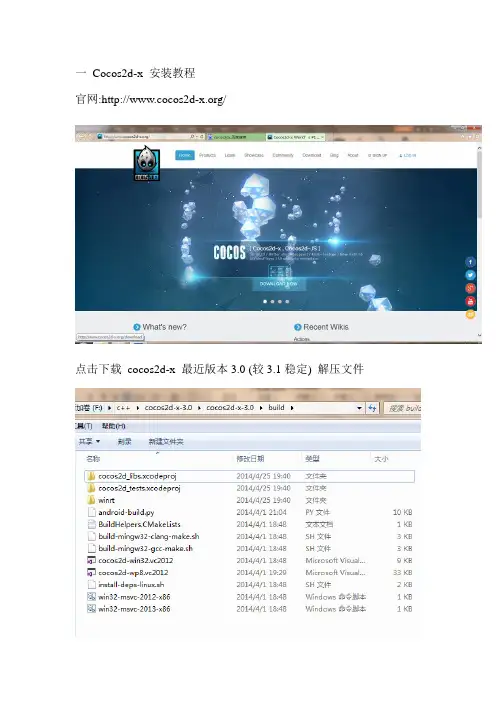
For Wid-win32.vc2012.sln
For Android
$ cd cocos2d-x/build $ python ./android-build.py cpp-empty-test -p 10 $ adb install ../tests/cpp-empty-tst/proj.android/bin/CppEmptyTest-debug.apk
Build and run new project for linux
if you never run cocos2d-x on linux, you need to install all dependences by the script in cocos2d/build/install-deps-linux.sh
Trasformation Actions: Move, Rotate, Scale, Fade, Tint, etc. Composable actions: Sequence, Spawn, Repeat, Reverse Ease Actions: Exp, Sin, Cubic, Elastic, etc. Misc actions: CallFunc, OrbitCamera, Follow, Tween Basic menus and buttons Integrated with physics engines: Box2d and Chipmunk Particle system Skeleton Animations: Spine and Armature support Fonts: Fast font rendering using Fixed and Variable width fonts Support for .ttf fonts Tile Map support: Orthogonal, Isometric and Hexagonal Parallax scrolling Motion Streak Render To Texture Touch/Accelerometer on mobile devices Touch/Mouse/Keyboard on desktop Sound Engine support (CocosDenshion library) based on OpenAL Integrated Slow motion/Fast forward Fast and compressed textures: PVR compressed and uncompressed textures, ETC1 compressed textures, and more Resolution Independence Language: C++, with Lua and JavaScript bindings Open Source Commercial Friendly: Compatible with open and closed source projects OpenGL ES 2.0 (mobile) / OpenGL 2.1 (desktop) based
contributing to cocos2d-x
Contact us
Forum: Twitter: /cocos2dx Weibo: /cocos2dx IRC: https:/// (#cocos2d and #cocos2d-x channels)
$ bin/cpp-empty-test/cpp-empty-test or $ bin/lua-empty-test/lua-empty-test
You may meet building errors when building libGLFW.so. It is because libGL.so directs to an error target,
$ cd cocos2d-x/build $ ./install-deps-linux.sh
Then
$ cd NEW_PROJECTS_DIR/MyGame $ cocos run -p linux
Run
$ bin/MyGame
Build and run new project for win32
$ cocos run -p win32
Running Tests
Select the test you want from Xcode Scheme chooser. For OS X / iOS
$ cd cocos2d-x/build $ open cocos_tests.xcodeproj
For Linux
$ cd cocos2d-x/build $ ./install-deps-linux.sh $ cmake .. $ make
Fast Free Easy to use Community Supported
How to start a new game
1. Download the code from cocos2d download site 2. Run setup.py 3. Run the cocos script
Then click item on Android device to run tests. Available value of -p is the API level, cocos2d-x supports from level 10.
Contributing to the Project
Did you find a bug? Do you have feature request? Do you want to merge a feature?
Build Requirements
Mac OS X 10.7+, Xcode 4.6+ or Ubuntu 12.10+, CMake 2.6+ or Windows 7+, VS 2012+ Python 2.7.5
Runtime Requirements
iOS 5.0+ for iPhone / iPad games Android 2.3+ for Android games Windows Phone 8+ for Windows Phone games OS X v10.6+ for Mac games Windows 7+ for Win games
cocos2d-x
cocos2d-x is a multi-platform framework for building 2d games, interactive books, demos and other graphical applications. It is based on cocos2d-iphone, but instead of using Objective-C, it uses C++. It works on iOS, Android, Windows Phone, OS X, Windows and Linux. cocos2d-x is:
Main features
Scene management (workflow) Transitions between scenes Sprites and Sprite Sheets Effects: Lens, Ripple, Waves, Liquid, etc. Actions (behaviours):
Example:
$ cd cocos2d-x $ ./setup.py $ source FILE_TO_SAVE_SYSTEM_VARIABLE $ cocos new MyGame -p com.your_company.mygame -l cpp -d NEW_PROJECTS_DIR $ cd NEW_PROJECTS_DIR/MyGame
Build and run new project for android
$ cocos run -p android -j 4
Build and run new project for iOS
$ cocos run -p ios
Build and run new project for OSX
$ cocos run -p mac
you should make it to direct to a correct one. `install-deps-linux.sh` only has to be run once.
For Wid-win32.vc2012.sln
For Android
$ cd cocos2d-x/build $ python ./android-build.py cpp-empty-test -p 10 $ adb install ../tests/cpp-empty-tst/proj.android/bin/CppEmptyTest-debug.apk
Build and run new project for linux
if you never run cocos2d-x on linux, you need to install all dependences by the script in cocos2d/build/install-deps-linux.sh
Trasformation Actions: Move, Rotate, Scale, Fade, Tint, etc. Composable actions: Sequence, Spawn, Repeat, Reverse Ease Actions: Exp, Sin, Cubic, Elastic, etc. Misc actions: CallFunc, OrbitCamera, Follow, Tween Basic menus and buttons Integrated with physics engines: Box2d and Chipmunk Particle system Skeleton Animations: Spine and Armature support Fonts: Fast font rendering using Fixed and Variable width fonts Support for .ttf fonts Tile Map support: Orthogonal, Isometric and Hexagonal Parallax scrolling Motion Streak Render To Texture Touch/Accelerometer on mobile devices Touch/Mouse/Keyboard on desktop Sound Engine support (CocosDenshion library) based on OpenAL Integrated Slow motion/Fast forward Fast and compressed textures: PVR compressed and uncompressed textures, ETC1 compressed textures, and more Resolution Independence Language: C++, with Lua and JavaScript bindings Open Source Commercial Friendly: Compatible with open and closed source projects OpenGL ES 2.0 (mobile) / OpenGL 2.1 (desktop) based
contributing to cocos2d-x
Contact us
Forum: Twitter: /cocos2dx Weibo: /cocos2dx IRC: https:/// (#cocos2d and #cocos2d-x channels)