
《配置Cisco路由器》课件
- 格式:ppt
- 大小:9.84 MB
- 文档页数:14

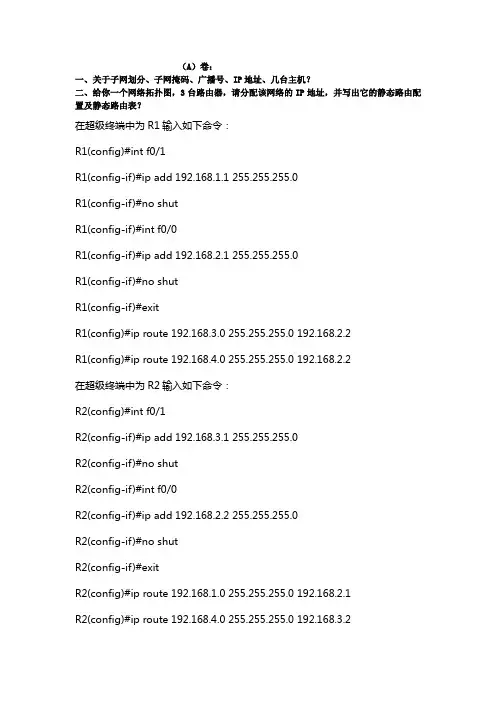
(A)卷:
一、关于子网划分、子网掩码、广播号、IP地址、几台主机?
二、给你一个网络拓扑图,3台路由器,请分配该网络的IP地址,并写出它的静态路由配置及静态路由表?
在超级终端中为R1输入如下命令:
R1(config)#int f0/1
R1(config-if)#ip add 192.168.1.1 255.255.255.0
R1(config-if)#no shut
R1(config-if)#int f0/0
R1(config-if)#ip add 192.168.2.1 255.255.255.0
R1(config-if)#no shut
R1(config-if)#exit
R1(config)#ip route 192.168.3.0 255.255.255.0 192.168.2.2
R1(config)#ip route 192.168.4.0 255.255.255.0 192.168.2.2
在超级终端中为R2输入如下命令:
R2(config)#int f0/1
R2(config-if)#ip add 192.168.3.1 255.255.255.0
R2(config-if)#no shut
R2(config-if)#int f0/0
R2(config-if)#ip add 192.168.2.2 255.255.255.0
R2(config-if)#no shut
R2(config-if)#exit
R2(config)#ip route 192.168.1.0 255.255.255.0 192.168.2.1
R2(config)#ip route 192.168.4.0 255.255.255.0 192.168.3.2
在超级终端中为R3输入如下命令:
R3(config)#int f0/1
R3(config-if)#ip add 192.168.4.1 255.255.255.0

Cisco路由配置语句汇总
启动接口,分配IP地址:
router>
router> enable
router#
router# configure terminal
router(config)#
router(config)# interface Type Port
router(config-if)# no shutdown
router(config-if)# ip address IP-Address Subnet-Mask
router(config-if)# ^z
配置RIP路由协议:30秒更新一次
router(config)# router rip
router(config-if)# network Network-Number <--通告标准A,B,C类网-->
router(config-if)#
配置IGRP路由协议:90秒更新一次
router(config)# router igrp AS-Number <-- AS-Number范围1~65535-->
router(config-if)# network Network-Number <--通告标准A,B,C类网-->
router(config-if)#
配置Novell IPX路由协议:Novell RIP 60秒更新一次
router(config)# ipx routing [node address]
router(config)# ipx maximum-paths Paths <--设置负载平衡,范围1~512-->
router(config)# interface Type Port
router(config-if)# ipx network Network-Number [encapsulation encapsulation-type] [secondary] <--通告标准A,B,C类网-->
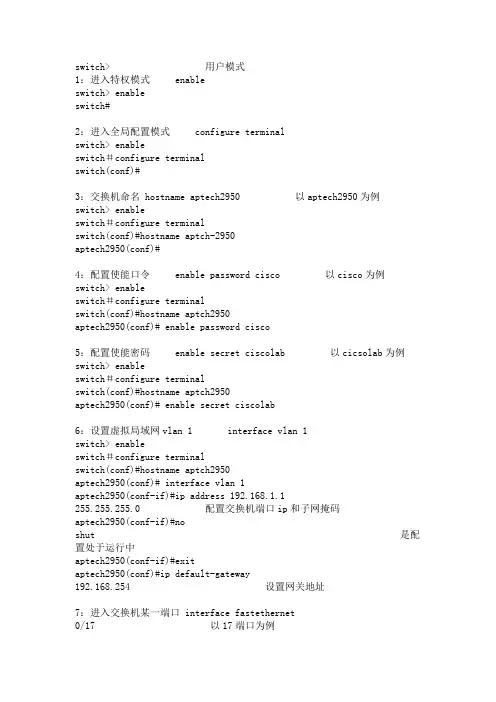
switch> 用户模式
1:进入特权模式 enable
switch> enable
switch#
2:进入全局配置模式 configure terminal
switch> enable
switch#configure terminal
switch(conf)#
3:交换机命名 hostname aptech2950 以aptech2950为例
switch> enable
switch#configure terminal
switch(conf)#hostname aptch-2950
aptech2950(conf)#
4:配置使能口令 enable password cisco 以cisco为例
switch> enable
switch#configure terminal
switch(conf)#hostname aptch2950
aptech2950(conf)# enable password cisco
5:配置使能密码 enable secret ciscolab 以cicsolab为例
switch> enable
switch#configure terminal
switch(conf)#hostname aptch2950
aptech2950(conf)# enable secret ciscolab
6:设置虚拟局域网vlan 1 interface vlan 1
switch> enable
switch#configure terminal
switch(conf)#hostname aptch2950
aptech2950(conf)# interface vlan 1
aptech2950(conf-if)#ip address 192.168.1.1 255.255.255.0 配置交换机端口ip和子网掩码

Cisco路由配置语句汇总
启动接口,分配IP地址:
router>
router> enable
router#
router# configure terminal
router(config)#
router(config)# interface Type Port
router(config-if)# no shutdown
router(config-if)# ip address IP-Address Subnet-Mask
router(config-if)# ^z
配置RIP路由协议:30秒更新一次
router(config)# router rip
router(config-if)# network Network-Number <——通告标准A,B,C类网——>
router(config-if)# ^z
配置IGRP路由协议:90秒更新一次
router(config)# router igrp AS-Number <—— AS-Number范围1~65535——>
router(config-if)# network Network-Number <——通告标准A,B,C类网——>
router(config-if)# ^z
配置Novell IPX路由协议:Novell RIP 60秒更新一次
router(config)# ipx routing [node address]
router(config)# ipx maximum-paths Paths <——设置负载平衡,范围1~512——>
router(config)# interface Type Port router(config-if)# ipx network Network-Number [encapsulation encapsulation-type]