
海报制作过程
- 格式:docx
- 大小:1.56 MB
- 文档页数:3
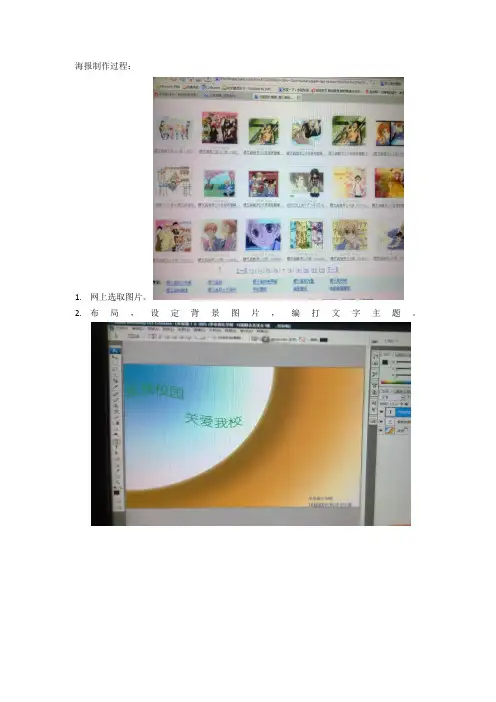

一、实验背景海报作为一种视觉传达的载体,广泛应用于广告、宣传、活动推广等领域。
随着社会经济的发展,海报设计在视觉效果、创意理念等方面要求越来越高。
本实验旨在通过实际操作,掌握海报制作的基本步骤和技巧,提高设计水平。
二、实验目的1. 熟悉海报设计的基本流程;2. 掌握海报设计的软件操作;3. 提高海报设计的审美能力;4. 培养创意思维,提高设计水平。
三、实验内容1. 确定海报主题:根据实验要求,确定本次海报主题为“环保生活,从我做起”。
2. 收集素材:通过网络、书籍等途径收集与环保相关的图片、文字素材。
3. 设计草图:根据主题,绘制海报草图,确定版面布局、色彩搭配、字体选择等。
4. 制作海报:使用Photoshop等设计软件,按照草图进行制作。
5. 修改与完善:对制作的海报进行细节调整,确保画面效果。
四、实验步骤1. 打开Photoshop,新建一个800像素×600像素的画布,分辨率设置为300dpi。
2. 选择“文件”菜单中的“新建”,设置画布大小为800像素×600像素,分辨率设置为300dpi。
3. 在工具箱中选择“矩形选框工具”,在画布上绘制一个800像素×600像素的矩形,填充颜色为#EFEFEF。
4. 在工具箱中选择“钢笔工具”,绘制一条曲线,代表地球,填充颜色为#0288D1。
5. 在工具箱中选择“文字工具”,在地球旁边输入文字“环保生活,从我做起”,字体选择“微软雅黑”,字号为48号,颜色为#FFFFFF。
6. 在工具箱中选择“图层样式”,添加“投影”效果,使文字具有立体感。
7. 在工具箱中选择“钢笔工具”,绘制一条波浪线,代表河流,填充颜色为#0288D1。
8. 在工具箱中选择“文字工具”,在河流旁边输入文字“节约用水,从我做起”,字体选择“微软雅黑”,字号为36号,颜色为#0288D1。
9. 在工具箱中选择“图层样式”,添加“描边”效果,使文字具有轮廓。
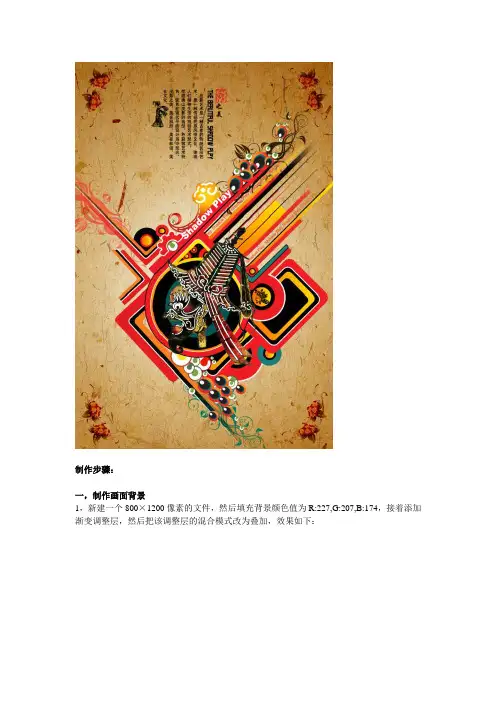
制作步骤:一,制作画面背景1,新建一个800×1200像素的文件,然后填充背景颜色值为R:227,G:207,B:174,接着添加渐变调整层,然后把该调整层的混合模式改为叠加,效果如下:2,分别添加“素材1”和“素材”文件,调整到合适大小,然后把图层混合模式分别改为:颜色加深和整片叠底,“素材2”可以适当调整图层的不透明度。
二,制作画面主体图像1,添加“素材3”调整到合适大小和位置,素材3的混合模式为亮度,素材3副本2和副本3在填充颜色时,锁定透明像素。
2,创建曲线调整层,使画面稍变暗一些,参数如下3,添加文字图层,然后添加图层蒙版,用黑白渐变做如下效果,并复制一个副本放到下方:4,绘制形状,用钢笔分别绘制红色,黑色,桔黄色形状,然后给黑色和桔黄色添加蒙版,把下方做透明状。
黑色形状添加描边样式。
绘制圆形形状并添加描边样式,注意颜色的选择,稍微偏暗灰些,显得古典,有内涵。
5,在红色圆的上方绘制黑的圆,然后描黑边,进行渐变叠加;同样的把旁边的小圆做出来:6,利用圆角矩形工具绘制4层形状,然后翻转,复制;然后把上面做的红色圆圈复制到圆角矩形顶上,把中间渐变圆的描边调小一些,效果如下:7,用两个图层绘制如下形状,然后调整合适大小和色彩,形成集散的自然状态8,绘制圆形,描边黑色,接着在上方做一个正方形形状,调整合适角度和大小9,添加“素材4”调整好大小和位置,然后用直线绘制形状,如下图:10,绘制一个圆形加梯形的形状,合并在一起,然后添加渐变叠加样式11,继续绘制圆形形状(R:4,G:85,B:86),并描黑色边12,绘制直线形状,注意颜色的搭配和图层蒙版的渐变效果。
13,继续绘制形状,注意整体的构图,色彩。
14,绘制类似于孔雀羽毛半点的形状,然后调整合适大小装饰于画面上15,继续绘制形状,利用圆形工具和图层样式(渐变叠加和描边)16,添加剩下的素材到合适位置,17,整体调整一下构图,色彩,细节等等,最终效果如下。


制作海报的过程英语作文The Process of Creating a Poster.Poster design is an intricate process that involves combining creativity, visual hierarchy, and effective messaging to communicate a specific message to a target audience. It's not just about making something visually appealing; it's about creating a visual narrative that captures attention, conveys information, and evokes a desired response. Here's a detailed look at the steps involved in creating a poster.1. Understanding the Purpose and Target Audience.The first and foremost step is to understand the objective of the poster. Is it to promote an event, advertise a product, raise awareness for a cause, or simply to inform? Understanding the purpose helps to shape the overall design and messaging of the poster. Additionally, defining the target audience is crucial as it affects thelanguage, visual style, and even the color scheme used in the design.2. Conducting Research.Once the purpose and target audience are clear, it's time to conduct research. This involves exploring similar posters, understanding the trends in the industry, and identifying the key messages that resonate with the target audience. Researching competitors' posters can provide insights into what works and what doesn't, while understanding industry trends can help to create a poster that is both unique and relevant.3. Brainstorming and Ideation.With the research in hand, it's time to brainstorm ideas. This involves free-thinking, exploring various concepts, and jotting down as many ideas as possible. It's important to be open-minded and not to judge ideas at this stage. The goal is to generate as many creative concepts as possible.4. Sketching and Thumbnailing.Once a few promising ideas have been identified, it's time to start sketching. Sketching helps to visualize the ideas and experiment with different layouts, compositions, and design elements. Thumbnailing is a smaller version of the final poster that helps to refine the design and identify any issues before committing to the final size.5. Choosing a Color Scheme.Color is a crucial element in poster design. It can evoke emotions, set a mood, and even affect the readability of the text. Choosing a color scheme that complements the purpose of the poster and resonates with the target audience is essential. Consider the psychology of color and how different hues can affect the viewer's perception.6. Typography and Copywriting.Typography and copywriting are key elements of anyposter. The choice of font, size, and placement of text are crucial in conveying the message. The text should be readable, hierarchical, and consistent with the overall design. Copywriting, on the other hand, involves writing catchy and engaging text that captures the reader's attention and encourages them to take action.7. Incorporating Visual Elements.Visual elements such as images, illustrations, and icons play a pivotal role in poster design. They add visual interest, break up text-heavy areas, and help to communicate the message visually. Choosing relevant and high-quality images that align with the poster's purpose is essential.8. Layouting and Composing.Layout and composition refer to how the various elements of the poster are arranged on the page. This involves considering the hierarchy of information, balance, alignment, contrast, and white space. Careful considerationof these elements helps to create a visually appealing and effective poster.9. Revision and Feedback.Once the initial design is complete, it's important to revise and seek feedback. This helps to identify any issues or improvements that can make the poster more effective.It's also a good idea to test the poster with a target audience to gauge their reaction and understand if the message is being communicated effectively.10. Finalizing and Printing.After revisions and feedback, it's time to finalize the design. This involves making any necessary adjustments and preparing the file for printing. Depending on the printing method chosen (digital or offset), specific file formats and resolutions may be required.In conclusion, creating a poster is a综合性过程 that requires careful consideration of purpose, target audience,design elements, and messaging. It's an iterative process that involves brainstorming, sketching, revising, and testing to ensure that the final design is both visually appealing and effective in communicating the desired message.。