FluidMechII-HW_4
- 格式:pdf
- 大小:90.61 KB
- 文档页数:1



U ±0.5% of Reading AccuracyU Economical Ball-Bearing DesignU 440C Bearing Retainers for Durability U B all Bearings are Field Replaceable Without Loss of Calibration U D eflector Cones Stabilize Low-Mass Rotor for Increased Bearing Life U NIST Certificate Supplied StandardFTB-909 turbine shown with FLSC-61 signal conditioner.ECONOMICAL BALL-BEARING LIQUID TURBINE FLOWMETERSWith Male NPT PortsFTB-900SeriesF-51Comes complete with operator’s manual and NIST certificate. Calibration is for water; for other viscosities please contact Flow Engineering Department. Ordering Examples: To order a scaled system including signal conditioner and turbine meter with MNPT end fittings, specify model number SYS/FTB-901B/FLSC-61, ball-bearing flowmeter with 0.5 to 2.5 gallon per minute range, plus 3-wire analog transmitter signal conditioner.SYS/FTB-904/FLSC-62A, ball-bearing flowmeter with 1.75 to 16 gallon per minute range, plus 2-wire analog transmitter signal conditioner.Output: 30 mV p-p sine wave minimum Electrical: 2-wire connector included Maximum Pressure Drop: 4 psid Temperature Range: -268 to 232°C (-450 to 450°F)DI SCONT INUE DSPECIFICATIONSAccuracy: ±0.5% rdg Repeatability: ±0.05%Materials of Construction: Body: 304 SSRotor: 17-4 PH SS Bearings: 440C SSOMEGA ® FTB-900 Series turbine meters have male NPT end fittings for easy connections. These units come with a mating 2-wireconnector and can be ordered with FLSC-60 Series integrally mounted signal conditioners to provide 4 to 20 mA, 0 to 5 Vdc, or amplified pulse outputs.These turbine meters are intended for clean fluid service only; when there is any question about the cleanliness of the process fluid, strainers are recommended. Inaddition, when using these units for fluids with viscosities other than 1 centistoke, special calibrations and universal viscosity curves are available—consult OMEGA’s Flow Engineering Department.。
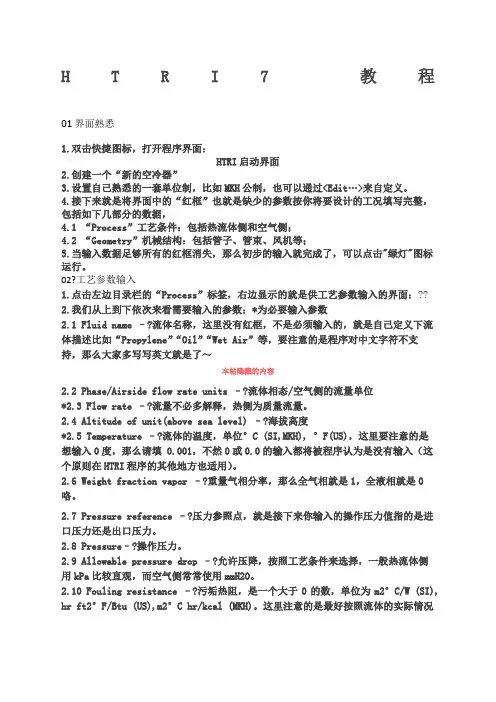
H T R I7教程01界面熟悉1.双击快捷图标,打开程序界面:HTRI启动界面2.创建一个“新的空冷器”3.设置自己熟悉的一套单位制,比如MKH公制,也可以通过<Edit…>来自定义。
4.接下来就是将界面中的“红框”也就是缺少的参数按你将要设计的工况填写完整,包括如下几部分的数据,4.1 “Process”工艺条件:包括热流体侧和空气侧;4.2 “Geometry”机械结构:包括管子、管束、风机等;5.当输入数据足够所有的红框消失,那么初步的输入就完成了,可以点击"绿灯"图标运行。
02?工艺参数输入1.点击左边目录栏的“Process”标签,右边显示的就是供工艺参数输入的界面:??2.我们从上到下依次来看需要输入的参数:*为必要输入参数2.1 Fluid name –?流体名称,这里没有红框,不是必须输入的,就是自己定义下流体描述比如“Propylene”“Oil”“Wet Air”等,要注意的是程序对中文字符不支持,那么大家多写写英文就是了~本帖隐藏的内容2.2 Phase/Airside flow rate units –?流体相态/空气侧的流量单位*2.3 Flow rate –?流量不必多解释,热侧为质量流量。
2.4 Altitude of unit(above sea level) –?海拔高度*2.5 Temperature –?流体的温度,单位°C (SI,MKH), °F(US),这里要注意的是想输入0度,那么请填 0.001,不然0或0.0的输入都将被程序认为是没有输入(这个原则在HTRI程序的其他地方也适用)。
2.6 Weight fraction vapor –?重量气相分率,那么全气相就是1,全液相就是0咯。
2.7 Pressure reference –?压力参照点,就是接下来你输入的操作压力值指的是进口压力还是出口压力。