
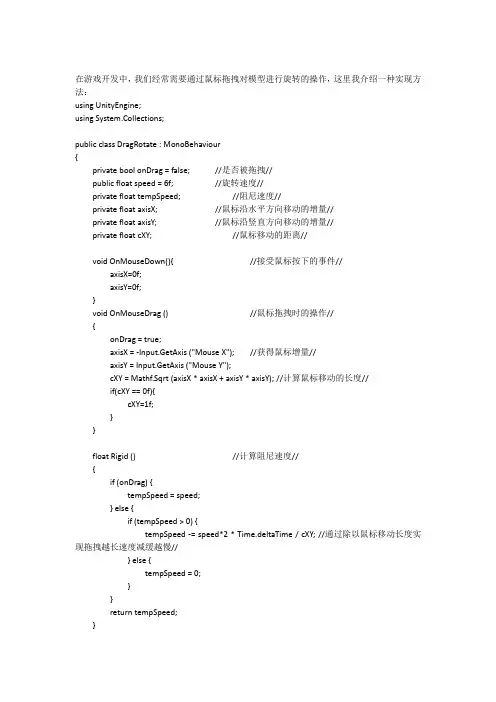
Unity3D鼠标拖拽绕任意轴旋转的实现
- 格式:docx
- 大小:14.76 KB
- 文档页数:2

unity移动原理
Unity移动原理
Unity作为一款流行的游戏开发引擎,其移动原理是游戏开发中的重要部分。在Unity中,移动可以分为两个方面,即物体的移动和摄像机的移动。本文将分别介绍这两个方面的移动原理。
一、物体的移动原理
在Unity中,物体的移动是通过改变物体的Transform组件实现的。Transform组件包括物体的位置、旋转和缩放信息,通过修改这些属性,可以实现物体的移动。
1. 位置移动
物体的位置由三个坐标值表示,分别是X、Y和Z轴。通过修改这三个坐标值,可以改变物体的位置。Unity提供了多种方式来实现位置移动,常用的方法有以下几种:
a. 直接赋值:可以直接通过修改物体的position属性来改变物体的位置。例如,transform.position = new Vector3(1, 0, 0)可以将物体的位置移动到坐标(1, 0, 0)处。
b. 增量赋值:可以通过修改物体的position属性的x、y和z值来实现位置的增量移动。例如,transform.position += new Vector3(1, 0, 0)可以将物体在x轴上向正方向移动1个单位。
c. Translate方法:Unity提供了Translate方法来实现位置的移动。该方法可以通过指定移动的方向和距离来实现物体的移动。例如,transform.Translate(Vector3.right * Time.deltaTime)可以将物体在x轴上向右移动。
2. 旋转移动
物体的旋转由四个坐标值表示,分别是X、Y、Z和W轴。通过修改这四个坐标值,可以改变物体的旋转。Unity提供了多种方式来实现旋转移动,常用的方法有以下几种:
a. 直接赋值:可以直接通过修改物体的rotation属性来改变物体的旋转。例如,transform.rotation = Quaternion.Euler(0, 90, 0)可以将物体绕Y轴顺时针旋转90度。

unity中实现物体在⼀定⾓度范围内来回旋转
1 using System.Collections;
2 using System.Collections.Generic;
3 using UnityEngine;
4
5 public class Rotate : MonoBehaviour {
6 private float origionZ;
7 private Quaternion targetRotation;
8 public float RotateAngle = 60;
9 public int count = 0;
10 private bool i;
11 // Use this for initialization
12 void Start () {
13 origionZ = transform.rotation.z;
14 }
15
16 // Update is called once per frame
17 void Update () {
18 if (Input.GetKeyDown(KeyCode.D))//当按下D时进⾏旋转
19 {
20 if (count >= 3)
21 {
22 i = false;
23 }
24 if (count <= 0)
25 {
26 i = true;
27 }
28
29 if (i == true)
30 {
31 count++;
32 targetRotation = Quaternion.Euler(0, 180, RotateAngle * count + origionZ) * Quaternion.identity;
33 }
34 if(i==false)
35 {
36 count--;
37 targetRotation = Quaternion.Euler(0,180,RotateAngle*count+origionZ) * Quaternion.identity;

- 1 - unity 旋转 原理
Unity是一款流行的游戏引擎,它可以用来创建各种类型的游戏。其中一个重要的功能是对象的旋转。在 Unity 中,对象可以绕着不同的轴进行旋转,比如绕着 x、y、z 轴等。那么这些旋转是如何实现的呢?
Unity 中的旋转是通过四元数(Quaternion)来控制的。四元数是一种数学概念,用于描述三维空间中的旋转。它可以看作是一个复数,由实部和虚部组成。在 Unity 中,四元数可以使用 Quaternion
类型来表示。
Quaternion 类型有四个成员变量:x、y、z 和 w,分别表示虚部的三个分量和实部。在 Unity 中,Quaternion 类型的值通常是由
Euler 角度(即绕 x、y、z 轴的旋转角度)转换而来的。
在 Unity 中,对象的旋转可以通过修改 Transform 组件的
rotation 属性来实现。rotation 属性的类型是 Quaternion,可以直接赋值一个 Quaternion 类型的值。比如,要让一个对象绕着 y 轴旋转 90 度,可以这样做:
```csharp
transform.rotation = Quaternion.Euler(0, 90, 0);
```
其中 Quaternion.Euler(x, y, z) 表示绕 x、y、z 轴旋转对应的 Euler 角度所构成的 Quaternion 类型的值。
除了直接设置 rotation 属性外,Unity 还提供了一些方便的接 - 2 - 口来控制对象的旋转,比如 Rotate、RotateAround 等。这些接口使用起来比较简单,可以根据具体需求进行选择。
总的来说,Unity 中的旋转是由四元数来控制的,而四元数的值通常是由 Euler 角度转换而来的。掌握了这些原理之后,就可以在

Unity中的物体旋转
(1) 物体在对应的坐标系中旋转,默认使⽤本地坐标系
public void Rotate(Vector3 eulers, Space relativeTo = Space.Self);
public void Rotate(float xAngle, float yAngle, float zAngle, Space relativeTo = Space.Self);
物体在对应的坐标系中以axis为轴进⾏旋转
public void Rotate(Vector3 axis, float angle, Space relativeTo = Space.Self);
(2) 在世界坐标系中以point的axis⽅向为轴进⾏旋转
public void RotateAround(Vector3 point, Vector3 axis, float angle);
(3) 旋转物体,使物体的Z轴指向target。
worldUp:对象朝向⽬标后旋转⾃⾝,使得worldUp垂直z轴向上
public void LookAt(Transform target);
public void LookAt(Transform target, Vector3 worldUp = Vector3.up);
旋转物体,使物体指向世界坐标系中的⼀点
public void LookAt(Vector3 worldPosition);
public void LookAt(Vector3 worldPosition, Vector3 worldUp = Vector3.up);
(4) 计算让Z轴对齐forward,让y轴对齐upward 所需要旋转的四元数
public static Quaternion LookRotation(Vector3 forward, Vector3 upwards = Vector3.up);