
Samba and Printing
- 格式:pdf
- 大小:157.04 KB
- 文档页数:33

Samba™OPLC™ SM35-J-T20SM43-J-T20SM70-J-T20Technical SpecificationsOrdering InformationItemSM35-J-T20 PLC with Flat panel, Color touch display 3.5’’SM43-J-T20 PLC with Flat panel, Color touch display 4.3’’SM70-J-T20 PLC with Flat panel, Color touch display 7’’You can find additional information, such as wiring diagrams, in the product’s installation guide located in the Technical Library at .Power SupplyItem SM35-J-T20 SM43-J-T20 SM70-J-T20Input voltage 24VDCPermissible range 20.4VDC to 28.8VDC with less than 10% rippleMax. currentconsumptionSee Note 1npn inputs 215mA@24VDC 215mA@24VDC 340mA@24VDCpnp inputs 120mA@24VDC 120mA@24VDC 240mA@24VDCNotes:1. To calculate the actual power consumption, subtract the current for each unused element from the maximumcurrent consumption value according to the values below:Backlight Ethernet cardSM35/SM43 20mA 35mASM70 80mA 35mADigital InputsNumber of inputs 12. See Note 2Input type See Note 2Galvanic isolation NoneNominal input voltage 24VDCInput voltagepnp (source) 0-5VDC for Logic ‘0’17-28.8VDC for Logic ‘1’npn (sink) 17-28.8VDC for Logic ‘0’0-5VDC for Logic ‘1’Input current 8mA@24VDCInput impedance 3KΩResponse time 10ms typical, when used as normal digital inputsInput cable lengthNormal digital input Up to 100 metersHigh Speed Input Up to 50 meters, shielded, see Frequency table below2/15 Samba™ OPLC™High speed inputs Specifications below apply when wired as HSC/shaft-encoder.See Note 2Frequency (max) See Note 3Cable length (max.) HSC Shaft-encoder10m 30kHz 20kHz25m 30kHz 13kHz50m 25kHz 9kHzDuty cycle 40-60%Resolution 32-bitNotes:2. This model comprises a total of 12 inputs. Input functionality can be adapted as follows:12 inputs may be used as digital inputs. They may be wired, in a group, and set to eithernpn or pnp via a single jumper.In addition, according to jumper settings and appropriate wiring:Inputs 10 and 11 can function as either digital or analog inputs.Inputs 0, 2, and 4 can function as high-speed counters, as part of a shaft-encoder,or as normal digital inputs.Inputs 1, 3, and 5 can function as either counter reset, as part of a shaft-encoder,or as normal digital inputs.If inputs 0, 2, 4 are set as high-speed counters (without reset), inputs 1, 3, 5can function as normal digital inputs.3. pnp/npn maximum frequency is at 24VDC.Analog InputsNumber of inputs 2, according to wiring as described above in Note 2Input type Multi-range inputs: 0-10V, 0-20mA, 4-20mAInput range 0-20mA, 4-20mA 0-10VDCInput impedance 243Ω>150KΩMaximum input rating 25mA, 6V 15VGalvanic isolation NoneConversion method Successive approximationResolution (except 4-20mA) 10-bit (1024 units)Resolution (at 4-20mA) 204 to 1023 (820 units)Conversion time One configured input is updated per scan. See Note 4Precision 0.9%Status indication Yes – if an analog input deviates above the permissible range,its value will be 1024.Note:4. For example, if 2 inputs are configured as analog, it takes 2 scans to update all analog values.SMxx-J-T20 Technical Specifications 2/15Digital OutputsNumber of outputs 8 transistor pnp (source)Output type P-MOSFET (open drain)Isolation NoneOutput current (resistive load) 0.5A maximum per output3A maximum total per commonMaximum frequency 50Hz (resistive load)0.5Hz (inductive load)PWM maximum frequency 0.5KHz (resistive load). See Note 5Short circuit protection YesShort circuit indication Via softwareOn voltage drop 0.5VDC maximumPower supply for outputsOperating voltage 20.4 to 28.8VDCNominal voltage 24VDCNote:5. Outputs 0 to 6 can be used as PWM outputs.Graphic Display ScreenItem SM35-J-T20 SM43-J-T20 SM70-J-T20 LCD Type TFT, LCD display TFT, LCD display TFT, LCD display Illumination backlight White LED White LED White LED Display resolution 320x240 pixels 480x272 pixels 800x480 pixels Viewing area 3.5" 4.3" 7"Colors 65,536 (16-bit) 65,536 (16-bit) 65,536 (16-bit) Touchscreen Resistive, analog Resistive, analog Resistive, analog Screen brightness control Via software (Store value to SI 9, values range: 0 to 100%)Virtual Keypad Displays virtual keyboard when the application requires data entry.ProgramItem SM35-J-T20 SM43-J-T20 SM70-J-T20 Memory sizeApplication Logic 112KB 112KB 112KBImages 1MB 2MB 5MBFonts 512KB 512KB 512KBOperand type Quantity Symbol ValueMemory Bits 512 MB Bit (coil)Memory Integers 256 MI 16-bit signed/unsignedLong Integers 32 ML 32-bit signed/unsignedDouble Word 32 DW 32-bit unsignedMemory Floats 24 MF 32-bit signed/unsignedFast Bits 64 XB Fast Bits (coil) – not retainedFast Integers 32 XI 16 bit signed/unsigned (fast, not retained)Fast Long Integers 16 XL 32 bit signed/unsigned (fast, not retained)Fast Double Word 16 XDW 32 bit unsigned (fast, not retained)Timers 32T Res. 10 ms; max 99h, 59 min, 59.99sCounters 16 C 32-bitData Tables 32K dynamic data (recipe parameters, datalogs, etc.)16K fixed data (read-only data, ingredient names, etc)HMI displays Up to 24Program scan time 15µs per 1kb of typical application2/15 Samba™ OPLC™Communication PortsPort 1 1 channel, RS232 (SM35) , USB device (SM43/SM70)Galvanic isolation SM35 and SM43 – NoSM70 - YesBaud rate 300 to 115200 bpsRS232 (SM35 only)Input voltage ±20VDC absolute maximumCable length 15m maximum (50’)USB device (SM43,SM70 only)Port type Mini-BSpecification USB 2.0 complaint; full speedCable USB 2.0 complaint; up to 3mPort 2 (optional) See Note 6CANbus (optional) See Note 6Notes:6. The user may order and install one or both of the following modules:- A serial RS232/RS485 isolated/non-isolated interface module, or an Ethernet Interface module in port 2.- A CANbus modulemodules documentation is available on the Unitronics website.MiscellaneousClock (RTC) Real-time clock functions (date and time)Battery back-up 7 years typical at 25°C, battery back-up for RTC and system data, includingvariable dataBattery replacement Yes. Coin-type 3V, lithium battery, CR2450DimensionsItem SM35-J-T20 SM43-J-T20 SM70-J-T20Size 109 x 114.1 x 68mm(4.29 x 4.49 x 2.67”).See Note 7 136 x 105.1 x 61.3mm(5.35 x 4.13 x 2.41”).See Note 7210 x 146.4 x 42.3mm(8.26 x 5.76 x 1.66”).See Note 7Weight 205g (7.23 oz) 344g (12.13 oz) 633g (22.32 oz) Notes:7. For exact dimensions, refer to the product’s Installation Guide.EnvironmentOperational temperature 0 to 50ºC (32 to 122ºF)Storage temperature -20 to 60ºC (-4 to 140ºF)Relative Humidity (RH) 10% to 95% (non-condensing)Mounting method Panel mounted (IP65/66/NEMA4X)DIN-rail mounted (IP20/NEMA1)Operating Altitude 2000m (6562 ft)Shock IEC 60068-2-27, 15G, 11ms durationVibration IEC 60068-2-6, 5Hz to 8.4Hz, 3.5mm constant amplitude,8.4Hz to 150Hz, 1G acceleration.SMxx-J-T20 Technical Specifications 2/15 The information in this document reflects products at the date of printing. Unitronics reserves the right, subject to all applicable laws, at any time, at its solediscretion, and without notice, to discontinue or change the features, designs, materials and other specifications of its products, and to either permanently ortemporarily withdraw any of the forgoing from the market.All information in this document is provided "as is" without warranty of any kind, either expressed or implied, including but not limited to any implied warranties of merchantability, fitness for a particular purpose, or non-infringement. Unitronics assumes no responsibility for errors or omissions in the information presented inthis document. In no event shall Unitronics be liable for any special, incidental, indirect or consequential damages of any kind, or any damages whatsoever arising out of or in connection with the use or performance of this information.The tradenames, trademarks, logos and service marks presented in this document, including their design, are the property of Unitronics (1989) (R"G) Ltd. or other third parties and you are not permitted to use them without the prior written consent of Unitronics or such third party as may own them.DOC17017-A8 02/15。
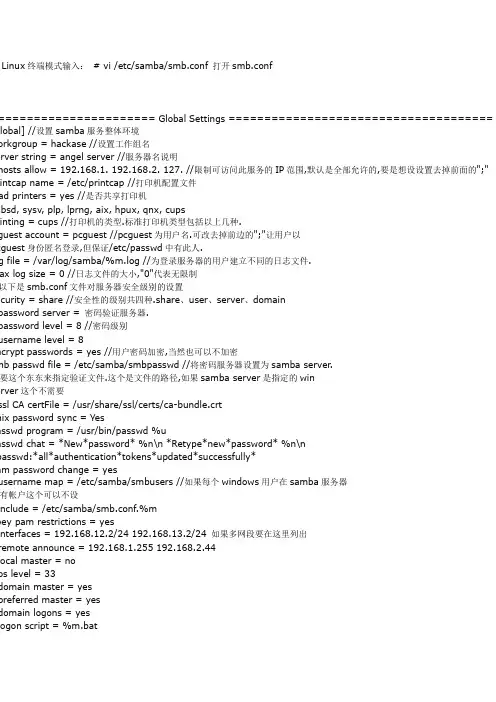
Linux终端模式输入:# vi /etc/samba/smb.conf 打开smb.conf====================== Global Settings ===================================== global] //设置samba服务整体环境orkgroup = hackase //设置工作组名erver string = angel server //服务器名说明hosts allow = 192.168.1. 192.168.2. 127. //限制可访问此服务的IP范围,默认是全部允许的,要是想设设置去掉前面的";" intcap name = /etc/printcap //打印机配置文件ad printers = yes //是否共享打印机bsd, sysv, plp, lprng, aix, hpux, qnx, cupsinting = cups //打印机的类型.标准打印机类型包括以上几种.guest account = pcguest //pcguest为用户名.可改去掉前边的";"让用户以cguest身份匿名登录,但保证/etc/passwd中有此人.g file = /var/log/samba/%m.log //为登录服务器的用户建立不同的日志文件.ax log size = 0 //日志文件的大小,"0"代表无限制以下是smb.conf文件对服务器安全级别的设置ecurity = share //安全性的级别共四种.share、user、server、domainpassword server = 密码验证服务器.password level = 8 //密码级别username level = 8ncrypt passwords = yes //用户密码加密,当然也可以不加密mb passwd file = /etc/samba/smbpasswd //将密码服务器设置为samba server.要这个东东来指定验证文件.这个是文件的路径,如果samba server是指定的winerver这个不需要ssl CA certFile = /usr/share/ssl/certs/ca-bundle.crtnix password sync = Yesasswd program = /usr/bin/passwd %uasswd chat = *New*password* %n\n *Retype*new*password* %n\npasswd:*all*authentication*tokens*updated*successfully*am password change = yesusername map = /etc/samba/smbusers //如果每个windows用户在samba服务器有帐户这个可以不设include = /etc/samba/smb.conf.%mbey pam restrictions = yesinterfaces = 192.168.12.2/24 192.168.13.2/24 如果多网段要在这里列出remote announce = 192.168.1.255 192.168.2.44local master = noos level = 33domain master = yespreferred master = yesdomain logons = yeslogon script = %m.batlogon script = %U.batlogon path = \\%L\Profiles\%Uwins support = yes //wins server支持wins server = w.x.y.zwins proxy = yes //wins 代理设置ns proxy = no //dns代理设置preserve case = noshort preserve case = nodefault case = lowercase sensitive = no============================ Share Definitions ============================ homes] //用户访问自已目录的设置omment = Home Directories //说明(以下同理)owseable = no//设定目录可不可以别人浏览riteable = yes//用户写入自己的权限alid users = %Seate mode = 0664rectory mode = 0775[netlogon] //此段域用户登录目录设置comment = Network Logon Servicepath = /usr/local/samba/lib/netlogonguest ok = yeswritable = noshare modes = noProfiles]path = /usr/local/samba/profilesbrowseable = noguest ok = yesprinters] //打印机设置omment = All Printersath = /var/spool/sambaowseable = nointable = yestmp] //用户共享资源设置comment = Temporary file spacepath = /tmp //可以自定义目录,去掉前边的";"就OK了read only = no //是否只读或可写public = yespublic] //用户共享资源设置comment = Public Stuffpath = /home/sambapublic = yeswritable = yesprintable = nowrite list = @stafffredsprn]comment = Fred's Printervalid users = fredpath = /home/fredprinter = freds_printerpublic = nowritable = noprintable = yesfredsdir]comment = Fred's Servicepath = /usr/somewhere/privatevalid users = fredpublic = nowritable = yesprintable = nopchome]comment = PC Directoriespath = /usr/local/pc/%mpublic = nowritable = yespublic]path = /usr/somewhere/else/publicpublic = yesonly guest = yeswritable = yesprintable = nomyshare]comment = Mary's and Fred's stuffpath = /usr/somewhere/sharedvalid users = mary fredpublic = nowritable = yesprintable = nocreate mask = 0765my work] //自己添加的共享资源omment = is me workath = /root/my workalid users angelublic = yesriteable = yes解smb.conf的文件就好办了.我们开始对samba server的四个安全级别分别讲解.、share级配置个在四个等级中是最低的,方法也是最简单.我们只要对smb.conf文件修改一下就可以了.orkgroup = hackaseerver string = angel serverosts allow = 192.168.1. //限制192.168.1的IP网段可以防问intcap name = /etc/printcapad printers = yes //共享打印机inting = cups //打印机用linux标准的uest account = angelg file = /var/log/samba/%m.logax log size = 20ecurity = share==================================================================他的设置默认就可以了,也可以像我把所有的注释删除.[tmp]这个字段的";"去掉.径可以更改. 重启一下服务/etc/samba/smb restart //ervice smb restart 也可testparm测试我们配置的文件是否正确:==================================================================oot@localhost root]# testparm //测试时[printers]注释掉了所以这里没有.oad smb config files from /etc/samba/smb.confocessing section "[homes]"ocessing section "[tmp]"ocessing section "[my]"oaded services file OK. //如有错误,会在这列出错误的地方.ess enter to see a dump of your service definitions================================================================= smbclient命令查看网络共享情况==================================================================oot@localhost etc]# smbclient -L localhost //本机名为localhostassword:omain=[HACKBASE] OS=[Unix] Server=[Samba 2.2.7a]harename Type Comment------- ---- -------mp Disk Temporary file spacey Disk is meC$ IPC IPC Service (angel server)DMIN$ Disk IPC Service (angel server)ot Printer Home Directorieserver Comment------- -------orkgroup Master------- -------======================================================================、user级配置ser比share级安全级别高一点点,很简单的,可以在share基础上改一下就可以了.一下security = share字段为:security = user.在加上如下字段:uest account = angel //机器上有这个用户名,如果你没有那就建一个吧!ncrypt passwords=yesmb passwd file=/etc/samba/smbpasswd1)生成口令文件.cat/etc/passwd | mksmbpasswd.sh>/etc/samba/smbpasswd命令将生成口令文件"/etc/samba/smbpasswd" 这个就是我们加上的"smb passwd file=/etc/samba/smbpasswd"2)我们知道建账户是建在etc/passwd文件里,我们须要用smbpasswd命令刚才建立的账名设置samba server口令. 格式为:smbpasswd angel3)重启samba server服务ser级的也OK了,你可以用testparm and smbclient命测试.windows用户想问就要输入angel and passwd.这个就不是谁都可以访问你的共享源了.、server 级配置erver级比user级也高那么一点,只需要user级配置上修改一下就OK了.1)security = user字段为:security = server2)加上password server = ****** //密码服务器,这个可以是你的windows主域控制器,也可以是别一个samba server服务器(无意思)3)注释smb passwd file=/etc/samba/smbpasswd4)重启samba server服务,你可以用testparm and smbclient 测试.了,又完事一个。

Samba服务全攻略1.1 Samba所需软件samba-*.rpm:该包为Samba服务的主程序包。
服务器必须安装该软件包,后面的数字为版本号samba-client-*.rpm:该包为Samba的客户端工具,是连接服务器和连接网上邻居的客户端工具并包含其测试工具samba-common-*.rpm:该包存放的是通用的工具和库文件,不管是服务器依旧客户端都需要安装该软件包samba-swat-*.rpm:当安装了那个包以后,就能够通过扫瞄器〔比如IE等哈〕来对Samba服务器进行图形化治理1.2 Samba的安装建议在安装Samba服务之前,使用rpm -qa命令检测系统是否安装了Samba相关性软件包:rpm -qa |grep samba假如系统还没有安装Samba软件包,我们能够使用rpm命令安装所需软件包。
安装Samba主程序包:rpm -ivh samba-*.rpm安装Samba客户端工具:rpm -ivh samba-client-*.rpm安装Samba通用工具和库文件:rpm -ivh samba-common-*.rpm现在我们再来安装Samba图形化治理工具:rpm -ivh samba-swat-*.rpm现在我们看到Samba图形化治理工具安装成功了哈~所有软件包安装完毕之后,我们能够使用rpm命令进行查询:rpm -qa | grep samba 2 Samba常规服务器配置在Samba服务安装完毕之后,并不是直截了当能够使用Windows或Linux的客户端访问Samba服务器哈,我们还必须对服务器进行设置,下面需要做的操作确实是说我们要告诉S amba服务器将哪些名目共享出来给客户端进行访问,并依照需要设置其他选项哈,比如添加对共享名目内容的简单描述信息和访问权限等具体设置。
作为我们Linux系统工程师了解及熟悉Samba服务器的搭建流程是至关重要滴。
差不多的Samba服务器的搭建流程要紧分为四个步骤:[1]、编辑主配置文件smb.conf,指定需要共享的名目,并为共享名目设置共享权限。

CentOS7下Samba服务器的安装与配置⽂基于《,参照原博⽂,⾃⼰在CentOS7环境上实现,并按照⾃⼰的环境修改博⽂内容⼀、简介 Samba是⼀个能让Linux系统应⽤Microsoft⽹络通讯协议的软件,⽽SMB是Server Message Block的缩写,即为服务器消息块,SMB主要是作为Microsoft的⽹络通讯协议,后来Samba将SMB通信协议应⽤到了Linux系统上,就形成了现在的Samba软件。
后来微软⼜把 SMB 改名为 CIFS(Common Internet File System),即公共 Internet ⽂件系统,并且加⼊了许多新的功能,这样⼀来,使得Samba具有了更强⼤的功能。
Samba最⼤的功能就是可以⽤于Linux与windows系统直接的⽂件共享和打印共享,Samba既可以⽤于windows与Linux之间的⽂件共享,也可以⽤于Linux与Linux之间的资源共享,由于NFS(⽹络⽂件系统)可以很好的完成Linux与Linux之间的数据共享,因⽽ Samba较多的⽤在了Linux与windows之间的数据共享上⾯。
SMB是基于客户机/服务器型的协议,因⽽⼀台Samba服务器既可以充当⽂件共享服务器,也可以充当⼀个Samba的客户端,例如,⼀台在Linux 下已经架设好的Samba服务器,windows客户端就可以通过SMB协议共享Samba服务器上的资源⽂件,同时,Samba服务器也可以访问⽹络中其它windows系统或者Linux系统共享出来的⽂件。
Samba在windows下使⽤的是NetBIOS协议,如果你要使⽤Linux下共享出来的⽂件,请确认你的windows系统下是否安装了NetBIOS协议。
组成Samba运⾏的有两个服务,⼀个是SMB,另⼀个是NMB;SMB是Samba 的核⼼启动服务,主要负责建⽴ Linux Samba服务器与Samba客户机之间的对话,验证⽤户⾝份并提供对⽂件和打印系统的访问,只有SMB服务启动,才能实现⽂件的共享,监听139 TCP端⼝;⽽NMB服务是负责解析⽤的,类似与DNS实现的功能,NMB可以把Linux 系统共享的⼯作组名称与其IP对应起来,如果NMB服务没有启动,就只能通过IP来访问共享⽂件,监听137和138 UDP端⼝。