
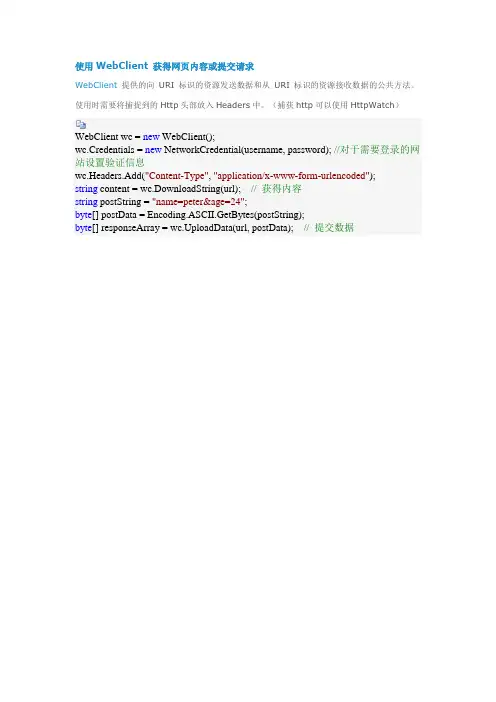
使用WebClient 获得网页内容或提交请求
- 格式:doc
- 大小:27.50 KB
- 文档页数:1

C#中HttpWebRequest、WebClient、HttpClient的使⽤详解HttpWebRequest:命名空间: ,这是.NET创建者最初开发⽤于使⽤HTTP请求的标准类。
使⽤HttpWebRequest可以让开发者控制请求/响应流程的各个⽅⾯,如 timeouts, cookies, headers, protocols。
另⼀个好处是HttpWebRequest类不会阻塞UI线程。
例如,当您从响应很慢的API服务器下载⼤⽂件时,您的应⽤程序的UI不会停⽌响应。
HttpWebRequest通常和WebResponse⼀起使⽤,⼀个发送请求,⼀个获取数据。
HttpWebRquest更为底层⼀些,能够对整个访问过程有个直观的认识,但同时也更加复杂⼀些。
//POST⽅法public static string HttpPost(string Url, string postDataStr){HttpWebRequest request = (HttpWebRequest)WebRequest.Create(Url);request.Method = "POST";request.ContentType = "application/x-www-form-urlencoded";Encoding encoding = Encoding.UTF8;byte[] postData = encoding.GetBytes(postDataStr);request.ContentLength = postData.Length;Stream myRequestStream = request.GetRequestStream();myRequestStream.Write(postData, 0, postData.Length);myRequestStream.Close();HttpWebResponse response = (HttpWebResponse)request.GetResponse();Stream myResponseStream = response.GetResponseStream();StreamReader myStreamReader = new StreamReader(myResponseStream, encoding);string retString = myStreamReader.ReadToEnd();myStreamReader.Close();myResponseStream.Close();return retString;}//GET⽅法public static string HttpGet(string Url, string postDataStr){HttpWebRequest request = (HttpWebRequest)WebRequest.Create(Url + (postDataStr == "" ? "" : "?") + postDataStr);request.Method = "GET";request.ContentType = "text/html;charset=UTF-8";HttpWebResponse response = (HttpWebResponse)request.GetResponse();Stream myResponseStream = response.GetResponseStream();StreamReader myStreamReader = new StreamReader(myResponseStream, Encoding.GetEncoding("utf-8"));string retString = myStreamReader.ReadToEnd();myStreamReader.Close();myResponseStream.Close();return retString;}WebClient:命名空间,WebClient是⼀种更⾼级别的抽象,是HttpWebRequest为了简化最常见任务⽽创建的,使⽤过程中你会发现他缺少基本的header,timeoust的设置,不过这些可以通过继承httpwebrequest来实现。

WebClient模拟⽹页提交表单最近学习开发,迷上了Http的传输,⼩试⽜⼑!1、Web页⾯: 很简单的⼀个页⾯,功能填⼊⼀些数据,保存到服务器C盘的⼀个⽂件,效果图:前台:View Code<%@ Page Language="C#" AutoEventWireup="true" CodeBehind="Default.aspx.cs" Inherits="Nankang.Test.Default" %><!DOCTYPE html PUBLIC "-//W3C//DTD XHTML 1.0 Transitional//EN""/TR/xhtml1/DTD/xhtml1-transitional.dtd"> <html xmlns="/1999/xhtml"><head runat="server"><title>保存</title></head><body><form id="form1" runat="server" enableviewstate="False"><div><asp:TextBox ID="m_TextBox" runat="server" Height="111px" Width="291px"></asp:TextBox><br /><asp:Button ID="m_Button" runat="server" Text="保存" onclick="m_Button_Click" /><asp:Label ID="m_Label" runat="server" Text="..."></asp:Label><br /></div></form></body></html>后台:View Codeprotected void m_Button_Click(object sender, EventArgs e){StreamWriter sw = null;try{string dir = @"C:\Test\";if (Directory.Exists(dir) == false){Directory.CreateDirectory(dir);}string path = dir + DateTime.Now.ToString("yyyyMMddHHmmss") + ".txt";FileStream fs = new FileStream(path, FileMode.Create);sw = new StreamWriter(fs);sw.WriteLine(this.m_TextBox.Text);this.m_Label.Text += "保存成功!";}catch (Exception ex){this.m_Label.Text = ex.Message;}finally{if (sw != null){sw.Close();}}}2、在WinForm中,⽤WebClient,调⽤Post⽅法,发送数据页⾯效果图:后台关键代码:View CodeWebClient webClient = new WebClient();byte[] responseData = webClient.DownloadData(uriString);string srcString = Encoding.UTF8.GetString(responseData);webClient = new WebClient();webClient.Headers.Add("Content-Type", "application/x-www-form-urlencoded");//VeiwStatestring viewStateFlag = "id=\"__VIEWSTATE\" value=\"";int i = srcString.IndexOf(viewStateFlag) + viewStateFlag.Length;int j = srcString.IndexOf("\"", i);string viewState = srcString.Substring(i, j - i);//EventValidationstring eventValidationFlag = "id=\"__EVENTVALIDATION\" value=\"";i = srcString.IndexOf(eventValidationFlag) + eventValidationFlag.Length;j = srcString.IndexOf("\"", i);string eventValidation = srcString.Substring(i, j - i);//获取页⾯的章数string viewmenuid = "<input name=\"txt_menuid\" type=\"text\" value=\"";i = srcString.IndexOf(viewmenuid) + viewmenuid.Length;j = srcString.IndexOf("\"", i);string txt_menuid = srcString.Substring(i, j - i);//提交按钮的⽂本string submitButton = "保存";bookTitle = System.Web.HttpUtility.UrlEncode(bookTitle);viewState = System.Web.HttpUtility.UrlEncode(viewState);eventValidation = System.Web.HttpUtility.UrlEncode(eventValidation);txt_menuid = System.Web.HttpUtility.UrlEncode(txt_menuid);submitButton = System.Web.HttpUtility.UrlEncode(submitButton);string postString = "__VIEWSTATE=" + viewState + "&__EVENTVALIDATION=" + eventValidation + "&m_TextBox=" + bookTitle + "&m_Button=" + submitButton;// 将字符串转换成字节数组byte[] postData = Encoding.ASCII.GetBytes(postString);responseData = webClient.UploadData(uriString, "POST", postData);srcString = Encoding.UTF8.GetString(responseData);MessageBox.Show("保存成功!");3、Code仅供参考,谢谢。

安装说明1、引用COMWebClient.dll文件。
使用说明构造函数构造COMWebClient.MyWebClient wcHTML = new COMWebClient.MyWebClient();方法下载HTMLpublic void DownLoadHTML(string URL, int URLID, string HTMLMad5Mark, int VersionType) 参数:string URL请求的URLint URLID 当前的URLIDstring HTMLMad5Mark HTML唯一标识int VersionType 请求的版本号注:intVersionType取值范围(-151,-150,-141,-140,-51,-50,-41,-40,-5~1)-151 HttpWebRequest 1.1 部分抓取 Gizp-141 HttpWebRequest 1.0 部分抓取 Gizp- 51 HttpWebRequest 1.1 部分抓取- 50 HttpWebRequest 1.1 Head抓取- 41 HttpWebRequest 1.0 部分抓取- 40 HttpWebRequest 1.0 Head抓取- 5 HttpWebRequest 1.1 Get抓取- 4 HttpWebRequest 1.0 Get抓取- 3 WebBrowser- 2 WebClient Gizp- 1 WebClient0 Socket 1.01 Socket 1.1杀死IEpublic void KillIE()注:用于杀死WebBrowser脚本弹出的IE,Timer时间10分钟杀死一次较为合适WebClient 同步下载public string[] synchronousWebClientDownload(string URL, int URLID, string Md5) 参数:string URL 请求的URL地址int URLID 请求的URL编号string Md5 HTML生成的唯一标识(可为空)返回值:string[]0:URLID1:网页源码2:请求的URL3:当前HTML的唯一标识 MD54:是否更新HttpWebRequest同步下载public string[] synchronousHttpWebResqustDownload(string URL, int URLID, string Md5, int Version) 参数:string URL 请求的URL地址int URLID 请求的URL编号string Md5 HTML生成的唯一标识(可为空)int Version HttpWebRequest版本(0,1)返回值:string[]0:URLID1:网页源码2:请求的URL3:当前HTML的唯一标识 MD54:是否更新WebClient 同步下载图片public Image WebClientDownPic(string PicURL, string RefererUrl)参数:string PicURL 请求的图片地址string RefererUrl 图片来源地址返回值:Image使用:Image images = WebClientDownPic("/2011/03/huke/Huke02.jpg","");images.Save("D:\\1.jpg", System.Drawing.Imaging.ImageFormat.Jpeg);HttpWebRequest同步下载图片public Image HttpWebResqustDownPic(string PicURL, string RefererUrl, int Version)参数:string PicURL 请求的图片地址string RefererUrl 图片来源地址int Version HttpWebRequest版本(0,1)返回值:Image使用: 同上注意:ImageFormat.Jpeg格式根据自己需要进行修改事件错误事件处理wcHTML.Error += new ErrorEvent(wcHTML_Error);接收到数据引发的事件wcHTML.Incept += new InceptEvent(wcHTML_Incept);错误属性Exception Error 错误信息string Errorname 错误信息名,用来存放URL等信息int Remark 错误URLID接收到数据引发的事件属性int URLID 请求地址编号string ResposeHTML 请求的地址的HTML源文件string URL 请求的地址int Version 请求的版本号int Update HTML是否更新string Md5Unique 当前HTML唯一标识属性部分抓取属性int intRangeFrom 部分抓取的开始结束位置int intRangeTo 部分抓取的结束位置注:在使用部分抓取必须初始化抓取开始位置和结束位置,结束位置不允许超过下载的最大长度知识点WebBrowser下载页面1.属性: AllowNavigation bool类型是否在新的窗口打开ScriptErrorsSuppressed bool类型是否行脚本提示2.事件: NewWindow 不弹出新窗口WebBrowser.NewWindow += new ponentModel.CancelEventHandler(wbDownLoad_NewWindow);void wbDownLoad_NewWindow(object sender, ponentModel.CancelEventArgs e){e.Cancel = true;}WebClient下载页面1.引ServicePointManager类属性: UseNagleAlgorithm bool类型Nagle算法用于缓冲小数据包并将它们作为单个数据包传输,可以减少传输的数据包数并降低每个数据包的开销,因此得到了广泛应用。

webclient 原理
`WebClient` 是一种用于在应用程序中发送 HTTP 请求和获取响应的类或组件。
它提供了一种简单且方便的方式来与 Web 服务器进行交互,允许开发人员向服务器发送请求,获取服务器的响应,并处理这些响应。
`WebClient` 的原理可以概括为以下几个步骤:
1. 构建请求:使用 `WebClient`,你可以通过设置各种参数来构建一个 HTTP 请求,例如请求方法(`GET`、`POST` 等)、请求的 URL、请求头和请求体。
2. 发送请求:一旦请求构建完成,`WebClient` 将负责将请求发送到目标服务器。
它会处理与服务器的连接、发送请求的实际网络通信。
3. 接收响应:服务器接收到请求后,会返回一个响应。
`WebClient` 会接收这个响应,并将其返回给应用程序。
4. 处理响应:应用程序可以从 `WebClient` 获取响应,并根据需要进行处理。
响应通常包含状态码、响应头和响应体。
5. 关闭连接:请求和响应完成后,`WebClient` 会关闭与服务器的连接,释放相关资源。
`WebClient` 通常隐藏了底层的网络通信细节,提供了一种高层的、易用的 API,使开发人员能够专注于发送请求和处理响应,而不必关心网络连接、请求和响应的细节。
需要注意的是,具体的实现方式可能因编程语言和框架而有所不同。
以上是`WebClient` 的一般原理概述,具体的实现可能会有所差异。