
Thin_Deduplication_101_v4
- 格式:pptx
- 大小:1.46 MB
- 文档页数:17

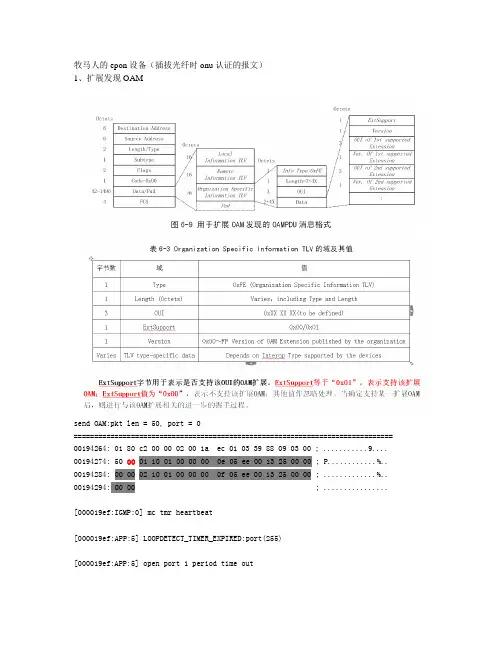
牧马人的epon设备(插拔光纤时onu认证的报文)1、扩展发现OAMsend OAM:pkt len = 50, port = 0============================================================================== 00194264: 01 80 c2 00 00 02 00 1a ec 01 03 39 88 09 03 00 ; ...........9.... 00194274: 50 00 01 10 01 00 00 00 0e 05 ee 00 13 25 00 00 ; P............%.. 00194284: 00 00 02 10 01 00 00 00 0f 05 ee 00 13 25 00 00 ; .............%.. 00194294: 00 00 ; ................[000019ef:IGMP:0] mc tmr heartbeat[000019ef:APP:5] LOOPDETECT_TIMER_EXPIRED:port(255)[000019ef:APP:5] open port 1 period time out[000019ef:APP:3] vlan flooding ,dport 1, vlan count 0[000019ef:APP:5] open port 2 period time out[000019ef:APP:3] vlan flooding ,dport 2, vlan count 0[000019ef:APP:5] open port 3 period time out[000019ef:APP:3] vlan flooding ,dport 3, vlan count 0[000019ef:APP:5] open port 4 period time out[000019ef:APP:3] vlan flooding ,dport 4, vlan count 0[00001a0d:PTP:1] The tod_info is: $GPZDA001964000119700019.[00001a0d:PTP:0] update sys time 64633442256[00001a0d:PTP:4] trigger 1pps signal at time 65000000000(0xd224d4a0) [00001a0d:PTP:4] trigger tod info at time 65001000000(0xd225c8c4) Rcv OAM:pkt len = 60, port = 0============================================================================== 0014f068: 01 80 c2 00 00 02 00 e0 8e 88 01 00 88 09 03 00 ; ................ 0014f078: 50 00 01 10 01 00 00 00 0f 05 ee 00 13 25 00 00 ; P............%.. 0014f088: 00 00 02 10 01 00 00 00 0e 05 ee 00 13 25 00 00 ; .............%.. 0014f098:00 00 fe 07 11 11 11 01 21 00 00 00 ; ........!.......oam_ctc_build_pdu_infoLength=7+4x 07是最小值0x01:支持OAM扩展0x00:不支持OAM扩展ONU支持电信的版本号send OAM:pkt len = 57, port = 0==============================================================================001941d4: 01 80 c2 00 00 02 00 1a ec 01 03 39 88 09 03 00 ; ...........9....001941e4: 50 00 01 10 01 00 00 00 0e 05 ee 00 13 25 00 00 ; P............%..001941f4: 00 00 02 10 01 00 00 00 0f 05 ee 00 13 25 00 00 ; .............%.. 00194204: 00 00 fe 07 11 11 11 01 21 ; ........!.......[00001a33:APP:3] app_pkt_rx len 64 type 10 port 0[00001a37:OAM:0] oam_ind_oampdu(2、扩展的组织特定(Organization Specific)OAMPDU消息概述2.1 扩展的组织特定(Organization Specific)OAMPDU消息结构及定义扩展的组织特定OAMPDU消息(即Organization Specific OAMPDU)应符合IEEE 802.3-2008 Clause57.4.3.6中关于OAM扩展的规定。

(O管理)对O数据库进行容灾(VVR(VVR))对Oracle数据库进行容灾(VeritasV olumeReplicator(VVR))随着全球信息化时代的到来,信息数据越来越成为企业关注的焦点,即在各种自然灾害或者人为破坏的情况下,如何保证生产数据的安全和关键业务的不中断运行。
传统的保护方法离线备份、备份介质异地保存在一定程度上可以解决上述问题,但为了能够对业务系统提供更高的实时性和可靠性,保证关键业务7x24不中断,应对激烈的市场竞争和提高客户满意度,企业必须在IT系统围绕“连续”(BC)主题进行构建,实施业务连续/容灾备份计划,包括业务连续性、高可用性管理、容灾、数据复制和恢复方案、安全等,下面就对数据复制技术做一个简单的介绍。
根据数据复制运行的位置,可以将数据复制方式分为以下四种:基于存储(Storage-Based):代表厂商有EMCSRDF、IBMPPRC/GDPS、HPBusinessCopy、HDSTrueCopy等,特点对主机透明,对应用系统的影响较小,技术成熟,有较多的成功案例,但是投资较大,对网络连接的要求也较高。
基于服务器(Host-based):代表厂商主要是Symantec公司的VeritasVolumeReplicator(V VR),是存储卷的复制技术。
需要占用主机一定的系统资源。
基于存储交换机(SAN-Based):运行于挂接在存储网络上的专用设备中,代表厂商有CISCO 的SANTap,FalconStorIPStor,TopioSANsafe,DataCoreSANsymphony,Asynchrono usInternetMirroring(AIM)等。
基于数据库/软件应用:代表厂商有OracleDataGuard,QuestSharePlex,IBM-DB2的远程Q复制,SYBASE的复制服务器(ReplicationServer)等,这些技术都是对数据逻辑操作的复制,属于逻辑数据复制,而其它3种复制的是数据卷中的数据变化,属于物理数据复制。

一、CATOS配置命令集I. 6509 configurationA. 管理交换机Console> enable进入交换机的CATOS的配置模式Console> (enable)Console> (enable) set system name Catalyst 6500设置交换机的名字Console> (enable) set prompt SY_6509_A>Catalyst 6000> (enable) set system contact ****@设置系统连接Catalyst 6000> (enable) set system location Shenyang Huanxiang Buliding, Liaoning, China 系统位置设置Catalyst 6000> (enable) show system系统查看PS1-Status PS2-Status Fan-Status Temp-Alarm Sys-Status Uptime d,h:m:s Logout---------- ---------- ---------- ---------- ---------- -------------- ---------ok none ok off ok 0,04:04:07 20 minPS1-Type PS2-Type Modem Baud Traffic Peak Peak-Time---------- ---------- ------- ----- ------- ---- -------------------------other none disable 9600 0% 0% Tue Jun 23 1998, 16:51:36System Name System Location System Contact------------------------ ------------------------ ------------------------Catalyst 6000 Sunnyvale CA sysadmin@Catalyst 6000> (enable)Console> (enable) set time Mon 06/15/98 12:30:00设置系统时间Mon Jun 15 1998, 12:30:00Console> (enable) show time查看系统时间Mon Jun 15 1998, 12:30:02Console> (enable)接入语言设置Console> (enable) set banner motd #Welcome to the Liaoning Shenyang Catalyst 6509 A Switch!#MOTD banner setip与实际名字的alias替代设置Console> (enable) set ip alias gsra 202.110.59.163Console> (enable) set ip alias gsrb 202.110.59.164Console> (enable) set ip alias switcha 202.110.59.168Console> (enable) set ip alias switchb 202.110.59.169IP alias added.查看替代设置Console> (enable) show ip aliasdefault 0.0.0.0sparc 172.20.52.3cat6509 172.20.52.71B. set the ip address and dnsConsole> (enable) set interface sc0 202.110.59.168/28 (202.110.59.169/28 for 6509 B) Interface sc0 IP address and netmask set.Console> (enable) set interface sc0 10Interface sc0 vlan set.Console> (enable)Console> (enable) show interfacesl0: flags=51slip 0.0.0.0 dest 0.0.0.0sc0: flags=63vlan 5 inet 172.20.52.124 netmask 255.255.255.248 broadcast 172.20.52.17Console> (enable)设置DNSDNS优先设置Console> (enable) set ip dns server 202.96.75.68 primaryadded to DNS server table as primary server.DNS备份设置Console> (enable) set ip dns server 202.96.64.68added to DNS server table as backup server.DNS域名设置Console> (enable) set ip dns domain Default DNS domain name set to 打开DNSConsole> (enable) set ip dns enableDNS is enabled查看DNS配置Console> (enable) show ip dnsDNS is currently enabled.The default DNS domain name is: DNS name server status---------------------------------------- -------dns_serv2dns_serv1 primaryC. set the default gateway交换的路由设置Console> (enable) set ip route default 202.110.59.163 primary Route added.Console> (enable) set ip route default 202.110.59.164Route added.查看路由Console> (enable) show ip routeFragmentation Redirect Unreachable------------- -------- -----------enabled enabled enabledThe primary gateway: 10.1.1.1Destination Gateway Flags Use Interface----------------------- ----------------------- ------ ---------- --------- default 10.1.1.20 G 0 sc0default 10.1.1.10 G 0 sc0default 10.1.1.1 UG 12 sc010.0.0.0 10.1.1.100 U 0 sc0default default UH 0 sl0D. 密码设置Console> (enable) set passwordEnter old password:Enter new password:Retype new password:Password changed.Console> (enable) set enablepassEnter old password:Enter new password:Retype new password:Password changed.Console> (enable)E.配置端口(Omit)Console> (enable) set port name 1/1 Router ConnectionPort 1/1 name set.Console> (enable) set port name 1/2 Server LinkPort 1/2 name set.查看端口Console> (enable) show port 1Port Name Status Vlan Duplex Speed Type----- ------------------ ---------- ---------- ------ ----- ------------1/1 Router Connection connected trunk full 1000 1000BaseSX 1/2 Server Link connected trunk full 1000 1000BaseSX<...output truncated...>Last-Time-Cleared--------------------------Wed Jun 16 1999, 16:25:57Console> (enable)设置端口速率活双工状态Console> (enable) set port speed 2/1 autoPort 2/1 speed set to auto-sensing mode.Console> (enable)是设置辨认端口关闭Console> (enable) set port negotiation 2/1 disablePort 2/1 negotiation enabled查看端口2/1Console> (enable) show port negotiation 2/1Port Link Negotiation----- ----------------2/1 enabledConsole> (enable)F. 测试连通性ping测试Console> (enable) ping somehostsomehost is alivetraceroute测试Console> (enable) traceroute somehosttraceroute to (10.1.2.3), 30 hops max, 40 byte packets1 (173.31.192.206)2 ms 1 ms 1 ms2 (173.31.196.204) 2 ms3 ms 2 ms3 gateway_ (173.16.1.201) 6 ms 3 ms 3 ms4 (10.1.2.3) 3 ms * 2 msG.配置一个链路捆绑Console> (enable) set port channel 2/2-8 desirablePorts 2/2-8 left admin_group 1.Ports 2/2-8 joined admin_group 2.Console> (enable)H. 培植VTPConsole> (enable) set vtp domain Shenyang_Internet_BackboneVTP domain Lab_Network modifiedConsole> (enable) set vtp mode server set vtp mode client on other 6509VTP domain Lab_Network modified查看VTPConsole> (enable) show vtp domainDomain Name Domain Index VTP Version Local Mode Password-------------------------------- ------------ ----------- ----------- ----------Lab_Network 1 2 server -Vlan-count Max-vlan-storage Config Revision Notifications---------- ---------------- --------------- -------------10 1023 4 0 enabledLast Updater V2 Mode Pruning PruneEligible on Vlans--------------- -------- -------- -------------------------172.20.52.70 disabled disabled 2-1000Console> (enable)查看VTPConsole> (enable) show vtp statisticsVTP statistics:summary advts received 4690subset advts received 7request advts received 0summary advts transmitted 4397subset advts transmitted 8request advts transmitted 0No of config revision errors 0No of config digest errors 0VTP pruning statistics:Trunk Join Trasmitted Join Received Summary advts received fromnon-pruning-capable device-------- --------------- ------------- ---------------------------1/1 0 0 01/2 0 0 0Console> (enable)I. Configuring VLANsConsole> (enable) set vlan 2 name Access_servers_VlanConsole> (enable) set vlan 10 name Routers_VlanVlan 2 configuration successfulConsole> (enable) show vlanVLAN Name Status IfIndex Mod/Ports, Vlans---- -------------------------------- --------- ------- ------------------------500 Engineering active 344VLAN Type SAID MTU Parent RingNo BrdgNo Stp BrdgMode Trans1 Trans2---- ----- ---------- ----- ------ ------ ------ ---- -------- ------ ------500 enet 100500 1500 - - - - - 0 0VLAN AREHops STEHops Backup CRF---- ------- ------- ----------Console> (enable)设置vlan10/* gigobit(or 100M) erthernet to gsr to use connect GSR */ 为描述语言Console> (enable) set vlan 10 3/1,5/40-48 /* gigobit(or 100M) erthernet to gsr to use connect GSR */设置vlan2Console> (enable) set vlan 2 4/1-30 /*ethernet to as5800 or access server*/VLAN 2 modified.VLAN 1 modified.VLAN Mod/Ports---- -----------------------2 4/1-30J. 配置vlan trunkConsole> (enable) set trunk 1/1 autoPort(s) 1/1 trunk mode set to on.06/16/1998,22:16:39TP-5ort 1/1 has become isl trunk06/16/1998,22:16:40AGP-5ort 1/1 left bridge port 1/1.06/16/1998,22:16:40AGP-5ort 1/1 joined bridge port 1/1.查看trunkConsole> (enable) show trunkPort Mode Encapsulation Status Native vlan-------- ----------- ------------- ------------ -----------1/1 on isl trunking 1Port Vlans allowed on trunk-------- --------------------------------------------------------------------- 1/1 1-1005Port Vlans allowed and active in management domain-------- --------------------------------------------------------------------- 1/1 1,521-524Port Vlans in spanning tree forwarding state and not pruned-------- --------------------------------------------------------------------- 1/1Console> (enable)核实连通使用ping命令:Switch1> (enable) ping switch2switch2 is aliveSwitch1> (enable)K. 检查端口状态和连通性:Console> (enable) show moduleConsole> (enable) show port 1/1Console> (enable) show port capabilities 1/1L. 检查flash or tftp/*flash is a PCI CARD*/Console> (enable) cd slot0:Console> (enable) pwdslot0查看系统Console> (enable)dir-#- -length- -----date/time------ name4 3134688 Mar 15 1999 08:27:01 cat6000-sup.5-2-1-CSX.bin5 3231989 Jan 24 1999 12:04:40 cat6000-sup.5-1-1-CSX.bin6 135 Feb 17 1999 11:30:05 dns_config.cfg1213952 bytes available (6388224 bytes used)Console> (enable)拷出设置Console> (enable) copy slot0:6000_config.cfg tftp文件地址IP address or name of remote host []? 172.20.52.3Name of file to copy to [6000_config.cfg]?/File has been copied successfully.Console> (enable)刷新系统Console> (enable) copy tftp configIP address or name of remote host []? 172.20.52.3Name of file to copy from []? dns-config.cfgConfigure using tftp:dns-config.cfg (y/n) [n]? y/Finished network download. (134 bytes)>>>> set ip dns server 172.16.10.70 primary172.16.10.70 added to DNS server table as primary server.>> set ip dns server 172.16.10.140172.16.10.140 added to DNS server table as backup server.>> set ip dns enableDNS is enabled>> set ip dns domain Default DNS domain name set to Console> (enable)拷贝配置到tftp服务器Console> (enable) copy config tftpIP address or name of remote host []? 172.20.52.3Name of file to copy to []? cat6000_config.cfgUpload configuration to tftp:cat6000_config.cfg, (y/n) [n]? y............................................./Configuration has been copied successfully.Console> (enable)清除配置Console> (enable) clear config allThis command will clear all configuration in NVRAM.This command will cause ifIndex to be reassigned on the next system startup. Do you want to continue (y/n) [n]? y........ .............................System configuration cleared.Console> (enable)M. 配置ip允许列表Console> (enable) set ip permit 172.16.0.0 255.255.0.0172.16.0.0 with mask 255.255.0.0 added to IP permit list.Console> (enable) set ip permit 172.20.52.32 255.255.255.224172.20.52.32 with mask 255.255.255.224 added to IP permit list. Console> (enable) set ip permit 172.20.52.3172.20.52.3 added to IP permit list.Console> (enable) show ip permitIP permit list feature disabled.Permit List Mask---------------- ----------------172.16.0.0 255.255.0.0172.20.52.3172.20.52.32 255.255.255.224Denied IP Address Last Accessed Time Type----------------- ------------------ ------Console> (enable) set ip permit enableIP permit list enabled.Console> (enable) show ip permitN. 配置网络管理系统Console> (enable) set snmp community read-only EveryoneSNMP read-only community string set to 'Everyone'.Console> (enable) set snmp community read-write AdministratorsSNMP read-write community string set to 'Administrators'.Console> (enable) set snmp community read-write-all RootSNMP read-write-all community string set to 'Root'.Console> (enable) set snmp trap 172.16.10.10 read-writeSNMP trap receiver added.Console> (enable) set snmp trap 172.16.10.20 read-write-allSNMP trap receiver added.Console> (enable) set snmp trap enable allAll SNMP traps enabled.查看网络管理协议Console> (enable) show snmpRMON: DisabledExtended RMON: Extended RMON module is not presentTraps Enabled:Port,Module,Chassis,Bridge,Repeater,Vtp,Auth,ippermit,Vmps,config,entity,stpx Port Traps Enabled: 1/1-2,4/1-48,5/1Community-Access Community-String---------------- --------------------read-only Everyoneread-write Administratorsread-write-all RootTrap-Rec-Address Trap-Rec-Community---------------------------------------- --------------------172.16.10.10 read-write172.16.10.20 read-write-allConsole> (enable)O. InterVLAN 配置路由Console> (enable) switch consoleRouter> exitConsole> (enable)1.Catalyst 2900XL/3500XL/2950系列交换机端口监听配置以下命令配置端口监听:port monitor例如,F0/1和F0/2、F0/2同属VLAN1,F0/1监听F0/2、F0/2端口:interface FastEthernet0/1port monitor FastEthernet0/2port monitor FastEthernet0/5port monitor VLAN12. Catalyst 4000,5000,and 6000系列交换机端口监听配置以下命令配置端口监听:set span例如,模块6中端口1和端口2同属VLAN1,端口3在VLAN2,端口4和5在VLAN2,端口2监听端口1和3、4 、5set span 6/1,6/3-5 6/2以下命令禁止端口监听:set span disable [dest_mod/dest_port all]+++++++++++++++++++++++++++++++++++++++++++++++++++++++++++++Console> (enable) session 15Router> exitConsole> (enable)Router# configure terminalEnter configuration commands, one per line. End with CNTL/Z.Router(config)# ip routingRouter(config)# interface vlan 2Router(config-if)# ip address 202.96.64.1 255.255.255.240 (2 for B)Router(config)# interface vlan 10Router(config-if)# ip address 202.110.59.161 255.255.255.240 (162 for B)Router(config-if)# ^ZRouter#二、Native IOS命令集:通过控制台或者远程登陆的6500系列交换机配置交换部分和路由部分如下:1、交换部分:router>enrouter#conf trouter(config)#host sw6500_1sw6500_1(config)#a、创建vlansw6500_1#vlan databasesw6500_1(vlan)#vlan 2 name lyyersw6500_1(vlan)#app......b、设置vtpsw6500_1(config)#vtp domainname lyyersw6500_1(config)#vtp mode server/client/tracprotsw6500_1(config)#vtp pass ciscoc、把某些接口放入vlan 2sw6500_1(config)# intface rane fa0/1 - 5 , fa 0/24sw6500_1(config-if)#switchprot access vlan 2d、封装trunksw6500_1(config)#int fa0/32sw6500_1(config-if)#sw mo trsw6500_1(config-if)#sw tr en dot1qe、设置控制台sw6500_1(config)# line con 0sw6500_1(config-line)# password ciscosw6500_1(config-line)# loginf、设置vty线路sw6500_1(config)#line vty 0 15sw6500_1(config-line)#password ciscosw6500_1(config-line)#loging、设置使能密码sw6500_1(config)#enable password ciscosw6500_1(config)#en secr ciscoh、设置超时时间sw6500_1(config)#line con 0sw6500_1(config-line)# exec-t 0 0i、配置默认网关sw6500_1(config)# ip default-getway 10.1.10.1sw6500_1(config)#int vlan 101sw6500_1(config-if)#ip address 10.1.10.1 255.255.255.0sw6500_1(config-if)#no shutdownj、设置ntp时钟sw6500_1#clock set hh:mm:ss day month yearsw6500_1(config)#clock timezone name [hours-set]sw6500_1(config)#ntp sever 10.0.0.1k、配置dnssw6500_1(config)#ip domain-name sw6500_1(config)# ip name-server 10.0.0.1 10.0.0.9sw6500_1(config)#ip domain-lookupl、配置系统日志sw6500_1(config)#logging 10.0.0.2542、路由配置sw6500_1(config)#ip routingsw6500_1(config)#router ospf 110sw6500_1(config-route)#router-id 1.1.1.1sw6500_1(config-route)#net 0.0.0.0 255.255.255.255 a 0sw6500_1(config-route)#redistribute eigrp 90 subnet router-map xxxxCisco CatOS基本安全配置详解2007-06-06 14:40:54大中小Cisco CatOS基本安全配置详解标签:配置密码set cdp disable //禁用cdpset ip http disable //禁用http server,这玩意儿的安全漏洞很多的!set logging timestamp enable //启用log时间戳set logging server 192.168.0.1 //向192.168.0.1发送logset logging server 192.168.0.2 //向192.168.0.2发送logset snmp community HSDxdf //配置snmp只读通讯字set ip permit enable snmp //启用snmp访问控制set ip permit 192.168.0.1 snmp//允许192.168.0.1进行snmp访问set ip permit enable telnet //启用telnet访问控制set ip permit 192.168.0.1 telnet//允许192.168.0.1进行telnet访问set password //配置telnet密码set enable //配置特权密码set logout 2 //配置超时参数,2分钟set banner motd //配置提示信息This is a private system operated for UltraTeam.Authorization from UltraTeam is required to use this systemUse by unauthorized persons is prohibited!set timezone PST-8 //设置时区set ntp authenticate enable//启用NTP认证set ntp key 1 md5 uadsf //设置NTP认证用的密码,使用MD5加密。
NetApp存储基础学习汇总(第二部分)目录一、管理磁盘和卷 (1)1.1、管理磁盘 (1)1.1.1、raid组概念 (1)2.1.2、什么是PLEX (3)2.1.3、Hotspare盘概念 (3)2.1.4、raid组大小的选择及考虑 (4)2.1.5、不同大小和转速的硬盘混装在同一存储的处理 (4)1.2、配置RAID组 (5)1.2.1、Raid4和Raid DP (5)1.2.2、一些关于raid组选项的设置 (11)1.2.3、一些关于磁盘操作的常用命令 (12)1.3、认证的磁盘 (15)1.4、怎么标识磁盘 (16)1.5、怎么管理volume (18)1.5.1、磁盘、RG组、plex与aggr的关系 (18)1.5.2、volume的定义、传统volume和flexvolume(灵活卷) (18)1.5.3、卷组成的层次结构 (19)1.5.4、传统卷和灵活卷要考虑的问题 (21)1.5.5、root volume和/VOL (22)1.5.6、数据的可靠性 (22)1.5.7、aggr命令和vol命令 (23)1.5.8、Disk scrub命令 (26)二、优化磁盘的配置 (27)2.1、volume和aggr的考虑 (27)一、管理磁盘和卷1.1、管理磁盘1.1.1、raid组概念SCSI磁盘阵列内部结构图(单控制器):SCSI磁盘阵列内部结构图(双控制器):Raid组是多个磁盘组合在一起,每个RAID group(RAID4)包含一个校验盘和一个或多个数据盘,当数据盘损坏的时候,存储会确定那个盘上都有哪些数据,然后在hot spare盘上重建这些数据。
RAID DP有两块校验盘,可以保护RAID组里面两块盘损坏,最少的盘数量至少是3块,一块数据盘,一块校验盘,一块dual校验盘。
如果是校验盘损坏了,则可以根据数据盘的内容来重建。
2.1.2、什么是PLEXA plex is a collection of one or more RAID groups that together provide storage for one or more Write Anywhere File Layout (W AFL®) file system volumes.PLEX是一个或多个RAID组的集合,它们在一起为WAFL文件系统卷提供了存储能力。