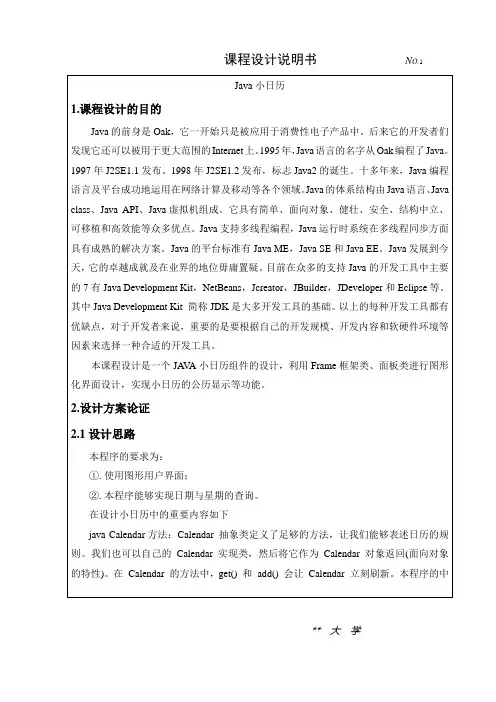
Java日历记事本课程设计报告在设计日历记事本时,需要编写6个JA V A源文件:CalendarWindow.java、CalendarPad.java、NotePad.java、CalendarImage.java、Clock.java和CalendarMesssage.java效果图如下. CalendarWindow类import javax.swing.*;import java.awt.*;import java.awt.event.*;import java.util.*;import java.io.*;public class CalendarWindow extends JFrame implements ActionListener,MouseListener,FocusListener{int year,month,day;CalendarMessage calendarMessage;CalendarPad calendarPad;NotePad notePad;JTextField showYear,showMonth;JTextField[] showDay;CalendarImage calendarImage;String picturename;Clock clock;JButton nextYear,previousYear,nextMonth,previousMonth;JButton saveDailyRecord,deleteDailyRecord,readDailyRecord;JButton getPicture;File dir;Color backColor=Color.white ;public CalendarWindow(){dir=new File("./dailyRecord");dir.mkdir();showDay=new JTextField[42];for(int i=0;i<showDay.length;i++){showDay[i]=new JTextField();showDay[i].setBackground(backColor);showDay[i].setLayout(new GridLayout(3,3));showDay[i].addMouseListener(this);showDay[i].addFocusListener(this);}calendarMessage=new CalendarMessage();calendarPad=new CalendarPad();notePad=new NotePad();Calendar calendar=Calendar.getInstance();calendar.setTime(new Date());year=calendar.get(Calendar.YEAR);month=calendar.get(Calendar.MONTH)+1;day=calendar.get(Calendar.DAY_OF_MONTH);calendarMessage.setYear(year);calendarMessage.setMonth(month);calendarMessage.setDay(day);calendarPad.setCalendarMessage(calendarMessage);calendarPad.setShowDayTextField(showDay);notePad.setShowMessage(year,month,day);calendarPad.showMonthCalendar();doMark();calendarImage=new CalendarImage();calendarImage.setImageFile(new File("flower.jpg"));clock=new Clock();JSplitPane splitV1=new JSplitPane(JSplitPane.VERTICAL_SPLIT,calendarPad,calendarImage);JSplitPane splitV2=new JSplitPane(JSplitPane.VERTICAL_SPLIT,notePad,clock);JSplitPane splitH=new JSplitPane(JSplitPane.HORIZONTAL_SPLIT,splitV1,splitV2);add(splitH,BorderLayout.CENTER);showYear=new JTextField(""+year,6);showYear.setFont(new Font("TimesRoman",Font.BOLD,12));showYear.setHorizontalAlignment(JTextField.CENTER);showMonth=new JTextField(""+month,4);showMonth.setFont(new Font("TimesRoman",Font.BOLD,12)); showMonth.setHorizontalAlignment(JTextField.CENTER); nextYear=new JButton("下年");previousYear=new JButton("上年");nextMonth=new JButton("下月");previousMonth=new JButton("上月");nextYear.addActionListener(this);previousYear.addActionListener(this);nextMonth.addActionListener(this);previousMonth.addActionListener(this);JPanel north=new JPanel();north.add(previousYear);north.add(showYear);north.add(nextYear);north.add(previousMonth);north.add(showMonth);north.add(nextMonth);add(north,BorderLayout.NORTH);saveDailyRecord=new JButton("保存日志"); deleteDailyRecord=new JButton("删除日志"); readDailyRecord=new JButton("读取日志"); saveDailyRecord.addActionListener(this); deleteDailyRecord.addActionListener(this); readDailyRecord.addActionListener(this);JPanel pSouth=new JPanel();pSouth.add(saveDailyRecord);pSouth.add(deleteDailyRecord);pSouth.add(readDailyRecord);add(pSouth,BorderLayout.SOUTH);getPicture=new JButton("选择日历图像");getPicture.addActionListener(this);pSouth.add(getPicture);add(pSouth,BorderLayout.SOUTH);setVisible(true);setBounds(60,60,660,480);validate();setDefaultCloseOperation(JFrame.EXIT_ON_CLOSE);}public void actionPerformed(ActionEvent e){if(e.getSource()==nextYear){year++;showYear.setText(""+year);calendarMessage.setYear(year);calendarPad.setCalendarMessage(calendarMessage);calendarPad.showMonthCalendar();notePad.setShowMessage(year,month,day);doMark();}else if(e.getSource()==previousYear){year--;showYear.setText(""+year);calendarMessage.setYear(year);calendarPad.setCalendarMessage(calendarMessage);calendarPad.showMonthCalendar();notePad.setShowMessage(year,month,day);doMark();}else if(e.getSource()==nextMonth){month++;if(month<1) month=12;showMonth.setText(""+month);calendarMessage.setMonth(month);calendarPad.setCalendarMessage(calendarMessage);calendarPad.showMonthCalendar();notePad.setShowMessage(year,month,day);doMark();}else if(e.getSource()==previousMonth){month--;if(month<1) month=12;showMonth.setText(""+month);calendarMessage.setMonth(month);calendarPad.setCalendarMessage(calendarMessage);calendarPad.showMonthCalendar();notePad.setShowMessage(year,month,day);doMark();}else if(e.getSource()==showYear){String s=showYear.getText().trim();char a[]=s.toCharArray();boolean boo=false;for(int i=0;i<a.length;i++)if(!(Character.isDigit(a[i])))boo=true;if(boo==true)JOptionPane.showMessageDialog(this, "您输入了非法年份","警告",JOptionPane.WARNING_MESSAGE);else if(boo==false)year=Integer.parseInt(s);showYear.setText(""+year);calendarMessage.setYear(year);calendarPad.setCalendarMessage(calendarMessage);calendarPad.showMonthCalendar();notePad.setShowMessage(year,month,day);doMark();}else if(e.getSource()==saveDailyRecord){notePad.save(dir,year,month,day);doMark();}else if(e.getSource()==deleteDailyRecord){notePad.delete(dir,year,month,day);doMark();}else if(e.getSource()==readDailyRecord){notePad.read(dir,year,month,day);}else if (e.getSource() ==getPicture ) {FileDialog fd=new FileDialog(this,"打开文件对话框");fd.setVisible(true);String fileopen = null, filename = null;fileopen = fd.getDirectory();filename = fd.getFile();calendarImage.setImageFile(new File(fileopen,filename));}}public void mousePressed(MouseEvent e){JTextField text=(JTextField)e.getSource();String str=text.getText().trim();try{ day=Integer.parseInt(str);}catch(NumberFormatException exp){}calendarMessage.setDay(day);notePad.setShowMessage(year,month,day);}public void mouseReleased(MouseEvent e){}public void mouseEntered(MouseEvent e){}public void mouseExited(MouseEvent e){}public void mouseClicked(MouseEvent e){}public void focusGained(FocusEvent e){Component com=(Component)e.getSource();com.setBackground(Color.pink);}public void focusLost(FocusEvent e){Component com=(Component)e.getSource();com.setBackground(backColor);}public void doMark(){for(int i=0;i<showDay.length;i++){showDay[i].removeAll();String str=showDay[i].getText().trim();try{int n=Integer.parseInt(str);if(isHaveDailyRecord(n)==true){JLabel mess=new JLabel("有");mess.setFont(new Font("TimesRoman",Font.PLAIN,11));mess.setForeground(Color.blue);showDay[i].add(mess);}}catch(Exception exp){}}calendarPad.repaint();calendarPad.validate();}public boolean isHaveDailyRecord(int n){String key=""+year+""+month+""+n;String [] dayFile=dir.list();boolean boo=false;for(int k=0;k<dayFile.length;k++){if(dayFile[k].equals(key+".txt")){boo=true;break;}}return boo;}public String getPicture_address() {String address = null;try {InputStream outOne = new FileInputStream("picture_address.txt");ObjectInputStream outTwo = new ObjectInputStream(outOne);try {address = (String) outTwo.readObject();} catch (Exception ex) {}outTwo.close();} catch (IOException eee) {}if (address != null) {return address;} else {return "picture.jpg";}}public void actionPerformed1(ActionEvent e) {if (e.getActionCommand().equals("更改图片背景")) {FileDialog dia = new FileDialog(this, "选择图片", FileDialog.LOAD);dia.setModal(true);dia.setVisible(true);if ((dia.getDirectory() != null) && (dia.getFile() != null)) {try {FileOutputStream inOne = new FileOutputStream("picture_address.txt");ObjectOutputStream inTwo = new ObjectOutputStream(inOne);inTwo.writeObject(dia.getDirectory() + dia.getFile());inTwo.close();} catch (IOException ee) {}String picturename = getPicture_address();calendarImage.setImageFile(new File(picturename));}}public static void main(String args[]){new CalendarWindow();}}CalendarPad类import javax.swing.*;import java.awt .*;import java.awt.event.*;import java.util.*;import javax.swing.JPanel;public class CalendarPad extends JPanel{int year,month,day;CalendarMessage calendarMessage;JTextField[] showDay;JLabel title[];String[] 星期={"SUN 日","MON 一","TUE 二","WED 三","THU 四","FRI 四","SAT 六"};JPanel north,center;public CalendarPad(){setLayout(new BorderLayout());north=new JPanel();north.setLayout(new GridLayout(1,7));center=new JPanel();center.setLayout(new GridLayout(6,7));add(center ,BorderLayout.CENTER );add(north,BorderLayout.NORTH );title=new JLabel[7];for(int j=0;j<7;j++){title[j]=new JLabel();title[j].setFont(new Font("TimesRoman",Font.BOLD ,12));title[j].setText(星期[j]);title[j].setHorizontalAlignment(JLabel.CENTER);title[j].setBorder(BorderFactory.createRaisedBevelBorder());north.add(title[j]);}title[0].setForeground(Color.red);title[6].setForeground(Color.blue);}public void setShowDayTextField(JTextField[]text){showDay=text;for(int i=0;i<showDay.length;i++){showDay[i].setFont(new Font("TimesRoman",Font.BOLD ,15));showDay[i].setHorizontalAlignment(JTextField.CENTER);showDay[i].setEditable(false);center.add(showDay[i]);}}public void setCalendarMessage (CalendarMessage calendarMessage){ this.calendarMessage=calendarMessage;}public void showMonthCalendar(){String[] a=calendarMessage.getMonthCalendar();for(int i=0;i<42;i++)showDay[i].setText(a[i]);validate();}}CalendarMesssage类import java.util.Calendar;public class CalendarMessage {int year=-1,month=-1,day=-1;public int getYear(){return year;}public void setMonth(int month){if(month<=12&&month>=1)this.month=month;elsethis.month =1;}public int getMonth(){return month;}public void setDay(int day){this.day =day;}public int getDay(){return day ;}public String []getMonthCalendar(){String[] day=new String[42];Calendar rili =Calendar.getInstance();rili.set(year, month-1,1);int 星期几=rili.get(Calendar.DAY_OF_WEEK )-1;int dayAmount=0;if(month==1||month==3||month==5||month==7||month==8||month==10||month== 12)dayAmount=31;if(month==4||month==6||month==9||month==11)dayAmount=30;if(month==2)if(((year%4==0)&&(year%100!=0)||year%400==0))dayAmount=29;elsedayAmount=28;for(int i=0;i<星期几;i++)day[i]="";for(int i=星期几,n=1;i<星期几+dayAmount;i++){day[i]=String.valueOf(n);n++;}for(int i=星期几+dayAmount;i<42;i++)day[i]="";return day;}public void setYear(int year) {this.year = year;}}NotePad类import java.awt.*;import javax.swing.*;import javax.swing.border.Border;import javax.swing.event.ListSelectionEvent;import javax.swing.event.ListSelectionListener;import java.io.*;import java.awt.event.*;public class NotePad extends JPanel implements ActionListener {JTextArea text;JTextField showMessage;JPopupMenu menu;JMenuItem itemCopy, itemCut, itemPaste, itemClear, btn;public NotePad() {showMessage = new JTextField();showMessage.setHorizontalAlignment(JTextField.CENTER);showMessage.setFont(new Font("TimesRoman", Font.BOLD, 16));showMessage.setForeground(Color.blue);showMessage.setBackground(Color.pink);showMessage.setBorder(BorderFactory.createRaisedBevelBorder());showMessage.setEditable(false);menu = new JPopupMenu();itemCopy = new JMenuItem("复制");itemCut = new JMenuItem("剪切");itemPaste = new JMenuItem("粘贴");itemClear = new JMenuItem("清空");btn = new JMenuItem("字体");itemCopy.addActionListener(this);itemCut.addActionListener(this);itemPaste.addActionListener(this);itemClear.addActionListener(this);btn.addActionListener(this);menu.add(itemCopy);menu.add(itemCut);menu.add(itemPaste);menu.add(itemClear);menu.add(btn);text = new JTextArea(10, 10);text.addMouseListener(new MouseAdapter() {public void mousePressed(MouseEvent e) {if (e.getModifiers() == InputEvent.BUTTON3_MASK)menu.show(text, e.getX(), e.getY());}});setLayout(new BorderLayout());add(showMessage, BorderLayout.NORTH);add(new JScrollPane(text), BorderLayout.CENTER);}public void setShowMessage(int year, int month, int day) {showMessage.setText("" + year + "年" + month + "月" + day + "日");showMessage.setForeground(Color.blue);showMessage.setFont(new Font("宋体", Font.BOLD, 15));}public void save(File dir, int year, int month, int day) {String dailyContent = text.getText();String fileName = "" + year + "" + month + "" + day + ".txt";String key = "" + year + "" + month + "" + day;String[] dayFile = dir.list();boolean boo = false;for (int k = 0; k < dayFile.length; k++) {if (dayFile[k].startsWith(key)) {boo = true;break;}}if (boo) {String m = "" + year + "年" + month + "月" + day+ "已有日志,将新的内容添加到日志吗?";int ok = JOptionPane.showConfirmDialog(this, m, "",JOptionPane.YES_NO_OPTION,JOptionPane.QUESTION_MESSAGE);if (ok == JOptionPane.YES_OPTION) {try {File f = new File(dir, fileName);RandomAccessFile out = new RandomAccessFile(f, "rw");long fileEnd = out.length();byte[] bb = dailyContent.getBytes();out.seek(fileEnd);out.write(bb);out.close();} catch (IOException exp) {}}} else {String m = "" + year + "年" + month + "月" + day + "还没有日志,保存日志吗?";int ok = JOptionPane.showConfirmDialog(this, m, "询问",JOptionPane.YES_NO_OPTION,JOptionPane.QUESTION_MESSAGE);if (ok == JOptionPane.YES_OPTION) {try {File f = new File(dir, fileName);RandomAccessFile out = new RandomAccessFile(f, "rw");long fileEnd = out.length();byte[] bb = dailyContent.getBytes();out.seek(fileEnd);out.write(bb);out.close();} catch (IOException exp) {}}}}public void delete(File dir, int year, int month, int day) {String key = "" + year + "" + month + "" + day;String[] dayFile = dir.list();boolean boo = false;for (int k = 0; k < dayFile.length; k++) {if (dayFile[k].startsWith(key)) {boo = true;break;}}if (boo) {String m = "删除" + year + "年" + month + "月" + day + "日的日志吗?";int ok = JOptionPane.showConfirmDialog(this, m, "询问",JOptionPane.YES_NO_OPTION,JOptionPane.QUESTION_MESSAGE);if (ok == JOptionPane.YES_OPTION) {String fileName = "" + year + "" + month + "" + day + ".txt";File deleteFile = new File(dir, fileName);deleteFile.delete();}}else {String m = "" + year + "" + month + "" + day + "";JOptionPane.showMessageDialog(this, m, "提示",JOptionPane.WARNING_MESSAGE);}}public void read(File dir, int year, int month, int day) {String fileName = "" + year + "" + month + "" + day + ".txt";String key = "" + year + "" + month + "" + day;String[] dayFile = dir.list();boolean boo = false;for (int k = 0; k < dayFile.length; k++) {if (dayFile[k].startsWith(key)) {boo = true;break;}}if (boo) {String m = "" + year + "" + month + "" + day + "";int ok = JOptionPane.showConfirmDialog(this, m, "询问",JOptionPane.YES_NO_OPTION,JOptionPane.QUESTION_MESSAGE);if (ok == JOptionPane.YES_OPTION) {text.setText(null);try {File f = new File(dir, fileName);FileReader inOne = new FileReader(f);BufferedReader inTwo = new BufferedReader(inOne);String s = null;while ((s = inTwo.readLine()) != null)text.append(s + "\n");inOne.close();inTwo.close();} catch (IOException exp) {}}} else {String m = "" + year + "" + month + "" + day + "";JOptionPane.showMessageDialog(this, m, "提示",JOptionPane.WARNING_MESSAGE);}}public void actionPerformed(ActionEvent e) {if (e.getSource() == itemCopy)text.copy();else if (e.getSource() == itemCut)text.cut();else if (e.getSource() == itemPaste)text.paste();else if (e.getSource() == itemClear)text.setText(null);if (e.getSource() == btn) {JFontDialog nFD = new JFontDialog("选择字体");nFD.setModal(true);nFD.setVisible(true);text.setFont(nFD.myFont);}}}class JFontDialog extends JDialog {private static final long serialVersionUID = 1L;JList fontpolics, fontstyle, fontsize;JTextField fontpolict, fontstylet, fontsizet;String example;JLabel FontResolvent;JButton buttonok, buttoncancel;Font myFont;public JFontDialog(String title) {Container container = getContentPane();container.setLayout(new BorderLayout());JPanel panel = new JPanel();panel.setLayout(new GridLayout(2, 1));JPanel FontSet, FontView;FontSet = new JPanel(new GridLayout(1, 4));FontView = new JPanel(new GridLayout(1, 2));example = "AaBbCcDdEe";FontResolvent = new JLabel(example, JLabel.CENTER);FontResolvent.setBackground(Color.WHITE);ListSelectionListener selectionListener = new ListSelectionListener() { public void valueChanged(ListSelectionEvent e) {if (((JList) e.getSource()).getName().equals("polic")) {fontpolict.setText((String) fontpolics.getSelectedValue());FontResolvent.setFont(new Font(fontpolict.getText(),FontResolvent.getFont().getStyle(), FontResolvent.getFont().getSize()));}if (((JList) e.getSource()).getName().equals("style")) {fontstylet.setText((String) fontstyle.getSelectedValue());FontResolvent.setFont(new Font(FontResolvent.getFont().getFontName(), fontstyle.getSelectedIndex(),FontResolvent.getFont().getSize()));}if (((JList) e.getSource()).getName().equals("size")) {fontsizet.setText((String) fontsize.getSelectedValue());try {Integer.parseInt(fontsizet.getText());} catch (Exception excepInt) {fontsizet.setText(FontResolvent.getFont().getSize()+ "");}FontResolvent.setFont(new Font(FontResolvent.getFont().getFontName(), FontResolvent.getFont().getStyle(),Integer.parseInt(fontsizet.getText())));}}};KeyListener keyListener = new KeyListener() {public void keyPressed(KeyEvent e) {if (e.getKeyCode() == 10) {if (((JTextField) e.getSource()).getName().equals("polic")) {FontResolvent.setFont(new Font(fontpolict.getText(),FontResolvent.getFont().getStyle(),FontResolvent.getFont().getSize()));}if (((JTextField) e.getSource()).getName().equals("style")) {fontstylet.setText((String) fontstyle.getSelectedValue());FontResolvent.setFont(new Font(FontResolvent.getFont().getFontName(), fontstyle.getSelectedIndex(),FontResolvent.getFont().getSize()));}if (((JTextField) e.getSource()).getName().equals("size")) {try {Integer.parseInt(fontsizet.getText());} catch (Exception excepInt) {fontsizet.setText(FontResolvent.getFont().getSize()+ "");}FontResolvent.setFont(new Font(FontResolvent.getFont().getFontName(), FontResolvent.getFont().getStyle(), Integer.parseInt(fontsizet.getText())));}}}public void keyReleased(KeyEvent e) {}public void keyTyped(KeyEvent e) {}};// 字体JPanel Fontpolic = new JPanel();Border border = BorderFactory.createLoweredBevelBorder();border = BorderFactory.createTitledBorder(border, "字体");Fontpolic.setBorder(border);Font[] fonts = java.awt.GraphicsEnvironment.getLocalGraphicsEnvironment().getAllFonts();int taille = fonts.length;String[] policnames = new String[taille];for (int i = 0; i < taille; i++) {policnames[i] = fonts[i].getName();}fontpolics = new JList(policnames);fontpolics.setName("polic");fontpolics.setSelectionMode(ListSelectionModel.SINGLE_SELECTION); fontpolics.addListSelectionListener(selectionListener);fontpolics.setVisibleRowCount(6);fontpolict = new JTextField(policnames[0]);fontpolict.setName("polic");fontpolict.addKeyListener(keyListener);JScrollPane jspfontpolic = new JScrollPane(fontpolics);Fontpolic.setLayout(new BoxLayout(Fontpolic, BoxLayout.PAGE_AXIS)); Fontpolic.add(fontpolict);Fontpolic.add(jspfontpolic);// 样式JPanel Fontstyle = new JPanel();border = BorderFactory.createLoweredBevelBorder();border = BorderFactory.createTitledBorder(border, "样式");Fontstyle.setBorder(border);String[] styles = { "PLAIN", "BOLD", "ITALIC", "BOLD ITALIC" };fontstyle = new JList(styles);fontstyle.setName("style");fontstyle.setSelectionMode(ListSelectionModel.SINGLE_SELECTION); fontstyle.addListSelectionListener(selectionListener);fontstyle.setVisibleRowCount(6);fontstylet = new JTextField(styles[0]);fontstylet.setName("style");fontstylet.addKeyListener(keyListener);JScrollPane jspfontstyle = new JScrollPane(fontstyle);Fontstyle.setLayout(new BoxLayout(Fontstyle, BoxLayout.PAGE_AXIS)); Fontstyle.add(fontstylet);Fontstyle.add(jspfontstyle);// 大小JPanel Fontsize = new JPanel();border = BorderFactory.createLoweredBevelBorder();border = BorderFactory.createTitledBorder(border, "大小");Fontsize.setBorder(border);String[] sizes = { "10", "14", "18", "22", "26", "30" };fontsize = new JList(sizes);fontsize.setName("size");fontsize.setSelectionMode(ListSelectionModel.SINGLE_SELECTION); fontsize.addListSelectionListener(selectionListener);fontsize.setVisibleRowCount(6);fontsizet = new JTextField(sizes[0]);fontsizet.setName("size");fontsizet.addKeyListener(keyListener);JScrollPane jspfontsize = new JScrollPane(fontsize);Fontsize.setLayout(new BoxLayout(Fontsize, BoxLayout.PAGE_AXIS)); Fontsize.add(fontsizet);Fontsize.add(jspfontsize);FontSet.add(Fontpolic);FontSet.add(Fontstyle);FontSet.add(Fontsize);FontView.add(FontResolvent);panel.add(FontSet);panel.add(FontView);JPanel panelnorth = new JPanel();panelnorth.setLayout(new FlowLayout());buttonok = new JButton("确定");buttoncancel = new JButton("取消");panelnorth.add(buttonok);panelnorth.add(buttoncancel);buttonok.addActionListener(new ActionListener() {public void actionPerformed(ActionEvent e) {myFont = FontResolvent.getFont();JFontDialog.this.setVisible(false);}});buttoncancel.addActionListener(new ActionListener() { public void actionPerformed(ActionEvent e) {JFontDialog.this.setVisible(false);}});container.add(panel, BorderLayout.CENTER);container.add(panelnorth, BorderLayout.SOUTH);setSize(400, 300);}}CalendarImage类import javax.swing.*;import java.io.*;import java.awt.*;public class CalendarImage extends JPanel{File imageFile;Image image;Toolkit tool;CalendarImage(){tool=getToolkit();}public void setImageFile(File f){imageFile=f;try{ image=tool.getImage(imageFile.toURI().toURL());}catch(Exception exp){}repaint();}public void paintComponent(Graphics g){super.paintComponent(g);int w=getBounds().width;int h=getBounds().height;g.drawImage(image, 0, 0, w, h, this);}}Clock类import java.applet.Applet;import java.applet.AudioClip;import java.awt.BasicStroke;import java.awt.Color;import java.awt.Graphics;import java.awt.Graphics2D;import java.awt.event.ActionEvent;import java.awt.event.ActionListener;import java.awt.geom.Line2D;import java.io.File;import .MalformedURLException;import .URI;import .URL;import java.util.Date;import javax.swing.JPanel;public class Clock extends JPanel implements ActionListener { Date date;javax.swing.Timer secondTime;int hour,munite,second;Line2D secondLine,muniteLine,hourLine;Line2D m=new Line2D.Double(0,0,0,0);Line2D s=new Line2D.Double(0,0,0,0);int a,b,c,width,height;double pointSX[]=new double[60],pointSY[]=new double[60],pointMX[]=new double[60],pointMY[]=new double[60],pointHX[]=new double[60],pointHY[]=new double[60];Clock(){setBackground(Color.cyan);initPoint();secondTime=new javax.swing.Timer(1000,this);secondLine=new Line2D.Double(0,0,0,0);muniteLine=new Line2D.Double(0,0,0,0);hourLine=new Line2D.Double(0,0,0,0);secondTime.start();}private void initPoint(){width=getBounds().width;height=getBounds().height;pointSX[0]=0;pointSY[0]=-height/2*5/6;pointMX[0]=0;pointMY[0]=-(height/2*4/5);pointHX[0]=0;pointHY[0]=-(height/2*2/3);double angle=6*Math.PI/180;for(int i=0;i<59;i++){pointSX[i+1]=pointSX[i]*Math.cos(angle)-Math.sin(angle)*pointSY[i];pointSY[i+1]=pointSY[i]*Math.cos(angle)+pointSX[i]*Math.sin(angle);pointMX[i+1]=pointMX[i]*Math.cos(angle)-Math.sin(angle)*pointMY[i];pointMY[i+1]=pointMY[i]*Math.cos(angle)+pointMX[i]*Math.sin(angle);pointHX[i+1]=pointHX[i]*Math.cos(angle)-Math.sin(angle)*pointHY[i];pointHY[i+1]=pointHY[i]*Math.cos(angle)+pointHX[i]*Math.sin(angle);}for(int i=0;i<60;i++){pointSX[i]=pointSX[i]+width/2;pointSY[i]=pointSY[i]+height/2;pointMX[i]=pointMX[i]+width/2;pointMY[i]=pointMY[i]+height/2;pointHX[i]=pointHX[i]+width/2; pointHY[i]=pointHY[i]+height/2;}}public void paintComponent(Graphics g){super.paintComponent(g);initPoint();for(int i=0;i<60;i++){int m=(int)pointSX[i];int n=(int)pointSY[i];if(i%5==0){if(i==0||i==15||i==30||i==45){int k=10;g.setColor(Color.orange);g.fillOval(m-k/2, n-k/2, k, k);}else{int k=7;g.setColor(Color.orange );g.fillOval(m-k/2, n-k/2, k, k);}}else{int k=2;g.setColor(Color.black);g.fillOval(m-k/2, n-k/2, k, k);}}g.fillOval(width/2-5, height/2-5, 10, 10);Graphics2D g_2d=(Graphics2D)g;g_2d.setColor(Color.red);g_2d.draw(secondLine);BasicStroke bs=newBasicStroke(2f,BasicStroke.CAP_ROUND,BasicStroke.JOIN_MITER);g_2d.setStroke(bs);g_2d.setColor(Color.blue);g_2d.draw(muniteLine);bs=newBasicStroke(2f,BasicStroke.CAP_BUTT,BasicStroke.JOIN_MITER);g_2d.setStroke(bs);g_2d.setColor(Color.orange);g_2d.draw(hourLine);bs=newBasicStroke(4f,BasicStroke.CAP_BUTT,BasicStroke.JOIN_MITER);g_2d.setStroke( bs);}public void actionPerformed(ActionEvent e){if(e.getSource()==secondTime){date=new Date();String s=date.toString();。