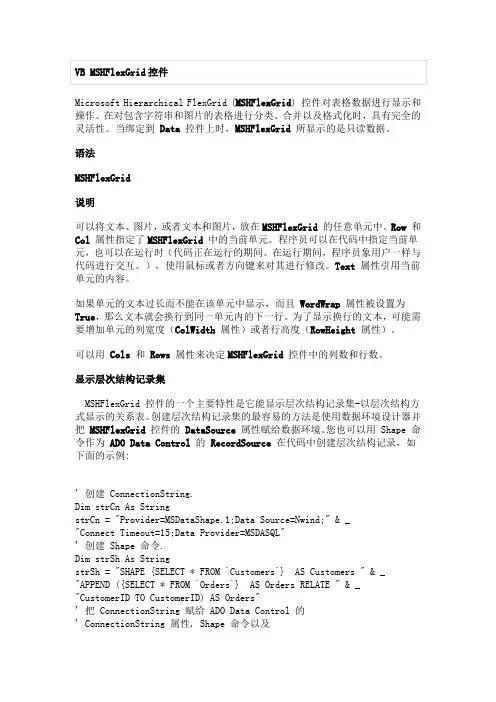
VB中MSHFlexGrid用法详解
- 格式:pdf
- 大小:223.67 KB
- 文档页数:15
MSHFlexGrid 用法详解
发布者:51编程网发布时间:2009-6-11 17:58:22浏览总数
添加 MSHFlexGrid 将 Name 改成 flex1
添加 text 将 name 改成 txtedit
Public rs1 As New ADODB.Recordset, rs2 As New ADODB.Recordset 据集对象 Dim i As Integer, j As Integer
End If End Sub ''添加下列例程以初始化文本框,并将焦点从 Hierarchical FlexGrid 传递到 TextBox 控 件: Sub MSHFlexGridEdit(MSHFlexGrid As Control, Edt As Control, KeyAscii As Integer)
End Sub
Private Sub lblSum_Click()
End Sub
Private Sub txt1_KeyDown(Index As Integer, KeyCode As Integer, Shift As Integer)
If KeyCode = vbKeyReturn And Index = 0 Then
Val(flex1.TextMatrix(flex1.Row, 5))
flex1.TextMatrix(flex1.Row, 6) = Format(flex1.TextMatrix(flex1.Row, 6),
"0.00")
End If
Dim A, B As Single
''声明单精度浮点型变量
On Error Resume Next
''求合计金额
B = Val(flex1.TextMatrix(i, 4)) + B
''求合计数量
End If
Next i
lblCount = B
lblSum = Format(A, "0.00")
''格式化合计金额
End Sub
Sub SetButtons(bVal As Boolean)
cmdRegister.Enabled = Not bVal
''定义数
Sub EditKeyCode(MSHFlexGrid As Control, Edt As Control, KeyCode As Integer,
Shift As Integer)
''标准编辑 控件处理。
Select Case KeyCode
Case 27
''ESC:隐藏焦点并将其返回 MSFlexGrid
''设置列标头。
s$ = "^|^商品名称
|^规格
|^单位
|^数量
|^进货价
|^金额
|^备注
"
flex1.FormatString = s$
End Sub
Private Sub flex1_KeyPress(KeyAscii As Integer)
If flex1.Col >= 4 Or flex1.Col = 1 Then MSHFlexGridEdit flex1, txtEdit, KeyAscii
''使用已输入的字符。 Select Case KeyAscii
''空格表示编辑当前的文本。 Case 0 To 32
Edt = MSHFlexGrid Edt.SelStart = 1000 ''其它所有字符表示取代当前的文本。 Case Else Edt = Chr(KeyAscii) Edt.SelStart = 1 End Select ''在合适的位置显示 Edt。 Edt.Move MSHFlexGrid.Left + MSHFlexGrid.CellLeft - 15, _ MSHFlexGrid.Top + MSHFlexGrid.CellTop - 15, _ MSHFlexGrid.CellWidth, _ MSHFlexGrid.CellHeight
''删除回车符,以消除嘟嘟声。 If KeyAscii = Asc(vbCr) Then KeyAscii = 0 End Sub Private Sub txtEdit_KeyDown(KeyCode As Integer, Shift As Integer) If KeyCode = vbKeyReturn And flex1.Col = 1 Then
Edt.Visible = True
Edt.SetFocus
End Sub
Private Sub flex1_DblClick()
If flex1.Col >= 4 Or flex1.Col = 1 Then
MSHFlexGridEdit flex1, txtEdit, 32
''模拟一个空格。
End If
txt1(0) = Adodc1.Recordset.Fields( "供应商全称") txt1(1).SetFocus DataGrid1.Visible = False End If End Sub Private Sub txtEdit_KeyPress(KeyAscii As Integer)
DoEvents
If MSFlexGrid.Row > MSFlexGrid.FixedRows Then
MSFlexGrid.Row = MSFlexGrid.Row - 1
End If
End Select
End Sub
Sub view_DP()
If flex1.Col = 4 Or flex1.Col = 5 Or flex1.Col = 6 Then
Private Sub flex1_MouseDown(Button As Integer, Shift As Integer, x As Single, y As
Single)
''利用 PopupMenu 方法
If Button And vbRightButton Then
PopupMenu edit
Edt.Visible = False
MSHFlexGrid.SetFocus
Case 13
''ENTER 将焦点返回 MSFlexGrid。
MSHFlexGrid.SetFocus
DoEvents
If MSHFlexGrid.Col < MSHFlexGrid.Cols - 1 Then
MSHFlexGrid.Col = MSHFlexGrid.Col + 1
Else
If MSHFlexGrid.Col = MSHFlexGrid.Cols - 1 Then
MSHFlexGrid.Row = MSHFlexGrid.Row + 1
MSHFlexGrid.Col = 1
End If
End If
Case 38
''向上
MSHFlexGrid.SetFocus
Adodc2.RecordSource = "商品信息表 where 商品名称 like +''%''+''" + txtEdit + "''+''%''"
Adodc2.Refresh If Adodc2.Recordset.RecordCount > 0 Then
DataGrid2.Visible = True DataGrid2.SetFocus Else Adodc2.RecordSource = "商品信息表" Adodc2.Refresh If Adodc2.Recordset.RecordCount > 0 Then
''弹出菜单
End If
End Sub
Private Sub Form_Load()
Dim i As Integer
''使第一列较窄。
flex1.ColWidth(0) = flex1.ColWidth(0) / 2
''初始化编辑框
txtEdit = ""
flex1.Rows = 101
flex1.Cols = 8
Adodc1.RecordSource = "供应商信息表 where 供应商编号 like +''%''+''" +
txt1(0) + "''+''%''or 供应商全称 like +''%''+''" + txt1(0) + "''+''%''or 简称 like
+''%''+''" + txt1(0) + "''+''%''"
Else MsgBox "无可选的供应商信息,请首先录入供应商数据!", , "提示窗口"
发布者:51编程网发布时间:2009-6-11 17:58:22浏览总数
添加 MSHFlexGrid 将 Name 改成 flex1
添加 text 将 name 改成 txtedit
Public rs1 As New ADODB.Recordset, rs2 As New ADODB.Recordset 据集对象 Dim i As Integer, j As Integer
End If End Sub ''添加下列例程以初始化文本框,并将焦点从 Hierarchical FlexGrid 传递到 TextBox 控 件: Sub MSHFlexGridEdit(MSHFlexGrid As Control, Edt As Control, KeyAscii As Integer)
End Sub
Private Sub lblSum_Click()
End Sub
Private Sub txt1_KeyDown(Index As Integer, KeyCode As Integer, Shift As Integer)
If KeyCode = vbKeyReturn And Index = 0 Then
Val(flex1.TextMatrix(flex1.Row, 5))
flex1.TextMatrix(flex1.Row, 6) = Format(flex1.TextMatrix(flex1.Row, 6),
"0.00")
End If
Dim A, B As Single
''声明单精度浮点型变量
On Error Resume Next
''求合计金额
B = Val(flex1.TextMatrix(i, 4)) + B
''求合计数量
End If
Next i
lblCount = B
lblSum = Format(A, "0.00")
''格式化合计金额
End Sub
Sub SetButtons(bVal As Boolean)
cmdRegister.Enabled = Not bVal
''定义数
Sub EditKeyCode(MSHFlexGrid As Control, Edt As Control, KeyCode As Integer,
Shift As Integer)
''标准编辑 控件处理。
Select Case KeyCode
Case 27
''ESC:隐藏焦点并将其返回 MSFlexGrid
''设置列标头。
s$ = "^|^商品名称
|^规格
|^单位
|^数量
|^进货价
|^金额
|^备注
"
flex1.FormatString = s$
End Sub
Private Sub flex1_KeyPress(KeyAscii As Integer)
If flex1.Col >= 4 Or flex1.Col = 1 Then MSHFlexGridEdit flex1, txtEdit, KeyAscii
''使用已输入的字符。 Select Case KeyAscii
''空格表示编辑当前的文本。 Case 0 To 32
Edt = MSHFlexGrid Edt.SelStart = 1000 ''其它所有字符表示取代当前的文本。 Case Else Edt = Chr(KeyAscii) Edt.SelStart = 1 End Select ''在合适的位置显示 Edt。 Edt.Move MSHFlexGrid.Left + MSHFlexGrid.CellLeft - 15, _ MSHFlexGrid.Top + MSHFlexGrid.CellTop - 15, _ MSHFlexGrid.CellWidth, _ MSHFlexGrid.CellHeight
''删除回车符,以消除嘟嘟声。 If KeyAscii = Asc(vbCr) Then KeyAscii = 0 End Sub Private Sub txtEdit_KeyDown(KeyCode As Integer, Shift As Integer) If KeyCode = vbKeyReturn And flex1.Col = 1 Then
Edt.Visible = True
Edt.SetFocus
End Sub
Private Sub flex1_DblClick()
If flex1.Col >= 4 Or flex1.Col = 1 Then
MSHFlexGridEdit flex1, txtEdit, 32
''模拟一个空格。
End If
txt1(0) = Adodc1.Recordset.Fields( "供应商全称") txt1(1).SetFocus DataGrid1.Visible = False End If End Sub Private Sub txtEdit_KeyPress(KeyAscii As Integer)
DoEvents
If MSFlexGrid.Row > MSFlexGrid.FixedRows Then
MSFlexGrid.Row = MSFlexGrid.Row - 1
End If
End Select
End Sub
Sub view_DP()
If flex1.Col = 4 Or flex1.Col = 5 Or flex1.Col = 6 Then
Private Sub flex1_MouseDown(Button As Integer, Shift As Integer, x As Single, y As
Single)
''利用 PopupMenu 方法
If Button And vbRightButton Then
PopupMenu edit
Edt.Visible = False
MSHFlexGrid.SetFocus
Case 13
''ENTER 将焦点返回 MSFlexGrid。
MSHFlexGrid.SetFocus
DoEvents
If MSHFlexGrid.Col < MSHFlexGrid.Cols - 1 Then
MSHFlexGrid.Col = MSHFlexGrid.Col + 1
Else
If MSHFlexGrid.Col = MSHFlexGrid.Cols - 1 Then
MSHFlexGrid.Row = MSHFlexGrid.Row + 1
MSHFlexGrid.Col = 1
End If
End If
Case 38
''向上
MSHFlexGrid.SetFocus
Adodc2.RecordSource = "商品信息表 where 商品名称 like +''%''+''" + txtEdit + "''+''%''"
Adodc2.Refresh If Adodc2.Recordset.RecordCount > 0 Then
DataGrid2.Visible = True DataGrid2.SetFocus Else Adodc2.RecordSource = "商品信息表" Adodc2.Refresh If Adodc2.Recordset.RecordCount > 0 Then
''弹出菜单
End If
End Sub
Private Sub Form_Load()
Dim i As Integer
''使第一列较窄。
flex1.ColWidth(0) = flex1.ColWidth(0) / 2
''初始化编辑框
txtEdit = ""
flex1.Rows = 101
flex1.Cols = 8
Adodc1.RecordSource = "供应商信息表 where 供应商编号 like +''%''+''" +
txt1(0) + "''+''%''or 供应商全称 like +''%''+''" + txt1(0) + "''+''%''or 简称 like
+''%''+''" + txt1(0) + "''+''%''"
Else MsgBox "无可选的供应商信息,请首先录入供应商数据!", , "提示窗口"