
ABAQUS屈曲分析ppt课件
- 格式:pptx
- 大小:1.35 MB
- 文档页数:42
| w w w .3d s .c o m | © D a s s a u l t S y s t èm e s |Buckling, Postbuckling, and CollapseAnalysis with Abaqus| w w w .3d s .c o m | © D a s s a u l t S y s t èm e s |Day 1•Lecture 1Basic Concepts and Overview •Workshop 1Buckling and Postbuckling Analyses of a Crane Structure •Lecture 2Finite Element Formulation•Lecture 3Finite Element Implementation in Abaqus •Lecture 4Eigenvalue Buckling Analysis •Workshop 2Eigenvalue Buckling of a Ring Subjected to External Pressure•Workshop 3Elastic Buckling of Ring-Supported Cylindrical Shell under Hydrostatic Pressure| w w w .3d s .c o m | © D a s s a u l t S y s t èm e s |Buckling, Postbuckling, and Collapse Analysis with AbaqusDay 2•Lecture 5Regular and Damped Static Solution Procedures for Postbuckling Analyses•Workshop 4Nonlinear Buckling of Ring-Supported Cylindrical Shell under Hydrostatic Pressure•Workshop 5Static Buckling Analysis of a Circular Arch •Lecture 6Modified Riks Static Solution Procedure for Postbuckling Analyses•Workshop 5Static Buckling Analysis of a Circular Arch (continued)•Lecture 7Dynamic Analysis Solution Procedures for Postbuckling Analyses•Workshop 5Static Buckling Analysis of a Circular Arch (continued)•Workshop 6Tube Crush Dynamic Analysis •Lecture 8Putting It All Together…•Workshop 7Capstone Workshop: Lee’s Frame Buckling Problem •Workshop 8Buckling and Postbuckling Analyses of a Stiffened Panel| w w w .3d s .c o m | © D a s s a u l t S y s t èm e s |Legal NoticesThe Abaqus Software described in this documentation is available only under license fromDassault Systèmes and its subsidiary and may be used or reproduced only in accordance with the terms of such license.This documentation and the software described in this documentation are subject to change without prior notice.Dassault Systèmes and its subsidiaries shall not be responsible for the consequences of any errors or omissions that may appear in this documentation.No part of this documentation may be reproduced or distributed in any form without prior written permission of Dassault Systèmes or its subsidiary.© Dassault Systèmes, 2011.Printed in the United States of AmericaAbaqus, the 3DS logo, SIMULIA and CATIA are trademarks or registered trademarks of Dassault Systèmes or its subsidiaries in the US and/or other countries.Other company, product, and service names may be trademarks or service marks of theirrespective owners. For additional information concerning trademarks, copyrights, and licenses, see the Legal Notices in the Abaqus 6.11 Release Notes and the notices at: /products/products_legal.html.| w w w .3d s .c o m | © D a s s a u l t S y s t èm e s |Buckling, Postbuckling, and Collapse Analysis with AbaqusRevision StatusLecture 15/11Updated for 6.11Lecture 25/11Updated for 6.11Lecture 35/11Updated for 6.11Lecture 45/11Updated for 6.11Lecture 55/11Updated for 6.11Lecture 65/11Updated for 6.11Lecture 75/11Updated for 6.11Lecture 85/11Updated for 6.11Workshop 15/11Updated for 6.11Workshop 25/11Updated for 6.11Workshop 35/11Updated for 6.11Workshop 45/11Updated for 6.11Workshop 55/11Updated for 6.11Workshop 65/11Updated for 6.11Workshop 75/11Updated for 6.11Workshop 85/11Updated for 6.11| w w w .3d s .c o m | © D a s s a u l t S y s t èm e s |Lecture 1Basic Concepts and Overview| w w w .3d s .c o m | © D a s s a u l t S y s t èm e s |L1.2Overview•Introduction •Solution Techniques •Analysis Selection Guide•Example: Lee’s Frame Buckling Problem •Summary•Workshop| w w w .3d s .c o m | © D a s s a u l t S y s t èm e s |Lecture 2Finite Element Formulation| w w w .3d s .c o m | © D a s s a u l t S y s t èm e s |L2.2Introduction•Basic Equations in Finite Element Analysis •Linearization•Nonlinear Problems in Mechanics•Geometrically Nonlinear Analysis •Stress and Strain Measures•Equilibrium and Virtual Work •Summary| w w w .3d s .c o m | © D a s s a u l t S y s t èm e s |Lecture 3FE Implementation in Abaqus| w w w .3d s .c o m | © D a s s a u l t S y s t èm e s |L3.2Outline•Abaqus Definitions•General and Perturbation Procedures•Including Nonlinear Effects in an Abaqus Simulation •General Procedure Solution Techniques•Nonlinear Analysis Using Implicit Methods •Solution Control •Diagnostics •Riks Method•Automatic Time Incrementation•General Procedure Implicit Equation Solvers •Nonlinear Analysis Using Explicit Methods •Perturbation Procedure Solution Techniques•Introducing Imperfections for Postbuckling Simulations•Summary| w w w .3d s .c o m | © D a s s a u l t S y s t èm e s |Lecture 4Eigenvalue Buckling Analysis| w w w .3d s .c o m | © D a s s a u l t S y s t èm e s |L4.2Overview•Introduction•Eigenvalue Problem Formulation •Abaqus Usage•Example: Buckling of a Thin Cylindrical Shell •Closely Spaced Eigenvalues•Symmetry in Buckling Analyses •Concluding Remarks •Workshops| w w w .3d s .c o m | © D a s s a u l t S y s t èm e s |Lecture 5Regular and Damped Static Solution Procedures forPostbuckling Analyses| w w w .3d s .c o m | © D a s s a u l t S y s t èm e s |L5.2Overview•Motivation•Regular Static Procedure•Motivation for Damped Static Procedures•Automatic Stabilization •Dashpots•Postbuckling and Loss of Contact •Summary for Damped Static Procedures •Concluding Remarks •Workshops| w w w .3d s .c o m | © D a s s a u l t S y s t èm e s |Lecture 6Modified Riks Static Solution Procedurefor Postbuckling Analyses| w w w .3d s .c o m | © D a s s a u l t S y s t èm e s |L6.2Overview•Introduction•Abaqus Implementation •Abaqus Usage•Snap-Through Problems •Postbuckling Problems•Postbuckling Examples •Usage Tips •Limitations•Concluding Remarks •Workshop| w w w .3d s .c o m | © D a s s a u l t S y s t èm e s |Lecture 7Dynamic Analysis Solution Procedures forPostbuckling Analyses| w w w .3d s .c o m | © D a s s a u l t S y s t èm e s |L7.2Overview•What Makes a Problem Dynamic? •Equations for Dynamic Problems •Nonlinear Dynamics•Workshop•Analyzing Highly Nonlinear Quasi-Static Problems•Quasi-Static Simulations Using Explicit Dynamics •Example: Dynamic Tube Collapse •Concluding Remarks •Workshop| w w w .3d s .c o m | © D a s s a u l t S y s t èm e s |Lecture 8Putting It All Together…| w w w .3d s .c o m | © D a s s a u l t S y s t èm e s |L8.2Buckling, Postbuckling, and Collapse Analysis with Abaqus Overview•Buckling Analysis Selection Guide Revisited •Weatherseal Example•References for Further Study•Workshops。
一.问题描述在钢结构中,受压杆件一般在其达到极限承载力前就会丧失稳定性,所以失稳是钢结构最为突出的问题。
压杆整体失稳形式可以是弯曲、扭转和弯扭。
钢构件在轴心压力作用下,弯曲失稳是常见的失稳形式。
而影响轴心受压构件整体稳定性的主要因素为纵向残余应力、初始弯曲、荷载初偏心及端部约束条件等。
实际的轴心受压构件往往会存在上述的一种或多种缺陷,导致构件的稳定承载力降低。
本文主要针对任意轴对称的圆形钢管截面,利用ABAQUS有限元非线性分析软件,对其在轴心受压情况下进行特征值屈曲分析和静态及动态的非线性屈曲分析(考虑材料弹塑性和初始缺陷的影响)。
通过考虑材料非线性、几何非线性并引入初弯曲,得出构件发生弯曲失稳的极限荷载,并且由弯曲失稳的临界荷载得出的构件荷载位移曲线。
同时再进行非线性分析时,需要施加初始扰动,以帮助非线性分析时失稳,可以通过特征值屈曲分析得到的初始弯曲模态来定义初始缺陷;最后由可以将特征值屈曲分析得到的临界荷载作为非线性屈曲分析时所施加荷载的参考。
二.结构模型用ABAQUS中的壳单元建立轴心受压模型,采用SI国际单位制(m)。
1.构件的材料特性: E=2.0×10¹¹N m2,μ=0.3, f y=2.35×10⁸N m2,ρ=7800kg m3,钢管半径:60mm,厚度:3mm,长度:2.5m。
2.钢管的截面尺寸及钢管受到的约束和荷载施加的模型图如图2-1及图2-2所示。
图2-1 图2-2三.建模步骤(Buckle分析)(1)创建部件在创建part模块中命名构件的名字为gang guan,创建的模型为三维可变形壳体单元,如图3-1所示。
截面参数见图2-1,构件长度2.5m。
图3-1(2)创建材料特性及截面属性并将其赋予单元。
材料定义为弹塑性,弹性模量E=2.0×10¹¹N m2,泊松比0.3,屈服强度2.35×10⁸N m2,ρ=7800kg m3,材料定义如下图3-2所示。
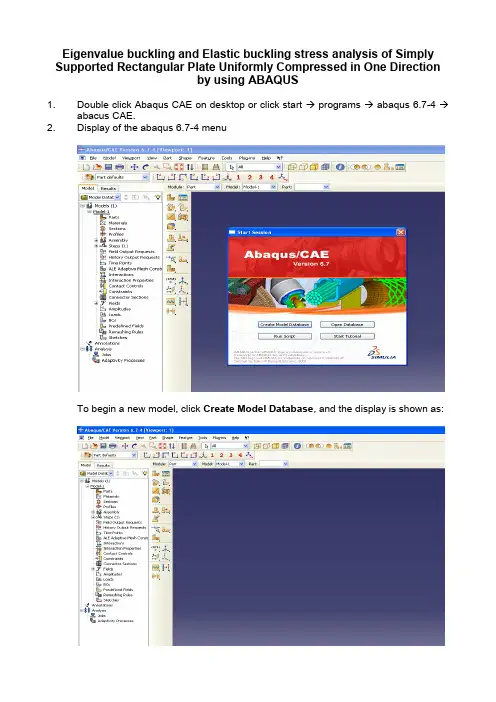
Eigenvalue buckling and Elastic buckling stress analysis of Simply Supported Rectangular Plate Uniformly Compressed in One Directionby using ABAQUS1. Double click Abaqus CAE on desktop or click start → programs → abaqus 6.7-4 →abacus CAE.2. Display of the abaqus 6.7-4 menuTo begin a new model, click Create Model Database, and the display is shown as:3. Double click icon and appear Create Part dialog box:In this dialog box, change Name Part-1 with plate (example only), in shape column select Shell and in the column type select Planar. Approximate size is given by 3000 (example only), and click Continue.4. Click icon to draw rectangular plate is shown as:5. Click icon to add dimension, select the line and fill dimension of plate 2400 forplate length also 800 for plate breadth (example only) into new dimension dialog box and press enter.And than click to fix the display. In display, right click on mouse click cancel procedure and click done is shown as6. Double click to define material is shown as:In this dialog box change name Material-1 with steel (example only) and select Elastic and appear dialog box is as shown:7. Double click to create section is as describe;In this figure, change Name: Section-1 with plate (example only), select shell in category column and select Homogeneous in type column, afterwards clicks continue. Also fill the Shell thickness with 10 and click OK.8. In the figure below, select Parts → plate →double click Section Assignments → andAnd click OK inthe Edit SectionAssignmentdialog box.9. From Parts → plate →double click Mesh (Empty). Afterwards, select Seed and clickPart is as shown by figure;Fill approximate global size 50 and clickOKSelect Mesh from menu bar and In Mesh Controls dialog box selectControls Structured and click OKFrom menu bar click Mesh and and click YesSelect Part10. Click Assembly double click Instances. In the Create Instance dialog box click onAuto-offset from other instances and click OK.11. Double click Steps (1) and appear Create Step dialog box. Afterwards, Name: Step-1 is changed by load (example only), Procedure type: Linear perturbation. SelectBuckle and click Continue.Fill in Number of eigenvalues requested: 10 (example only) and click OK12. Double click Loads, select Shell edge load and click ContinueSelect the left edge of the plate, and click doneIn the Edit Load dialog Box fill inMagnitude 0.01and click OK and load willapply on plate is shown as in figure:Name: BC-1 (example only can be changed or not) and click continue.Select the edge and click done. Afterwards, Edit Boundary Condition dialog box will appear and make sign . In this case, U3, UR1 and UR3 are fixed (can not move and rotate) and click OK. Similarly for the three edges of the plate.After completed the Boundary Condition, the last stage is analysis.14. Double click jobs click continue and click OK in Edit Job dialog boxRight click on mouse at Job-1, select submit and click OK on ABAQUS dialog box.If the analysis has completed, right click on mouse at Job-1 (Completed) and select Results.This is the end of eigen-value buckling and Elastic buckling stress analysis of Simply Supported Rectangular Plate Uniformly Compressed in One Direction by using ABAQUS. The result can be seen on the next page.This is the result of eigenvalue buckling and elastic buckling stress analysis of simply supported rectangular plate 2400 x 800 (mm) and thickness is 10 mm, where Elastic buckling stress (MPa) is determined by using formula :)()(*t thickness P Load Eigenvalue E =σ。