
Mic ch 10
- 格式:ppt
- 大小:270.50 KB
- 文档页数:39

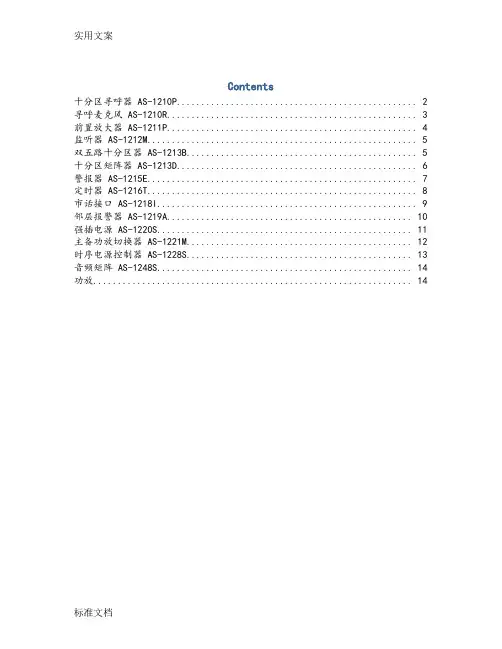
Contents十分区寻呼器 AS-1210P (2)寻呼麦克风 AS-1210R (3)前置放大器 AS-1211P (4)监听器 AS-1212M (5)双五路十分区器 AS-1213B (5)十分区矩阵器 AS-1213D (6)警报器 AS-1215E (7)定时器 AS-1216T (8)市话接口 AS-1218I (9)邻层报警器 AS-1219A (10)强插电源 AS-1220S (11)主备功放切换器 AS-1221M (12)时序电源控制器 AS-1228S (13)音频矩阵 AS-1248S (14)功放 (14)十分区寻呼器 AS-1210P性能特点(1)10分区寻呼报警功能(2)音频信号采用优质平衡传输连接技术(3)音频信号、控制信号采用双绞线同缆实时传输连接技术(4)采用专业级钟声提示音音效电路技术(5)具有四级优先权设计,分别为:本机MIC 1、钟声提示音为最高优先级,紧急音频信号(EMC)为第二级,寻呼麦克风1(MIC1)为第三级,寻呼麦克风2、3、4 (RMIC 2、3、4)和线路(AUX)为第四级(6)采用地址拨码,同时最多8台分区寻呼器相连接(7)15针电脑激活接口,低电平报警激活性能规格表寻呼麦克风 AS-1210R性能特点(1)具有8个分区寻呼器选择按键和10个分区选择键,能够对80个分区进行远程寻呼(2)具有全开,全关按键便于操作(3)具有一个鹅颈式麦克风和麦克风控制键,音频信号采用平衡传输方式,具有信号质量和传输距离(4)具有一个输出口,传输线采用屏蔽双绞线,同时传输音频信号的控制信号,方便安装性能规格表前置放大器AS-1211P功能描述:(1)多种、多个输入/输出口:5个话筒输入口;3个线路输入口;2个紧急输入口;4个输出口。
(2)各通道独立音量控制(3)高音和低音音调控制(4)自动默音(0-30dB)(5)紧急输入无音量控制性能规格表监听器 AS-1212M功能描述:(1)10个通道供任意选通(2)5个单元LED电平指示(3)监听音量可调(4)内置监听扬声器性能规格表双五路十分区器 AS-1213B功能描述:(1)2路输入(A和B),10通道输出,每路功率输入负载5个区域(2)10个通道分区可以任意选取通.十分区矩阵器 AS-1213D功能描述(1)2路输入(A和B),10通道输出,有强行插入功能切换通道功率音频信号(2)15针紧急警报激活口,10路报警信号输入,低电平报警激活.(3)当有警报信号输入时,相应通道自动切换到通道B,并且输出两路短路激活报警信号.警报器 AS-1215E功能描述(1)自动触发报警,输出消除报警声或预先固化的语音信号(2)60秒钟数字录/放语音IC,可擦可写(3)录/放电平可控定时器 AS-1216T功能描述(1)AP-9816T是一款功能强大的电源定时控制器,采用中文液晶显示,可定时控制五路电源输出,1路短路定时输出;(2)可以设置节假日,使定时操作非常灵活,单键飞梭的使用操作更加方便快捷,可以帮你实现各种定时电源控制功能.性能规格表市话接口 AS-1218I性能特点(1)本机是公共广播系统的配套设备,可将市话转换入广播系统,具有电话线路输入,音频输出接口。

This document is printed on chlorine-free (ECF) paper with soy ink. Printed in JapanLCK-0511For details please contact:For Vocal RecordingFor Guitarist(Song Writer)For DJ Mixing and PodcastingFor Making Video(Audio Capture)Desktop PCUSBIEEE1394orFireWireVideo CameraCD Player MD Player etc.Mics(Condenser Microphones)HeadphoneDesktop PCMicUSBSynthsizer (MO6 etc.)HSSpeakersUSBNOTE PCTurn table (Record Player)Turn table (Record Player)HDDAudio playerMW10Preamp for Acoustic GuitarAcoustic GuitarSystem ExamplesHSSpeakersHSSpeakersUSBNOTE PCMW12MW12MW10*All specifications are subject to change without notice.*All trademarks and registered trademarks are property of their respective owners.SpecificationsElectrical CharacteristicsMW10MW12UNIT Total Harmonic Distortion 0.1%Frequency Response 20Hz~20kHz (ST Out)-3 (MIN), 0 (TYP), 1 (MAX)dB Hum & NoiseEquivalent Input Noise (CH IN /MIC)-128dBu Residual Output Noise (ST OUT)-100dBu ST master control at nominal level and all-87-88dBu channel LEVEL controls at minimum level. (ST OUT)All channel AUX controls at minimum level. (AUX SEND)-85-81dBu ST master control and one channel LEVEL control -64dBu at nominal level. (CH INPUT 1, 2) (ST OUT)Maximum Voltage GainMIC to CH INSERT OUT 60dB MIC to ST OUT, GROUP OUT 7684dB MIC to ST OUT, GROUP to ST -94dB MIC to REC OUT64.262.2dB MIC to AUX SEND (PRE)7076dB MIC toAUX SEND (POST)7686dB LINE to ST OUT, GROUP OUT 5058dB LINE to AUX SEND (PRE)7076dB LINE to AUX SEND (POST)4757dB LINE TO ST OUT(MW10: CH7/8, 9/10)2634dB (MW12: CH/10, 11, 12)RETURN to ST OUT 1216dB RETURN to AUX SEND -9dB 2TR IN to ST OUT23.827.8dB Crosstalk-70dBAnalog Input SpecificationsInput Imp,Appropriate lmpMW10MW12UNIT MIC INPUT GAIN3k ohms, 50-600 ohms mic -60 ~ -16MIC INPUT SENSITIVITY to MAX -72 ~ +4-80 ~ +4dBu LINE INPUT GAIN10k ohms, 600 ohms line -34 ~ +10LINE INPUT SENSITIVITY to MAX -46 ~ +30-54 ~ +30dBu ST CH MIC INPUT GAIN3k ohms,50-600 ohms mic -60 ~ -16ST CH LINE INPUT SENSITIVITY to MAX -72 ~ -10-80 ~ -10dBu ST CH LINE INPUT GAIN10k ohms,50-600 ohms line -34 ~ +10ST CH LINE INPUT SENSITIVITY to MAX -46 ~ +30-54 ~ +30dBu ST CH MIC INPUT GAIN3k ohms, 50-600 ohms mic -60 ~ -16ST CHMIC INPUT SENSITIVITY to MAX -72 ~ -10-80 ~ -10dBu ST CH LINE INPUT GAIN10k ohms, 600 ohms line-34 ~ +10ST CH LINE INPUT SENSITIVITY to MAX -46 ~ +30-54 ~ +30dBu ST CH INPUT -22 ~ +10-30 ~ +10dBu CH INSERT IN 10k ohms, 600 ohms line-12 ~ +20-20 ~ +20dBu RETURN (L, R)-8 ~ +24-12 ~ +24dBu 2TR IN-22 ~ +10-26 ~ +10dBuAnalog Output SpecificationsInput Imp, Appropriate Imp MW10MW12UNIT ST OUT (L, R)Normal 150 ohms, 10k ohms line (MW10)+4Max 75 ohms, 600 ohms line (MW12)+20+24dBu AUX SEND Normal 150 ohms, 10k ohms line +4Max +20dBu GROUP OUT Normal 150 ohms, 10k ohms line -+4Max -+20dBu CH INSERT OUTNormal 150 ohms, 10k ohms line 0Max +20dBu C-R OUT Normal 150 ohms, 10k ohms line +4Max +20dBu Rec OUT Normal 600 ohms, 10k ohms line -10Max +10dBu PHONESNormal 100 ohms, 40 ohms phone3Max75dBuGeneral SpecificationsMW10MW12High Pass Filter 80kHz 12dB/OctaveCH EQ±15dBHIGH: 10kHz (shelving)MID: 2.5kHz (peaking)LOW: 100Hz (shelving)Phantom Power +48VPower Adaptor PA-10PA-20Power Consumption 19 W29 WDimensions (W x H x D)251 mm x 65 mm x 290.5 mm322 mm x 108 mm x 416.6 mmNet Weight1.8 kg 5 kgTemperature Range Operating temperature: 0 to 40 ˚C, Storage temperature: -20 to 60 ˚CDigital Input/Output USB Audio1.1, 44.1/48kHz 16bit, USB B typeOther-Included Rack mount EarsHum & Noise Rs=150 ohms, Gain=Maximum (CH INPUT 1-2), Hum & Noise are measured with a-6dB/********************;equivalent to a 20 kHz filter with infinite dB/octave attenuation.(CH INPUT 1-11/12 to ST OUT, GROUP OUT, AUX SEND, C-R OUT, REC OUT)1 kHz, 10k ohms PAN/BAL: panned hard left or hard right.Setting up for the first timeAfter you’ve installed and launched Cubase LE for the first time,you’ll need to make a few configuration settings—such as selecting the audio driver, enabling inputs and outputs within Cubase LE, etc. Once you’ve done this, the MW can be used for recording every time you open Cubase LE.Getting ready to recordOpen a new project in Cubase LE, and set up for recording. Select or create an audio track (stereo or mono), open the Mixer window, and turn Click on (for a metronome guide). Set the start point for recording, too.Everything connected? You’re almost ready… Turn Record Enable on, and check the levels while you adjust the Gain and Master Level controls on the MW.Recording and playbackNow start recording (from the Transport panel), play or sing the part, and stop when you’re finished. Play it back and add other parts to it as needed, building up a complete song part-by-part. Mixing your songOnce you have several different parts—all on different tracks—call up the Mixer window. Use the faders in the Mixer to control the balance of the parts, and use the Pan controls and EQ processing to adjust the sound as needed.TIP – Use your favorite outboard gearIf you’re recording vocals, you can insert your favorite outboard compressor or EQ into the signal path before recording, by using the MW’s rear-panel INSERT jacks. Guitarists can plug in their stomp boxes to record the exact sound they want.TIP – Dig into your mic closetThe MW also has 48V phantom power, so you can use high-quality condenser or ribbon microphones and get pro-quality sound for your vocals and acoustic instruments.TIP – Plug-in effectsCubase LE also has a wide variety of plug-ineffects— including reverbs, delays, distortion, and more—you can use to enhance or alter the sound of each track as desired.Tip – Cut out the Latency problem!If you require to use the VST instruments with MIDI controller and you need a low latency. No problem! You can download ASIO low latency audio driver at Inspiration can come at any time. But it can also leave—if you have to spend too much time fiddling with your equipment. Not so with the MW. With the included Cubase LE software, the MW gives you a simple yet comprehensive system for recording all your musical ideas to computer—and recording your moments of inspiration before they have a chance to leave!Plug in a guitar, a microphone, a keyboard, even a CD player. Use the three-band EQ to tweak your sound, and connect your favorite effect device to the send/return jacks for further processing. The familiar mixer layout lets you stay in your comfort zone and work efficiently. Recording to Cubase LE is a breeze, too—especially with the downloadable low-latency ASIO driver, which lets you use your plug-in software synths and effects in real time.The MW is also ideal for collaborating with others. Just bring it along with your laptop and guitar, and you’ve got a complete, portable mobile studio—ready to go anywhere and record with anyone.Scene 1Laying down tracks for solo musicians, producers, small project studiosIf you’re a DJ and have a standard two-turntables-and-a-microphone setup, the MW can help keep your beats flowing. The MW has enough connectors for bigger live rigs as well—letting you add a couple of synths and a CD player, and still have room for more.The big-brother MW12 is even more capable, handling up to 12 simultaneous inputs. It features a paired bus (Group 1/2) for assigning channels to a separate grouped output. There’s also a PFL (Pre-Fader Listen) switch that lets you conveniently cue up tracks—so you can monitor the sound of a source through your headphones before letting your audience hear it.At home, use the MW with Cubase LE to record your personal mixes, then burn them to CDs for your friends and fans. This system is perfect for creating custom remixes, too. With the full audio editing capabilities of Cubase LE—including automatic tempo matching and stretching of audio parts—plus multitrack recording of up to 48 tracks, you’ve got all you need to record, edit and mix your musical masterpieces.Scene 3Enjoying total control for club music, DJ work, mixing straight to CDScene 2Capturing the moment for recording backup singers, multi-instrument partsRecording ProcedureScenesMusic is a succession of magic moments—made even more magical and exciting when you get several musicians and singers together. The MW lets you capture those moments, mixing down the performance of several backup singers or instrumentalists and recording them directly to a two-channel stereo track in Cubase LE.With the MW and a laptop, the whole world becomes your personal recording studio. Portable, self-contained, flexible, comprehensive—the MW mixers give you virtually everything you need to make great recordings. Since Cubase LE gives you 48 tracks of audio to work with, you can build up songs part-by-part and easily create professional sounding arrangements.Use the MW as a keyboard submixer when you play live, or use it as a utility mixer for events, gatherings and small rehearsals—and even record these events direct to stereo on your computer.Step 1Step 3Step 4Step 2Front PanelsMW10MW12Yamaha MW10 and MW12USB Mixing StudioGetting the music that’s in your head out into the real world doesn’t have to be difficult. In fact, with Yamaha’s new MW10 and MW12 USB Mixing Studio, making great music is easier than ever before. Combined with the powerful Cubase LE audio/MIDI sequencing software, the MW Mixer provides a comprehensive tabletop studio setup for the solo recording musician and for the travelling producer/arranger.High-quality multitrack mixing/recording systems don’t get any simpler than this. Along with its versatile mixing functions, the MW features a true plug-and-play USB audio interface—giving you a fast, no-nonsense way to get quality audio tracks into your computer. With Cubase LE, it’s also an advanced, all-in-one solution that turns any computer into a complete, top-flight recording system.USB StudioConnect the MW to a USB terminal on your laptop or desktop computer, and you’ve got an instant, high-quality audio recording studio in-a-box.The MW delivers true plug-and-play USB audio input/output interfacing, and lets you easily mix your audio sources down to two-track stereo for recording to computer.The MW package includes Steinberg’s Cubase LE—a cross-platform software that provides a complete audio/MIDI recording solution, along with video playback and music notation capabilities. A low-latency ASIO driver is available for free download at our website, giving you optimum performance and letting you use VST plug-in instruments and effects in real time. Cubase LE has over 40 built-in VST instruments and effects, but you can add more as your needs grow.Mixer Input SectionThe MW10 gives you a total of 10 inputs, including four ultra-low-noise mic preamps. The MW12 has even more—12 inputs, with six mic pre amps. These high-performance balanced inputs also have a phantom power switch, allowing you to take advantage of the superior sonic quality of professional-level condenser microphones.These mixers accept just about any source you want to plug into them, with a full variety of input connectors—including balancedXLR, 1/4” phone jacks and RCA pin jacks. Comprehensive sound shaping is also onboard with pan controls, 3-band EQ and 80 Hz high-pass filters (to cut hum and low-frequency noise) on each channel strip.The MW provides insert patch points —for two channels on the MW10, and four on the MW12—letting you put external compressors and EQ into the signal path, and process your vocals or guitar as needed.Mixer Master SectionThese versatile mixers are also fully equipped for your external processing and monitoring needs. Two AUX send/return buses let you apply further signal processing on each channel—for example, with your favorite external reverb and delay units, or other effects devices.In addition to the main stereo outputs, the MW features separate headphone, control room and recording outputs as well, giving you plenty of options for a wide range of monitoring and recording applications. And visual monitoring of the output level is made accurate and easy with the bright 12-segment level meters.Exclusive Features of the MW12The MW12 has all the USB studio features found on the MW10, but packs even more mixing power, control and flexibility into its compact package. Foremost are the 12 inputs, including sixbalanced XLR inputs (for microphones), and four stereo line input channels. The MW provides separate inserts for Channels 1 – 4, letting you route the incoming signals through your favorite processors before mixing and recording.The MW12 is also rack-mountable and uses long-throw faders instead of knobs for easy level control. The two AUX Sends each have separate knob controls, and the AUX 1 bus can be configured pre- or post-fader, useful for setting up an independent monitor mix. The MW12 also has Master Send and Return controls for maximum control over the AUX buses.Separate Group buses 1 and 2 give you further flexibility in creating sub mixes. The MW12 features a convenient PFL (Pre-Fader Listen) switch that lets you monitor an incoming signal (in your headphones, for example) without having to boost the level of the channel, and has independent Stereo switches on all channels, for sending the signal to both the stereo L/R bus and the computer.HardwareSoftwareCubase LE is a full-featured music production software based on the award-winning Cubase SX and SL programs. It gives you up to 48 simultaneous audio tracks and 64 MIDI tracks, plus a variety of VST plug-in software synths and effects, as well as full VSTi compatibility, with support for up to eight VST instruments. Just as the Yamaha MW USB Mixing Studio is your all-in-one solution to mixing and recording tracks to computer, the powerful Cubase LE provides all you need to record, edit, process and mixdown your masterpieces. At the center of Cubase LE is a full-fledged audio/MIDI sequencer, which allows you to record audio (vocals, guitar, etc.) along with MIDI data (from keyboards, synthesizers, etc.) and have everything in perfect sync. What’s more, Cubase LE also includes built-in virtual sound modules, letting you play and record MIDI tracks with software synths. The LM-7 provides drum and percussion kits, while the VB-1 has a variety of bass sounds. And the Universal Sound Module has a comprehensive set of instrument sounds in every category, mapped according to the standard GM format. These VSTinstruments give you the power to create full arrangements —without the need for external tone generators.Cubase LE also has a complete set of built-in virtual effects to process your sound —everything from reverb, chorus and delay effects to distortion, rotary speaker, filter and modulation—plus many different and unusual variations within. All of the effects are software based, so you can enhance and transform the sound all inside your computer!The editing features of Cubase LE give you further control over yourrecordings, providing a number of different ways to rearrange your parts and tracks. Use the mainProject window to recordand do basic work on your tracks (such as cutting, copying and moving sections), and use the other editing windows for more detailed work. The Sample Editor, for example, lets you easily manipulate your audio recordings. For MIDI recordings,there are a variety of options—the Key Editor (in piano roll form), the Drum Editor (with convenient event and drum mapping indications), the Score Editor (for notation based editing), and the detailed List Editor (showing all MIDI events).The power and versatility of Cubase LE is truly amazing, when you take a look at all the different projects and applications it can handle. If you’re into video production, you can easily use Cubase LE to create complex soundtracks and sound effect beds for your projects. Simply import the video (from your camcorder, for example) into Cubase LE and record narration and music on top—and have all your tracks synchronize perfectly with the images. Then creatively enhance your projects with the effects in Cubase LE—making huge explosive sounds with the help of reverb, or using the Vocoder effect for robot-like voices.Since the MW lets you record your analog sources (microphone, etc.) to computer in digital form, this compact setup is perfect for podcasting applications as well. Produce your own Internet radio programs, create custom remixes, and record your own CDs—the possibilities are endless.Cubase LE is compatible with both the Mac and Windows PC platforms, and since Cubase LE projects are completely upward compatible with the professional level Cubase SX and SL, you can still use your LE songs if and when you decide to upgrade. Cubase LE is the perfect way to enter the world of computer-based recording, giving you all the tools to produce professional level recordings—quickly and easily—while providing a system that you can expand into the future!Note: If you want to connect a MIDI keyboard, the optional Yamaha UX16 USB/MIDI interface provides a very simple, inexpensive way to get MIDI data into and out of your computer.Block DiagramsRear PanelsMacintoshWindowsPower Mac G4 450 MHzPentium III 500 MHz or AMD K7(P III / Athlon 1 GHz or faster recommended)256 MB RAM (512 MB recommended)256 MB RAM (512 MB recommended)1GB of free hard disk space for 1GB of free hard disk space for complete content complete contentcomplete contentOS X Version 10.2 or higherWindows 2000, Windows XP Home and XP Professional CoreAudio compatible audio hardwareWindows MME compatible audio hardware ASIO compatible sound card recommendedSystem RequirementsCubase LE。

MIC-711AI Inference System based onJetson Orin NX/NanoCopyright/版权声明/版權聲明The documentation and the software included with this product are copyrighted 2023 by Advantech Co., Ltd. All rights are reserved. Advantech Co., Ltd. reserves the right to make improvements in the products described in this manual at any time without notice. No part of this manual may be reproduced, copied, translated, or transmitted in any form or by any means without the prior written permission of Advantech Co., Ltd. The information provided in this manual is intended to be accurate and reliable.However, Advantech Co., Ltd. assumes no responsibility for its use, nor for any infringements of the rights of third parties that may result from its use.随附本产品发行的文件为研华公司 2023 年版权所有,并保留相关权利。
针对本手册中相关产品的说明,研华公司保留随时变更的权利,恕不另行通知。
未经研华公司书面许可,本手册所有内容不得通过任何途径以任何形式复制、翻印、翻译或者传输。

四.使用方法说明无线麦克风使用说明书 型号:K380H一. 产品简介中文简体手麦接收器1个1个1个USB充电线 1条D3.5转D6.5转接头D3.5转接线 1条防滑圈 1个三. 配件清单2.接收器使用方法1.麦克风使用方法蓝牙连接:按PAIR键蓝牙指示灯闪烁,确保接收器蓝牙在配对状态下,在手机等设备点开设置-蓝牙-搜索设备中找到K380H,并点选K380H完成连接,播放手机上的音乐就可以将伴奏音传到音响上了。
五.产品连接示意图六.简易故障处理1.手麦或接收器不开机:2.麦克风的声音啸叫:麦克风的咪头与音响靠太近,或音响音量过大,适当降低音响音量或远离音响。
手麦电池电量不足,请更换电池;若接收器无电,请用USB线给接收器充电。
二. 技术参数工作频段: UHF 可变频道: 10个拾音器 :动圈式咪芯供电方式 :接收器内置可充电锂电池 失真度: ≤0.5% 使用距离 >10M 3.充电,低电指示说明充电:充电时接收器指示灯红灯亮,充满时红灯灭。
低电:当电量过低时,手麦显示屏有电亮显示;接收器指示灯橙灯闪烁,直至自动关机。
智能设备2.SET键(短按改变工作频道,有十个频道可选)1.电源键3.电池状态4.无线信号强度5.工作频道 (CH01-CH10)旋转打开尾管,安装两节五号电池,短按电源键开机(长按关机);开机状态,短按SET键可改变手麦的工作频道,共有十个频道可以选择,从CH01-CH10。
6.低电指示灯(橙色)7.话筒接收指示灯(蓝色)8.蓝牙状态灯(蓝色)9.充电指示灯(红色)10.PWR:电源开关11.PAIR:蓝牙配对按钮12.DC5V: 充电口I. Product introductionEnglishWorking frequency band: UHF Variable channels: 10 Distortion factor: ≤0.5%Operating range > 10mVibration pickup: moving coil type microphone core 1. Power key2.SET key :short press to change working channel, 10 channels optional3. Battery status4.Wireless signal intensity5.Working channel CH01-CH10)6. low-battery indicator(orange)III.Packaging ListMicrophone 1 Receiver 1 USB charging line 1 D3.5 to D6.5 connector 1D3.5 Connecting line 1 Anti-skid ring 17. Microphone receiver LED indicator(blue)8. Bluetooth status indicator (blue) 9. Charging indicator(red)10.PWR: PWR: power switch 11.PAIR: PAIR: Bluetooth pair button 12.DC5V: charging portwireless microphoneUser Manual Model: K380HPower supply: built-inrechargeable lithium batteryII. Technical parametersIntelligentequipmentIV. Instructions1. Microphone usageTurn on the tailpipe, install two No.5 batteries, short press the power button to turn on (long press to shut down);2.Receiver usageBluetooth connection: Press PAIR button and bluetooth indicator flashes to ensure the receiver bluetooth is in “pairing” mode; Click settings-bluetooth-search in mobile phone to find and click K380R for connection; Play the music on mobile phone, thus background music is uploaded to stereo.3.Charging, low power indicationCharging: Receiver’s red LED indicator is on when charging, and red light goes off when fully charged; Low-power: Low battery indicator of speakermicrophone shows when the power is low; Receiver’s orange LED indicator flashes, with warning tone.VI. Simple fault treatment1. Speaker microphone or receiver fails be turned on:Please replace the battery when it indicates low battery power; If the receiver is not powered, use USB cable to charge. 2.Sound of microphone:When microphone is too close to the stereo or sound volume is too high, reduce the sound volume or keep away from the stereo.。