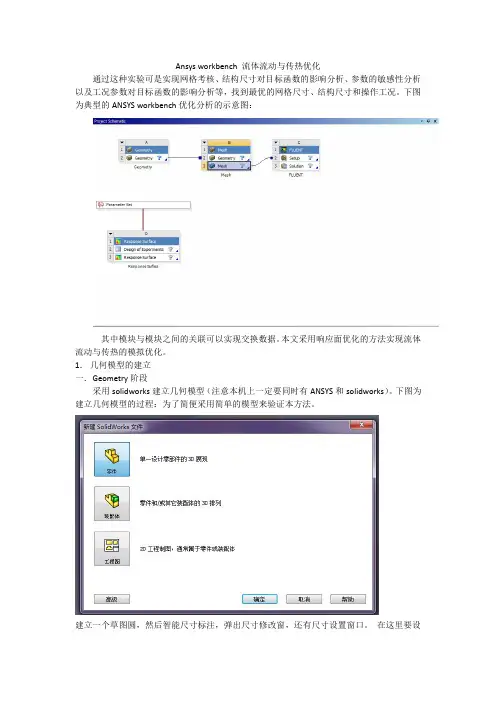
workbench 优化
- 格式:pdf
- 大小:2.42 MB
- 文档页数:30
And also for some custom usages: Excel, External Connection
11
© 2014 ANSYS, Inc.
February 28, 2014
Release 15.0
Workbench Power
• Workbench input and output parameters is all
15
© 2014 ANSYS, Inc.
February 28, 2014
Release 15.0
Parameters
Derived Parameters
• Derived Parameters:
– Parameters created using analytical expressions composed of input and output parameters. – Derived parameters can be defined using various built in arithmetic, trigonometric and –
Workbench.
14
© 2014 ANSYS, Inc.
February 28, 2014
Release 15.0
Parameters
Parameterizing WB dimensions, BCs, etc.
Parameters created in DM and Mechanical
Parameters created in CFX, Fluent and CFD Post
engineering challenges.
– – – –
Determine the key parameters influencing the design Explore and understand the performance at other design or operating conditions Find the conditions which give the best performance Explore the robustness of the design
3-step workflow
13
© 2014 ANSYS, Inc.
February 28, 2014
Release 15.0
Parameters
Parameterizing CAD dimensions
• CAD parameters are filtered with a prefix/suffix • The default filter is “DS” (can be changed or left blank) • Leaving the filter blank will allow all CAD parameters to be passed to
Input parameters vary!
Output parameter
• Understand how your performance will vary with your design tolerances • Determine how many parts will likely fail • Understand which inputs require the greatest control
Release 15.0
DX User Interface
Response Surface Optimization
Optimization Candidate
Optimization Algorithm
18
© 2014 ANSYS, Inc.
Find the Best Design
• Based on Direct Solves
– Follow algorithm convergence
9
© 2014 ANSYS, Inc.
February 28, 2014
Release 15.0
DX Features
Six Sigma Analysis
? ?
?பைடு நூலகம்
Single Point
What If?
Response Surface
Release 15.0
2
© 2014 ANSYS, Inc.
February 28, 2014
DX Features
What if Study
Manual Search
Sensitivity / Correlation Analysis
that DX needs
• Run Design Points simultaneously
– On a cluster – On available machines in your office
• Take advantage of HPC Parametric Pack Licenses
– Multiply your number of licenses to run Design
– Generate a Surrogate Model – Min/Max Search – 2D/3D plots – Local Sensitivities – RS Quality Assessment
8
© 2014 ANSYS, Inc.
February 28, 2014
Release 15.0
Update All Design Points
Select Exported to save an independent project for this Design Point
RMB > Update Selected Design Points
17
© 2014 ANSYS, Inc.
February 28, 2014
16
© 2014 ANSYS, Inc.
February 28, 2014
Release 15.0
Parameter Set
Table of Design Points (“What-If” Study)
Parameter values currently loaded in applications
statistical functions. Examples include (but are not limited to):
• cost function (i.e., the product of mass and cost per mass) • normalized stress (i.e., stress response divided by an applied stress) • Mesh sizing (setting a mesh parameter as a function of a geometric parameter)
Robust Design
Six Sigma Analysis
Optimized and Robust Design
3 © 2014 ANSYS, Inc. February 28, 2014 Release 15.0
DX Features
What if’ Study Automatically run through a list of manually specified design points [does not require a DX license]
Engineering data Meshing Mechanical Mechanical APDL ExplicitSTR Vista TF, CCD… Icepak nCode …
CFX Fluent CFD Post Polyflow AQWA ICEM CFD
Ansoft Products: Designer HFSS Maxwell Q3D Extractor Simplorer
6
© 2014 ANSYS, Inc.
February 28, 2014
Release 15.0
DX Features
Design of Experiments
• Specify the DOE Type • Specify each parameter range and type
(Continuous, Discrete, Manufacturable Values)
10 © 2014 ANSYS, Inc. February 28, 2014 Release 15.0
Workbench Power
Parameters coming from any source
CAD Structural
CFD
Electromagnetics
DesignModeler SpaceClaim Catia V5 UG NX SolidWorks Creo Parametric Solid Edge Autodesk Inventor …
Find the relevant parameters
Design of Experiments
Run a smart set of Design Points
Response Surface
Build a Mathematical model
Optimization
With or without a Response Surface
• Design Points are automatically chosen to explore the parametric space
efficiently