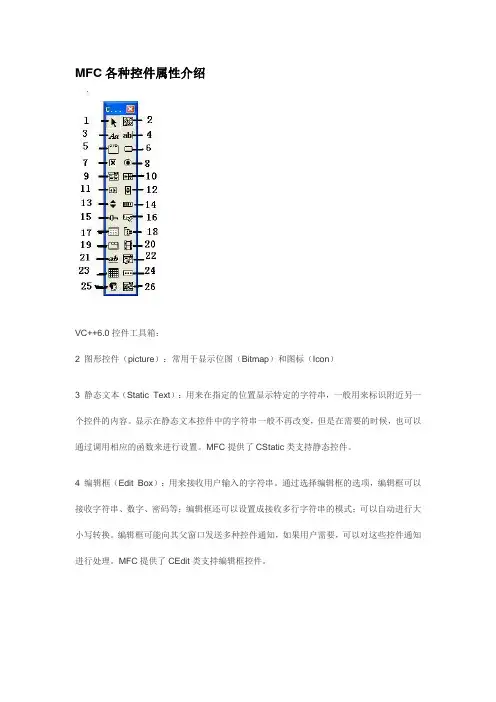
VC++6.0MFC常用控件
- 格式:docx
- 大小:19.13 KB
- 文档页数:5
一般控件可用/不可用EnableWindow(TRUE);EnableWindow(FALSE);1、Static Text------------静态控件--类CStatic取值/赋值(变量类型为Control)m_lbl.GetWindowText(string);m_lbl.SetWindowText(string);2、Edit Box---------------编辑控件--类CEdit取值/赋值m_txt.GetWindowText(string);m_txt.SetWindowText(string);3、Check Box------------复选控件--类CButton(1)设置选中/未选中m_chk.SetCheck(BST_CHECKED);m_chk.SetCheck(BST_UNCHECKED);(2)判断是否选中intnCur = m_chk.GetCheck();nCur取值为BST_CHECKED/BST_UNCHECKED。
4、Radio Box------------单选控件--类CButton(1)默认选中第一项m_radio.SetCheck(BST_CHECKED);(2)选中组中任一项CWnd::CheckRadioButtonSelects (adds a check mark to) a given radio button in a group and clears (removes a check mark from) all other radio buttons in the group.void CheckRadioButton(int nIDFirstButton, int nIDLastButton, int nIDCheckButton); ParametersnIDFirstButtonSpecifies the integer identifier of the first radio button in the group.nIDLastButtonSpecifies the integer identifier of the last radio button in the group.nIDCheckButtonSpecifies the integer identifier of the radio button to be checked.(3)判断哪一项被选中CWnd::GetCheckedRadioButtonRetrieves the ID of the currently checked radio button in the specified group.int GetCheckedRadioButton(int nIDFirstButton, int nIDLastButton);ParametersnIDFirstButtonSpecifies the integer identifier of the first radio button in the group.nIDLastButtonSpecifies the integer identifier of the last radio button in the group.Return ValueID of the checked radio button, or 0 if none is selected.(4)控件变量类型为Value时,可通过给int型变量赋值0、1、2...选中第1、2、3...个选项。
int型变量默认值为-1,是在构造函数中赋的值。
当然也可通过判断int型变量的值,知道哪一个选项被选中。
5、Combo Box-----------组合框控件--类CComboBox(1)风格Simple-象List Box一样显示数据Dropdown-可以输入,也可以选择Drop List-只能选择(2)添加数据a.属性对话框->Data->Enter listbox items,用Ctrl+Enter换行;b.m_combo.AddString(string);c.m_combo.InsertString(index,string);(3)显示数据设计页面,点击Combo Box Control右边的下拉箭头,显示的矩形框就是显示数据的区域。
(4)设置当前选项m_combo.SetCurSel(项索引);(5)获取当前选项intnIndex = m_combo.GetCurSel();CStringstr;m_combo.GetLBText(nIndex, str);注:Combo Box Control会自动排序,数据显示顺序可能与预期不同,建议添加数据时用InsertString(索引,值)。
6、List Box---------------列表框控件--类CListBox(1)插入项m_list.AddString(string);(2)设置当前选择项m_list.SetCurSel(项索引);(3)获取当前选择项intnIndex = m_list.GetCurSel();m_list.GetText(nIndex, string);(4)删除一项m_list.DeleteString(项索引);(5)删除所有项m_list.ResetContent();(6)获取总项数m_list.GetCount()(7)List Box的选项前面加复选框(Check Box)a.风格声明时用类CCheckListBox代替CListBox,即CCheckListBox m_list;而不是CListBox m_list; 属性对话框->Styles->Owner draw设为Fixed属性对话框->Styles->勾选Has stringsb.设置选择voidSetCheck(int nIndex, int nCheck);ParametersnIndexIndex of the item whose check box is to be set.nCheckState of the check box: 0 for clear, 1 for checked, and 2 for indeterminate.c.获取选择intGetCheck(int nIndex);ParametersnIndexIndex of the item whose check status is to be retrieved.Return ValueZero if the item is not checked, 1 if it is checked, and 2 if it is indeterminate.7、List Control----------列表框扩展控件--类CListCtrl(1)样式:属性对话框框->Styles->Format有4,分别是Icon/Small Icon/List/Report;(2)Report格式设置扩展风格DWORD dwStyle = m_list.GetExtendedStyle();dwStyle |= LVS_EX_FULLROWSELECT; // 选中某行使整行高亮(只适用与report风格的listctrl)dwStyle |= LVS_EX_GRIDLINES; // 网格线(只适用与report风格的listctrl)m_list.SetExtendedStyle(dwStyle);(3)Report格式插入列m_list.InsertColumn(1, "列一", LVCFMT_RIGHT, 150);m_list.InsertColumn(2, "列二", LVCFMT_LEFT, 100);m_list.InsertColumn(3, "列三", LVCFMT_LEFT, 100);m_list.InsertColumn(4, "列四", LVCFMT_LEFT, 200);m_list.InsertColumn(5, "ID", LVCFMT_CENTER, 0);(4)Report格式插入一行数据intnIndex = m_list.GetItemCount();m_list.InsertItem(nIndex, s1);m_list.SetItemText(nIndex, 1, s2);m_list.SetItemText(nIndex, 2, s3);m_list.SetItemText(nIndex, 3, s4);m_list.SetItemText(nIndex, 4, s5);(5)Report格式删除所有行m_list.DeleteAllItems();(6)Report格式获取某行某列数据CStringsID = m_list.GetItemText(行索引, 列索引);(7)Report格式删除选择行,多选时可用循环。
POSITION pos = m_list.GetFirstSelectedItemPosition();if (pos != NULL){intnIndex = m_list.GetNextSelectedItem(pos);m_list.DeleteItem(nIndex);}8、Date Time Picker----日期时间控件--类CDateTimeCtrl(1)样式:属性对话框框->Styles->Format有3,分别是Short Date/Long Date/Time,分别显示短日期(2009-03-12)/长日期(2009年3月12日)/时间(20:08:06),日期格式默认有一向下箭头,时间格式默认有一Spin Control;(2)可编程设置其显示格式,例如年4位,月、日、时、分、秒2位,CStringformatStr= _T("yyyy-MM-dd");m_txtDate.SetFormat(formatStr);formatStr= _T("HH:mm:ss");m_txtTime.SetFormat(formatStr);(3)取值赋给CStringm_txtDate.GetWindowText(sAddDate);m_txtTime.GetWindowText(sAddTime);9、Spin------------------旋转按钮控件--类CSpinButtonCtrl(1)与Edit控件关联首先,排列控件的Tab键顺序,要让Spin Control的Tab Order紧跟着Edit Control(就是说,Spin Control的Tab Order是Edit Control的Tab Order加1);设置tab order 的方法是Ctrl+d,然后用鼠标挨个点击,就是按TAB键时焦点在窗体上的移动顺序;然后,Spin Control属性对话框中勾选Auto buddy和Set buddy integer。