HACMP修改bootIP、persistIP、serviceIP非常详细
- 格式:doc
- 大小:108.00 KB
- 文档页数:9
HACMP修改boot-IP、persist-IP、service-IP(非常详细) 环境:
问题:boot IP、persistIP、service IP变更
停掉HACMP做以下操作:
修改boot IP
1.smit tcpip 修改网卡
2.修改/etc/hosts的boot
3.修改HACMP配置
smitty hacmp ->Extended Configuration->
Extended Topology Configuration
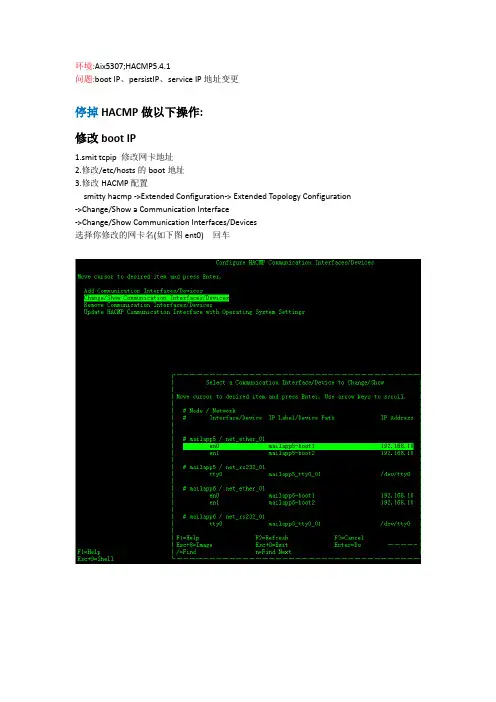
->Change/Show a Communication Interface
->Change/Show Communication
Interfaces/Devices
选择你修改的网卡名(如下图ent0) 回车
回车后将出现下图: 不做修改 ,直接回车即可;
以同样方法修改其他 boot
修改persist IP、service IP
1.所有节点(fep1和fep2)修改 /etc/hosts 将persist ip以及share ip修改为需要的
――0.131 fep1_per_ip――0.132
fep2_per_ip
――0――0.133 oia_share_ip
2.修改HACMP的persist ip配置
smitty hacmp ->Extended Configuration->
Extended Topology Configuration
->Configure HACMP Persistent Node IP
Label/Addresses
->Change / Show a Persistent Node IP
Label/Address
选择你修改的fep1_per_ip回车
回车后将出现下图:
不做修改 ,直接回车即可;
以同样方法修改其他fep2_per_ip
3.修改HACMP的share ip配置
smitty hacmp ->Extended Configuration->
Extended Resource Configuration
-> HACMP Extended Resources Configuration
-> Configure HACMP Service IP
Labels/Addresses
选择你修改的fep_share_ip回车
回车后将出现下图:
不做修改 ,直接回车即可;
以同样方法修改其他oia_share_ip
4.修改资源组配置 smitty hacmp ->Extended Configuration->
Extended Resource Configuration
-> HACMP Extended Resources Configuration
-> Change/Show Resources and Attributes for
a Resource Group
将出现下图:(你的机器会出现两个资源组)
选择第一个资源组 回车将出现下图:不做修改 ,直接回车即可,
同样方法修改第二个资源组
修改完毕以后:
1. 同步HACMP
smitty hacmp ->Extended Configuration->
Extended Verification and
Synchronization
2. 启动HACMP
smitty clstart