
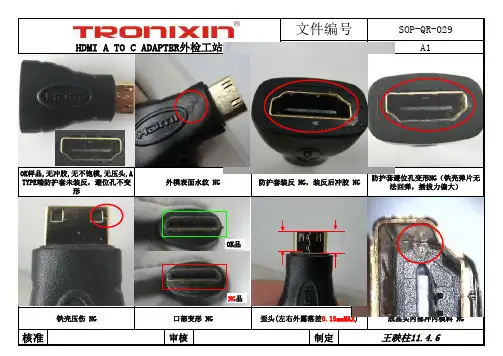
SOP HDMI A TO C 转接头限度样板
- 格式:xls
- 大小:14.76 MB
- 文档页数:1

B-200-DVIDTOHDSPECIFICATIONSDVI-D Input Supports up to 1080pAudio SPDIF Input (Up to) LPCM7.1/ DTS/ Dolby-AC3/ DSD HDMI Resolution (matches input)1080p /1080i /720p /576p /576i/ 480p/ 480i (24/ 50/ 60 f/s)Support Audio Format LPCM7.1/DTS/Dolby-AC3/DSD Max Transmission Bandwidth 5.1Gbps Max working Current 480mAPower AdapterOutput:*********Operating Temperature Range 5° to 130° FOperating Humidity Range 5 to 90% (No Condensation)Dimension (L x W x H) 3.5” x 2.8” x1.3” Weight0.4 lbsOn/OffDC 5VHDMIOutputSPDIFCOAXCoaxialSPDIFToslinkInputDVIFEATURES• Convert any DVI-D video and digital audio device to HDMI • High-bandwidth input for support up to 1080p to ensure the best HD picture available• High-quality RCA and Fiber optic inputs with support for SPDIF Toslink and Digital Coax.• Resolution matches the DVI input and passes Digital audio • Easy Plug and Play Installation with LED indication for diagnostics.• Includes 5VDC/0.8A power supplyCONNECTING AND OPERATING1. Connect the source to the Video and Audio inputs.2. Connect the HDMI output to the display (monitor or projector).3. Connect 5V power supply.4. Slide the HDCP switch to the “ON” position. NOTE: Blue LED indicates successful sync RED LED indicates no syncWARNINGS1. Read and follow all instructions and warnings in this manual. Keep for future reference.2. Do not use this apparatus near water.3. Clean only with a dry cloth.4. Do not block any ventilation openings. Install according to manufacturer’s instructions.5. Do not install near any heat sources such as radiators, heat registers, stoves or other apparatus (including amplifiers) that produce heat.6. Do not override the safety purpose of the polarized or grounding-type plug. A polarized plug has two blades - one wider than the other. If the provided plug does not fit into your outlet, consult an electrician for replacement of the obsolete outlet.7. Protect the power cord from being walked on or pinched particularly at plug, convenience receptacles, and the point where it exits from the apparatus.8. Only use attachments/accessories specified by the manufacturer.9. Unplug this apparatus during lightning storms or when unused for long periods of time.10. Refer all servicing to qualified service personnel. Servicing is required when the apparatus has been damaged in any way, such as when the power-supply cord or plug is damaged, liquid has been spilled or objects have fallen into the apparatus, the apparatus has been exposed to rain or moisture, does not operate normally, or has been dropped.11. Do not expose this equipment to dripping or splashing and ensure that no objects filled with liquids, such as vases, are placed on the equipment.12. To completely disconnect this equipment from the AC mains, disconnect the power supply cord plug from the AC receptacle.Welcome to the Binary ™brand of HDMI ®products.This product is designed to provide years of exceptional reliability. Binary™ is one of the most highly-regarded brands available today. We appreciate your business and we stand committed to providing our customers with the highest degree of quality and service in the industry.2-Year Limited WarrantyThis Binary™ Product has a 2 Year Limited Warranty. Thiswarranty includes parts and labor repairs on all components found to be defective in material or workmanship under normal conditions of use. This warranty shall not apply to products which have been abused, modified or disassembled. Products to be repaired under this warranty must be returned to Binary™ Cables or a designated service center with priornotification and an assignment return authorization number (RA).。