中兴OLT和onu常用命令
- 格式:docx
- 大小:20.36 KB
- 文档页数:6
.
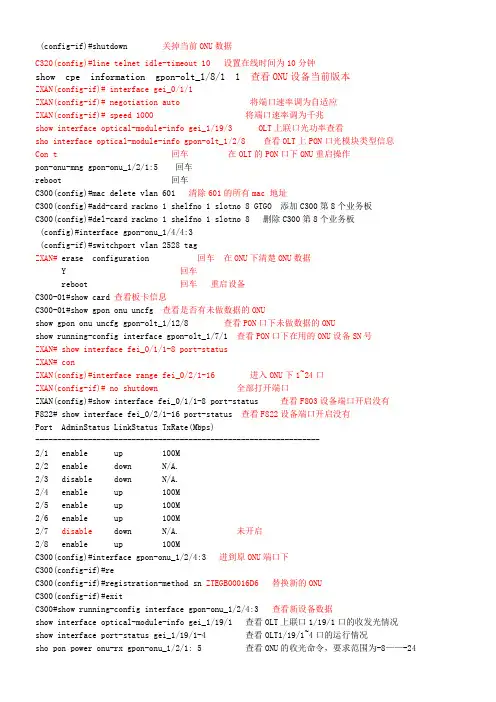
;. (config-if)#shutdown 关掉当前ONU数据
C320(config)#line telnet idle-timeout 10 设置在线时间为10分钟
show cpe information gpon-olt_1/8/1 1 查看ONU设备当前版本
ZXAN(config-if)# interface gei_0/1/1
ZXAN(config-if)# negotiation auto 将端口速率调为自适应
ZXAN(config-if)# speed 1000 将端口速率调为千兆
show interface optical-module-info gei_1/19/3 OLT上联口光功率查看
sho interface optical-module-info gpon-olt_1/2/8 查看OLT上PON口光模块类型信息
Con t 回车 在OLT的PON口下ONU重启操作
pon-onu-mng gpon-onu_1/2/1:5 回车
reboot 回车
C300(config)#mac delete vlan 601 清除601的所有mac 地址
C300(config)#add-card rackno 1 shelfno 1 slotno 8 GTGO 添加C300第8个业务板
C300(config)#del-card rackno 1 shelfno 1 slotno 8 删除C300第8个业务板
(config)#interface gpon-onu_1/4/4:3
(config-if)#switchport vlan 2528 tag
ZXAN# erase configuration 回车 在ONU下清楚ONU数据
Y 回车
reboot 回车 重启设备
C300-01#show card 查看板卡信息
C300-01#show gpon onu uncfg 查看是否有未做数据的ONU
show gpon onu uncfg gpon-olt_1/12/8 查看PON口下未做数据的ONU
show running-config interface gpon-olt_1/7/1 查看PON口下在用的ONU设备SN号
ZXAN# show interface fei_0/1/1-8 port-status
ZXAN# con
ZXAN(config)#interface range fei_0/2/1-16 进入ONU下1~24口
ZXAN(config-if)# no shutdown 全部打开端口
ZXAN(config)#show interface fei_0/1/1-8 port-status 查看F803设备端口开启没有
F822# show interface fei_0/2/1-16 port-status 查看F822设备端口开启没有
Port AdminStatus LinkStatus TxRate(Mbps)
----------------------------------------------------------------- .
;. 2/1 enable up 100M
2/2 enable down N/A.
2/3 disable down N/A.
2/4 enable up 100M
2/5 enable up 100M
2/6 enable up 100M
2/7 disable down N/A. 未开启
2/8 enable up 100M
C300(config)#interface gpon-onu_1/2/4:3 进到原ONU端口下
C300(config-if)#re
C300(config-if)#registration-method sn ZTEGB00016D6 替换新的ONU
C300(config-if)#exit
C300#show running-config interface gpon-onu_1/2/4:3 查看新设备数据
show interface optical-module-info gei_1/19/1 查看OLT上联口1/19/1口的收发光情况
show interface port-status gei_1/19/1-4 查看OLT1/19/1~4口的运行情况
sho pon power onu-rx gpon-onu_1/2/1: 5 查看ONU的收光命令,要求范围为-8——-24
sho interface optical-module-info gpon-olt_1/2/1 查看OLT PON口的发光命令
show running-config interface gpon-onu_1/5/3:7 查看F803 ONU设备配置情况
show onu running config gpon-onu_1/7/1:7 查看ONU情况。
no onu 5 在config模式下。在PON口下,删除PON口下的第5个ONU。
show mac gpon onu gpon-onu_1/2/1:1 查看该ONU下的MAC地址。
ZXAN(config)# interface fei_0/2/4 回车 (F822设备开第四个端口)
ZXAN(config-if)# no shutdown 回车 完了。
C300(config)#pon-onu-mng gpon-onu_1/2/1:5
-C300(gpon-onu-mng)#vlan port eth_0/1 mode tag vlan 2001 F803更改专线ONU的端口
(gpon-onu-mng)#vlan port eth_0/8 mode tag vlan 2002 将1口换成2口
2. 将OLT PON 口加入管理VLAN。
ZXAN(config)# interface gpon-onu_1/6/1:1
ZXAN(config-if)# switchport vlan 100 tag
ZXAN(config-if)# exit
ZXAN(config)#
3. 配置OLT上联口的PVID为管理VLAN。
ZXAN(config)# interface gei_1/4/3
ZXAN(config-if)# switchport default vlan 2535
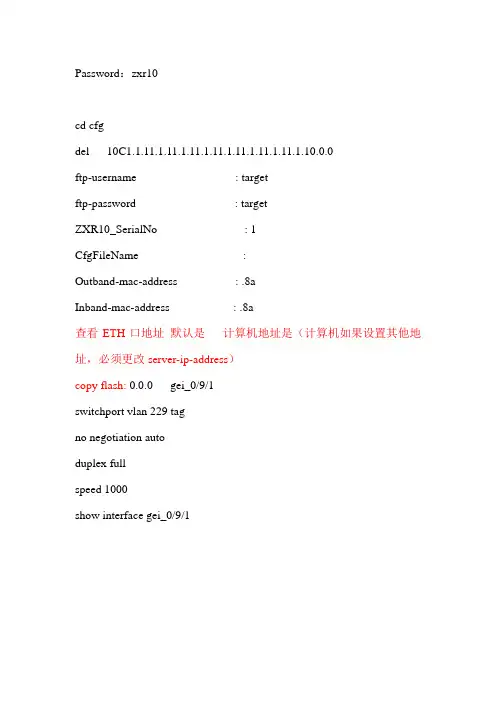
ZXAN# reboot .
;. Are you sure to reboot system?
Press Y to confirm or another key to exit: [N]Y 系统复位。
ZXAN# reset card 2
Are you sure to reset the card? Press Y to confirm or another key to exit: [N]Y 复位2号板位单板。
进入OLT设备上联口,添加VLAN数据。
C300#con t
C300(config)#interface gei_1/19/1
C300(config-if)#switchport vlan XXXX tag
C300(config-if)#switchport vlan AAAA tag
C300(config-if)#switchport vlan WWWW tag
将日志文件上传到FTP服务器上。
ZXAN# copy log network
IP address of the host where the file resides:[0.0.0.0]X.X.X.X
Name of the file at ftp server:[]log
Ftp UserName:[]target
Ftp Password:[]target
Upload Success!
ZXAN#
将FTP服务器中的配置下载到设备Flash中。
ZXAN# copy network startup-config
IP address of the host where the file resides:[0.0.0.0]X.X.X.X
Name of the file at ftp server:[]startupconfig
Ftp UserName:[]target
Ftp Password:[]target
............................................Download Success!
ZXAN#
将当前配置信息保存到FTP服务器上。
ZXAN# copy running-config network
IP address of the host where the file resides:[0.0.0.0]X.X.X.X
Name of the file at ftp server:[]runningconfig
Ftp UserName:[]target
Ftp Password:[]target
.............Upload Success!
ZXAN#
将配置文件上传到FTP服务器上。
ZXAN# copy startup-config network
IP address of the host where the file resides:[X.X.X.X]