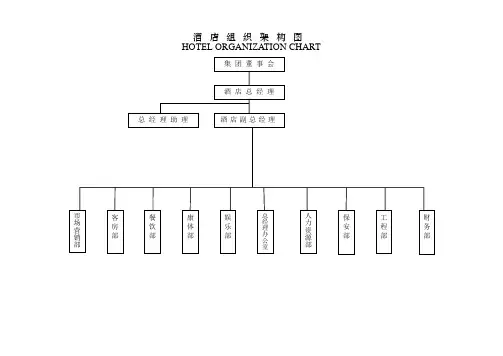
Organization Chart
- 格式:pptx
- 大小:81.22 KB
- 文档页数:1


officeexcel中英文标签对照序号英文名中文名1Worksheet Menu Bar工作表菜单栏2Chart Menu Bar图表菜单栏3Standard常用4Formatting格式5PivotTable数据透视表6Chart图表7Reviewing审阅8Forms窗体9Stop Recording停止录制10External Data外部数据11Formula Auditing公式审核12Full Screen全屏显示13Circular Reference循环引用14Visual Basic Visual Basic15Web Web16Control Toolbox控件工具箱17Exit Design Mode退出设计模式18Refresh刷新19Watch Window监视窗口20PivotTable Field List数据透视表字段列表21Borders边框22Protection保护23Text To Speech文本到语音24List列表25Compare Side by Side并排比较26Drawing绘图27PivotChart Menu数据透视图菜单28Workbook tabs工作簿标签29Cell单元格30Column列31Row行32Cell单元格33Column柱形图34Row行35Ply工作表36XLM Cell XLM 单元格37Document文档38Desktop桌面39Nondefault Drag and Drop非默认拖放40AutoFill自动填充41Button按钮42Dialog对话框43Series序列44Plot Area图形区45Floor and Walls基底和墙纸46Trendline趋势线47Chart图表48Format Data Series设置数据系列格式49Format Axis设置数据轴格式50Format Legend Entry设置图例项格式51Formula Bar编辑栏52PivotTable Context Menu数据透视表上下文菜单53Query查询54Query Layout查询布局55AutoCalculate自动计算56Object/Plot对象/图形区57Title Bar (Charting)标题栏(图表)58Layout框架59Pivot Chart Popup数据透视图快捷菜单60Phonetic Information拼音信息61Auto Sum自动合计62Paste Special Dropdown选择性粘贴下拉框63Find Format查找格式64Replace Format替换格式65List Range Popup列表区域快捷菜单66List Range Layout Popup列表区域布局快捷菜单67XML Range Popup XML 区域快捷菜单68List Range Layout Popup列表区域布局快捷菜单69WordArt 艺术字70Picture图片71Shadow Settings阴影设置723-D Settings三维设置73Drawing Canvas绘图画布74Organization Chart组织结构图75Diagram图示76Ink Drawing and Writing墨迹绘图与书写77Ink Annotations墨迹注释78Borders边框79Borders边框80Draw Border绘图边框81Chart Type图表类型82Pattern图案83Font Color字体颜色84Fill Color填充颜色85Line Color线条颜色86Drawing and Writing Pens绘图与书写笔87Annotation Pens批注笔88Drawing and Writing Pens绘图和书写笔89Annotation Pens注释笔90Order叠放次序91Nudge微移92Align or Distribute对齐或分布93Rotate or Flip旋转或翻转94Lines直线95Connectors连接符96AutoShapes自选图形97Callouts标注98Flowchart流程图99Block Arrows箭头总汇100Stars & Banners星与旗帜101Basic Shapes基本形状102Insert Shape插入形状103Shapes形状104Inactive Chart非活动图表105Excel Control Excel 控件106Curve曲线107Curve Node曲线结点108Curve Segment曲线段109Pictures Context Menu图片上下文菜单110OLE Object OLE 对象111ActiveX Control ActiveX 控件112WordArt Context Menu艺术字上下文菜单113Rotate Mode旋转方式114Connector连接符115Script Anchor Popup脚本标记快捷菜单116Canvas Popup Canvas Popup117Organization Chart Popup Organization Chart Popup 118Diagram图表119Select选择120Layout版式121符号栏符号栏122Task Pane任务窗格123124Add Command添加命令125Built-in Menus内置菜单126Clipboard剪贴板127Envelope信封128Online Meeting联机会议。

chart例句简单1. I need to create a chart to display the sales data.我需要制作一个图表来展示销售数据。
2. The pie chart shows the distribution of our expenses.这个饼图展示了我们的费用分布。
3. Let's use a bar chart to compare the revenue of different months.让我们使用柱状图来比较不同月份的收入。
4. The line chart indicates the trend of customer satisfaction over time.这个折线图显示了随着时间推移客户满意度的变化趋势。
5. The organization chart outlines the hierarchical structure of the company.组织结构图概述了公司的层级结构。
6. The flow chart demonstrates the step-by-step process of our production line.流程图展示了我们生产线的逐步流程。
7. The Gantt chart helps us visualize the project timeline and task dependencies.甘特图帮助我们可视化项目的时间表和任务依赖关系。
8. The scatter plot on the chart represents thecorrelation between two variables.图表上的散点图表示两个变量之间的相关性。
9. The radar chart displays the performance of different competitors in various areas.雷达图展示了不同竞争对手在各个领域的表现。