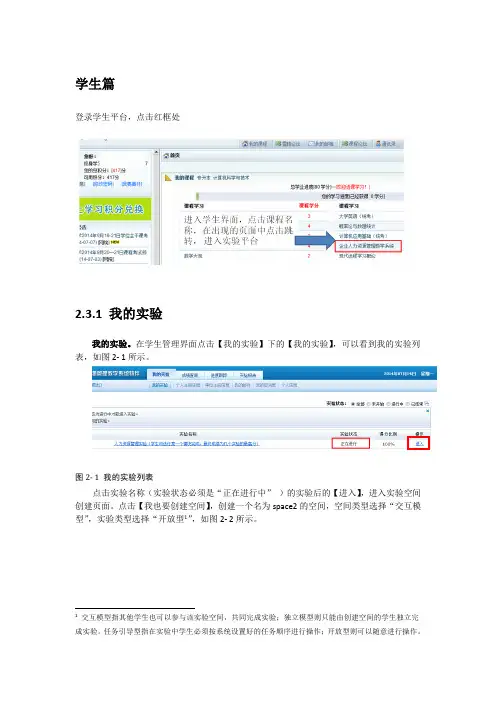
TekSmartLab ™TBX3000A, TSL3000B DatasheetTekSmartLab is the industry's first network-based instrument management solution for teaching labs, enabling a more efficient lab experience. With the TekSmartLab, instructors, students, and lab managers all benefit from improved connectivity, workflow, and automation.Key featuresEasy to setup with industrial reliabilityIntuitive instructor - course - exercise organizationCentralized monitoring and remote assistanceOnline editing and submission of test reports Automatic instrument asset information recordingKey benefitsLab managers can efficiently manage lab instruments:Setup configurations of large fleets of instruments with one clickCapture instrument asset information automaticallyInstructors can manage teaching work flow more efficiently:Instrument configuration can be saved and distributed to all theinstruments when requiredMonitor and control the lab instruments remotely to assist thestudentsDefine report templates and have them load automatically whenstudents are using smart devicesStudents can interact with their lessons seamlessly:Retrieve and save test results wirelessly via smart devicesEdit and submit test reports electronicallyDownload materials that are on the lab server (lab procedures,videos, and more)ApplicationsBasic teaching laboratoryTekSmartLab network diagramIn traditional teaching labs, connecting instruments to a network can be challenging, building an internal network through cables is tedious, and many lab instruments do not have a LAN port.Tektronix TekSmartLab is different: On each bench, the TBX3000Aconnects and controls instruments through USB cables, and communicates with the TSL3000B software on the lab server via the wireless network. The TBX3000A has a LAN port (standard), and can support a WI-FI connection when equipped with a compatible USB-WIFI dongle, such asTEK-USB-WIFI.On the lab server, the TSL3000B communicates with the TBX3000A on each bench. The TSL3000B gives instructors centralized control of large fleets of instruments and gives students the ability to retrieve test results,and edit test reports online.Campus level TekSmartLabWhen one lab manager must manage multiple labs, it can be a challenge to manage all of the instruments efficiently since the lab manager needs to spend time visiting each of the different labs. With campus level TekSmartLab, the lab manager can centrally control and monitor theinstruments in different labs remotely from his own office.Campus level TekSmartLab network diagramAs shown in the example above, TekSmartLab systems are setup in each of the labs and the lab servers are connected to a local area network, such as a campus network. TekSmartLab software is installed on the labmanager's computer, which is connected to the same local area network.Once the lab servers and the lab manager computer are connected to the local area network and can communicate properly, the lab manager can access any of the lab servers to remotely monitor and control the instruments in that lab.Easy to setup with industrial reliabilityTekSmartLab can be easily setup via WI-FI without laying LAN cables.Without any configuration, instruments are recognized automatically by the system when they are connected to the system.For the labs which have already equipped with Tektronix and Keithley instruments, instructors can smoothly update their labs to TekSmartLab as most of the Tektronix and Keithley teaching lab instruments are supported,even some instruments that have been phased out in the last five years (see Specifications ).Instead of controlling all the instruments by lab server directly, theTBX3000A on each bench controls the instruments connected to it. Using the TekSmartLab is an efficient and stable way to work. The TBX3000A,which is based on the Tektronix oscilloscope platform, works seamlessly with Tektronix and Keithley instruments, assuring the industrial reliability of the entire system.Course and exercise based applicationsTekSmartLab uses an instructor - course - exercise oriented hierarchy, an organization familiar to instructors at most universities: Instructors have different courses, and within each course there are different exercises. New exercises are easily created using the instructor name and course name,and easily selected with the same information.Applications, like saved configuration, exercise material sharing, and reporttemplates, for instance, are linked to specific exercises.Centralized configurationInstructors can setup the configurations of the instruments and distribute them to over 100 instruments with a single click. Instrument configuration changes can be made and delivered anytime; for example, the Autoset function can be disabled to encourage students to learn how to manuallyadjust an oscilloscope to display the correct waveform.DatasheetInstrument configuration can also be saved into a specific exercise andrecalled when the exercise is selected.When the TBS1000B-EDU series oscilloscopes are connected to the system, the courseware contents, as well as instrument firmware, can be updated remotely, a manual update for each instrument via USB thumb drives before.Centralized monitoring and remote assistanceWith TekSmartLab, the physical bench layout and lab layout is easily emulated: The number and type of the instruments on the bench can besetup, and the location of each bench within the lab can be customized.Instructors can easily monitor the status of all instruments during theexperiment: Green signifies that the instrument is working, gray signifies no connection, and red signifies an error. An instructor can check on or help aspecific bench by clicking the corresponding bench icon.Clicking a bench icon displays the readouts and key configuration settingsfor the instruments on that bench.TekSmartLab TBX3000A TSL3000BRetrieving and saving test reports onlineIn a traditional teaching lab, when students need to save test results they typically take snapshots of oscilloscopes and download those to a USB thumb drive or, more often, use a mobile device to take the picture. The result is that the quality of test results is not consistent and test results are difficult to archive for future access.TekSmartLab provides a more intelligent approach for editing andsubmitting test reports online: The TSL3000B server software creates a web page available in the local network for each bench. Each web page can be conveniently accessed by bench-specific IP address.With TSL3000B, instructors can change the IP address to QR (quick response) codes, and place it permanently as a printed sticker on eachbench.Students can login in to the web page using their mobile device to scan the QR code or by inputting the IP address in the web browser of their laptops.Once logged in, students can easily edit and submit test reports online.When students create a new test report, the report template, created byinstructor and saved on the server, is loaded automatically.When students edit their test reports, test results, like snapshots of theoscilloscope retrieved wirelessly, can be inserted at any time.The test report can be downloaded locally or archived on the lab server forfuture access.DatasheetSharing exercise material onlineTekSmartLab integrates FTP into the distribution of materials, allowing instructors to easily share any type of exercise materials, whether they arePowerPoint, Word, or even video, to students efficiently.Once instructors load exercise materials onto the lab server, students candownload them though the lab server web page onto their smart devices.Automatic instrument asset information recordingIn conventional teaching labs, the asset manager manually checks and records information such as instrument model numbers, serial numbers,and locations. Detailed information like the length of usage can only be estimated by experience or by keeping usage logs.The TekSmartLab solution automatically records and displays asset information, including time in use. Just one click archives the asset and usage information. TekSmartLab dramatically increases asset management accuracy compared to previous methods and makes managing lab assetsmuch more efficient.Sample TekSmartLab configurationThe following shows a sample setup of a TekSmartLab system with 15 benches and 60 instruments connected through WI-FI.1To use WI-FI on systems with more than 15 benches, it is recommended to setup the WI-FI network by wired router and access points instead of a WIFI router.TekSmartLab TBX3000A TSL3000BDatasheetSpecificationsAll specifications are guaranteed unless noted otherwise. All specifications apply to all models unless noted otherwise.TBX3000A characteristicsGeneral characteristicsMax instruments connected6, by USB cablesCompatible USB-WIFI dongle TEK-USB-WIFILAN Port 1LED 6 – Instrument status indicators1 – Wi-Fi connection status indicator1 – System status indicatorEnvironmental characteristicsTemperature Operating. 0 °C to 40 °CNon-operating. -20 °C to +60 °CHumidity Operating. (Low) 0 °C to 40 °C, 10% to 90% relative humidityNon-operating. (High) 40 °C to 60 °C, 5% to 60% relative humidity; (Low) 0 °C to 40 °C, 5% to 90% relative humidity.Altitude Operating. Up to 3,000 m (10,000 ft.)Non-operating. Up to 15,240 m (50,000 ft.)Regulatory complianceEMC compliance EN61326, Class A.Power consumption Maximum 15 WPhysical characteristicsMaximum benches supported100Maximum instruments supported600 (six instruments per bench)Bench layout emulation Select bench layout template (from 1 to 6 instruments), select instrument typeLaboratory layout emulation Add, Delete, Bench NumberLarge fleet configuration By exercise, by instrument typeTekSmartLab TBX3000A TSL3000BTSL3000B general characteristicsSupported instrumentsOscilloscopes Tektronix TBS1000B-EDU seriesTektronix TBS2000 seriesTektronix TDS2000C seriesTektronix DPO/MSO2000B series (oscilloscope function only)Tektronix MDO3000 series (oscilloscope function and spectrum analyzer function only)Arbitrary function generators Tektronix AFG1000 seriesTektronix AFG2021Tektronix AFG3000C seriesDigital multimeters Keithley DMM2110Keithley DMM2100Tektronix DMM4000 seriesPower supplies Keithley 2230G(J)-30-1Keithley 2220G(J)-30-1Keithley 2220(J)-30-1Keithley 2230(J)-30-1Keithley 2231A-30-3 (requires Option 2231A-001)Discontinued instruments Tektronix TDS1000B seriesTektronix TDS1000C-SC seriesTektronix TDS1000C-EDU seriesTektronix TBS1000Tektronix DPO/MSO2000Tektronix AFG3021BTektronix AFG3022BTektronix AFG3011Tektronix AFG3101Tektronix AFG3102Tektronix AFG3251Tektronix AFG3252General functions Check status, preset, record model number, S/N, time of use and locationOscilloscope functionsAnalog channel ON/OFFDigital channel ON/OFF (MSO2000 and MDO3000 with digital channel option only)Set/Check input coupling (AC, DC, Ground)Set/Check input attenuationSet/Check horizontal/vertical resolution and scale Set/Check trigger level (support Edge trigger only)Set/Check cursors (support time and amplitude mode only)Set/Check measurement (Frequency, Period, Rise time, Fall Time, Positive Pulse Width, Negative Pulse Width, Peak to Peak,Amplitude, Maximum, Minimum, High, Low, Positive Overshot, Negative Overshot, Mean, RMS)Check/Save snapshotWaveform update (analog channel only)Autoset Enable/Disable AutosetCourseware contents and firmware remote update (support for the TBS1000B-EDU series only)Spectrum Analyzer funtions (MDO3000 series only)Set/Check start/stop frequency, center frequency, span Set/Check reference levelSet/Check RBW mode, RBW value, window Waveform updateManual/Peak markers ON/OFF Spectrogram ON/OFFArbitrary Function Generator (AFG) functionsSet/Check carrier waveform (support Sine, Pulse, Ramp, Square, Noise, DC waveforms)Set/Check carrier frequency, amplitude, phase, pulse width (for Pulse only), symmetry (for Ramp only)Set/Check modulating type: AM, FM, PM, FSK, Sweep, Burst Set/Check output impedance, voltage limit Output ON/OFFDigital Multimeter functionsSet/Check measurement function: DCI, DCV, ACI, ACV, Ohm (2 wires, 4 wires), Frequency, Period, Temperature Set/Check Auto/Manual range, Integration Time, Auto Zero, Detector Bandwidth, Reference, Digital Filter Check measurement resultPower supply functionsSet/Check setting voltage/currentCheck output voltage/current (resolution 3 decimal digits)Output ON/OFFTest report online editing and submitting functionQR code generation Support Web browser access Support Test report template format docx Created test report format HTMLTest report edit functionsCreate a new report, edit text, insert oscilloscope snapshot, insert instrument setting, submit report, download reportDatasheetTSL3000B general characteristicsSystem requirementsOperating system Win 7 Professional (Enterprise or Ultimate), Win 8.1 Professional (Enterprise), Win 10 Professional (Enterprise)CPU Dual core 2.3 GHz or above RAM 4 GB DDR3 or above Hard disk 200 GB (minimum)Screen resolution 1366 x 768 or aboveWeb service IIS6.0 or above (supplied with system)DatabaseSQL Server 2014 Express (free download from the Microsoft website)WI-FI networking requirements (for labs with 15 benches)802.11n, 2.4 GHz, 300 Mbps data transfer rate Signal level >= -50 dBm Signal to noise >= 35 dBMax clients accessed>=31 (15 clients are TBX3000A, 15 clients are students' mobile devices, and one client for the lab server)TekSmartLab TBX3000A TSL3000BTSL3000B general characteristicsOrdering informationTekSmartLab ™TBX3000A TekSmartLab ™ hardwareTSL3000B-FLTekSmartLab ™ software, floating licenseHow to orderTekSmartLab ™ software is available for download at /downloads .In July 2017, the license policy and nomenclature was changed for TekSmartLab ™ software. The legacy system with TSL3000B will continue to be supported in the software,so there is no need to change your current licenses when upgrading to the latest version software.The new application license with TSL3000B-FL offers floating licenses (FL) that can be checked in and out of the Tektronix Asset Management System (Tek AMS) on the Tektronix website.TBX3000A power plug optionsA0North America A1Universal EURO A2United Kingdom A3AustraliaA4240v North AmericaA5Switzerland A6Japan A10China A11India A12BrazilA99No Power Cord or AC AdapterTBX3000A service optionsR5Repair Service 5 yearsTBX3000A warrantyWarranty3 yearsRecommended accessoriesTEK-USB-WIFIThis dongle is certified to comply with CE, FCC and IC regulations. Available in Australia, Canada, China, EU Region, New Zealand, and United States.Tektronix is registered to ISO 9001 and ISO 14001 by SRI Quality System Registrar.DatasheetTekSmartLab TBX3000A TSL3000B 11DatasheetASEAN / Australasia (65) 6356 3900 Austria 00800 2255 4835*Balkans, Israel, South Africa and other ISE Countries +41 52 675 3777 Belgium 00800 2255 4835*Brazil +55 (11) 3759 7627 Canada180****9200Central East Europe and the Baltics +41 52 675 3777 Central Europe & Greece +41 52 675 3777 Denmark +45 80 88 1401Finland +41 52 675 3777 France 00800 2255 4835*Germany 00800 2255 4835*Hong Kong 400 820 5835 India 000 800 650 1835 Italy 00800 2255 4835*Japan 81 (3) 6714 3086 Luxembourg +41 52 675 3777 Mexico, Central/South America & Caribbean 52 (55) 56 04 50 90Middle East, Asia, and North Africa +41 52 675 3777 The Netherlands 00800 2255 4835*Norway 800 16098People's Republic of China 400 820 5835 Poland +41 52 675 3777 Portugal 80 08 12370Republic of Korea +822 6917 5084, 822 6917 5080 Russia & CIS +7 (495) 6647564 South Africa +41 52 675 3777Spain 00800 2255 4835*Sweden 00800 2255 4835*Switzerland 00800 2255 4835*Taiwan 886 (2) 2656 6688 United Kingdom & Ireland 00800 2255 4835*USA180****9200* European toll-free number. If not accessible, call: +41 52 675 3777For Further Information. Tektronix maintains a comprehensive, constantly expanding collection of application notes, technical briefs and other resources to help engineers working on the cutting edge of technology. Please visit . Copyright © Tektronix, Inc. All rights reserved. Tektronix products are covered by U.S. and foreign patents, issued and pending. Information in this publication supersedes that in all previously published material. Specification andprice change privileges reserved. TEKTRONIX and TEK are registered trademarks of Tektronix, Inc. All other trade names referenced are the service marks, trademarks, or registered trademarks of their respective companies.20 Dec 2018 61W-60019-5 。