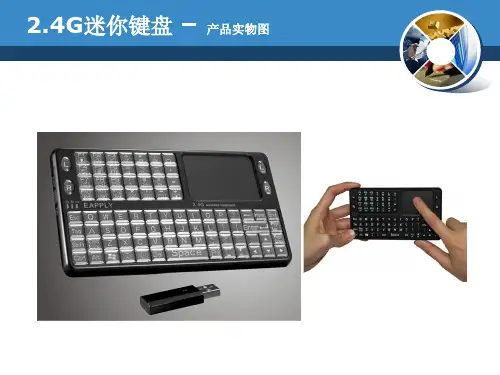
User ManualMini Bluetooth Keyboard with IR Remote Featuring Integrated Interactive Voice TechnologyModel:KP-810-18BVRev.1.01Basic info:1.1Overview:Bluetooth3.0keyboard remote integrates QWERTY layout,mouse touchpad,voice mode,microphone,headphone and learning infrared remote control.1.2Package:Mini Bluetooth Keyboard with IR RemoteUSB cable for recharging the unit*1User manual*11.3System requirement:--Windows/Google/Mac/Linux--Mac OS,iOS--Android4.0Smart Phone with HDMI/MHL HD out put port2.How to use2.1Function description of keyboard9.Front viewItem Function OperationMouse left Press to operate like left mouse key Mouse rightPress to operate like right mouse key BT Bluetooth reset Press topair keyboard and USB receiverCursorup,down left,right Press the four keys to move cursor up,down,left,and rightPage up Press to scroll page up Page downPress to scroll page downTouch PADMouse touch padSlide your finger on touch pad to movemouse cursorIndicator recharge indicator and go out when fully Recharged.LightupwhenfullyrechargedFlash when signal transited Light up when switch to Caps lock inputSound light2.2Composed keys:All composed keys must work with Fn,for example,if you want to activate “Home”,you have to press key “Fn”and key “9”together.Item Function OperationFn Work with other blue keys Press this key and other bluekey togetherChange operation directions Press“Esc”and“Fn”togetherPress to turn backlit on/off Press“F1”and“Fn”togetherVolume down Press“F2”and“Fn”togetherV olume up Press“F3”and“Fn”togetherMute Press“F4”and“Fn”togetherPrevious Press“F5”and“Fn”togetherStop Press“F6”and“Fn”togetherNext Press“F7”and“Fn”togetherReturn to main page Press“F8”and“Fn”togetherBack to previous page Press“F9”and“Fn”together Prtsc Print screen Press“F10”and“Fn”togetherDel Delete Press“”and“Fn”together Home Home Press“9”and“Fn”together F12F12Press“=”and“Fn”together F11F11Press“-”and“Fn”together End End Press“0”and“Fn”together Ins Insert Press“8”and“Fn”together Ctrl+Alt+Del Ctrl+Alt+Del Press Fn+Enter together2.3How to start:1)Turn unit on by switching power switch to“on“.2)charge your keyboard:when its LED flashes even no any operation on it,that means yourkeyboard is in low power capacity.Please charge it by suppliedcharging cable,connecting micro end of USB cable to yourkeyboard and the other end to usb port of computer,then led willlight be steady on,and go out when it is fully charged.3IR learning:To learn the original code from the other home appliance,take the TV remote as an example:3.1.There are two modes available:“AV”or“TV”.If you want to learn from the TV Remote,please press the TV key and the LED blue light will flash,and if A V,the LED orange light.3.2.Press key“set”for about2seconds until LED lights solid,whichmeans a learning mode.Then tap the key you want to copy andLED will flash one time and then light solid again,which means asearch and pairing state.3.3.Approach two emitting heads of both your TV remote and keyboardabout10mm,then press the original button on TV remote,and theLED of your tv remote blinks and code value of this button is being sent.3.4The LED of the keyboard blinks quickly for3times and lights solid,which means this round of learning process is successfully done.3.5Repeat3.2,3.3to program other infrared learning buttons.Pleas note that LED will go out and quit learning mode if nooperation within10seconds,which means an auto setting save.3.6.Press the“set”key to save and quit the learning mode at any time orat the end of learning process.4.Change operation directions:We may,or exactly,need to use the touchpad horizontally or vertically, you can make it by pressing the key Fn and then click the key“Esc”to change direction of cursor track.5.Voice:The device integrates interactive voice technology to support skype,QQ chatting,MSN real-time talking,Google Talking,wireless music and so on.Just hold the button to speak out.6.Pair Android4.0smart phone/tablet6.1First bluetooth pairing1).Turn on the Bluetooth voice keyboard,Hold BT button till thesecond LED flash.2)Navigate to activate bluetooth mode on your phone or tablet tosearch bluetooth signal around.When the icon“bluetoothiPazzPort”appears,click to connect.Sometimes,you may beasked to input a password(it will show on screen,such as3849).6.2Voice function:1)First voice pairingHold the voice button on the keyboard for about5Seconds,until two LED indicators flash alternately.Find and click the icon “iPazzPortvoice”on Smart phone/tablet to connect.When the fourth LED flashes quickly about3seconds and slows down,this connection is successful.2)Second voice connectionTurn on the keyboard and hold voice button for3seconds till the fourth LED lights.The fourth LED flashes quickly about3seconds and slows down,which means the connecting is successful.3)Turn off the Bluetooth voice function:hold the voice button for 3seconds till the fourth LED lights.6.3Pick up call/cut off call by remote keyboard:Having connected it with this bluetooth keyboard,you can click thesound button on the keyboard to answer the call,and click againto hang up the phone;and hold the sound button for2minutes toreject the phone.7WEEE Directive&Product DisposalAt the end of its serviceable life,this product should not be treated as household or general waste.It should be handed over to the applicable collection point for the recycling of electrical and electronic equipment,or returned to the supplier for disposalNotice to customersThis symbol on the battery indicates that the battery is to be collected separately.The following applies only to users in European countries.This battery should be separately collected at an appropriate collection point.Do not dispose of as household waste.For more information,contact the retailer or local authorities in charge of waste,management.8Caution:Changes or modifications not expressly approved by the party responsible for compliance could void the user's authority to operate the equipment. Compliance statement:Please keep this manual for instant and convenient reference.And please contact us on social platform iPazzPortfans,or at *********************for timely help if you have any question or any problem with our product.。