
锐捷交换机常用配置命令详解
- 格式:ppt
- 大小:2.43 MB
- 文档页数:21

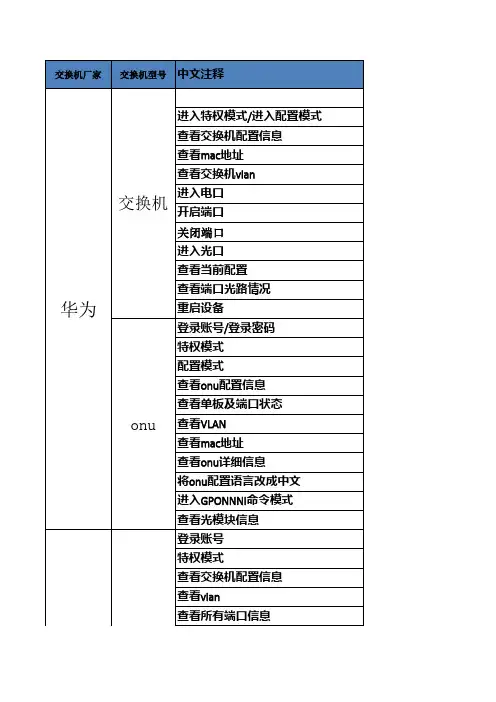
交换机厂家交换机型号中文注释
登录账号/登录密码
进入特权模式/进入配置模式
查看交换机配置信息
查看mac地址
查看交换机vlan
进入电口
开启端口
关闭端口进入光口
查看当前配置
查看端口光路情况
重启设备
登录账号/登录密码
特权模式
配置模式
查看onu配置信息
查看单板及端口状态
查看VLAN
查看mac地址
查看onu详细信息
将onu配置语言改成中文
进入GPONNNI命令模式
查看光模块信息
登录账号
特权模式
查看交换机配置信息
查看vlan
查看所有端口信息交换机
onu华为查看版本信息
查看mac地址
进入端口
关闭端口
开启端口
查看端口信息锐捷命令
登录账号:huawei123 登录密码:Huawei@123sys
display current-configuration (dis cu)
display mac-address | include Ethernet
display vlan
interface Ethernet 0/0/1
no shutdown
shutdown
interface GigabitEthernet 0/0/1
display this
display transceiver interface GigabitEthernet 0/0/1 verbose
reboot
登录账号:root 登录密码:mduadmin
enable 提示符由>变成#
config提示符由#变成(config)#
display current-configuration (disp cu)
display board 0/1
display vlan all
display mac-address vlan ****
display onu info
switch language-mode
interface gponnni 0/0/1
display port state
账号 ruijie
enable 密码:ruijie
show running-config
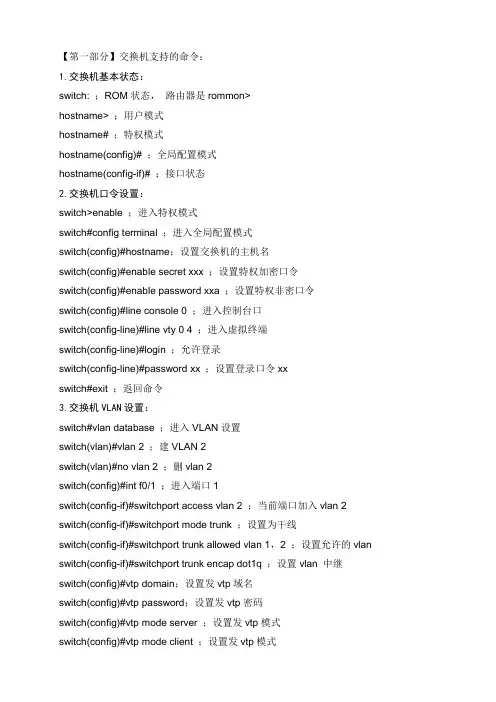
【第一部分】交换机支持的命令:
1.交换机基本状态:
switch: ;ROM状态, 路由器是rommon>
hostname> ;用户模式
hostname# ;特权模式
hostname(config)# ;全局配置模式
hostname(config-if)# ;接口状态
2.交换机口令设置:
switch>enable ;进入特权模式
switch#config terminal ;进入全局配置模式
switch(config)#hostname;设置交换机的主机名
switch(config)#enable secret xxx ;设置特权加密口令
switch(config)#enable password xxa ;设置特权非密口令
switch(config)#line console 0 ;进入控制台口
switch(config-line)#line vty 0 4 ;进入虚拟终端
switch(config-line)#login ;允许登录
switch(config-line)#password xx ;设置登录口令xx
switch#exit ;返回命令
3.交换机VLAN设置:
switch#vlan database ;进入VLAN设置
switch(vlan)#vlan 2 ;建VLAN 2
switch(vlan)#no vlan 2 ;删vlan 2
switch(config)#int f0/1 ;进入端口1
switch(config-if)#switchport access vlan 2 ;当前端口加入vlan 2
switch(config-if)#switchport mode trunk ;设置为干线
switch(config-if)#switchport trunk allowed vlan 1,2 ;设置允许的vlan
switch(config-if)#switchport trunk encap dot1q ;设置vlan 中继

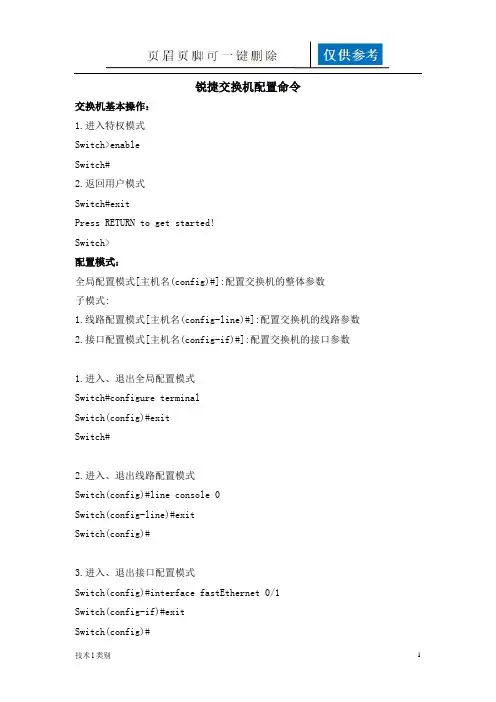
第 1 页 共 13 页 一、交换机配置模式介绍 ...................................................... 1
二、交换机基本配置 .......................................................... 1
2.1 接口介质类型配置 ..............................................................................................................2
2.2 接口速度/双工配置 .............................................................................................................2
2.3 VLAN配置 ...........................................................................................................................2
2.4 端口镜像 ..............................................................................................................................3
2.5 端口聚合 ..............................................................................................................................4
技术l类别 1 锐捷交换机配置命令
交换机基本操作:
1.进入特权模式
Switch>enable
Switch#
2.返回用户模式
Switch#exit
Press RETURN to get started!
Switch>
配置模式:
全局配置模式[主机名(config)#]:配置交换机的整体参数
子模式:
1.线路配置模式[主机名(config-line)#]:配置交换机的线路参数
2.接口配置模式[主机名(config-if)#]:配置交换机的接口参数
1.进入、退出全局配置模式
Switch#configure terminal
Switch(config)#exit
Switch#
2.进入、退出线路配置模式
Switch(config)#line console 0
Switch(config-line)#exit
Switch(config)#
3.进入、退出接口配置模式
Switch(config)#interface fastEthernet 0/1
Switch(config-if)#exit
Switch(config)#
技术l类别 2
从子模式下直接返回特权模式
Switch(config-if)#end
Switch#
交换机操作帮助:
1.支持命令简写(按TAB键将命令补充完整)
2.在每种操作模式下直接输入“?”显示该模式下所有的命令
3.命令空格 “?”显示命令参数并对其解释说明
4. “字符?”显示以该字符开头的命令
5.命令历史缓存: (Ctrl+P)显示上一条命令,(Ctrl+N)显示下一条命令
6.错误提示信息
交换机显示命令:
显示交换机硬件及软件的信息 Switch#show version
显示当前运行的配置参数 Switch#show running-config
显示保存的配置参数 Switch#show configure