
H3C设备口令丢失的处理
- 格式:doc
- 大小:46.00 KB
- 文档页数:4
8.8 口令丢失的处理
如果路由器的BootWare口令、用户口令和Super Password丢失,可以采用如下方法解决。
8.8.1 BootWare口令丢失
如果路由器的BootWare口令丢失,请与代理商联系。
BootWare口令修改是在BootWare主菜单下实现的。
在BootWare主菜单下键入<5>,按提示更改密码。
配置终端显示如下:
please input old password:
输入旧密码:
please input old password: ******
●如果旧密码输入错误,那么系统会提示再次输入旧密码:Wrong
password,Please input password again:。
●如果连续输入3次均错误,系统会提示:Wrong password,system halt,
即系统挂死。
旧密码输入完毕后,系统会提示输入两遍新密码,以保证输入的新密码前后一致:
Please input new password: ******
Please input new password again: ******
如果系统出现如下提示信息,则表示新密码设置成功:
Password Set Successfully.
●输入的BootWare口令以“**”形式回显。
●口令长度支持32个字符,如果输入的口令超过32个字符,系统将自
动截取前32个字符作为口令。
8.8.2 用户口令丢失
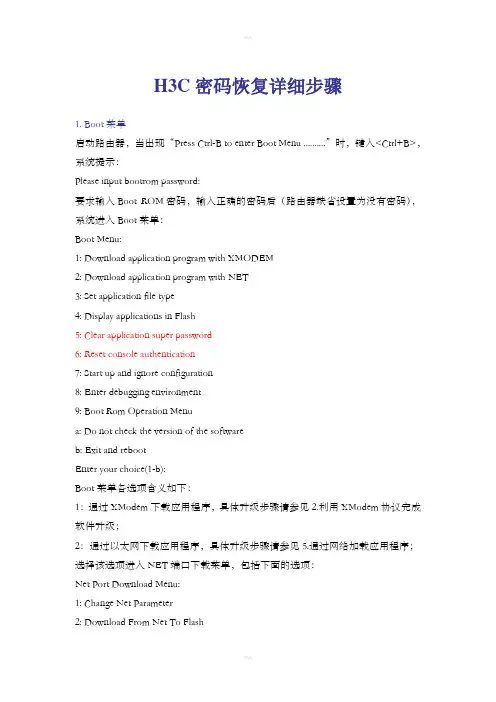
用户口令的丢失会使用户无法进入系统,这时可以采用忽略系统配置的方式启动。
请按如下步骤操作:
(1)进入BootWare主菜单,选择<6>,即以忽略系统配置方式启动。
系统出现如下提示:
Flag Set Success.
表明系统已经设置成功。
(2)当再次出现BootWare主菜单时,选择<0>,系统开始重新启动。
System is rebooting now.
System start booting...
Booting Normal Extend BootWare....
(3)重启后在系统视图下设置新的用户口令。
<H3C> system-view
[H3C] user-interface console 0
[H3C-ui-console0] authentication-mode password
[H3C-ui-console0] set authentication password simple 123456
以上就表示设置CONSOLE口验证方式为密码验证,且为CONSOLE口设置密码为123456,密码采用明文存储。
●重启后,系统按初始缺省配置运行,但原配置文件仍保存在存储介质
中。
为了恢复原配置,可使用display saved-configuration命令将原
配置显示出来,然后拷贝并执行这些配置。
●密码采用明文存储时用命令display current-configuration可以从
当前配置中看到密码,设置密码时用命令设置set authentication
password cipher 123456后,密码会加密存储。
(4)保存新配置。
[H3C] save
●修改用户口令后应执行save命令,以保存修改。
●建议用户将所作的修改保存到默认的配置文件。
8.8.3 Super Password口令丢失
Super Password可以使用户在四个Super等级的权限中切换,Super Password 丢失会使用户无法进行一些权限较高的操作。
在BootWare主菜单下键入<8>,可以清除Super Password:
========================<EXTEND-BOOTWARE
MENU>========================
|<1> Boot System | |<2> Enter Serial SubMenu | |<3> Enter Ethernet SubMenu | |<4> File Control | |<5> Modify BootWare Password | |<6> Skip Current System Configuration | |<7> BootWare Operation Menu | |<8> Clear Super Password | |<9> Storage Device Operation |
|<0>
Reboot |
===================================================================== =
Enter your choice(0-9):8
如果系统出现如下提示信息,则表明清除Super Password成功。
Clear Application Password Success!
●选择清除Super Password后再退出并重启路由器时,用户可以直接进
入系统视图。
●设置该选项后,仅在第一次重启路由器时生效,第二次重启路由器后
超级用户口令将恢复。

![H3C_S2100系列以太网交换机_安装手册(V1[1].03)](https://imgs-1438308264.cos.ap-hongkong.myqcloud.com/15335151f01dc281e53af0ee.webp)
