案例二 路由器的基本配置
- 格式:doc
- 大小:78.50 KB
- 文档页数:10
本资料由-大学生创业|创业|创业网/提供资料
在线代理|网页代理|代理网页|
减肥药排行榜|淘宝最好的减肥药|什么减肥药效果最好|减肥瘦身药| 案例二 路由器的基本配置
【背景描述】
你是某公司新进的网管:公司要求你熟悉网络产品,公司采用全系列锐捷网络产品,首先要求你登录路由器,了解、掌握路由器的命令操作;为了进行区分和管理,公司要求你进行路由器设备的配置,配置路由器登录时的描述信息。并过查看路由器的系统和配置信息,了解公司的设备和网络环境。
你在一家公司就职,负责组建一个省级广域网络。现项目经理要求你根据实际网络需求,对路由器的端口配置基本的参数。
【实现功能】
熟练掌握路由器的命令行操作模式。
配置路由器的设备名称和每次登录时提示相关信息。
给路由器的物理接口配置IP地址,并在DCE端配置时钟频率,限制端口带宽。
查看交换机的各项参数。
【使用设备】
设备类型 设备名称 设备数量
交换机 router 1
路由器
三层交换机
双绞线 1
计算机 pc 1
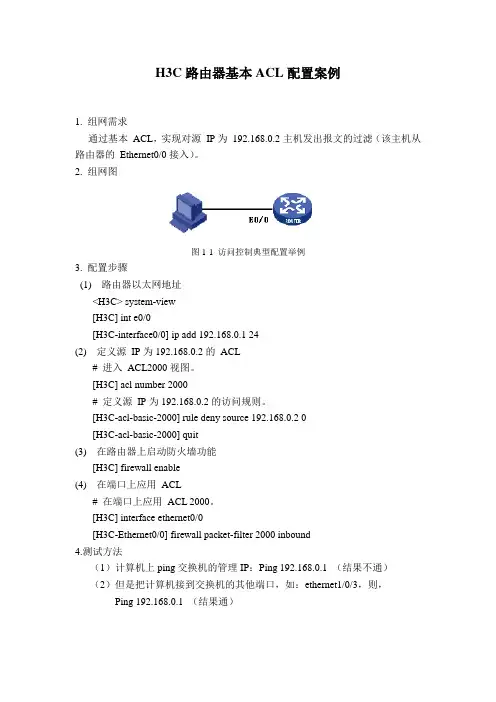
【案例拓扑】
本资料由-大学生创业|创业|创业网/提供资料
在线代理|网页代理|代理网页|
减肥药排行榜|淘宝最好的减肥药|什么减肥药效果最好|减肥瘦身药| 【实现步骤】
步骤1 路由器命令行操作模式的进入。
Red-Giant>enable !进入特权模式
Red-Giant#configure terminal !进入全局模式
Red-Giant(config)#interface fastEthernet 0 !进入路由器F0的接口模式
Red-Giant(config-if)#exit !退回到上一级操作模式
Red-Giant(config-if)#end !直接退回到特权模式
步骤2 路由器命令行基本功能
Red-Giant>? !显示当前模式下所有可执行的命令
Exec commands:
exit Exit from the EXEC
quit
access-enable Create a temporary Access-List entry
connect Open a terminal connection
disable Turn off privileged commands
disconnect Disconnect an existing network connection
enable Turn on privileged commands
help Description of the interactive help system
lock Lock the terminal
login Log in as a particular user
logout Exit from the EXEC
mrinfo Request neighbor and version information from a multicast
router
mstat Show statistics after multiple multicast traceroutes
mtrace Trace reverse multicast path from destination to source
name-connection Name an existing network connection
pad Open a X.29 PAD connection
ping Send echo messages
ppp Start IETF Point-to-Point Protocol (PPP)
resume Resume an active network connection
rlogin Open an rlogin connection 本资料由-大学生创业|创业|创业网/提供资料
在线代理|网页代理|代理网页|
减肥药排行榜|淘宝最好的减肥药|什么减肥药效果最好|减肥瘦身药| show Show running system information
slip Start Serial-line IP (SLIP)
systat Display information about terminal lines
telnet Open a telnet connection
terminal Set terminal line parameters
traceroute Trace route to destination
x3 Set X.3 parameters on PAD
Red-Giant#co? !显示当前模式下所有以co开头的命令
configure connect copy
Red-Giant#copy ? !显示copy命令后可执行的参数
running-config Copy from current system configuration
startup-config Copy from startup configuration
tftp Copy from a TFTP server
命令的简写
Red-Giant#conf ter !路由器命令支持的简写,该命令代表configure
terminal
命令的自动补齐
Red-Giant#conf !路由器支持命令的自动补齐
Red-Giant#configure
Configuring from terminal, memory, or network [terminal]?
Red-Giant(config)#interface fastEthernet 0
Red-Giant(config-if)#^Z !ctrl+Z退回到特权模式
Red-Giant#
Red-Giant#ping 1.1.1.1
!一个ping不存在的地址,显示如下,有的显示可能不是这种形式
% Unrecognized host or address, or protocol not running.
这儿显示的是一个错误的地址,有的时候发现找不到所要ping的地址找不到的时候显示的是超时的结果.
步骤3 路由器设备名称的配置
Red-Giant>en
Red-Giant>enable 本资料由-大学生创业|创业|创业网/提供资料
在线代理|网页代理|代理网页|
减肥药排行榜|淘宝最好的减肥药|什么减肥药效果最好|减肥瘦身药| Red-Giant#configure terminal
Red-Giant(config)#hostname RouterA !配置路由器设备名称为RouterA
步骤4 路由器每日提示信息的配置.
RouterA(config)#banner motd & welcome to routerA,if you are admin,you can config it ,if you
are not admin,please exit & !配置每日提示信息&为终止符
步骤5 路由器A的端口基本配置
Router>enable
Router#configure t
Router(config)#hostname Ra
Ra(config)#interface serial 0 !进入S0的端口模式
Ra(config-if)#ip address 1.1.1.1 255.255.255.0 !配置端口的IP地址
Ra(config-if)#bandwidth 512 !配置端口的带宽为512KB
Ra(config-if)#no shutdown !开启端口,使端口转发数据
Ra(config-if)#
步骤6 路由器B的端口配置
Red-Giant>enable
Red-Giant#configure terminal
Red-Giant(config)#hostname Rb
Rb(config)#interface serial 0 !进入S0端口模式
Rb(config-if)#ip address 1.1.1.2 255.255.255.0 !配置端口的IP地址
Rb(config-if)#clock rate 64000 !在DCE接口上配置时钟频率为64000
Rb(config-if)#bandwidth 512 !配置端口的带宽为512KB
Rb(config-if)#no shutdown !开启端口
步骤7 查看路由器端口的配置参数
Ra#show interfaces serial 0 !查看Ra serial 0 接口的状态
Serial0 is up, line protocol is up !接口的状态是否为up
Hardware is HDLC4530A
Internet address is 1.1.1.1/24 !接口的IP地址
MTU 1500 bytes, BW 512 Kbit, DLY 20000 usec, rely 255/255, load 1/255
Encapsulation HDLC, loopback not set, keepalive set (10 sec)
Last input 00:00:04, output 00:00:09, output hang never