三层交换机三层接口实验实验目的1、验证三层交换机ip分组转发机制2、掌握三层交换机接口配置过程3、体会三层交换机三层接口等同于路由器以太网接口的含义4、区分三层接口与VLAN对应的ip接口之间的差别实验原理三层交换机具备网络层的功能,实现VLAN间相互访问的原理是:利用三层交换机的路由功能,通过识别数据包的IP地址,查找路由表进行选路转发。
三层交换机利用直连路由可以实现不同VLAN之间的互相访问。
三层交换机给接口配置IP地址,采用SVI(交换虚拟接口)的方式实现VLAN间互连。
SVI是指为交换机中的VLAN创建虚拟接口,并且配置IP地址。
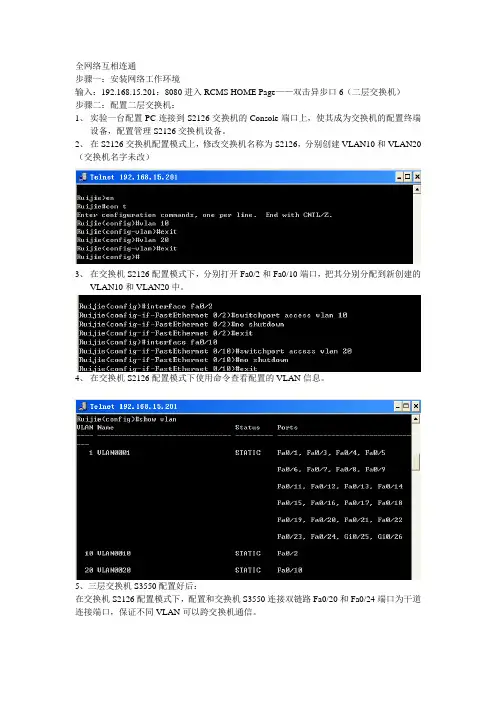
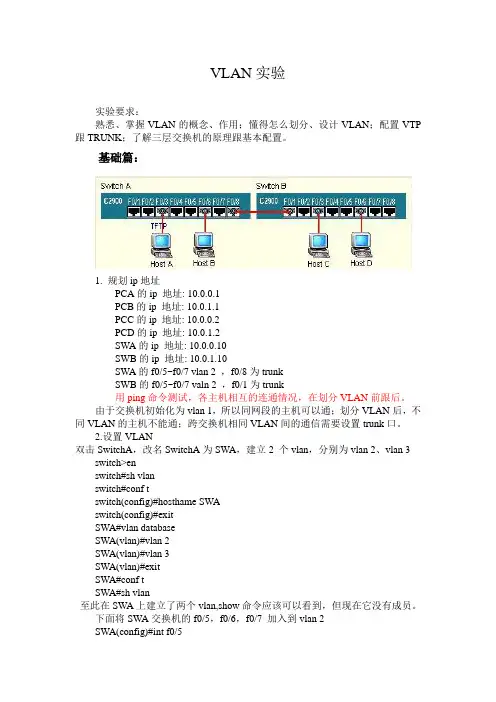
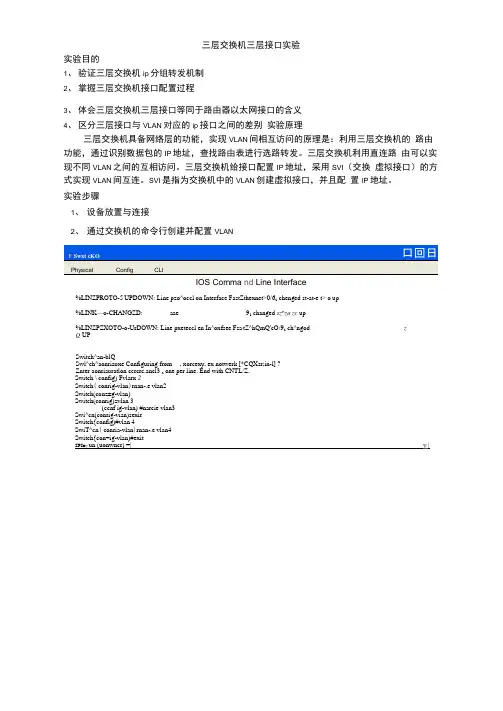
实验步骤1、设备放置与连接2、通过交换机的命令行创建并配置VLANIOS Comma nd Line Interface%LINZPROTO-5-UPDOWN: Line pzo^occl on Interface FastZthexnet>0/6z chenged st-at-e t> o up%LINK—o-CHANGZD: aae 91 changed sz^za zc up%LINZPZXOTO-o-UrDOWN: Line pxeteccl en In^oxfsee Fsa,tZ^hQmQ'cO/9z ch^ngod zQ UPSwitch^an-blQSwl^ch^aonriauxe Configuring from , xorcexy, ex notwerk [*CQXsr;in-l] ?Znter aonriauratlon ccrcrc.ancl3 z one per line. End with CNTL/Z.Switch \ config) Fvlarx 2Switch( conrig-vlan)rnan-.e vlan2Switch(conz±g-vlan)Switch(conrig)zvlan 3(ccnf ig-vlan) #narcie vlan3Swi^cn(conrig-vian)sexirSwitch{config)#vlan 4SwiT^cn( conria-vlan)rnan-.e vlan4Switch{con=ig-vlan)#exitSPI■匸un (uonwncr) =| y |“ h ・ n (:hn13回凶IOS Command Line InterfaceSwitch(config)tvlan 3Switch(conflQ-vlan)rname vlan3 Switen <canTig-vlan)roxit Switch(canrxg)rvlan 4Switch (consxg-vlan) Fn-rtLQ vlan4 Switch \ conf xg-vlan)Switch (config) Fxn'&cxf ACQ Fas^Z^hemc^O/l Sx^i^ch (con = ±g-iz) #sw±tchpoxt mode ouuunn Switch < CGrx£iQ-i£) c switchpos V access vlan 2 Switch <ccn£ig-i£) «exxt>Switch < config) x interface Fa s t>Et>hernet>0/2 Switch(con*la-ir )rswitchport mcxle access Switch<conr±g —±r)cawitchport AacAfia vl-n 2 Switch(canrig-ir )TexitSwiten(cenrig)rxnrerrace FaatZthornet0/3 Swi^cH(cenzxg-x=)Fawi^chpex^ medo 二uuazu Swx^ch(conzxg-xf)Fawi^chpex^ 二uuaun vlan 2 Switch(conz±g-iz ?Switch {config) Finrcxface Fa5^Z^hemc^0/4 Switch (con£xQ-i£) «swivchpcrt iriudu access Swxvch < CGn£iQ-x£) « swxtchpor t> access vlan 3 switch (conria-ir )texii> switch <conria )zx° S<it chOPhysical Config CLIIOS Comma nd Line In terfaceig-if) irswitchport mode access ig-if)^switchpert access vlsn 3 ig-if)$exi€ig)^interface FastZthernetO/5 ig-if) #swi*cchport rr.ede access ig-if)^switchport access vlan 3 ig-if)#exitig) irinterface FastZ ,cherne ,cO/c ig-if)^switchport mode access ig-if)^swi^chpert access vlan 3 ig-if)#exirig)Sinterface FastZtheznetO/? ig-if) #switchport rr.ede access ig-if) irswitchport access vlan 4 ig-if) #exi*cig) irinterface FastZ ,cherne ,cO/8 ig-if) irswi'uchport access vlan 4 ig-if) ^exi'Cig) ?in*cerface rastZ^hernetO/S ig-if) irswi^chpert rtiede access ig-if) #swi*cchport access vlan 4 ig-if)#exir3、三层交换机连接各个VLAN 的物理接口配宜ip 和子网掩码,生成路由表如下 Switch•conSwitch(ccnSwitch(ccnSwitch(conSwitch(conSwitch <conSwitch(cen Switch(con Switch(con Switch(cen Switch(ccn Switch(ccn Switch(con Switch(con Switch(cen Switch(con Switch•con Switch(ccn Switch(ccn Switch(con Switch(con Switch <con Switch 「conIOS Comma nd Line In terfaceTV*丄VzJ —・J ▲■丄目 亠■%LINZrROTO-5-UP'DO?7N: Line pretocal on Interface FascZthemetO/2, changed szaze z o down %LIN£rROTO-5-UPDO77N: Line protocol en Interface Fas*cZthemetO/2, changed szaze z a up Switch <ccnfig-if)#no swirchper^Switch (ccnf ig-if) trip address 192.1.2.2=4 255.2S5.255.0 Switch(canfig-if)#exirSwitch(config)winterface FasrZ^hernerO/3 Switch(ccnfig-if)#nc switchper^%LINEP^OTO-5-UP^077N: Line protocol on Interface FastEthernetO/3. changed state z c down Switch(cenfig-if)#%LINZrROTO-5-UPDO?7N: Line protocol on Interface Fas'ClthernetO/S, changed szaze z c up Switch(ccnfig-if)?nc switchpor^Switch(ccnfig-if)#ip address 192.1.3.254 255.2S5.255.0 Switch(config-if)?exit Switch(ccnfig)?ip routing的ip 地址Type Network PortNext Hop IPMetric C192.1.1.0/24FastEthGrneto/l ・・・ 0/0C 192.1.2.0/24 F3StEth€rneW./2 …0/0 C 192.1.3.0/24FastEthernetO/30丿0PATPC4PC-PTPC3PC-PT PC54、为各个终端配宜ip 和子网掩码.默认网关即和该终端连接在同一个vlan 的三层交换机=>C-PT PC2Table for3>it chU4PC5Physical config 「Desktop5、通过ping 验证属于不同vlan 的终端之间ip 分组的传输过程> PCOPhysical | Config j DesktopCommand PromptReplytrera 19Z .1.3.284: bytx?3-32 Reply trcn 19Z.1.3.ZS4: byte3-3Z Reply Trcn 19Z.1.byte3-3Z Reply Hran 19Z .1.3.2S4: tame —4mo sane-GZ TB . GZng tawe -GZnis TT17-2SS TTLr-ZSSTTLr-ZS& TT^-ZS53«ea3Cic3 for 192.1.3.2 吕4:DackQvaz Sunt = <, RQOQXvQd = <, Xx>ac = 0 (C% loaa)v AppxriM 1 aiQ^g xourxl cxXp v 1 maa Xn mlXUL —aacoxids :Minlmun = 17x&fl r M AX I XKJIA = 62aui. A VQXQQQ = 58x&a PC>pln<j 1^2.1.3 ・2Pinging 152.1.3.2 wi t ;H 32 by 匕■■ o£ =R«»pLy £rm 192.1.3 ・2 RarpLy £ECSB 192.1.3.2 R«»pLy £ccn 192.1.3 ・2 R«»pLy £rcn 192.1.3.2byt««—32 byt««—32 byt«»«i —32 hayf —32t 12 SmMt 2 Sn&M t £*••»—10t i-raw —12 Sm«TTL-127TTI —127 TTI —127 TTL-127勻53■susror 19Z . 1.3 . ZrPackers: S5t — 4Z Recover — 4“ Bost — 0 <0W loss) # Approximatie round crap time3 in rail 11-seconds :Miniroun — LO9r»!5r MaxLroiin ■ LZSns, Ave rage — 1Z Ins PC,IP ConfigurationCisco IP Comm un icatorPDU FormatsEEGmet II431419PREAMBLE: DEST MAC:SRC MAC: 101010.. .lOll0002 ・1704・ 1E01 0090.2118.EE66TYPE: 0x800DATA (VARIABLE LENGTH)FCS: 0x016TYPE: 0x8 | CODE: 0x0CHECKSUMID : Oxa SEQ NUMBER : 34PC0->PC5 IP 分组PCO 至三层交换机这一段的MAC 帧格式PDU Tn-For*a-t- i onDevice :L I 二亠JL 丄 I JL01J.UIU 儿、JL ■ 2 且見Svi*t chOOSI ModelInbound PDU D-atailsI Outbound PDU Details IPDU FormatsEthernet 1 -gTYPE: 0x8 | CODE; 0x0UHECKSUM ID: OxcSEQ NUMBER.: 41IP 分组三层交换机到PC5这一段的MAC 帧格式OSI ModelOSI ModelInbound PDU DetailsXnf orBL^it ion a± Dcvico:4 8 LE31 4| IHL | DSCP:0x0TL: 128ID :0x240x0 |0x0 TTL: 128 | PRO: 0x1CHKSUMSRC IP: 192-1.1.1DST IP : 192.1.3.2OPT:0x0|0x0DATA (VARIABLE LENGTH)IPICMPBizs0 4oL419 PREAMBLE: DEST MAC : SRC MAC: 101010.. 0001.C7LC.33A90002.1.704 ・1 E03 TYPE:0x800 DATA (VARIABLE LENGTH)FCS:0x0Byre4 8L5 1931 4 | IHL | DSCP: 0x0 TL: 128ID : OXZb0X0 I 0X0 TTL: 127 | PRO : 0X1 CHKSUMSRC IP: 192.1.1.1DST IP: 102-1.3.2OPT: 0x0|0x0DATA (VARIABLE LENGTH)IPBics IUMP三层交换机的各端口MAC。