
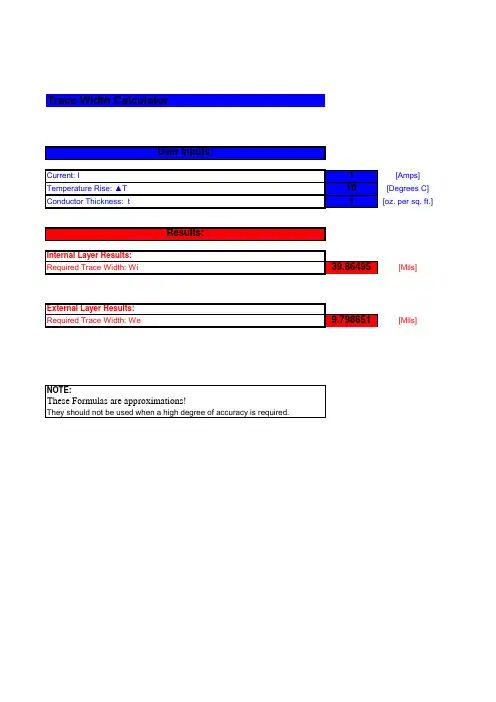
PCB超级计算器
- 格式:xls
- 大小:58.50 KB
- 文档页数:2

电子算盘的制作方法电子算盘是一种计算器,利用电子技术实现了计算功能。
它通常由数字显示屏、操作按钮和计算芯片组成。
下面我们来介绍一下电子算盘的制作方法。
首先,我们需要准备以下材料和工具:1. PCB板:提供电路的支撑结构,可以购买或自己制作;2. 电子元件:如集成电路、电容器、电阻等;3. 导线:用于连接电子元件;4. 数字显示屏:用于显示计算结果;5. 操作按钮:用于进行输入和操作;6. 电源:为电子算盘供电;7. 焊接工具:如焊台、焊锡等。
制作电子算盘的第一步是设计电路图。
根据电子算盘的功能需求,我们需要设计一个包含计算芯片、显示和输入接口的电路。
在这个过程中,需要考虑电路的可靠性和性能。
接下来,我们需要将电路图转化为实际的布局。
在 PCB 板上根据电路图设计放置电子元件的位置,并确定元件之间的连线。
可以使用 CAD 软件来辅助完成布局设计。
完成布局设计后,就可以进入制作 PCB 板的阶段。
根据布局设计,可以使用化学蚀刻技术将电路图转移到 PCB 板上。
首先,将电路图转移到透明胶片上,并使用 UV 曝光机将电路图暴露在感光涂层的 PCB 板上。
接着,使用蚀刻剂将未暴露部分的铜层蚀刻掉,形成电路线路。
最后,清洗掉感光涂层,得到完整的 PCB 板。
完成 PCB 板后,就可以开始焊接电路元件。
首先,将电子元件根据布局图插入 PCB 板对应的位置。
然后,使用焊锡将元件与 PCB 板焊接起来。
焊接过程中要确保焊接质量,保证焊点牢固可靠。
接下来,安装数字显示屏和操作按钮。
将数字显示屏和操作按钮安装在 PCB 板上设计好的位置上。
连接导线将它们与 PCB板的对应接口焊接起来。
保持焊接质量,确保连接稳定可靠。
最后,连接电源并测试电子算盘的功能。
将电源连接到电子算盘上,并打开电源开关。
使用操作按钮进行数字输入和计算,并观察显示屏上的结果是否正确。
如果有任何问题出现,需要检查电路连线和焊接是否正确,并进行修复。
综上所述,制作电子算盘的过程包括设计电路图、布局设计、制作 PCB 板、焊接元件、安装显示屏和按钮,连接电源并测试功能。
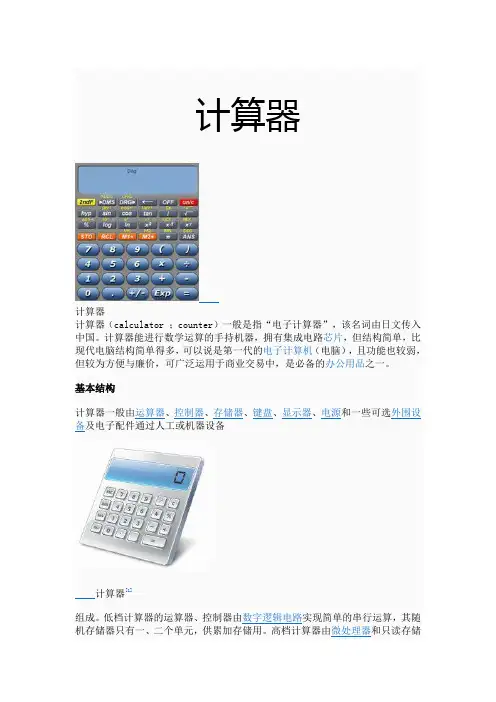
③程序员计算器——专门为程序员设计的计算器, 主要特点是支持And, Or, Not, Xor:最基本的与或非和异或操作, 移位操作 Lsh, Rsh:全称是Left Shift 和Right Shift,也就是左移和右移操作,你需要输入你要移动的位数(不能大于最大位数) RoL, RoR:全称是Rotate Left和Rotate Right,对于RoL来讲,就是向左移动一位,并将移出的那位补到最右边那位上,RoR类似④ 统计计算器-- 为有统计要求的人员设计的设计的计算器, 可以是软件,也可以是实物。
[1]专用计算器1.除常用计算器外, 还有专用计算器, 专用计算器就特别多了,如个人所得税计算器, 房贷计算器, 油耗计算器等. 一般以软件的形式存在.2.再有就是综合功能计算器 (可编程计算器)此类计算器一般都是以软件的形式存, 它除了具有常用计算器的功能外, 还可以由使用者自已编写程序或公式,把较复杂的运算步骤或者公式贮存起来,以后可以调用,进行多次重复的运算, 甚至能打印计算过程与结果。
大多数的专用计算器的能功能它都可实现, 如个人所得税计算, 单位换算等都可以由使用者自行编程计算. 使用者也可到网上下载别人制作好的公式文件进行计算. 综合计算器适用范围广, 不仅适用于普通用户, 也适用程序员, 更适合于各个设计行业的复杂计算, 如建筑, 水利, 机械, 传动, 齿轮, 结构,医学, 甚至大学生的毕业设计, 中小学生也可使用它来学习数学知识和一些简单的编程计算, <超级公式计算器>就是此类计算器中的一个代表。
[3]超级公式计算器一个现代手持型科学计算器电子计算器windows系统自带的计算器程序叫做calc.exe,其路径是X:\WINDOWS\system32\calc.exe 。
("X"代表系统盘符号)计算时可使用鼠标点击按钮进行操作,也可在键盘的数字键区呈开启状时,通过数字键区的按键进行操作。

PCB计算器October31,2021Contents1介绍1 2计算器22.1稳压器 (2)2.2布线宽度 (2)2.3电气间距 (3)2.4传输线 (4)2.5RF衰减器 (5)2.6色标 (6)2.7电路板类别 (7)2.7.1性能等级 (7)2.7.2PCB类型 (7)参考手册Copyright本文档由以下列出的贡献者版权所有(C)2019。
您可以根据GNU通用公共许可证(/licenses/gpl.html),版本3或更高版本或知识共享许可协议的条款进行分发和/或修改(http:///licenses/by/3.0/),3.0或更高版本。
贡献者Heitor de Bittencourt.Mathias Neumann翻译taotieren<*******************>,2019Telegram简体中文交流群:https://t.me/KiCad_zh_CN反馈请将任何错误报告,建议或新版本指向此处:•关于KiCad文档:https:///kicad/services/kicad-doc/issues•关于KiCad软件:https:///kicad/code/kicad/issues•关于KiCad软件国际化:https:///kicad/code/kicad-i18n/issues出版日期和软件版本2020年3月5日1介绍KiCad PCB计算器是一组实用程序,可帮助您查找布局的元件或其他参数的值。
计算器具有以下工具:•稳压器•布线宽度•电气间距•传输线•射频衰减器•色标•电路板类别2计算器2.1稳压器该计算器有助于找到线性和低压差稳压器所需的电阻值。
对于典型,作为参考电压Vref和电阻器R1和R2的函数的输出电压Vout由下式给出:对于3端子类型,由于从调节引脚流出的静态电流Iadj,存在校正因子:此电流通常低于100uA,可谨慎忽略。
要使用此计算器,请输入调节器类型,Vref的参数,如果需要,输入Iadj,选择要计算的字段(电阻器或输出电压之一)并输入其他两个值。

DX/TX seriesMay. 11, 2006Uniwell DX-TX operation ManualCONTENTSRefer to the separate User's manual for the specifications, installation, display and screen layout.1.FUNCTION BUTTON LIST (1)2.CLERK OPERATIONS (3)2-1.Clerk systems (3)2-2.Signing on a clerk (3)a)Using hard clerk buttons (3)b)Using secret clerk codes (3)c)Using clerk card (4)d)Using clerk iButton (4)e)Using clerk bar code (4)2-3.Signing off a clerk (4)2-4.Assign HARD CLERK buttons in X key position [SF-21.C] (5)2-5.Clerk sign-on screen (6)2-6.Clerk log-on/off - time and attendance operation (7)a)Clerk Log-on/off Operation on Normal Screen (non clerk sign-on screen) (7)b)Clerk Log-on/off Operation on Clerk Sign-on Screen (8)2-7.Clerk training mode (10)3.PLU SALES OPERATIONS (11)3-1.PLU registration (11)a)Hard PLU buttons / Scanner (11)b)Coded PLUs (11)3-2.Look up PLU buttons (12)3-3.PLU multiplication (12)a)Hard PLU buttons / Scanner (12)b)Coded PLUs (13)c)Look up PLUs (13)d)4-digit multiplication (14)3-4.Manual price entry (15)a)Hard PLU buttons / Scanner (15)b)Coded PLUs (16)c)Look up PLUs (16)3-5.Prices (17)a)How to change price levels (17)b)How to change price within each level (17)3-6.PLU modifiers (half / double, small / large, or programmable value) (18)3-7.PLU menu levels (19)3-8.Price inquiry (display only) (20)3-9.Single item (20)plimentary PLUs (21)3-11.Coupon PLUs (22)3-12.Special PLUs (23)3-13.Cooking instructions (26)a)By linking them directly to specified PLUs in programming (SP-122 PLUs: COOK = 1~20) (26)b) By pressing a COOKING 1 ~ 64 buttons (SP-122 PLUs: COOK = 0) (26)c) Cooking instruction group 1 is listed by pressing COOKING MESSAGE (SP-122 PLUs: COOK = 0) (27)d) Manual cooking message entry by pressing MANUAL COOKING button (27)3-14.Condiments (28)3-15.Category Change (30)3-16.Automatic link PLUs (expanded Look Up PLU function) (33)a) Chained up to 40 PLUs [SF-20.E=YES, PF-04.F=YES] (33)b) One link PLU (unchained) [SF-20.E=NO, PF-04.F=YES] (35)3-17.Set menu - Course (expanded Look Up PLU function) (36)3-18.Topping (expanded Look Up PLU function) (40)a) Selectable topping lists - by pressing one of Look Up PLU buttons (40)b) Pre-programmed topping list - automatic topping list (41)3-19.Take out / Eat in system with Combo menu (expanded Look Up PLU function) (42)a) Eat in/Take out operation (43)b) Eat in/Take out operation with Price Level Shift (43)c) Eat in/Take out operation with Combo Menu (45)d) Mode selection for take-out system (46)e) Kitchen Printer for take-out and delivery items (47)f) Automatic tax shift in take-out system (48)g) Tax status changed by the Eat-in/Take-out/Delivery (49)h) Grouped PLU report used as Eat in/Take out/Delivery sales report (51)3-20.Mix & Match (53)a) Programming Contents (53)b) Operation Samples (54)c) Mix & Match Report (61)d) Operational Restrictions (63)4.OTHER FUNCTIONS (64)4-1.No sale (64)4-2.Item correction (CR) (65)4-3.Void (66)4-4.Item Refund (67)4-5.Media Refund (68)4-6.Transaction Void (69)4-7.Non-add number (Message Entry) (70)4-8.Tip (71)4-9.Amount discount (72)a) Preset amount discount (72)b) Manual amount discount (72)4-10.Adjustments (73)4-11.Percentages (75)a)Preset percentage on subtotal (75)b)Manual percentage on subtotal (75)c)Item discount / add-on charge (76)4-12.Repeat transaction (76)4-13.Media (Total) to finalize transaction (77)a)Tendering (Closing methods) (77)b)Preset tender (77)c)Special media (78)d)Media multiplication (78)e)Pre-payment (partial payment) media for track operation (79)f)Card payment (80)g)National (Local) currency symbol print (82)4-14.Euro currency (83)4-15.Foreign currency (85)4-16.Paid out (86)4-17.Deposit (87)a)Deposit in (87)b)Deposit out (88)4-18.Persons (89)4-19.Track systems (Billing systems) (91)a) Characteristics (91)b) Operation Sequence --- same for both bill and table number systems (92)c) Split Bill - Item Transfer [SF-37.E=NO] (100)Split Bill for Multiplied Items (102)d) Track Transfer (105)e) Clerk Track Transfer (106)f) Floating Track (112)g) Program Options for Track Systems (112)4-20.Seat number assignment (114)a) Seat assignment - assigning seat numbers to each person (114)b) Seat change - changing seat numbers on registered items (115)c) Seat transfer - splitting seats to another transaction (116)d) Notes (118)4-21.Tax system (119)a) Tax System Outline (119)b) Automatic Tax Exemption --- only for add-on tax items calculated by add-on tax method (121)c) Manual Tax Exemption --- only for add-on tax items calculated by add-on tax method (122)d) Tax Shift --- for add-on tax system and VAT system (124)e) Program Options (126)f) Tax Display (V3.50) (127)4-22.Ticket System (129)4-23.Customer file (132)a) Customer file addition during registration [SF-109.G=NO] (133)b) Broadcast customer file [SF-87.A=YES] (135)c) Customer file pick-up methods during registration (136)d) Picked up customer file cancellation during registration (139)e) Picked up customer file checking during registration (140)f) Limitations for customer file function (140)g) Customer name printed in header (140)h) Customer file search by customer name (141)i) Customer file pick up prohibited [Customer Flag-H] (V3.50) (141)4-24.Server number (142)4-25.Room system (143)4-26.Loyalty system (143)4-27.Cash declaration (144)4-28.2nd page on main screen (REG mode) (145)4-29.Automatic Order Number (146)bor Cost (147)a) Programming Contents (147)b) Setup (152)c) X/Z-20 Labor Cost Report (153)d) Labor Cost Report Sample (154)4-31.Scale function (159)a) Programming Contents (159)b) Registration of Scalable Items (161)c) Registration of Scalable Items with Tare Weight Entry (163)d) Print/Display of Scalable Item Registration (165)e) Refund of Scalable Item Registration (166)4-32.Customer Invoice (168)4-33.Track Name (168)4-34.Table Plan (168)4-35.Piece Count System (168)4-36.Proforma Invoice Function (168)4-37.Add Value to Smart Card Function (168)5.PRINT FUNCTION (169)5-1.Types of printer (169)5-2.Flexible receipt printing (169)5-3.Graphic logo (169)5-4.Receipt on/off (169)5-5.Direct sales print (170)5-6.Media prints the signature line (171)5-7.Buffer print system (171)5-8.Subtotal bills (172)5-9.Final checkout bills (172)5-10.KP server / Receipt server (172)5-11.Order (kitchen) printer (173)5-12.Slip printer (174)5-13.Cheque printing by slip printer TP-620 (174)MUNICATION (175)7.REPORTING (176)7-1.X/Z reports (176)7-2.Electronic Journal Function (EJF) (177)7-3.FTP Communication and UDP Streaming (177)7-4.Program Dump Reports (177)7-5.Report List (178)7-6.IRC Report List (179)8.WARNING MESSAGE (180)Appendix-look up plu screen layout v350.pdf-additional operation v400.pdf1. Look Up PLU link to Look Up PLUs for unlimited levels [LUPF-C]2. Entry limit for the number of Condiment PLU entry3. Preset tender for each media4. Payment LALO5. Change disregarded [MF-5.G,F]6. Average price and sales % per PLUs on PLU report [SF-118.E]7. Special PLU function on report improved [SF-106.D]8. Previously used local currency in Price Embedded Bar Code is automatically converted into Euro9. VAT calculation for HotelThis is a “Table of Contents preview” for quality assuranceThe full manual can be found at /estore/catalog/ We also offer free downloads, a free keyboard layout designer, cable diagrams, free help andsupport. : the biggest supplier of cash register and scale manuals on the net。