
IBM DS4300配置手册
- 格式:doc
- 大小:322.00 KB
- 文档页数:9
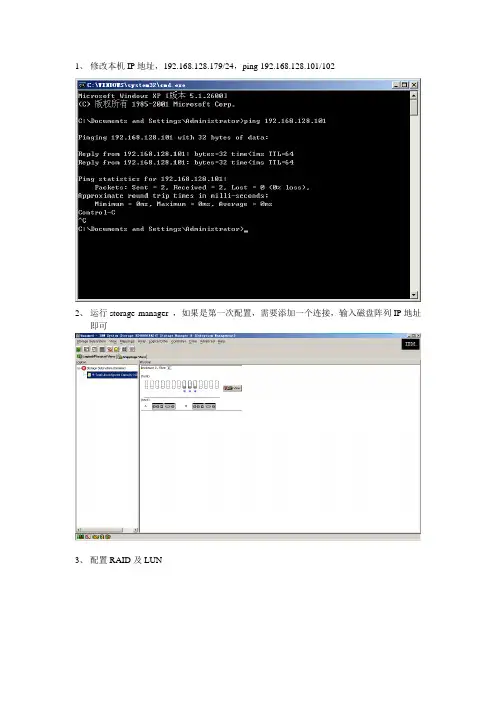

DS4300 使用维护指南(1)在笔记本(或管理机)上安装Storage Manager Version 9.15
软件缺省安装在C:/Program Files/IBM_DS4000目录下
(2)启动软件
注:部分机器因为安装Java 虚拟机版本问题可能无法正常启动,处理办法如下
到C:/Program Files/IBM_DS4000/client目录下执行SMclient.bat
(3) DS4300配置过程
1把DS4300的两块控制卡的网络接口和安装有SM9的管理机连接在同一个交换机上
2DS4300控制卡的IP地址192.168.128.101和192.168.128.102,管理机IP地址192.168.128.103
3创建hotspare 盘
4创建逻辑卷
打开向导
选择RAID级别及硬盘
选择创建逻辑盘的大小及LUN号创建完成,可继续创建新逻辑盘
5定义主机输入主机名
6定义主机端口
选择光纤通道卡的串号(光纤卡串号可以在服务器启动时按ctrl +Q查看)
选Edit,写个alias名为erp
输入主机类型及主机端口名字7完成
8在服务器计算管理中可搜到新划盘,格式化后即可正常使用。
9日常维护时注意看硬盘灯有无告警,如有黄灯亮,可能有故障。
通过storage manager client 查看报错信息。

IBM TS4300 Tape LibraryProduct GuideIBM TS4300 Tape Library (Machine Type 6741) combines IBM enterprise tape automation and reliability with open system affordability. It is a high-density, highly scalable, easy-to-manage solution designed to keep data securely stored long-term, while helping reduce the costs associated with data center space and utilities.The TS4300 utilizes modular design to meet growing long-term storage requirements. Starting with a single 3U base module, customers can scale the tape library by adding up to six 3U expansion modules for the overall capacity of up to 280 LTO cartridges. Each 3U base or expansion module can house up to 40 cartridges in two removable magazines.Each 3U module can accommodate up to three half-height tape drives or a combination of one half-height tape drive and one full-height tape drive. The choice of the tape drives includes IBM LTO Ultrium 9, 8, 7, or 6 Tape Drives with SAS or Fibre Channel host connectivity interfaces.Figure 1. IBM TS4300 Tape Library: Base module (bottom) with one expansion module (top)Did you know?Featuring the latest LTO Ultrium 9 technology, the TS4300 Tape Library provides up to 5.04 PB of native backup storage.Lenovo can be your trusted partner that offers "one stop shop" and single point of contact for delivery of leading edge technologies and innovations from Lenovo and other leading IT vendors. These offerings can satisfy the wide range of your end-to-end IT infrastructure needs, including end-user devices, servers, storage, networking, services, management software, and financing.Click here to check for updatesFigure 2. Front view of the TS4300 Tape Library base moduleThe following figure shows the front view of the TS4300 Tape Library expansion moduleFigure 3. Front view of the TS4300 Tape Library expansion moduleThe following figure shows the rear view of the TS4300 Tape Library base moduleFigure 4. Rear view of the TS4300 Tape Library base moduleThe following figure shows the rear view of the TS4300 Tape Library expansion module.Figure 5. Rear view of the TS4300 Tape Library expansion moduleSystem specificationsThe following table lists the TS4300 Tape Library system specifications.Table 1. System specificationsAttribute SpecificationForm factor Base module: 3U rack-mount or stand-aloneExpansion module: 3U rack-mount; up to 6 expansion modules7-module library: 21U rack-mountDrive technology LTO Ultrium 9, 8, 7, and 6 Full-High (FH) and Half-High (HH) tape drives Drive interface UItrium LTO9 12 Gbps SAS Half and Full High drivesUItrium LTO8 6 Gbps SAS Half-High driveTape drivesTape drivesEach TS4300 module (base or expansion) can accommodate up to three LTO Ultrium half-height tape drives or a combination of one LTO Ultrium half-height tape drive and one LTO Ultrium full-height tape drive.The following table lists the supported tape drives for the TS4300.Table 4. Tape drive optionsPart number Featurecode DescriptionMaximumquantityper moduleFull Height 8 Gb Fibre Channel02JH837BLW0LTO 9 FH Fibre Channel Drive101KP954B1ET LTO 8 FH Fibre Channel Drive101KP938B16Y LTO 7 FH Fibre Channel Drive1Half Height 8 Gb Fibre Channel02JH835BLVZ LTO 9 HH Fibre Channel Drive301KP952B1ER LTO 8 HH Fibre Channel Drive301KP936B16W LTO 7 HH Fibre Channel Drive3Full Height 12 Gb SAS02JH838BLW6LTO 9 FH SAS Drive3Half Height 12 Gb SAS02JH836BLW7LTO 9 HH SAS Drive3Half High 6 Gb SAS01KP953B1ES LTO 8 HH SAS Drive301KP937B16X LTO 7 HH SAS Drive3Tape drive support (Wrap tool)01KP939B16R Fibre Tape Drive Support (Wrap Tool)701KP940B16S SAS Tape Drive Support (Wrap Tool) (for LTO8, LTO7)702JH839BLW8Mini SAS-HD Tape Drive Support (wrap tool) (for LTO9)7A wrap tool is a loopback connector that provides the ability to run port tests and isolate sled problems in tape drives. The Fibre Tape Drive Support is required when at least one Fibre Channel tape drive is installed in the tape library, and the SAS Tape Drive Support is required when at least one SAS tape drive is installed in the tape library.Cables for host connectivityCables for host connectivityA SAS cable or Fibre Channel cable is required to attach a tape drive in the TS4300 Tape Library to a host. The following table lists supported cable options for LTO9 connectivity.Table 5. SAS cables for LTO9Description PartnumberFeaturecodeMaximumquantitySAS connectivity cables: Mini-SAS HD (HBA SFF-8644 host) to Mini-SAS HD (HBA SFF-8644 tape drive) 3 m Mini-SAS HD/Mini-SAS HD 1x Cable(from HBA with SFF-8644 to tape drive (LTO-9) with SFF-8644)02JH830BLW311.5 m Mini-SAS HD/Mini-SAS HD 1x Cable(from HBA with SFF-8644 to tape drive (LTO-9) with SFF-8644)02JH831BLW41 3 m Mini-SAS HD/Mini-SAS HD (Y) 2X Cable02JH832BLW51 The following table lists supported cable options for LTO8 and LTO7 connectivity.Table 6. Cable options for LTO 8 & LTO 7Description PartnumberFeaturecodeMaximumquantityper driveSAS connectivity cables - Mini-SAS (SFF-8088 host) to Mini-SAS (SFF-8088 tape)Mini-SAS/Mini-SAS 4x Interposer (from HBA with SFF-8088 to max 4 cableswith SFF-8088)00NA077AS0Y1*2 m Mini-SAS/Mini-SAS 1x Cable (host SFF-8088 to target SFF-8088)00NA009AS0Z2SAS connectivity cables - Mini-SAS HD (SFF-8644 host) to Mini-SAS (SFF-8088 tape)HD-SAS Cable to Mini-SAS (4 m)00NV419AS102Y SAS HD to Mini-SAS Cable (3 m)00NV420AS122**Fibre Channel connectivity cable8s10 m LC-LC Fibre Cable01KP929B16M2* The interposer is used on the host side to connect up to four SAS tape drives to a single Mini-SAS x4 port on a SAS HBA with up to four 2 m Mini-SAS to Mini-SAS cables (part number 00NA009).** The Y SAS HD cable is used to connect up to two SAS tape drives to a single Mini-SAS HD x4 port on a SAS HBA.Tape mediaLenovo Financial ServicesLenovo Financial Services reinforces Lenovo’s commitment to deliver pioneering products and services that are recognized for their quality, excellence, and trustworthiness. Lenovo Financial Services offers financing solutions and services that complement your technology solution anywhere in the world.We are dedicated to delivering a positive finance experience for customers like you who want to maximize your purchase power by obtaining the technology you need today, protect against technology obsolescence, and preserve your capital for other uses.We work with businesses, non-profit organizations, governments and educational institutions to finance their entire technology solution. We focus on making it easy to do business with us. Our highly experienced team of finance professionals operates in a work culture that emphasizes the importance of providing outstanding customer service. Our systems, processes and flexible policies support our goal of providing customers with a positive experience.We finance your entire solution. Unlike others, we allow you to bundle everything you need from hardware and software to service contracts, installation costs, training fees, and sales tax. If you decide weeks or months later to add to your solution, we can consolidate everything into a single invoice.Our Premier Client services provide large accounts with special handling services to ensure these complex transactions are serviced properly. As a premier client, you have a dedicated finance specialist who manages your account through its life, from first invoice through asset return or purchase. This specialist develops an in-depth understanding of your invoice and payment requirements. For you, this dedication provides a high-quality, easy, and positive financing experience.For your region-specific offers, please ask your Lenovo sales representative or your technology provider about the use of Lenovo Financial Services. For more information, see the following Lenovo website: https:///us/en/landingpage/lenovo-financial-services/Seller training coursesTrademarksLenovo and the Lenovo logo are trademarks or registered trademarks of Lenovo in the United States, other countries, or both. A current list of Lenovo trademarks is available on the Web athttps:///us/en/legal/copytrade/.The following terms are trademarks of Lenovo in the United States, other countries, or both:Lenovo®Lenovo ServicesThinkSystem®The following terms are trademarks of other companies:Linux® is the trademark of Linus Torvalds in the U.S. and other countries.Microsoft®, Hyper-V®, Windows Server®, and Windows® are trademarks of Microsoft Corporation in the United States, other countries, or both.Other company, product, or service names may be trademarks or service marks of others.。

动平衡机使用说明书geodyna 43001内容提要1。
安全规则和功能2。
机器安装定位3。
电路连接4。
控制与显示5。
开机6。
装夹车轮7。
输入轮胎类型,平衡模式和轮胎尺8。
平衡车轮9。
在轮辐后放置平衡块101112/平衡块小型化131********。
安全规则和功能1,1导读手册中的一些具体图标说明有利于读者理解1,2应用概述车轮平衡机设计平衡车轮最大直径950毫米和最大车轮重量70公斤的轿车及轻型货车的车轮进行动平衡和静平衡除进行动平衡之外,本机还可以测量和改善由于轮圈和轮胎,几何尺寸误差所引起的车轮运行跳动并尽可能排除,仔细调整车轮轮圈和轮胎的匹配可以使车轮达到行车时减少跳动以降低应加的平衡块的重量,即车轮镇静性优化和平衡块小型化。
寸。
改变操作模式。
错误代码。
镇静性优化。
操作员的再调整。
重新调整。
维修。
技术参数。
电路图2图1机器一览图1按键和显示器2,轮罩3,用于测量轮圈直径和间距的测量杆4,制动器踏板5,电源开关1,3一般安全规则仅由被正确训练过人员和专业人员才能允许操作平衡机平衡机须在操作手册说明范围内进行使用对由操作人员自行决定对机器的改装或变动而引起的责任厂家不负责严禁私自拆除或关闭安全装置所有电源连接或转接工作只允许指定的专业电工进行,并符合所在国家的供电部门的有关规定工作中应注意不可预知的危险因此操作员应排除上面讲的危险下面几点应该注意:使用的技术装备仅在应用范围永远使用适合和适当的装备和工具遵循车轮平衡机制造商的说明,注解和技术参数盖上适当的保护罩和附件一些特殊的安全提示将在以下章节中给出1,4功能屏幕和键盘屏幕和键盘在前面板上屏幕和键盘在前面板上根据人体工程学排列,前面机箱3测量杆测量.轮圈直径及左侧校正面与机器的间距可以通过一个随机配带的测量杆测量或通过键盘输入.通过键盘输入时在按住菜单键的同时转动车轮,所需的输入数据将被显示出来并写入电子单元进行处理测量杆用于从左边开始确定粘块的精确位置〈安装位置准确表明〉。