静态路由和默认路由的配置
- 格式:docx
- 大小:26.70 KB
- 文档页数:4
实验三:静态路由和默认路由的配置
一、实验目的
通过该试验,掌握静态路由和默认路由的配置操作方法和验证, 掌握静态路由的配置
场景和默认路由配置的应用背景。为今后 CCNA勺学习打下路由的基础。
二、实验要求
给定192.168.1.0/24 的地址,本实验要达到如下要求:
1、 子网的划分和依据,子网掩码的设置。
2、 静态路由的配置
3、 默认路由的配置
4、 验证配置的正确性
5、 静态路由和默认路由的应用场合
三、实验拓扑
四、实验设备
1、 路由器3个
2、 PC机两台
3、 交叉线数条
4、 Packet Tracer 软件
五、实验设计到的基本概念和理论
静态路由:静态路由是指由网络管理员手工配置的路由信息。当网络的拓扑结构 或链路的状态发生变化时,网络管理员需要手工去修改路由表中相关的静态路由信 息。
默认路由:默认路由是一种特殊的静态路由 ,指的是当路由表中与包的目的地址之
间没有匹配的表项时路由器能够做出的选择 .如果没有默认路由,那么目的地址在路
由表中没有匹配表项的包将被丢弃 .默认路由在某些时候非常有效 ,当存在末梢网络 时,默认路由会大大简化路由器的配置 ,减轻管理员的工作负担,提高网络性能
六、实验过程和主要步骤
步骤1:子网的划分和子网掩码的配置
将给定网络地址192.168.1.0/24 划分为 4个子网,分别为192.168.1.0/26
192.168.1.64/26 192.168.1.128/26 192.168.1.192/26 子网掩码是 255.255.255.192
步骤2: 3个路由器和2个pc机上的ip地址配置
设备 接口 IP 子网掩码
路由器A FastEthernet0/0 192.168.1.2/26 255.255.255.192
FastEthernet1/0 192.168.1.65/26 255.255.255.192
路由器B FastEthernet0/0 192.168.1.129/26 255.255.255.192
FastEthernet1/0 192.168.1.66/26 255.255.255.192
路由器C FastEthernet0/0 192.168.1.130/26 255.255.255.192
FastEthernet1/0 192.168.1.193/26 255.255.255.192
PC_A LAN 192.168.1.1/26 255.255.255.192
PC_B LAN 192.168.1.194/26 255.255.255.192
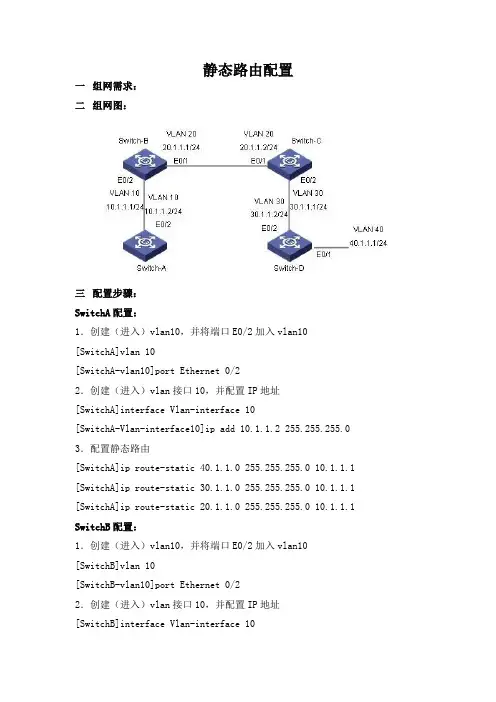
步骤3:在路由器A配置一条默认路由
Router(config> fip route 0.0-0-0 0_ 0_ 0_ 0 f1/0
Routs er ( conf icr> #
步骤4:在路由器B配置2条静态路由
Pouter(config)Sip toute 152.168,1,□ Z55,Z55,255.X92 1?2.168.1,65
Router(config)ffip route 192.1^8,1,13Z 25S.Z55.255.1^2 19Z,168,1,130
Iboviter (config)尊
步骤5:在路由器C配置一条默认路由
Hoxxter
Router '(config) f
步骤6:通过show ip route 给出3个路由器的路由表内容 路由器A: ip route
Cades: C - connectS - static, I - IGRP, 口 - RIP, M - mobile A B - BGP
D - EIG&P, BX - ElCAP Ex^srnal^ 0 - OSPFK IA - OSPF intsr area
Ml - OSPF NSSA axtarnal type 1, M2 - OSPF NSSA «xtarnal typa 2
Bl - OSPF arnal type 1r E2 - OSPF ex^arnal typ* † Zt E - BGP
i - IS-IS, Li - IS-IS lsvsl-L, L2 - IS-IS lavsl-Z^ ia - IS-IS inter arsa
* - candidata default, U - par-user static routeo - 口DR
P - periodic dotniloaded static routrfi
Gaceuay a f la^t cesort is 0.0.0. 0 to netrwork 0. 0.0.0
152.168.1.0/26 is subnetrted, 2 stibnecs
C 192.16S . X. 0 if directrly coiinected^ FastEthern^trQ/O
C 192.163.X.64 is directly ccnnec€ed^ FastBthemet1/0
S* 0.0.0.0/0 is directly connected, FastEthernet1/0
Router# v
Rout erf sh.a v ip route
Codes: C - connected, 5 - static, I - IGRP, R - RIP, H - mobile” B - EGP
D - BIGRPZ EX - EIGRP externalr 0 - OSPF, IA - OSPF inter N1 - OSPF USSA external type 1, W2 - OSPF HSSA
external type Z 且丄 一 OSPP ttxtLarnal type 1, E2 - OSPF extsrual 七ype £E - ESP
i - IS-IS, LI - IS-IS lewel-1^ L2 - IS-IS level-Z^ ia - TS-IS inter area * - candidate default r U - per-ussr static routs f o -
DDR
p - periodic doimloaded static route
Gateway of last resort is no^ set
19Z.L68x1.0/26 is suhnetted, 4 subnets
19£.1€8.1.0 [1/0] via 192.1S6.1.6S
192.166,1. S4 is directly connarted^ f rnet 1/0
132,169,1-1Z8 is directly connected^ FastEthernet0/0 152.163.1.1?2 [I/O] 192.166.1.130
Rcuter#|
步骤7:在PC_A通过ping PC_B测试连通性,并给出结果。
*hV WW J ■ ■ ■ J
Roucer#£hov ip route
Code^: C - connected, S - s^acic, I - IGRF t R - RIF t M - mobile, B - EGP
D - EIGUP, EX - HIGRP «xtam&Lz 0 - OSPF^ IA - 口SPF intar area
N1 - OSPF NSSA EKt^rnal type 丄十 N2 - OSPF USSA external type 2 EL - OSPF ex^eriial type J.” H2 - OSPF external
type 2, E - EGP
i - IS-I5^ LI - JS-IS l&veX-l, L£ - IS-IS level-Zf ia - IS-IS int^r area
† - candxdat-e tie faulty u - per-user strat-ic route, o - ODR
P - periodic downloaded static route
Gatevay of 丄resort Is 口.口.口.口 to network 口.口.0* D
C
c
s* 192.16S.1.0/2C is subnetred^
192.168.1.126 Is
192,168.1,192 i.s directly Z subnets directly ecnnect-sd, connects df FastBthsrnet0/0
Fast KtJfier nets I/O
0, 0. 0 r 0/0 is directly connect Fast Ether net 0/0 Command Prompt
Packet Tracer PC Comm and Line 1.0
PC>ping 192.X68,1.194
Pinging 19Z. 163.1.194 with 3Z tytes □ f
Ping statistics for ISZ.168,1.134:
PacJictrS: Sent = Received = 4, Lc^t = 0 (0^ loss) AppfOiciiaaCre round 匕士 me# in lull Li-seconds;
HizilmTua - 12 SILS R Maximum = L25nif AVEr a^a = 12 5ms
PC>
七、心得体会
通过本次实验,我基本掌握了静态路由和默认路由的配置,并且通过 Packet Tracer
对路由器的配置有了更一步的认知,通过这些使我对书上的知识有了更好的理解,也提高 了我对CCNA这门课的学习兴趣。
在实验过程中,我也遇到了很多问题,比如:不知道各命令参数代表的什么意思,不 能正确输入命令符后的参数等等,通过老师的讲解、查看课本和询问同学,最终解决了这 些问题,完成了这次实验,感谢老师的指导和同学们的帮助。 El
Rep ly frcu 192.158.1.194:
from 192.158.1.194:
from 192.1S6.1.194:
from 19Z.1SS.1.134: bytas=32 tiiae'lZSiiis TTL=125 bytes=32
tiins=125iiLs TTL=1Z£
bytas=32 tiKL@=12SiiLs
TTL=12£ bytB£»3Z tijna^lzSnLS TTL-12S