
交换机链路聚合的模式
- 格式:docx
- 大小:110.20 KB
- 文档页数:1

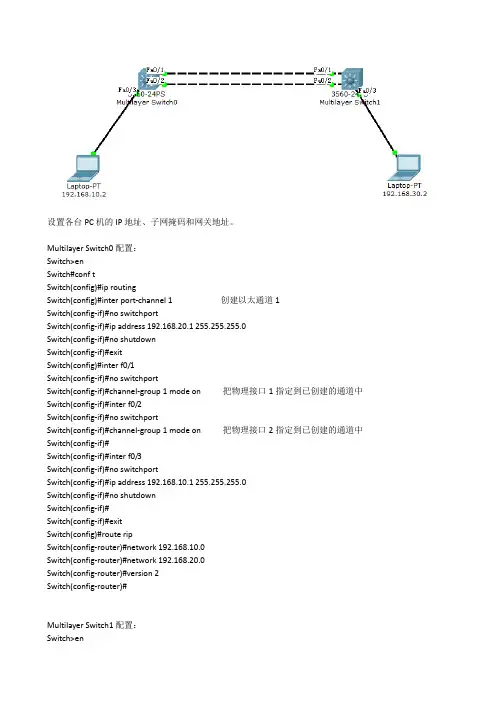
设置各台PC机的IP地址、子网掩码和网关地址。
Multilayer Switch0配置:
Switch>en
Switch#conf t
Switch(config)#ip routing
Switch(config)#inter port-channel 1 创建以太通道1
Switch(config-if)#no switchport
Switch(config-if)#ip address 192.168.20.1 255.255.255.0
Switch(config-if)#no shutdown
Switch(config-if)#exit
Switch(config)#inter f0/1
Switch(config-if)#no switchport
Switch(config-if)#channel-group 1 mode on 把物理接口1指定到已创建的通道中
Switch(config-if)#inter f0/2
Switch(config-if)#no switchport
Switch(config-if)#channel-group 1 mode on 把物理接口2指定到已创建的通道中
Switch(config-if)#
Switch(config-if)#inter f0/3
Switch(config-if)#no switchport
Switch(config-if)#ip address 192.168.10.1 255.255.255.0
Switch(config-if)#no shutdown
Switch(config-if)#
Switch(config-if)#exit
Switch(config)#route rip
Switch(config-router)#network 192.168.10.0

实验四
以太网链路聚合
【实训背景】
假设企业采用两台交换机组成一个局域网,由于很多数据流量是跨过交换机进行转发的,为了提高带宽,你在两台交换机之间连接了两条网线,希望能够提高链路带宽,提供冗余链路。
【实训目的】
掌握端口聚合的配置方法,理解端口聚合的作用和特点
【技术原理】
端口聚合(Aggregate-port )又称链路聚合,是指两台交换机之间在物理上将多个端口 连接起来,将多条链路聚合成一条逻辑链路。从而增大链路带宽,解决交换网络中因带宽 引起的网络瓶颈问题。多条物理链路之间能够相互冗余备份,其中任意一条链路断开,不会影响其他链路的正常转发数据。
端口聚合遵循IEEE 802.3ad协议的标准。
【实训内容】
1、根据拓扑将主机和交换机进行连接(未形成环路)
2、测试主机之间可以相互ping通
3、配置端口聚合
4、测试(形成环路)
5、测试(断开任一链路)
【实现功能】
增加交换机之间的传输带宽,并实现链路元余备份。
【实训设备】
s3100(2台),PC(2台)、直连线(4条)
【实训拓扑】
【实训步骤】
1、在交换机 SwitchA 上创建 Vlan 10,并将端口划分到 Vlan 10 中。
system-view !进入全局配置模式
[h3c]sysname SwitchA
[SwitchA] vlan 10 !创建 Vlan 10
[SwitchA-vlan10]name caiwu !将 Vlan 10 命名为 caiwu
[SwitchA-vlan10] port Ethernet1/0/3 to Ethernet1/0/10 ! 将端口划分到 Vlan 10
[SwitchA-vlan10]quit
验证测试:验证已创建了 Vlan 10,并将端口已划分到 Vlan 10 中
SwitchA#display vlan id 10

2.5 配置举例
介绍了两种模式下的典型应用场景举例。
2.5.1 配置手工负载分担模式链路聚合示例
2.5.2 配置静态LACP 模式链路聚合示例
2.5.1 配置手工负载分担模式链路聚合示例
2 LACP 配置
组网需求
如图2-4 所示,S-switch-A 和S-switch-B 为两台S-switch 设备,它们之间的链路为某城
域网骨干传输链路之一,要求S-switch-A 和S-switch-B 之间的链路有较高的可靠性,并
在S-switch-A 和S-switch-B 之间实现数据流量的负载分担。
配置思路
采用如下的思路配置负载分担链路聚合:
1. 创建Eth-Trunk。
2. 加入Eth-Trunk 的成员接口。
说明
创建Eth-Trunk 后,缺省的工作模式为手工负载分担模式,所以,缺省情况下,不需要配置
其模式为手工负载分担模式。如果当前模式已经配置为其它模式,可以使用mode 命令更
改。
数据准备
为完成此配置例,需准备的数据:
l 链路聚合组编号。
l Eth-Trunk 的成员接口类型和编号。
配置步骤
1. 创建Eth-Trunk
# 配置S-switch-A。
system-view
[Quidway] sysname S-switch-A
[S-switch-A] interface eth-trunk 1 [S-switch-A-Eth-Trunk1] quit
# 配置S-switch-B。
system-view
[Quidway] sysname S-switch-B
[S-switch-B] interface eth-trunk 1
[S-switch-B-Eth-Trunk1] quit
2. 加入Eth-Trunk 的成员接口
# 配置S-switch-A。
[S-switch-A] interface Ethernet0/0/1

Cisco二层交换机链路聚合
拓扑图
SwitchA的配置
Switch>en
Switch#conf t
Enter configuration commands, one per line. End with CNTL/Z.
Switch(config)#vlan 10
Switch(config-vlan)#exit
Switch(config)#vlan 20
Switch(config-vlan)#exit
Switch(config)#int fa0/5
Switch(config-if)#switchport acc vlan 10
Switch(config-if)#no shut
Switch(config-if)#exit
Switch(config)#int range fa0/1-2
Switch(config-if-range)#switchport acc vlan 20
Switch(config-if-range)#exit
Switch(config)#int vlan 10
Switch(config-if)#ip add 192.168.10.254 255.255.255.0
Switch(config-if)#exit
Switch(config)#int vlan 20
Switch(config-if)#
Switch(config-if)#ip add 192.168.20.253 255.255.255.0
Switch(config-if)#exit
Switch(config)#int range fa0/1-2
Switch(config-if-range)#channel-group 1 mode desirable upSwitch(config-if-range)#exit
Switch(config)#int port-channel 1