
3D_Animation
- 格式:ppt
- 大小:7.40 MB
- 文档页数:32

动画软件,3D动画软件和网页动画软件2D动画软件包括:ANIMO、RETAS PRO、USANIMATION3D动画软件包括:3DMAX ,MAYA、LIGHTWAVE网页动画软件包括:FLASH编辑本段动画软件介绍2D动画软件:ANIMO、RETAS PRO、USANIMATIONANIMO:ANIMO 是英国Cambridge Animation公司开发的运行于SGI O2工作站和Windows NT平台上的二维卡通动画制作系统,它是世界上最受欢迎、使用最广泛的系统,众所周知的动画片>、>、> 等都是应用animo的成功典例。
它具有面向动画师设计的工作界面,扫描后的画稿保持了艺术家原始的线条,它的快速上色工具提供了自动上色和自动线条封闭功能,并和颜色模型编辑器集成在一起提供了不受数目限制的颜色和调色板,一个颜色模型可设置多个"色指定"。
它具有多种特技效果处理包括灯光、阴影、照相机镜头的推拉、背景虚化、水波等并可与二维、三维和实拍镜头进行合成。
新版Animo6对使用性和功能方面进行了大量的更新和补充,进而提高了Animo用户在从系统构造、扫描、处理和上色一直到合成和输出整个制作管线的使用效率。
有史以来最棒的Animo系统"对于Animo6.0而言,我们关注的是如何回应用户的要求,现在我们为得到了需要的结果而感到高兴。
我们的开发队伍在此版本的发布上尽了很大努力,我相信它会带给我们的用户有史以来最棒的Animo系统。
" Phil Barrett, Cambridge Animation Systems 公司首席技术总监说道。
"Animo始终致力于提供广大用户的使用经验,6.0版本更是比以前好了很多。
" Cormac Slevin, Cambridge公司产品支持经理赞同道,"它更加快速、功能更强,并包括了大量基于用户要求的非常有用的新功能。
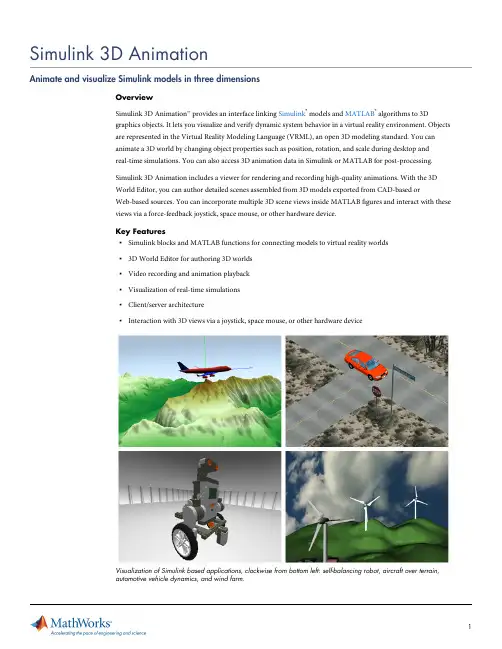
Visualization of Simulink based applications, clockwise from bottom left: self-balancing robot, aircraft over terrain, automotive vehicle dynamics, and wind farm.Authoring and Importing 3D WorldsSimulink 3D Animation provides two editors for authoring and importing virtual reality worlds: V-Realm Builder and 3D World Editor.Building 3D WorldsV-Realm Builder in Simulink 3D Animation is a native VRML authoring tool that enables you to create 3D views and images of physical objects using VRML. 3D World Editor offers a hierarchical, tree-style view of VRML objects that make up the virtual world. It contains a set of object, texture, transform, and material libraries that are stored locally for reuse.3D World Editor showing a hierarchical, tree-style view (left) and scene preview (right) of components of a lunar module.Importing 3D Content from the WebYou can build 3D worlds with several3D authoring tools and export them to the VRML97 format for use with Simulink 3D Animation. In addition, you can download 3D content from the Web and use it to assemble detailed 3D scenes.Importing CAD Models3D World Editor lets you manipulate 3D VRML objects imported from most CAD packages for developing detailed 3D worlds that animate dynamic systems modeled in Simscape™,SimMechanics™, and Aerospace Blockset™. Simulink 3D Animation enables you to process VRML files created by CAD tools such as SolidWorks®and Pro/ENGINEER®. You can use the SimMechanics Link utility to automatically create SimMechanics models from CAD tools and add associated Simulink 3D Animation visualization to them.3D animation of the dynamics of an internal combustion engine modeled in SimMechanics (top) and trajectory trace of an aircraft computed using coordinate transformations from Aerospace Blockset (bottom).Animating 3D WorldsSimulink 3D Animation provides bidirectional MATLAB and Simulink interfaces to 3D worlds.MATLAB Interface to 3D WorldsFrom MATLAB, you can read and change the positions and other properties of VRML objects, read signals from VRML sensors, create callbacks from graphical tools, record animations, and map data onto 3D objects. You can use MATLAB Compiler™to generate standalone applications with Simulink 3D Animation functionality forroyalty-free deployment.MATLAB based 3D application compiled as an executable using MATLAB Compiler and deployed on an end-user machine running MATLAB Compiler Runtime.Simulink Interface to 3D WorldsYou can control the position, rotation, and size of a virtual object in a scene to visualize its motion and deformation. During simulation, VRML object properties in the scene can also be read into Simulink. A set of vector and matrix utilities for axis transformations enables associations of Simulink signals with properties of objects in your virtual world. You can adjust views relative to objects and display Simulink signals as text in the virtual world. You can also trace the 3D trajectory, generated using Curve Fitting Toolbox™, of an object in theassociated virtual scene. For example, you can perform flight-path visualization for the launch of a spacecraft.Modeling and simulation in Simulink of a multi-agent system animated with Simulink 3D Animation. The virtual world is linked through the VR Sink block (middle) and viewed with the Simulink 3D animation viewer (bottom).Viewing and Interacting with 3D WorldsSimulink 3D Animation provides VRML viewers that display your virtual worlds and record scene data. It also provides Simulink blocks and MATLAB functions for user interaction and virtual prototyping with 3D input devices, including 3D mice and force-feedback joysticks.VRML ViewersSimulink 3D Animation includes viewers that let you navigate the virtual world by zooming, panning, moving sideways, and rotating about points of interest known as viewpoints. In the virtual world, you can establish viewpoints that emphasize areas of interest, guide visitors, or observe an object in motion from different positions. During a simulation, you can switch between these viewpoints.Integrating with MATLAB Handle GraphicsThe Simulink 3D Animation viewer integrates with MATLAB figures so that you can combine virtual scenes withMATLAB Handle Graphics®and multiple views of one or more virtual worlds.Example of a graphical interface authored with MATLAB Handle Graphics. The screen shows a car suspension test on a race track that combines multiple 3D views (top), including speed data and visualizations of the steering wheel and force triads, with 2D graphics for trend analysis (bottom).Recording and Sharing AnimationsSimulink 3D Animation enables you to record scene data and share your work.Recording Scene DataSimulink 3D Animation enables you to control frame snapshots (captures) of a virtual scene, or record animations into video files. You can save a frame snapshot of the current viewer scene as a TIFF or PNG file. You can schedule and configure recordings of animation data into AVI video files and VRML animation files for future playback. You can use video and image processing techniques on frame snapshot and animation data. These approaches enable the development of control algorithms using a visual feedback loop through the link with a virtual reality environment instead of physical experimental setups.Enabling Collaborative EnvironmentsSimulink 3D Animation lets you view and interact with simulated virtual worlds on one machine that is running Simulink or on networked computers that are connected locally or via the Internet. In a collaborative work environment, you can view an animated virtual world on multiple client machines connected to a host server through TCP/IP protocol. When you work in an individual (nonnetworked) environment, your modeled system and the 3D visualization run on the same host.Visualizing Real-Time SimulationsSimulink 3D Animation contains functionality to visualize real-time simulations and connect with input hardware. You can use C code generated from Simulink models using Simulink Coder™to drive animations. This approach enhances your hardware-in-the-loop simulations or rapid prototyping applications on xPC Target™and Real-Time Windows Target™by providing a visual animation of your dynamic system model as it connects withreal-time hardware.Product Details, Demos, and System Requirements/products/3d-animationTrial Software/trialrequestSales/contactsalesTechnical Support/support Components of an xPC Target real-time testing environment that includes Simulink 3D Animation for rapid prototyping (top) and hardware-in-the-loop simulation (bottom).ResourcesOnline User Community /matlabcentral Training Services /training Third-Party Products and Services /connections Worldwide Contacts /contact。

3D动画短片的制作--人物建模摘要三维动画是近年来随着计算机软硬件技术的发展而产生的一新兴技术,是一件艺术和技术紧密结合的工作。
在制作过程中,一方面要在技术上充分实现创意,另一方面,还要在画面色调、构图、明暗、镜头设计组接、节奏把握等方面进行艺术的再创造。
与平面相比,三维动画多了时间和空间的概念,它需要借鉴平面设计的一些法则,但更多是要按影视艺术的规律来进行创作。
本文探讨了三维动画设计的发展现状、前景、软件工具以及实现方法,并对三维动画发展前景表达了个人的观点。
同时,从实际入手,以三维影视动画的制作为例,阐述了动画制作的全过程,其中包括剧本、建模、动画编辑、渲染、后期合成等要点。
本文通过对三维动画的理论认识到动画的具体实现,把理论与实践结合起来,从而掌握三维动画的相关技术。
关键字:三维动画;艺术和技术;动画制作Abstract3D animation is one of the emerging technologies with the development of computer technology in recent years. 3D animation is an art and technology in close connection with the work. In the production process, on the one hand, the full realization of the technical creativity. On the other hand, to the screen color, composition, shading, the lens design team then, grasp the rhythm, and other aspects of the art of re-creation. Compared with the plane, 3D animation must consider the time and space. It needs to draw on some of the graphic design rules, but more is in accordance with the laws of T elevision Arts for creativity.This paper discusses the development, Prospects, soft tools and methods of a 3D animation, And expressing my personal views on 3D animation development prospects. At the same time, from a practical point of start to 3D animation film production as an example, described the whole process of animation production. Including script, modeling, animation, editing, rendering, and synthesis. This paper will be Based on the understanding of 3D animation to the realization of animation,the theory will combine with practice in the paper,so we will master the technology of 3D animationKey words:3D animation; art and technology; Animation production目录第1章绪论 (1)1.1 引言 (1)1.2 三维动画概述 (1)1.2.1 三维动画概念 (1)1.2.2 三维动画的优势 (1)1.2.3 三维动画的发展 (2)1.3 本课题的主要工作 (3)第2章三维动画的开发环境 (4)2.1 硬件支持 (4)2.2 软件支持 (4)2.2.1 三维动画软件的发展 (4)2.2.2 常见的3D软件 (5)2.2.3 制作软件3DSMAX介绍 (7)2.2.3.1 3DSMAX简介 (7)2.2.3.2 3DSMAX的界面及功能 (7)2.2.3.3 Vray-for-3DSMAX (11)第3章动画的具体实现 (12)3.1 剧本 (12)3.2 角色模型制作 (12)3.2.1 人物草图 (12)3.2.2 人物建模 (13)3.2.3 材质 (21)3.3 场景制作 (22)3.4 编辑动画 (23)3.4.1 制作骨骼蒙皮 (23)4.4.2 人物动画及镜头 (24)3.4.3 灯光 (25)3.5 渲染输出 (26)3.6 后期合成 (27)第4章结束语 (28)致谢语 (29)参考文献 (30)ContentsChapter 1 Introduction (1)1.1 Introduction (1)1.2 A summary of 3D animation (1)1.2.1 The concept of 3D animation (1)1.2.2 The advantages of 3D animation (1)1.2.3 The development of 3D animation (2)1.3 The main topic of the work (3)Chapter 2 3D animation development environment (4)2.1 Hardware support (4)2.2 Software support (4)2.2.1 3D animation software development (4)2.2.2 Common 3D animation software (5)2.2.3 3DSMAX Introduction (7)2.2.3.1 3DSMAX Introduction (7)2.2.3.2 The interface and features of 3dsmax (7)2.2.3.3 Vray-for-3DSMAX (11)Chapter 3 Implementation of The animation (12)3.1 Script (12)3.2 Production the model (12)3.2.1 Draft the figures (12)3.2.2 Production the model (13)3.2.3 Material (21)3.3 Production the scene (22)3.4 Editor the animation (23)3.4.1 bone & role skin (23)4.4.2 edit action figures (24)3.4.3 Lighting (25)3.5 Rendering (26)3.6 Composition (27)Chapter 4 Conclusion (28)Acknowledgement (29)References (30)第1章绪论1.1引言三维动画业是新兴行业,综观三维动画的发展历程,相信不久的将来,三维将进入千家万户,不再是大电影厂和专业影视制作公司的垄断的专利。
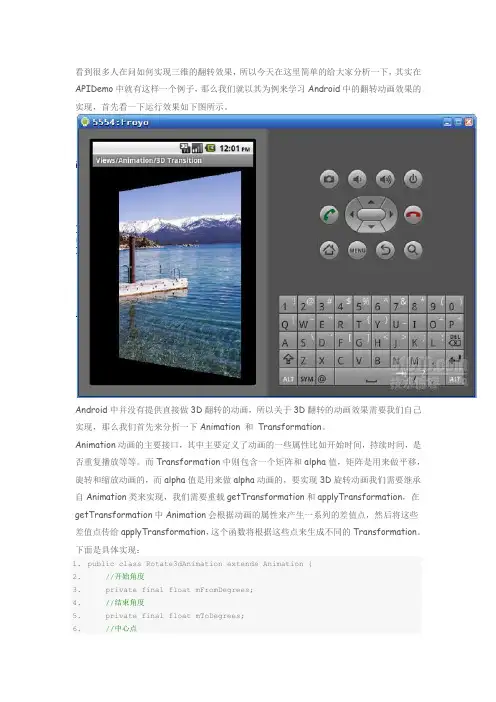
看到很多人在问如何实现三维的翻转效果,所以今天在这里简单的给大家分析一下,其实在APIDemo中就有这样一个例子,那么我们就以其为例来学习Android中的翻转动画效果的实现,首先看一下运行效果如下图所示。
Android中并没有提供直接做3D翻转的动画,所以关于3D翻转的动画效果需要我们自己实现,那么我们首先来分析一下Animation 和Transformation。
Animation动画的主要接口,其中主要定义了动画的一些属性比如开始时间,持续时间,是否重复播放等等。
而Transformation中则包含一个矩阵和alpha值,矩阵是用来做平移,旋转和缩放动画的,而alpha值是用来做alpha动画的,要实现3D旋转动画我们需要继承自Animation类来实现,我们需要重载getTransformation和applyTransformation,在getTransformation中Animation会根据动画的属性来产生一系列的差值点,然后将这些差值点传给applyTransformation,这个函数将根据这些点来生成不同的Transformation。
下面是具体实现:1.public class Rotate3dAnimation extends Animation {2.//开始角度3. private final float mFromDegrees;4.//结束角度5. private final float mToDegrees;6.//中心点7. private final float mCenterX;8. private final float mCenterY;9. private final float mDepthZ;10.//是否需要扭曲11. private final boolean mReverse;12.//摄像头13. private Camera mCamera;14. public Rotate3dAnimation(float fromDegrees, float toDegrees,15. float centerX, float centerY, float depthZ, boolean reverse) {16. mFromDegrees = fromDegrees;17. mToDegrees = toDegrees;18. mCenterX = centerX;19. mCenterY = centerY;20. mDepthZ = depthZ;21. mReverse = reverse;22. }23.24. @Override25. public void initialize(int width, int height, int parentWidth, int parentHeight) {26. super.initialize(width, height, parentWidth, parentHeight);27. mCamera = new Camera();28. }29.//生成Transformation30. @Override31. protected void applyTransformation(float interpolatedTime, Transformation t) {32. final float fromDegrees = mFromDegrees;33.//生成中间角度34. float degrees = fromDegrees + ((mToDegrees - fromDegrees) * interpolatedTime);35.36. final float centerX = mCenterX;37. final float centerY = mCenterY;38. final Camera camera = mCamera;39.40. final Matrix matrix = t.getMatrix();41.42. camera.save();43. if (mReverse) {44. camera.translate(0.0f, 0.0f, mDepthZ * interpolatedTime);45. } else {46. camera.translate(0.0f, 0.0f, mDepthZ * (1.0f - interpolatedTime));47. }48. camera.rotateY(degrees);49.//取得变换后的矩阵50. camera.getMatrix(matrix);51. camera.restore();52.53. matrix.preTranslate(-centerX, -centerY);54. matrix.postTranslate(centerX, centerY);55. }56.}其中包括了旋转的开始和结束角度,中心点、是否扭曲、和一个Camera,这里我们主要分析applyTransformation函数,其中第一个参数就是通过getTransformation函数传递的差指点,然后我们根据这个差值通过线性差值算法计算出一个中间角度degrees,Camera 类是用来实现绕Y轴旋转后透视投影的,因此我们首先通过t.getMatrix()取得当前的矩阵,然后通过camera.translate来对矩阵进行平移变换操作,camera.rotateY进行旋转。