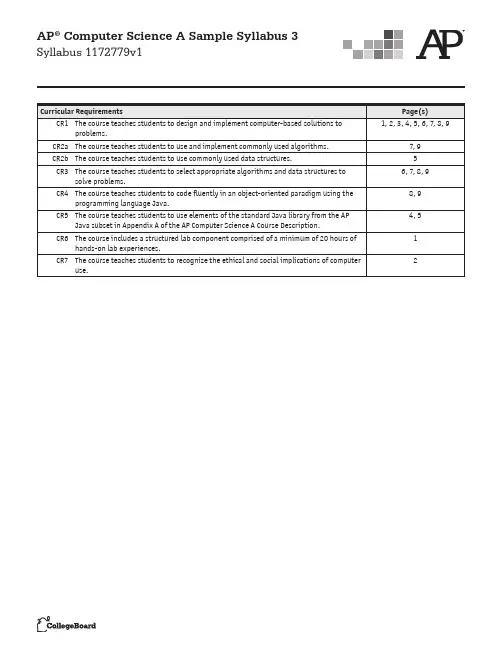
AP® Computer Science A Sample Syllabus 3 Syllabus 1172779v1AP® Computer Science A Sample Syllabus 3 Syllabus 1172779v1 Course OverviewAP® Computer Science A is both a course for potential computer science majors anda foundation course for students planning to study in other technical fields such asengineering, physics, chemistry, and geology. The course emphasizes programmingmethodology, procedural abstraction, and in-depth study of algorithms, data structures,and data abstractions, as well as a structured lab component comprised of a minimumof 20 hours of hands-on lab experiences integrated throughout the course. [CR6]Instruction includes preparation for the AP Computer Science A Exam. In teachingthis course, my reward comes when students can apply the programming tools theyhave learned to real-life examples on their own. Computer science is more than justprogramming. Students should leave my class with a clear understanding of Java and theability to adapt to any new programming language that they are taught in college. I wantthem to have the confidence to tackle any problem-solving obstacles they encounter.Major TextsBergin, Joseph et al. Karel J Robot: A Gentle Introduction to the Art of Object-OrientedProgramming in Java. Redwood City, Calif.: Dreamsongs Press, 2005./~bergin/KarelJava2ed/Karel%2B%2BJavaEdition.htmlHorstmann, Cay. Big Java. Hoboken, N.J.: Wiley, 2012.Lambert, Ken, and Martin Osborne. Fundamentals of Java: AP Computer Science Essentials.Boston: Course Technology, 2010.Course PlannerThe resources list includes the following text references: Karel J. Robot (KJR), Big Java(BJ), and Fundamentals of Java (FJ).Unit 1 (Weeks 0-3)Karel J. Robot(Introduces objects and inheritance)Topics:• Objects• Classes• Looping• ConditionalsObjectives:• Write and use simple classes with Karel J. Robot• Learn the basics of conditionals and loopingAssessments:[CR1]• Program-specific tasks for Karel• Create a SmartRobot Class to teach Karel more commands: turnRight(), CR1— The course teaches students to design and implement computer-based solutions to problems.CR6— The course includes a structured lab component comprised of a minimum of 20 hours of hands-on lab experiences.AP® Computer Science A Sample Syllabus 3 Syllabus 1172779v1 turnAround(), climbStair()• Clear a field of beepers (using loops)• Redistribute a field of beepers (using loops and conditionals)• Run a hurdle race:o Same height and equally spaced;o Same height and unequally spaced; ando Different heights and unequally spaced.Unit 2 (Week 4)Java BasicsTopics:• Computer basics• Java basics• Using the compiler• Input and outputObjectives:• Understand terminology: CPU, system and application software, primary andsecondary memory, LAN, WAN, hard disk, CD-ROM• Understand computer ethics such as acceptable use policies, copyright, intellectualproperty, freeware, shareware, downloading music• Understand how all the different parts of the computer work together• Understand terminology: compiler, IDE, JVM• Edit, compile, and run a simple program in Java• Understand the different compile time errors, runtime errors, and logic errors• Use BufferedReader for input• Use output with System.out using print and println and formatoutput to look niceAssessments: [CR1]• Labs: Triangle, rectangle, square; area; and perimeter program• Get input for the registrar’s office program• Label the parts of the computerStrategies:• To discuss computer ethics, begin by looking at the school’s acceptable use policy, then go to the Web and look at the ACM’s code of ethics. Students will write a small paper in favor of or against something related to computer ethics, such as making copies of a copyrighted program and giving it away for free. [CR7]• Assign a lot of small programs that illustrate different types of input and output—make sure students have used every type of input and displayed it in different ways. Unit 3 (Week 5)CR1— The course teaches students to design and implement computer-based solutions to problems.CR7— The course teaches students to recognizethe ethical and social implications of computer use.AP® Computer Science A Sample Syllabus 3 Syllabus 1172779v1 Defining Variables, Arithmetic ExpressionsTopics:• Using and understanding variables• Comments• Arithmetic expressions in Java programs• Representing numbers in different basesObjectives:• Understand terminology: comments, variables, constants, reserved words, literals• Declare and initialize variables and constants in Java• Understand mathematical expressions in Java and their precedence• Understand how to change bases of numbers• Use casting to make their data more accurate• Understand limitations of finite representations of numbers such as the range ofintegers, real, and float• Use the assignment operator correctlyAssessments: [CR1]• Labs:o Paycheck program; have employee information entered and calculate payo Modify the paycheck program to also include any overtime hours in the calculationsStrategies:• Students need practice with how the different types, double and int, relate when they are used in mathematical operations• Present a lot of small program examples in which they have to find the errorsUnit 4 (Weeks 6-7)Introduction to Classes and OOPTopic:• Creating and using classesObjectives:• Understand terminology: constructor, accessor, mutator, instance variable, encapsulation, information hiding, procedural abstraction• Understand the difference between public and private access in a class• Use and comprehend the DecimalFormat class and the Random class• Write classes from scratch, choosing appropriate data representation• Understand how to declare a method and declare parameters in that method• Understand the use of preconditions, postconditions and assertions when designing methods• Understand the difference between OOP development and top-down development CR1— The course teaches students to design and implement computer-based solutions to problems.AP® Computer Science A Sample Syllabus 3 Syllabus 1172779v1 Assessments: [CR1]• Labs: Purse class and StampMachine classStrategies:• Give students classes to complete, in which they are given a description and they must choose appropriate representation for that classUnit 5 (Weeks 8-12)Conditionals and LoopingTopics:• if, if-else, while, forObjectives:• Understand terminology: control statements, counter, infinite loop, iteration, nested loops, logical operators, truth tables• Construct syntactically correct loops and conditional statements• Understand the different errors that may occur with loops and employ helpful debugging techniques such as hand-tracing and extra print statements to figure out errors• Use logical operators to make programs more robust• Construct truth tables• Be able to calculate statement execution counts, e.g., how many times did the loop execute?Assessments: [CR1][CR5]• Labs:o Approximate PI using Leibniz’s methodo Base Conversion: Convert from baseo 10 to base 2o Guess My Number gameo Euclidean algorithm programo Perimeter and area of rectangles using all combinations of certain rangeStrategies:• Students need practice writing different types of loops and conditionalsUnit 6 (Weeks 13-14)The String ClassTopic: [CR5]• String class CR1— The course teaches students to design and implement computer-based solutions to problems.CR5— The course teaches students to use elements of the standard Java library from the AP Java subsetin Appendix A of the AP Computer Science A Course Description.AP® Computer Science A Sample Syllabus 3 Syllabus 1172779v1 Objectives:• Instantiate String objects• Understand that Strings are immutable• Use appropriate String methods to solve problemsAssessments:Lab: Magpie[CR1]Strategies:• Work several examples using the substring methodUnit 7 (Weeks 15-17)Array ListTopic: [CR2b][CR5]• Using ArrayList classObjective:• Use the ArrayList methodsAssessments: [CR1]• WordList (2004 AP Computer Science A Exam, Free-Response Question 1, AP Central®)Strategies:• Stress the difference between add and set• Draw pictures of the ArrayList after add, set, and remove have been performedUnit 8 (Week 18)ArraysTopics: [CR2b]• Declaring and initializing arrays• Manipulating arrays with loops• Creating parallel arraysObjectives:• Understand terminology: array, element, index, logical size, physical size, parallel arrays• Declare one-dimensional arrays in Java CR2b— The course teaches students to use commonly-used data structures.CR5— The course teaches students to use elements of the standard Java library from the AP Java subsetin Appendix A of the AP Computer Science A Course Description.CR1— The course teaches students to design and implement computer-based solutions to problems.AP® Computer Science A Sample Syllabus 3 Syllabus 1172779v1• Use initializer lists when declaring arrays• Manipulate arrays using loops and array indices• Use the physical and logical size of an array together to guarantee they do not gobeyond the bounds of their array by identifying the boundary cases and using testdata to verify results• Understand how parallel arrays can be useful when processing certain types of data• Work with arrays of primitive data types as well as arrays of objects whileunderstanding the difference between the two types of data• Understand when to choose an array to represent data instead of an ArrayList[CR3]Assessments:• Lab:o For one-dimensional arrays, read in numbers and place each one in an even,odd, and/or negative list [CR1]Strategies:• Students need practice manipulating loops that work with arrays• Students also need to be reminded about the indexing of arrays beginning at zero Unit 9 (Week 19)Two-dimensional ArraysTopics:• Using 2-D arrays• Introduction to inheritance and interfaces• Class diagramsObjectives:• Understanding that 2-D arrays are stored as arrays of arrays• Understand the meaning of row-major order• Traversing all and part of a two-dimensional arrays• Using nested loops to manipulate objects in a two-dimensional array Assessments:• Lab: [CR1]o Picture and Picture lab activities 1-9o Picture lab extensions: steganography and chromakeyStrategies:• Focus on the order in which Java stores the elements of a two-dimensional array in the computer’s memory.• Learn how to write code that corresponds to a class diagram and learn how to draw a class diagram that describes code.CR1— The course teaches students to design and implement computer-based solutions to problems.CR3— The course teaches students to select appropriate algorithms and data structures to solve problems.AP® Computer Science A Sample Syllabus 3 Syllabus 1172779v1 Unit 10 (Weeks 20-21)Searching and Sorting ArraysTopic: [CR2a]• Bubble, Selection, Insertion sorts• Sequential and Binary searchesObjectives:• Write a method for searching an array• Perform insertions and deletions at given positions in arrays• Trace through sorting and searching algorithms and understand time constraints ofeach [CR3]• Understand the algorithms behind each of the following searching and sorting techniques: bubble, selection, and insertion sorts; sequential search and binarysearch• Understand the time efficiency of each sort and search and when it is desirable to use each one [CR3]• Identify reusable components from existing code using classes and class libraries • Given different scenarios, students should be able to choose the most appropriate sort or search [CR3]Assessments:• Lab:o Students make their own “utility” class that includes all of these sorts and searches [CR1]Strategies:• Students need practice tracing through sorts and searches and determining the runtime of each• Students also do well with a worksheet that addresses the efficiency of each of the strategies they have learned, efficiency for a sorted versus unsorted list, and “best,”“worst,” and “average” efficiencyUnit 11 (Weeks 22-24)Elevens LabTopics:• Game design and development• Experimenting with a large program• Using classes• Modifying classes• InheritanceObjectives:CR3— The course teaches students to select appropriate algorithms and data structures to solve problems.CR1— The course teaches students to design and implement computer-based solutions to problems.CR2a— The course teaches students to use and implement commonly used algorithms.AP® Computer Science A Sample Syllabus 3 Syllabus 1172779v1• Design a class that models a deck of cards• Analyze and discuss the efficiency of shuffling algorithms [CR3]• Extend an abstract Board classAssessments:• Lab: ElevensStrategies:• Be familiar with all the classes and interfaces discussed• Focus on the how the classes are related to one another and the reasons forpreferring one algorithm over another [CR3][CR4]Unit 12 (Weeks 25-27)More on Classes, Inheritance, InterfacesTopics:• Classes• Inheritance• Abstract classes• InterfacesObjectives:• Demonstrate inheritance by extending a class• Understand polymorphism and know when it is appropriate to override methods in asuper class• Create and extend an abstract class• Create and extend a class given class specifications with the relationships among theclasses described• Implement an interfaceAssessments: [CR1]• Create an abstract Shape class• Pet Parade (2004 AP Computer Science A Exam: Free-Response Question 2, on AP Central)Strategies: [CR4]• Draw pictures of the inheritance hierarchyUnit 13 (Weeks 28-29)Topic:• Inheritance CR1— The course teaches students to design and implement computer-based solutions to problems.CR4— The course teaches students to code fluently in an object-oriented paradigm using the programming language Java.CR3— The course teaches students to select appropriate algorithms and data structures to solve problems.AP® Computer Science A Sample Syllabus 3 Syllabus 1172779v1 Objective:• Use inheritance to extend the Critter class by making new types of EmployeesAssessments:• Exercises from the textStrategies:• Have fun with this chapter• Allow the students to be creative after working through the exercises and analysis• Create different kinds Employees[CR4]Unit 14 (Weeks 30-31)Recursion (and Merge Sort)Topics:• Recursion• Merge Sort [CR2a]Objectives:• Create a recursive method to solve a problem• Understand the difference between recursive and iterative solutions to a problem [CR3]• Understand and use the Merge Sort• Understand how to calculate the informal runtime of merge sort and compare it’s running time to the other sorts already learned [CR3]Assessments: [CR1]• Factorial program• Rewrite loop programs with recursionStrategies:• Ask, “What is returned by this method?”Unit 15 (Weeks 32-36)ReviewTopics:• Review AP Computer Science A topicsObjective:• Prepare for the AP Computer Science A Exam by reviewing material and taking practice exams CR3— The course teaches students to select appropriate algorithms and data structures to solve problems.CR1— The course teaches students to design and implement computer-based solutions to problems.CR2a— The course teaches students to use and implement commonly used algorithms.CR4— The course teaches students to code fluently in an object-oriented paradigm using the programming language Java.AP® Computer Science A Sample Syllabus 3 Syllabus 1172779v1 Assessments:• Practice examsTeaching StrategiesI strive to create a learning environment that is comfortable for all students. Thosewho have never touched a computer should be as at ease in my class as those who havetaught themselves how to program. I aim to foster critical thinking, a lifelong skill, and Iaccomplish this by giving challenging, yet not impossible, assignments. When new topicsare introduced, I use a hands-on approach of having students see and run examples.While the novices ask questions, more experienced students can make changes to theexamples and experiment with different outcomes.Experienced programmers help the novices in a mentoring program after school. Thispromotes student leadership and propels in-class learning.10。