
Linksys 无线网络适配器 说明书
- 格式:pdf
- 大小:949.60 KB
- 文档页数:24

Linksys WRT300N 安装配置图解(中文)
有两种方法配置路由器。你可以自选下面一种:
1、运行安装光盘 - 把安装光盘放进光驱,
按屏幕上的提示操作。
2、用快速安装指南 - 如果你愿意, 你可以用路由器的Web配置功能。跳到下面步骤一:
一、连接路由器
A: 确保切断所有硬件的电源,包括宽带猫和电脑的电源
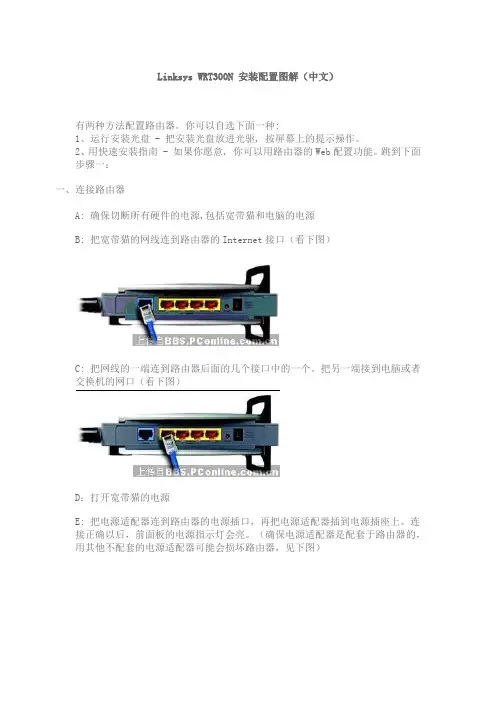
B: 把宽带猫的网线连到路由器的Internet接口(看下图)
C: 把网线的一端连到路由器后面的几个接口中的一个。把另一端接到电脑或者交换机的网口(看下图)
D:打开宽带猫的电源
E: 把电源适配器连到路由器的电源插口,再把电源适配器插到电源插座上。连接正确以后,前面板的电源指示灯会亮。(确保电源适配器是配套于路由器的,用其他不配套的电源适配器可能会损坏路由器,见下图) F:打开你的电脑
G: 把路由器放在合适的地方,最好的地点通常是你的无线网络的中心,使所有的设备都在视距之内。
二、配置路由器
注意: 确保你电脑的网卡设置为自动获得IP地址(在网络连接属性里面设置)
A:打开网页浏览器,在地址栏里输入http://192.168.1.1。回车
B:此时会跳出一个要求输入密码的对话框. 用户名一栏为空, 密码栏输入默认密码admin. (为了确保安全,你需要稍后设置一个新密码,在Web设置的Administration菜单下面,Management选项里面设置). 选OK
C:这时候会出现Setup菜单。如果你的服务提供商要求的话,填入主机名和域名。(通常ADSL提供商会有要求) ,否则就空着不填 D:在网络连接类型设置里面, 下拉菜单提供了6种类型.每种连接类型的安装屏幕和可用功能都不同
网络连接类型:
自动配置 - DHCP:
如果你通过DHCP服务器或者动态IP连接,保持这个选项为默认
静态 IP: 如果你的服务提供商给你的是静态IP,从下拉菜单里选 Static IP。填入IP地址、子网掩码、默认网关和DNS服务器。至少输入一个DNS服务器地址

USER GUIDE
Wireless-G USB
Network Adapter
Model:
WUSB54G
About This Guide
iWireless-G USB Network AdapterAbout This Guide
Icon Descriptions
While reading through the User Guide you may see
various icons that call attention to specific items. Below is
a description of these icons:
NOTE: This check mark indicates that there is
a note of interest and is something that you
should pay special attention to while using the
product.
WARNING: This exclamation point indicates
that there is a caution or warning and it is
something that could damage your property or
product.
WEB: This globe icon indicates a noteworthy
website address or e-mail address.
Online Resources
Website addresses in this document are listed without http:// in front of the address because most current web
browsers do not require it. If you use an older web browser,

USER GUIDE
Wireless-G Home Router
with SpeedBurst
Model: WRT54GH
About This Guide
iWireless-G Home Router with SpeedBurstAbout This Guide
Icon Descriptions
While reading through the User Guide you may see various icons that call attention to specific items. Below is a description of these icons:
NOTE: This check mark indicates that there is a note of interest and is something that you should pay special attention to while using the product.
WARNING: This exclamation point indicates that there is a caution or warning and it is something that could damage your property or product.
WEB: This globe icon indicates a noteworthy website address or e-mail address.
Online Resources
Website addresses in this document are listed without http:// in front of the address because most current web browsers do not require it. If you use an older web browser, you may have to add http:// in front of the web address.

Model No.
WET54G
Product Data
Model No.WPC55AGUniversal wireless connectivity for
your notebook computer—high-
speed networking without wires!
Universal wireless adapter con-
nects your notebook PC to
Wireless-A (802.11a), Wireless-B
(802.11b), or Wireless-G
(802.11g) networks
WirelessProtects your wire-
less communica-
tions with up to
152-bit encryptionIncredible data
rates up to 54Mbps
in Wireless-G and A
modesAlso downward
compatible with
popular 11Mbps
Wireless-B networksThe Linksys Dual-Band Wireless A+G Notebook Adapter lets
your notebook communicate with all three wireless network
standards. With one PC Card, you can connect to Wire-
less-A (802.11a), Wireless-G (802.11g) and Wireless-B
(802.11b) networks.
Wireless-B networks have a data rate of 11Mbps, and are
commonly found in corporate environments and in homes