EPOS2 USB Driver Installation
- 格式:pdf
- 大小:1.08 MB
- 文档页数:20
How to use
Take note of the following notations and codes which will be used throughout the document. Notation «Abcd» ¤Abcd¤ (n) Table 1-1 Explanation indicating a title or a name (such as of document, product, mode, etc.) indicating an action to be performed using a software control element (such as folder, menu, drop-down menu, button, check box, etc.) or a hardware element (such as switch, DIP switch, etc.) referring to an item (such as order number, list item, etc.) denotes “see”, “see also”, “take note of” or “go to” Notations used in this Document
Edition: April 2010
© 2010 maxon motor. Subject to change without prior notice.
A-3
••page intentionally left blank••
A-4
Edition: April 2010
© 2010 maxon motor. Subject to change without prior notice.
Figure 2-1
Windows 7 – “Device Driver Installation failed” Message
2.2
Open «Control Panel»
1) Click ¤Control Panel¤. 2) Select ¤Hardware and Sound¤. 3) Select ¤Devices and Printers¤. 4) Search for listing «Unspecified/Unknown Device». 5) Click right to open context menu and select ¤Properties¤. 6) Select ¤Hardwarel¤ tab. 7) Click ¤Propertiesl¤.
Figure 2-2
Windows 7 – “Unknown Device Properties” Context Window
maxon motor control EPOS2 Positioning Controllers EPOS2 USB Driver Installation
Edition: April 2010
9) Click ¤Update Drivers¤. The following screen will appear:
Байду номын сангаас
Figure 2-4
Windows 7 – “Update Driver Software” Screen
10) Doubleclick ¤Browse my computer for driver software¤.
A-2
Edition: April 2010
© 2010 maxon motor. Subject to change without prior notice.
maxon motor control EPOS2 Positioning Controllers EPOS2 USB Driver Installation
© 2010 maxon motor. Subject to change without prior notice.
2-7
Windows 7
8) Select ¤Change Settings¤.
Figure 2-3
Windows 7 – “Unknown Device Properties” Window
maxon motor control EPOS2 Positioning Controllers EPOS2 USB Driver Installation
Edition: April 2010
© 2010 maxon motor. Subject to change without prior notice.
TABLE OF CONTENTS
1 2 3 4 About this Document Windows 7 Windows Vista Windows XP 5 7 11 15
maxon motor control EPOS2 Positioning Controllers EPOS2 USB Driver Installation
1-6
Edition: April 2010
© 2010 maxon motor. Subject to change without prior notice.
maxon motor control EPOS2 Positioning Controllers EPOS2 USB Driver Installation
Note Operating System Languages Designation of program directories as well as menus and buttons may vary depending on the system language installed.
1.1
maxon motor control EPOS2 Positioning Controllers EPOS2 USB Driver Installation
About this Document
1
About this Document
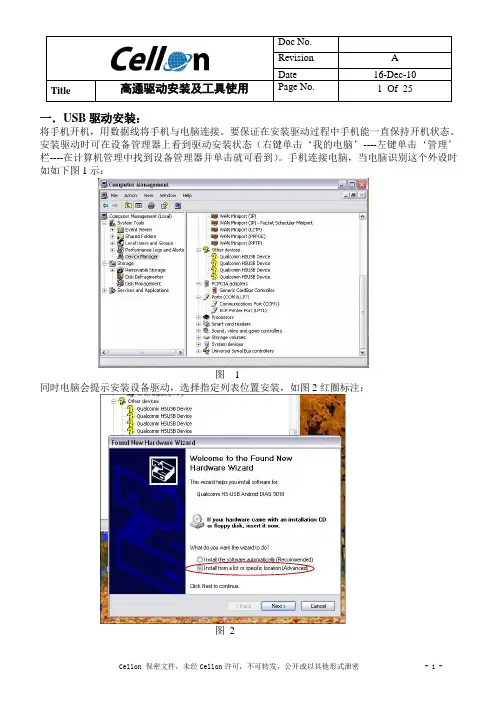
The present document provides information on the USB driver installation when connecting the EPOS2 Positioning Controller to the PC’s USB port for the first time. It covers the respective routines for the following Microsoft® operation systems: • • • Windows 7 Windows Vista Windows XP, SP3
1.2
Trademarks and Brand Names
For easier legibility, registered brand names are listed below and will not be further tagged with their respective trademark. It must be understood that the brands (the below list is not necessarily concluding) are protected by copyright and/or other intellectual property rights even if their legal trademarks are omitted in the later course of this document. The brand name(s) … Windows Vista® Windows® Table 1-2 … is/are a registered trademark(s) of … © Microsoft Corporation, USA-Redmond, WA © Microsoft Corporation, USA-Redmond, WA Brand Names and Trademark Owners
maxon motor control USB Driver Installation
EPOS2 Positioning Controllers Edition April 2010
Positioning Controllers
USB Driver Installation
maxon motor ag Brünigstrasse 220 P.O.Box 263 CH-6072 Sachseln Phone +41 (41) 666 15 00 Fax +41 (41) 666 15 50
1-5
About this Document
1.3
Copyright
© 2010 maxon motor. All rights reserved. The present document – including all parts thereof – is protected by copyright. Any use (including reproduction, translation, microfilming and other means of electronic data processing) beyond the narrow restrictions of the copyright law without the prior approval of maxon motor ag, is not permitted and subject to persecution under the applicable law. maxon motor ag Brünigstrasse 220 P.O.Box 263 CH-6072 Sachseln Switzerland Phone +41 (41) 666 15 00 Fax +41 (41) 666 15 50