JAVA程序设计——猜数字游戏
- 格式:doc
- 大小:49.50 KB
- 文档页数:4
JAVA程序设计——猜数字游戏
1.实训项目的内容
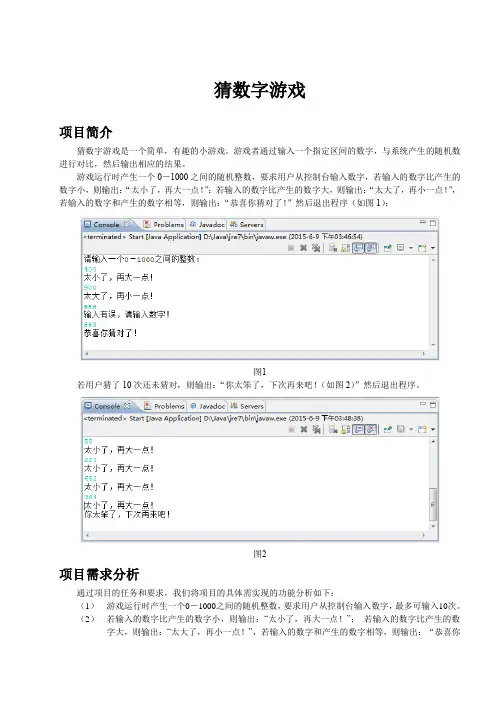
程序运行时自动产生一个1-100之间的随机数,让游戏者来猜这个数。当从键盘接收到游戏者输入的数据后,程序给出的相应的提示信息,游戏者根据提示不断从键盘输入数据,直到猜中。另外程序还提供了“重新开始”和“退出”的功能,可供游戏者重复进行游戏。
2.实训项目要求
1. 建立Java程序,使用键盘输入流提供用户输入所猜数据;
2. 使用Math.random()产生一个100以内的随机数;
3. 使用一个循环从键盘输入数据,并和产生的随机数判断是否大小关系,给出相应提示,循环结束条件为猜中产生的随机数;
4. 判断是否继续游戏;要求用户输入信息;
5. 添加外层循环判断是否继续游戏;
6. 在项目报告中说明键盘输入的基本语句。
7. 在项目报告中写出for语句的执行过成。
8. 在项目报告中分析while与do-while之间的区别和联系
3.实训项目的具体实现(本页不够可以另加页)
import java.awt.*;
import java.awt.event.ActionEvent;
import java.awt.event.ActionListener;
import java.awt.event.KeyEvent;
import java.awt.event.KeyListener;
import java.awt.event.WindowEvent;
import java.awt.event.WindowListener;
public class GuessNumberFrame extends Frame implements
ActionListener,WindowListener,KeyListener{
Button buttonGetNumber,buttonEnter;
Label labelShow;
TextField textInput;
int realNumber;
public GuessNumberFrame() {
super("猜数字游戏");
this.setSize(200,180);
this.setLocation(300,300);
this.setBackground(Color.lightGray);
int width=Toolkit.getDefaultToolkit().getScreenSize().width;
int height=Toolkit.getDefaultToolkit().getScreenSize().height;
this.setLocation((width-300)/2,(height-310)/2);
this.setResizable(false);
this.setLayout(new FlowLayout(1,5,15));
buttonGetNumber=new Button("得到一个随机数");
this.add(buttonGetNumber);
buttonGetNumber.addActionListener(this);
labelShow=new Label("欢迎使用,猜数字游戏:",Label.CENTER);
labelShow.setBackground(Color.orange);
this.add(labelShow);
textInput=new TextField(10);
this.add(textInput);
textInput.addKeyListener(this);
buttonEnter=new Button("确定");
this.add(buttonEnter);
buttonEnter.addActionListener(this);
this.addWindowListener(this);
this.setVisible(true);
}
public void actionPerformed(ActionEvent e) {
if(e.getSource()==buttonGetNumber){
realNumber=(int)(Math.random()*100)+1;
labelShow.setText("请输入你的猜测");
textInput.requestFocus();
}
if(e.getSource()==buttonEnter){
try{
int guess=Integer.parseInt(textInput.getText());
if(guess==realNumber){
labelShow.setText("猜对了");
}
else if (guess>realNumber) {
labelShow.setText("猜大了");
textInput.requestFocus();
}
else if (guess labelShow.setText("猜小了"); textInput.requestFocus(); } }catch (NumberFormatException e1) { labelShow.setText("请重新输入数字"); } } } public void keyPressed(KeyEvent e) { if(e.getKeyCode()==KeyEvent.VK_ENTER){ try{ int guess=Integer.parseInt(textInput.getText()); if(guess==realNumber){ labelShow.setText("猜对了"); } else if (guess>realNumber) { labelShow.setText("猜大了"); textInput.requestFocus(); } else if (guess labelShow.setText("猜小了"); textInput.requestFocus(); } }catch (NumberFormatException e1) { labelShow.setText("请重新输入数字"); } } } public void windowClosing(WindowEvent e) { System.exit(0); } public void windowActivated(WindowEvent e) {} public void windowClosed(WindowEvent e) {} public void windowDeactivated(WindowEvent e) {} public void windowDeiconified(WindowEvent e) {} public void windowIconified(WindowEvent e) {} public void windowOpened(WindowEvent e) {} public void keyReleased(KeyEvent e) {} public void keyTyped(KeyEvent e) {} } class GuessNumberFrame_ex{ public static void main(String[] args){ new GuessNumberFrame(); }