
EZON宜准GPS智能运动手表,G2跑步运动表简易使用说明书
- 格式:pdf
- 大小:3.50 MB
- 文档页数:14

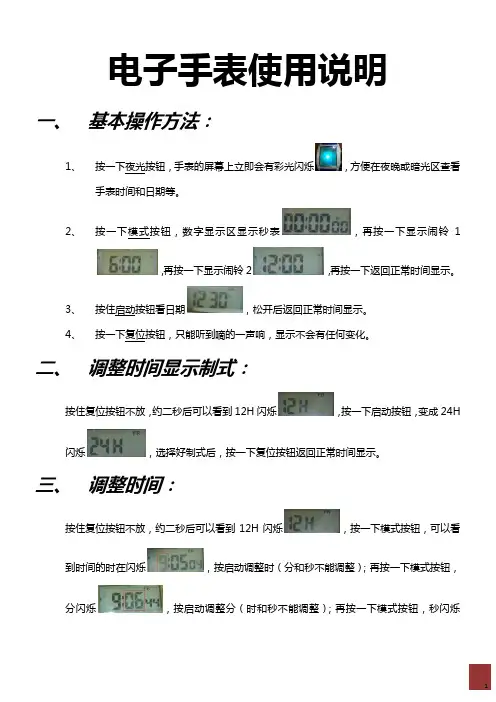
电子手表使用说明一、基本操作方法:1、按一下夜光按钮,手表的屏幕上立即会有彩光闪烁,方便在夜晚或暗光区查看手表时间和日期等。
2、按一下模式按钮,数字显示区显示秒表,再按一下显示闹铃1,再按一下显示闹铃2,再按一下返回正常时间显示。
3、按住启动按钮看日期,松开后返回正常时间显示。
4、按一下复位按钮,只能听到嘀的一声响,显示不会有任何变化。
二、调整时间显示制式:按住复位按钮不放,约二秒后可以看到12H闪烁,按一下启动按钮,变成24H闪烁,选择好制式后,按一下复位按钮返回正常时间显示。
三、调整时间:按住复位按钮不放,约二秒后可以看到12H闪烁,按一下模式按钮,可以看到时间的时在闪烁,按启动调整时(分和秒不能调整);再按一下模式按钮,分闪烁,按启动调整分(时和秒不能调整);再按一下模式按钮,秒闪烁,按启动按钮调整秒(时和分不能调整)。
调整好后,按复位按钮返回正常时间显示。
四、年月日和星期的调整:按住复位按钮不放,约二秒后可以看到12H闪烁,按模式按钮四次,即可看到年在闪烁,按启动按钮调整年份;再按一次模式按钮,可以看到日期的月在闪烁,按启动按纽调整月份;再按一次模式按钮,可以看到日期的日在闪烁,按启动按纽调整日期。
再按一次模式按钮,可以看到星期在闪烁,按启动按钮调整星期(SU 星期日、MO星期一、TU星期二、WE星期三、TH星期四、FR星期五、SA星期六),调整完后按一次复位按钮,返回到正常时间显示。
五、A和P的意思:A是指凌晨的1点钟至中午的12点钟;P是指下午的1点钟(13点)到晚上的0点钟。
如要调到早上6点钟闹铃,则调成A06:00,如果调整为P06:00则是晚上的6点钟闹铃了。
六、全显示:同时按下启动+复位+模式按钮,就出现了数字全显示画面。
此操作主要是检查手表的显示是否有缺点缺画现象,如果全部显示出来了,证明显示是完好的。
七、闹钟设定:按两下模式按钮,显示,按住复位按钮不放,时6闪烁,待调整闹铃时间但不能调分钟,按启动按钮调整闹时;再按模式按钮一次,分钟00闪烁,按启动按钮调整要闹铃的分钟时间(如6:35闹铃,则把分时调整为35),要确定AL1小字下面的小铃铛图标要显示才会响闹。
eTrex Venture(中文)——奇遇使用手册合众思壮隆重推出中文输入功能完善面积计算器人性化界面第一章序言说明书介绍感谢您购买eTrex Venture(奇遇)GPS接收机——我们不停努力的结果,为了可以使您的新型GPS接收机发挥最大的用途,并且了解所有的操作细节,您可以花些时间阅读一下本手册。
手册由四部分组成:一、序言部分二、速查部分介绍了一些Venture的细节、主要操作页面和基本导航方式三手册部分提供了使用Etrex Venture 的所有细节。
四、附录部分包括一些有关附件,说明书,维修向导,主题索引等方面的信息。
标准配置包括主机1个牵引绳索1根中文说明书1本本手册中,所有的按键将使用黑体字,所有的菜单选项将用“”括起来。
GPS介绍全球定位系统(Global Positioning System - GPS)是美国从本世纪70年代开始研制,历时20年,耗资200亿美元,于1994年全面建成,具有在海、陆、空进行全方位实时三维导航与定位能力的新一代卫星导航与定位系统。
经近10年我国测绘等部门的使用表明,GPS以全天候、高精度、=自动化、高效益等显著特点,赢得广大测绘工作者的信赖,并成功地应用于大地测量、工程测量、航空摄影测量、运载工具导航和管制、地壳运动监测、工程变形监测、资源勘察、地球动力学等多种学科,从而给测绘领域带来一场深刻的技术革命。
随着全球定位系统的不断改进,硬、软件的不断完善,应用领域正在不断地开拓,目前已遍及国民经济各种部门,并开始逐步深入人们的日常生活。
GPS系统的特点:1、全球,全天候工作:能为用户提供连续,实时的三维位置,三维速度和精密时间。
不受天气的影响。
2、定位精度高:单机定位精度优于10米,采用差分定位,精度可达厘米级和毫米级。
3、功能多,应用广:随着人们对GPS认识的加深,GPS不仅在测量,导航,测速,测时等方面得到更广泛的应用,而且其应用领域不断扩大GPS发展历程GPS实施计划共分三个阶段:第一阶段为方案论证和初步设计阶段。

eTrex Legend(中文)——传奇使用手册GPS新概念——真正的数字化生活中文输入功能完善超大内存面积计算人性化界面不得用于商业用途目录第一章:序言部分第二章:速查部分1.性能简介2.按键及功能介绍3.电池的安装4.显示屏背景光及对比度设置5.主页页面转换6.地图页面基本情况7.导航页面基本情况8.旅行计算机页面基本情况9.主菜单页面基本情况10.把当前位置标志为航路点11.改变航路点符号12.引导返回到您的起始点第三章:手册部分13.概述14.如何选择“关闭GPS”15.导航方式——概述16.地图页面概述17.地图页面选项概述18.使用移动光标概述19.停止导航20.数据区概述21.设置地图概述22.设置地图操作步骤23.导航页面概述24.设置导航页面操作步骤25.旅行计算机页面概述26.使用主菜单27.存点航路点页面概述28.创建航路点29.设计航路点不得用于商业用途30.查找菜单概述31.查找航路点概述32.查找操作步骤34.查找兴趣点概述37.创建和使用航线概述38.编辑航线39.编辑航路点40/41。
航线使用概述42.航线页面的数据区43.使用航迹概述44.航迹使用操作步骤45.设置页面概述46.单位页面概述47.显示页面概述48.接口页面概述49.系统页面概述50.工具概述51.日历概述52.打猎/捕鱼概述53.面积计算第四章:附录附录A:技术指标附录B:时差表附录C:配件附录D:数据接口附录E:简单故障维修不得用于商业用途第一章序言说明书介绍感谢您购买eTrex Legend(传奇)GPS接收机——我们不停努力的结果,为了可以使您的新型GPS接收机发挥最大的用途,并且了解所有的操作细节,您可以花些时间阅读一下本手册。
手册由四部分组成:一、序言部分二、速查部分介绍了一些Legend的细节、主要操作页面和基本导航方式三手册部分提供了使用Etrex Legend 的所有细节。
四、附录部分包括一些有关附件,说明书,维修向导,主题索引等方面的信息。

4G GPS Tracking Watch Important!Please read below statements:1.Due to external factors all GPS devices have positionerror,so the position provided by this device is just forreference.2.There may be delays caused by telecom operators atcertain circumstance.Our company doesn’t assume totake responsibility of loss causes by this delay.Main features:●4G LTE+3G WCDMA+2G GSM networks●1.54”LCD touch screen(240*240pdi)●GPS positioning,with accuracy of5m outdoors●WIFI positioning,with accuracy of30m indoors●Health management with HR&BP,Pill reminder andStep counting●Remove alarm●Waterproof IP67●Web platform/Phone App/SMS for positions check●SOS call,Voice call,Voice chat●Geo-fence:GPS fence&WIFI fence double care●High pixel camera●Talking clock monitor●Low battery alarm●Ringtone to find people Product specification:Version A bands combination:4G-FDD:Band1/2/3/5/7/84G-TDD:Band38/39/40/413G-WCDMA:Band1/2/5/82G-GSM:Band2/3/5/8Version B bands combination:4G-FDD:Band1/2/3/4/5/7/8/12/20/28A3G-WCDMA:Band1/2/5/82G-GSM:Band2/3/5/8GPS locating time:30sec with cold boot(open sky)29sec with warm boot(open sky)5sec with hot boot(open sky)GPS positioning accuracy:5-15m(open sky)WIFI positioning accuracy:15-100m(Under WIFIrange)Working temperature:-10℃~+80℃Working humidity:5%~95%RHHost size:58.2(L)*40.8(W)*17.2(H)mmHost Net weight:41gBattery:600mAhAccessories:Step1:Get a new SIM card:Get a new Nano SIM card as below instruction.Activate the SIM card’s Cellular data plan andCaller ID display function.(Tracking needs consume data,making phone calls also needs charges.)Step2:Learn your GPS Tracking Watch details:Step3:SIM card installation and power on1).Please make sure the tracking watch is powered offbefore inserting SIM card;2).Open the Sim slot withscrew driver and insert aSIM card into the slotaccording to the direction indiagram below.When incorrect way,the SIM cardwill give an elastic feel.If not,please stop and checkSIM direction.(Warning:Wrong SIM card directionwill cause damage to SIM base for normal use.)3).To ensure waterproof,please install the SIM slot coverwith screws as diagram shows on left.4).Please use the magnet charger to charge the watch.5).Press5to7seconds of the power button to turn it on.The screen will light up.Status instructions:When the screen is lit up,slide down from the top ofthe screen to display the working status of the GPS watch.The instructionsare asfollows:Step4:Install App on Guardian's Mobile PhoneScanning the QR code of the watch interface with theguardian's mobile phone,downloading and installing theGPS positioning App,and then register the accountaccording to the operation guidelines.Step5:Log in to App and set up your watchAfter login,click"+"in the upper right corner to add asmart watch.Scanning Watch InterfaceStep6:Check the GPS watch information✧Click the upper left corner of the APP to select theobject to be monitored,as shown below,you cancheck the positioning location,set up the phone bookremotely,make call or voice chat.✧There are some icons on the screen:Map:Select different map modes to view theposition.Mobile phone:Display the current location of theguardian's mobile phone.Man:Select to view the location of a single watch,or the location of all watches.Chat:The voice conversation between watch andApp can be realizeSecurity zone:Set the safety zone for watch’s user.Multiple security zones can be added.Locate:click the icon,the tracker will upload a newlocation data when the device is online.Footprint:Look at the historical route of any day in90days.Click the Setting icon go set up pageSOS/family number:You can set3numbers forSOS call.Sound Guardian:Type a phone number,and then 1*GPS Tracking watch1*USB charging cable1*Screw driver1*User manual.2*Spare screws1*Sim Card Ejector Pin4G Network GPS position OK3G Network WIFI connection OK2G Network Network signalNo Network Battery levelNo SIM card Alarm clock remindthe watch will call to this phone.Telephone book:15 friends and family numbers can be set so that watch users can quickly dial through the telephone book. Call:You can dial the watch phone directly to communicate.(Speech intercom,no telephone charges)Equipment managemen t: Display relevant information and functions of mobile phones. Healthy:Motion status:The guardian can set the time period of step counting through APP,so as to understand the movement of the guardian.Heart Rate and Blood Pressure:Watches canmeasure the heart rate and blood pressure of a guardianremotelySleep quality:Record the sleep of the guardianduring the specified period of time.Remote picture:Send a photo command at any timeto better know the safety of the wearer.Pill alarm:The watch wearer may be reminded to takemedicine by text or voice to provide better care for them.Video chat:Initiate video chat via App or watch,or groupchat with other guardians.。