
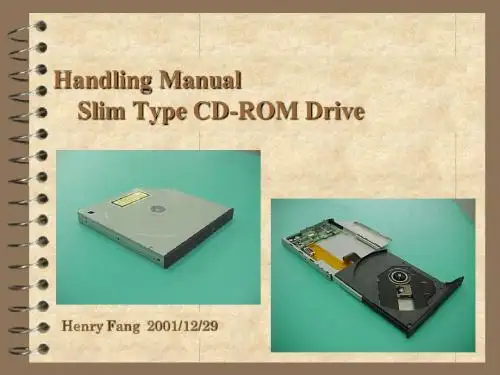
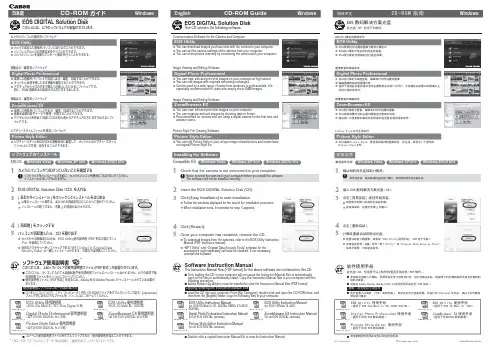
CD-ROM Handling Guide
- 格式:ppt
- 大小:1.21 MB
- 文档页数:26

PN: SP40K36722Printed in China 安全、保修和设置指南简要用户须知ThinkCentre M79/supportLenovo®电子版手册... 让地球更绿色!有关详细的产品信息,请参阅电子版《用户指南》,网址为:/UserManuals打开包装*计算机鼠标*键盘*电源线*文档注:您的计算机可能未附带 Windows®全套恢复光盘或恢复 U 盘。
要恢复 Windows 操作系统,请参阅《用户指南》中的恢复信息。
有关其他信息,请参阅本文稍后的“访问《用户指南》”。
使用计算机之前,请阅读此文档此文档提供有关 Lenovo 计算机的关键性安全和法律法规信息。
安全信息激光合规性声明警告:装有激光产品(如 CD-ROM、DVD 驱动器、光纤设备或发射器)时,请注意以下情况:•请勿卸下外盖。
卸下激光产品的外盖可能会导致遭受危险的激光辐射。
设备中没有可维修的部件。
•进行此处未指定的控制或调整,或执行此处未指定的操作步骤,可能会导致遭受危险的辐射。
危险某些激光产品包含嵌入式 3A 类或 3B 类激光二极管。
请注意以下情况:打开时有激光辐射。
请勿注视光束,请勿直接用光学仪器查看并避免直接暴露于光束之中。
塑料袋声明危险塑料袋有危险。
请将塑料袋放在婴儿和儿童接触不到的位置,以避免窒息危险。
纽扣锂电池声明危险如果电池更换不当会有爆炸危险。
更换钮扣锂电池时,请仅使用相同类型的电池或制造商推荐的同类电池。
该电池中含有锂,如果使用、操作或处理不当,可能会发生爆炸。
请勿:•将电池投入或浸入水中•将电池加热至超过 100°C (212°F)•修理或拆开电池请按照当地的法令法规要求处理电池。
以下声明适用于美国加利福尼亚州的用户。
加利福尼亚州高氯酸盐相关信息:使用二氧化锰锂钮扣电池的产品可能含有高氯酸盐。
高氯酸盐材料 - 可能需要采取特殊的处理方法,请访问/hazardouswaste/perchlorate使用耳塞式耳机、头戴式耳机或耳麦•如果您的计算机既有耳机接口又有音频输出接口,使用耳塞式耳机、头戴式耳机或耳麦时请务必插入耳机接口。

打印HP PageWide Managed Color P75250dn 管理型彩色页宽打印机智能、高效的HP PageWide 彩色页宽复合机可提供经济实惠的彩色文印,实现正常运行时间最大化,并带来强大的安全保护1。
惠普管理型打印机针对管理型环境进行优化,可实现设备月印量更高,需要 的人为干预更少,有助于减少打印和复印成本。
详情请咨询惠普授权经销商。
经济实惠的彩色办公文印• 以超低的单页成本提供客户期望的专业彩色文印品质。
• 将设备设置为“一般办公打印模式”时,打印速度更快,单页成本更低4。
• 提供大容量墨水,单墨盒印量更高,墨盒更换次数更少3。
• 比惠普同档次激光产品更节能,有助于帮助客户降低能源成本2。
运行中断最小化,正常运行时间最大化• 惠普管理型彩色页宽复合机的维护需求比同档次激光复合机更少,最大限度地减少了停机时间5。
• 打印速度比惠普同类激光产品快50%-彩色和黑白打印速度同为70页/分钟6。
• USB 端口可快速识别、格式化和打印Microsoft®Word 和PowerPoint®文件7。
• 惠普管理型彩色页宽复合机拥有丰富的选配件,可满足多种个性化办公需求。
强大的安全功能,可自动检测和阻止攻击• 嵌入式安全功能可防止打印机成为攻击的入口点。
• 只有在设备上输入PIN 码,方可检索打印作业,充分保障机密信息安全。
• 轻松设定配置策略,自动验证并设定设备组中每台惠普打印机的配置8。
• 发现问题时设备会立即发出安全警报,并采取行动阻止潜在的攻击。
以环保为本的设计理念• 相较于惠普同类激光复合机,HP PageWide 管理型彩色页宽复合机的能耗更低,更节能2。
• 获得ISO 5级洁净室认证,非常适用于敏感环境。
• 通过惠普星球伙伴计划免费回收墨水盒,有助于降低对环境的影响9。
• 经过精心设计,将噪音降至最低,即使将设备放在办公桌附近,也不会影响到工作。
ordetails.编号 Y3Z49A 描述 HP PageWide Managed Color P75250dn 管理型彩色页宽打印机耗材及维护套件编号 W1B43A W1B44A W1B45A W1B47A 描述HP PageWide 打印头刮墨片套件HP PageWide 保护液容器HP PageWide 进纸辊套件HP ADF 进纸辊更换套件配件 编号 B5L28A B5L31A E5K48A J8031A J8030A CC487A W1B49A P1V16A P1V17A P1V18A P1V19A 描述 惠普内置USB 端口惠普对外接口HP 1GB x32 144针(800 Mhz)DDR3 SODIMM HP Jetdirect 2900nw 打印服务器HP Jetdirect 3000w NFC/无线配件惠普激光复合机模拟传真配件500HP 128GB 内存模块HP PageWide Managed 550页纸盒HP PageWide Managed 550页纸盒与支架HP PageWide Managed 3x550页纸盒与支架HP PageWide Managed 4000页大容量纸盒与支架惠普金牌服务 编号 U9VX9E U9VY1E U9VY2E U9VY4E U9VY6E U9VY8E U9VY9PE U9VZ1PE U9VZ3PE 描述 惠普3年下一个工作日支持和硬盘不返还服务惠普5年下一个工作日支持和硬盘不返还服务惠普3年4小时响应9x5支持和硬盘不返还服务惠普5年4小时响应9x5支持和硬盘不返还服务惠普3年部件更换服务(仅限管理型部件)惠普5年部件更换服务(仅限管理型部件)惠普1年保修期后下一工作日支持和硬盘不返还服务惠普1年保修期后4小时响应9x5支持和硬盘不返还服务惠普1年保修期后部件更换服务(仅限管理型部件)使用惠普金牌服务保护您的投资。

T o enjoy fully all the features and functions of your product, please read this owner’s manual carefully and completely.OWNER’S MANUAL Blu-ray/DVD WriterENGLISHWH16NS40iii CAUTION :CLASS 3B VISIBLE AND INVISIBLE LASER RADIATION WHEN OPEN.AVOID EXPOSURE TO THE BEAM.ADVARSEL :KLASSE 3B SYNLIG OG USYNLIG LASERSTRÅLING VED ÅBNING.UNDGÅ UDSÆTTELSE FOR STRÅLING.ADVARSEL :KLASSE 3B SYNLING OG USYNLIG LASERSTRÅLING NÅRDEKSEL ÅPENS. UNNGÅ EKSPONERING FOR STRÅLEN.VARNING :KLASSE 3B SYNLING OCH OSYNLIG LASERSTRÅLNING NÄR DENNALDEL ÄR ÖPPNAD. STRÅLEN ÄR FARLIG.VARO! :KURSSI 3B NÄKYVÄ JA NÄKYMÄTÖN AVATTAESSA OLETALTTIINA LASERSÄTEILYLLE. ÄLÄ KATSO SÄTEESEN.The appliance is not intended for use by young children or infirm persons without supervision.ContentsFeatures . . . . . . . . . . . . . . . . . . . . . . . . . . . . . . . . . . . . . . . . . . . . . . . . . . . . . . . . . . .1 Important Precautions . . . . . . . . . . . . . . . . . . . . . . . . . . . . . . . . . . . . . . . . . . . . . . . .2 System Environment . . . . . . . . . . . . . . . . . . . . . . . . . . . . . . . . . . . . . . . . . . . . . . . . .3 Location and Function of Controls . . . . . . . . . . . . . . . . . . . . . . . . . . . . . . . . . . . . . .4 Installing the Drive . . . . . . . . . . . . . . . . . . . . . . . . . . . . . . . . . . . . . . . . . . . . . . . . . .5 Device Drivers . . . . . . . . . . . . . . . . . . . . . . . . . . . . . . . . . . . . . . . . . . . . . . . . . . . . . .7 How to Use the Discs . . . . . . . . . . . . . . . . . . . . . . . . . . . . . . . . . . . . . . . . . . . . . . . .8 Troubleshooting . . . . . . . . . . . . . . . . . . . . . . . . . . . . . . . . . . . . . . . . . . . . . . . . . . . .9 Specifications . . . . . . . . . . . . . . . . . . . . . . . . . . . . . . . . . . . . . . . . . . . . . . . . . . . . .10 Features• Serial ATA interface.• Power tray loading and ejection of disc. (The disc can also be ejected manually.)• CD-R/RW, DVD-R/RW/+R/RW/+/-R DL, DVD-RAM, BD-R(SL/DL/XL(3 Layer)/ XL(4 Layer))/ RE(SL/DL/XL(3 Layer)), BD-R (SL LTH)read and write compatible, CD Family, DVD-ROM and BD-ROM read compatible.• Supports Regional Playback Control Phase II for DVD-Video.• Automatic buffer underrun error prevention technology.• Supports BD 3D movie play.1Important PrecautionsFollow these precautions when handling the drive or discs.• Please take notice that the manufacturer of this equipment does not offer any warranty against data loss due to inappropriate installation or handling, or direct or indirect damages.• Please take notice that the manufacturer will bear no responsibility for direct or indirect damages caused by the use of this product or its malfunction.• Please take notice that the manufacturer will bear no responsibility for damage to data caused by this product.• Please backup (copy) all important data as a protection against data loss.• Avoid placing the drive in a location subject to:- high humidity, high temperature, excessive dust, mechanical vibration,direct sunlightWe recommend using the drive in a horizontal or vertical position.Do not use it in tilted position.• Don’t move the drive suddenly from a cold place to a warm one or raise the room temperature suddenly. Condensation may occur, causing abnormal operation.• Make sure to remove the disc before moving the drive. The disc may become damaged, causing data loss.• Be careful to prevent foreign objects, such as liquids or metal, from entering the drive.• Don’t interrupt the electric power while the drive is operating.• Please pay attention to handling Electrostatic Sensitive Devices, you may use anti-static products such as wrist straps, heel straps, mats to protect your body from electrostatic.23Operating EnvironmentThis unit can be operated in the system environment explained here.System Environmentmanufacturing quality. Maximum write (or read) speed depends on system environments.* There may be some cases when motion picture playback is not smooth depending on bit rate.* Under Windows 8 operating system, a specific mainboard with nVidia GeForce 7025 Chipset may cause an abnormal operation.* Please visit to learn more about the M-DISC .• Playing Blu-ray Disc Movies *NOTICE*Due to copyright protection features, certain requirements must be met in order to playback BD movies on a computer. When using digital video connections, the monitor and graphics card must support High-bandwidth Digital Content Protection (HDCP). Note that most monitors and graphics cards currently don’t support HDCP .But, most High Definition TVs and multimedia monitors do support HDCP . Refer to the PC or graphic card maker’s web site to see if your card supports HDCP .*Graphic Cards with following GPUs (Graphic Processing Unit) are recommended.- Blu-ray Disc playback: Intel G45, ATA radeon HD 2400, nVdia GeForce 7600GT or above.- 3D playback: Intel G45, ATA radeon HD2400, nVdia GeForce 8800GT or above.*When using ATI Radeon HD 1000 Series Graphic Card, some BLURAY movie title can not be played on Windows7 normally. It caused by giving up supporting the device driver of this Graphic Card by ATI Radeon.For more information, Please contact to customer service center or website of ATI Radeon .Graphic card driver shall meet AACS compliance criteria. Please consult your graphics card vendor for proper driver solution.HDCP (High Bandwidth Digital Content Protection): Required to view pre-recoded Blu-ray Disc which is copy protected.4Location and Function of ControlsFront Panel 1. SATA Power Connector (15 pin)2. SATA Data Connector (7 pin)Rear Panel1.Disc Tray2.Emergency Eject Hole3.Drive activity indicatorThe LED is used to indicate the operation ofWriter.4.Eject Button❏ Occasionally CD-R and CD-RW discs written by a CD-R/RW drive cannot be read by otherCD drives. These unreadable discs may need to be read using the CD-R/RW drive they were created with. The disc written using the CD-R/RW drive might not be readable by CD-ROMs other than Multi-read compatible (UDF compatible) CD-ROMs.Multiread compatible (UDF compatible) CD-ROMs are CD-ROMs that can read lowreflectance and support Packet Write.❏ Please note: Certain software (i.e. particularly those including Video playback) may requirea considerably increased specification PC to give acceptable results. While this Blu-ray Disc Rewriter can read DVD-video or BD-MV(BD-ROM) discs, decoding them todisplay on your pc’s monitor requires separate MPEG, H.264 or VC-1 decoding that is done by separate hardware (either an MPEG, H.264 or VC-1 decoder card or MPEG, H.264 or VC-1 decoding done by your video card), or separate software that you install to doMPEG, H.264 or VC-1 decoding. For further details, refer to the documentation that comes with MPEG, H.264 or VC-1 software.5Before installing the drive, please note the following points.■You will need the following:• A screw driver of a suitable size to fit the securing screws for the drive unit.• The manual for the computer, so you can find the mounting positions for the SATA cable.■Turn off all peripheral appliances of the computer and the computer itself, anddisconnect their power cords from the wall sockets.■Discharge any static electricity on your person by touching the computer covers, etc.Removing the Computer CoverMake sure all peripheral devices of the computer and the computer itself are turned off,and then remove the cover. Refer to the manual for the computer for details about removing the cover.NOTE : There may be sharp edges inside the computer so take care to avoid injury.Mounting the Drive1. Remove the a 51/4″ drive bay panel from the computer. Refer to the manual for the computer for details.2. Insert the drive unit into the bay. Do not apply excessive pressure to the cables inside the computer.3.Secure the drive with the screws. If there is not much space behind the drive,NOTE : This is a general installation guide. If your PC hardware appears different, please consult your hardware manual for installing peripheral devices.Installing the Drive6PC ConnectionThe Writer connects to the motherboard of the host computer using a SATA interfaceConnect the power cable so the projection of the cable connector side to come to the left side. Be careful not to connect upside down.NOTE :Improper connection may damage the drive and void the warranty. Generally, the power connector can only fit one way.Connecting the SATAData Cable Connect the data cable. Be careful not to connect upside down.Connect to the SATA connectoron the PC's Motherboard.Connect to the powerconnector of the PC.Device DriversWhen using Windows XP SP3, Vista, Windows 7 and Windows 8/8.1, no special device driver is required. Your system, upon Power On and bootup after installing and connecting the new Blu-ray Disc Rewriter will recognize and load native software drivers automatically.For Windows Users■In order to ensure normal drive operation, please check the following:•The drive is displayed inWindows XP: [Control Panel]-([Performance and Maintenance])-[System]-[Hardware]-[Device Manager]-[DVD/CD-ROM-drives]■If the drive is not recognized by your computer, please check the following items.indicator is displayed on the IDE ATA/ATAPI controllers in [Control•board’s manufacturer and get the appropriate IDE controller driver.■Run Add New Hardware in Control Panel to let PC search again for new device.Included SoftwareRetail versions of this drive come with CD/DVD/BD authoring Software.Before installing, please uninstall any previous CD/DVD/BD burning software you may have loaded on your PC in order to prevent possible compatibility issues. Once you have installed the application software, you may (if you wish) begin to reinstall previous software, taking note for errors. Check for software updates for all of your writing software.7How to Use the DiscsDon’t attach any stickers or labels to discs, It could cause read/write errors and data loss.use damaged, cracked orDO NOT use non-standard discs. NON-standard discs may not play or store data properly.Emergency EjectThis drive has a feature that allows the disc to be ejected manually if this becomes necessary such as failure of the drive or a power outage.NOTE:Don’t use this feature except in an emergency.1)Turn the power to OFF.2)Poke a fine-tipped object (such as a straightened heavy duty paper clip) into thesmall hole above the eject button. The front door will pop open and the disk tray will come partway out.This feature is a last measure to be or spring clamp to pull it out.8TroubleshootingBefore Requesting ServiceBefore calling for service, check this list.•The drive doesn’t have power.•Is the power supply cable from the host computer plugged in?•Is the Power Connector to the drive securely attached?•The system doesn’t start.•Are the power and SATA cables to the PC correctly connected?•Is the total length of the SATA cable 20 inches or less?•Is each connector completely attached?Other connections may have been knocked lose while installing the drive.•Cannot Read or Write Discs.•Is the condition of everything else in the system (CPU, hard disc, and others) as it should be? (See system environment.)•Does the CD, DVD or BD disc have dirt or scratches?•Did a screen saver or other application operate while writing to the disc?•Is there enough free space on the CD, DVD and BD disc?•Does writing fail even using the simulation test for CD or DVD disc?•Is the disc loaded in the drive with the read/write surface facing the right direction?(label up)•Is the drive installed in the correct orientation?•Was the drive or disc moved from a low temperature environment to a high temper-ature environment? (There is a possibility of condensation on the lens in the drive or on the surface of the disc.)When you call for service, be prepared to give as much information as possible of your system, environment, and the specific problem. (What happened? When? How long? What was going on? Were there any error messages displayed? etc.)Please Note: Since this product supports Regional Playback Control Phase II forDVD-Video with CSS, a certain MPEG decoder card or Software without regional code setting may cause this drive not to read DVD-Video with CSS discs. This Drive enables you to change the regional code up to 5 times.9SpecificationsBD-RE: The disc of version 1.0 is not supported.There might be some cases when this drive can not satisfy the best performance depending on the conditions of the disc, the drive, and the recording format.* The drive’s appearance and specifications may change without prior notice.1011Caution!The disc rotates at high speed in the drive unit.Use of worn, damaged, or non-standard discs can adversely affect the drive and cause the disc to shatter or crush while in use.Disc crush can only occur when you use a damaged disc in the drive. It is an extremely rare occurrence, but there are steps which can be taken to prevent it. Always check your discs before inserting them into the drive.1. Take care not to use worn, cracked, damaged,warped or poor quality discs, as this maycause damage to your drive.2. Check the clear plastic on the center of thedisc, cracks here are the main cause of disccrush.3. Do not play discs which are a non-standard(I.e. non-circular)shape, such as heart shapeddiscs, or discs in the shape of a businesscard.How can you keep your discs from becoming damaged?1. When not in use, remove discs from the drive.2. Keep discs in the packaging supplied withthem and out of direct sunlight and away from heat sources.Excessive vibration or a sudden jolt to the drive during operation may cause a malfunction.Avoid exposing the drive to sudden changes in temperature as it may cause condensation to collect inside the drive.Please visit and install the automaticfirmware download program, “LG ODD Online F/W update.”This program will automatically check for new firmwarereleases and download them. It is also included on thesoftware discs that accompany our drives.©2014 Made by LG Electronics.。