路由器端口的基本配置
- 格式:docx
- 大小:643.22 KB
- 文档页数:51
1
路由器端口的基本配置
【实验名称】
路由器端口的基本配置。
【实验目的】
掌握路由器端口的常用配置参数。
【背景描述】
你在一家网络工程公司就职,负责组建一个省级广域网络。现项目经理要求你根据实际 网络需求,对路由器的端口配置基本的参数。
【技术原理】
路由器接口 Fastethernet 接口默认情况下是 10M/100M 自适应端口,双工模式也为自适应,并且在默认情况下路由器物理端口处于关闭状态。
路由器提供广域网接口(serial 高速同步串口),使用 V.35 线缆连接广域网接口链路。在广域网连接时一端为 DCE(数据通信设备),一端为 DTE(数据终端设备)。要求必须在
DCE 端配置时钟频率(clock rate)才能保证链路的连通。
在路由器的物理端口可以灵活配置带宽,但最大值为该端口的实际物理带宽。
【实现功能】
给路由器接口配置 IP 地址,并在 DCE 端配置时钟频率,限制端口带宽。
【实验设备】
路由器(两台)、V.35 线缆(1 条) 2 !配置带宽时,以 K 为单位 !开启该端口,使端口转发数据 Ra(config-if)#no shutdown !配置端口的带宽速率为 512KB Ra(config-if)#bandwidth 512 !在 DCE 接口上配置时钟频率 64000 Ra(config-if)#clcok rate 64000 Ra(config-if)#ip address 1.1.1.1 255.255.255.0 !配置端口的 IP 地址 !进行 s1/2 的端口模式 Red-Giant>enable
Red-Giant # configure terminal
Red-Giant(config)#hostname Ra
Ra(config)#interface serial 1/2
!配置端口的 IP 地址 Rb(config-if)#ip address 1.1.1.2 255.255.255.0 !进行 s1/2 的端口模式 Red-Giant>enable
Red-Giant # configure terminal
Red-Giant(config)#hostname Rb
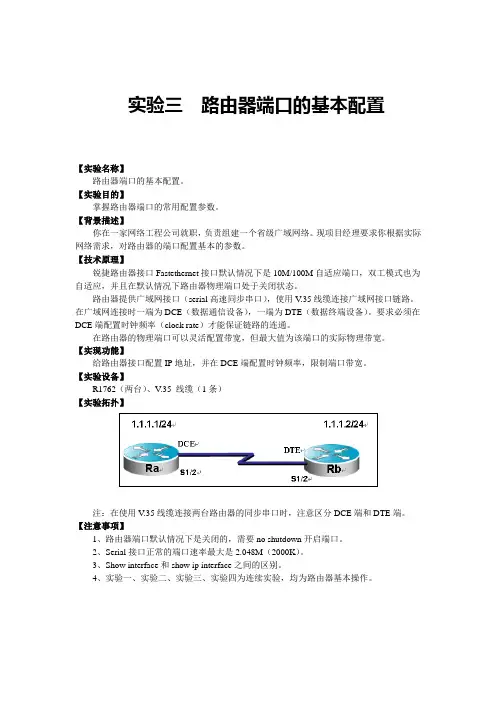
Rb(config)#interface serial 1/2 【实验拓扑】
图 13
注:在使用 V.35 线缆连接两台路由器的同步串口时,注意区分 DCE 端和 DTE 端。
【实验步骤】
步骤 1. 路由器 A 端口参数的配置。
步骤 2. 路由器 B 端口参数的配置。 3 Ra#show interface serial 1/2 !查看 RA serial 1/2 接口的状态
Ra#show ip interface serial 1/2 !查看该端口的 IP 协议相关属性
步骤 3. 查看路由器端口配置的参数。
serial 1/2 is UP , line protocol is UP !接口的状态,是否为 UP
Hardware is PQ2 SCC HDLC CONTROLLER serial
Interface address is: 1.1.1.1/24 !接口 IP 地址的配置
MTU 1500 bytes, BW 512 Kbit !查看接口的带宽为 512KB
Encapsulation protocol is HDLC, loopback not set
Keepalive interval is 10 sec , set
Carrier delay is 2 sec
RXload is 1 ,Txload is 1
Queueing strategy: WFQ
5 minutes input rate 17 bits/sec, 0 packets/sec
5 minutes output rate 17 bits/sec, 0 packets/sec
511 packets input, 11242 bytes, 0 no buffer
Received 511 broadcasts, 0 runts, 0 giants
0 input errors, 0 CRC, 0 frame, 0 overrun, 0 abort
511 packets output, 11242 bytes, 0 underruns
0 output errors, 0 collisions, 1 interface resets
1 carrier transitions
V35 DCE cable !该接口为 DCE 端
DCD=up DSR=up DTR=up RTS=up CTS=up
serial 1/2
IP interface state is: UP !接口状态IP interface type is: POINTOPOINT !开启该端口,使端口转发数据 Rb(config-if)#no shutdown !配置端口的带宽速率为 512KB Rb(config-if)#bandwidth 512 4 Rb#show interface serial 1/2 !查看路由器 B serial1/2 接口的状态 IP interface MTU is: 1500
IP address is: 1.1.1.1/24(primary) !接口 IP 地址信息
IP address negotiate is: OFF
Forward direct-boardcast is: ON
ICMP mask reply is: ON
Send ICMP redirect is: ON
Send ICMP unreachabled is: ON
DHCP relay is: OFF
Fast switch is: ON
Route horizontal-split is: ON
Help address is: 0.0.0.0
Proxy ARP is: ON
Outgoing access list is not set.
Inbound access list is not set.
serial 1/2 is UP , line protocol is UP !接口的状态,是否为 UP
Hardware is PQ2 SCC HDLC CONTROLLER serial
Interface address is: 1.1.1.2/24 !接口 IP 地址的配置MTU 1500 bytes, BW 512 Kbit !接口的带宽为 512K
Encapsulation protocol is HDLC, loopback not set
Keepalive interval is 10 sec , set
Carrier delay is 2 sec
RXload is 1 ,Txload is 1
Queueing strategy: WFQ
5 minutes input rate 17 bits/sec, 0 packets/sec
5 minutes output rate 17 bits/sec, 0 packets/sec
511 packets input, 11242 bytes, 0 no buffer
Received 511 broadcasts, 0 runts, 0 giants
0 input errors, 0 CRC, 0 frame, 0 overrun, 0 abort 5 Rb#show ip interface serial 1/2 !查看该端口的IP 协议相关属性
Ra#ping 1.1.1.2 !在 RA ping 对端RBserial 1/2 接口的 IP 511 packets output, 11242 bytes, 0 underruns
0 output errors, 0 collisions, 1 interface resets
1 carrier transitions
V35 DTE cable !该接口为 DCE 端
DCD=up DSR=up DTR=up RTS=up CTS=up
serial 1/2
IP interface state is: UP !接口状态IP interface type is: POINTOPOINT
IP interface MTU is: 1500
IP address is: 1.1.1.2/24(primary) !接口 IP 地址信息
IP address negotiate is: OFF
Forward direct-boardcast is: ON
ICMP mask reply is: ON
Send ICMP redirect is: ON
Send ICMP unreachabled is: ON
DHCP relay is: OFF
Fast switch is: ON
Route horizontal-split is: ON
Help address is: 0.0.0.0
Proxy ARP is: ON
Outgoing access list is not set.
Inbound access list is not set.
步骤 4. 验证配置。
Sending 5, 100-byte ICMP Echoes to 1.1.1.2, timeout is 2 seconds:
< press Ctrl+C to break >