
真三国无双7with猛将传张颌猛兽爱护战视频
- 格式:pdf
- 大小:25.64 KB
- 文档页数:1

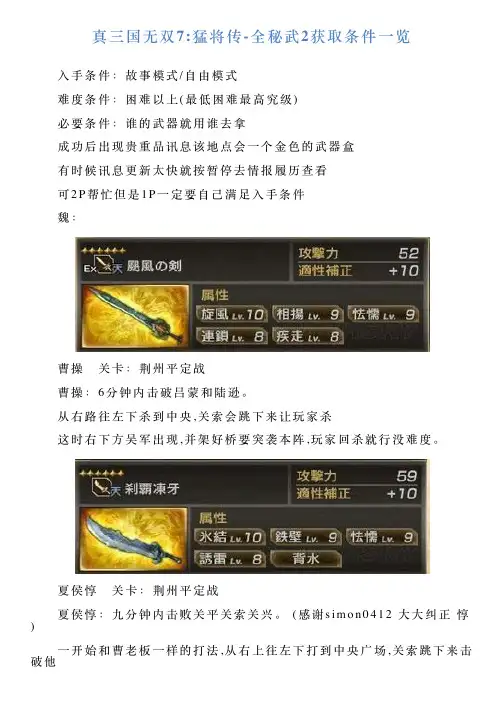
真三国⽆双7:猛将传-全秘武2获取条件⼀览 ⼊⼿条件:故事模式/⾃由模式 难度条件:困难以上(最低困难最⾼究级) 必要条件:谁的武器就⽤谁去拿 成功后出现贵重品讯息该地点会⼀个⾦⾊的武器盒 有时候讯息更新太快就按暂停去情报履历查看 可2P帮忙但是1P⼀定要⾃⼰满⾜⼊⼿条件 魏: 曹操 关卡:荆州平定战 曹操:6分钟内击破吕蒙和陆逊。
从右路往左下杀到中央,关索会跳下来让玩家杀 这时右下⽅吴军出现,并架好桥要突袭本阵,玩家回杀就⾏没难度。
夏侯惇 关卡:荆州平定战 夏侯惇:九分钟内击败关平关索关兴。
(感谢s i m o n0412⼤⼤纠正惇) ⼀开始和曹⽼板⼀样的打法,从右上往左下打到中央⼴场,关索跳下来击破他 这时东吴援军赶到回右边击破保本阵,再回到中央爬上梯⼦,关平就在上⾯打败他后。
接下来玩家可以到,处清武将不久会出现关兴出现的讯息⼈出现在左上⽅打倒他后秘武。
郭嘉 关卡:定军⼭救出战 郭嘉:传令发现弩炮部队后3分钟内击破张苞。
⾸先先把定军⼭本阵附近的敌⼈全部打败之后⾛地图右边的道路, 传令出来后到中央⾼台去击破张苞。
曹丕 关卡:官渡决战 曹丕:10分钟内击破甄姬。
⾸先先将南寨附近的敌⼈清⼀清,⾛左边路线跟着流程⾛ 找到乌巢压制后不久,甄姬就会主动出击打玩家。
夏侯渊 关卡:梓潼之战 夏侯渊:黄忠⼸箭齐射事件后5分钟内击破严颜和黄忠。
⼀开始将本阵附近敌将清光,接着去地图左边偷袭兵粮库将兵粮库⾥的张苞击破后 引发黄忠齐射事件,接着从兵粮库另外⼀个门出去把严颜和黄忠击破。
于禁关卡:荆州平定战 于禁:8分钟内使⽤梯⼦并击破赵云和张飞 快速杀到中央⼴场击破跳下来的关索后架好梯⼦爬上去将关平击破。
赵云(地图西北⽅)张飞(地图西南⽅)出现击破即可。
此关敌⽅⽆双武将⼤多皆阳炎化打起来有⼩⼩难度,不过等级⾼武器好基本上没什么问题。
秘武1-关卡:樊城防卫战 于禁:战⽃开始后9分钟内使魏军的⽔计成功 ⼀开始先到外⾯绕⼀下顺便杀个12只蜀将。

力量型蜀:関羽張飛馬超関平魏:許储夏侯淵張遼庞徳呉:孫権黄蓋孫策他:呂布董卓孟獲祝融戦1:慶次五右衛門謙信くのいち蘭丸戦2:義元忠勝家康長政誾千代義弘速度型蜀:姜維魏延庞統星彩魏:夏侯惇曹操司馬懿張颌甄姫呉:太史慈孫尚香孫堅呂蒙甘寧小喬周泰凌統他:左慈戦1:光秀政宗濃姫戦2:稲姫三成左近ねね小太郎技术型蜀:趙雲諸葛亮劉備黄忠月英魏:典韋徐晃曹仁曹丕呉:周瑜陸遜大喬他:貂蝉袁紹張角戦1:幸村信長お市阿国孫市信玄半蔵戦2:秀吉兼続武蔵全角色出现方法如下:蜀赵云初期角色关羽蜀七章过关张飞蜀七章过关诸葛亮蜀七章过关刘备蜀终章过关马超战国2章外传,在救出全部民众且马超生存的情况下过关。
黄忠战国1章过关姜维蜀2章外传,完成引诱东西两方敌将的计策且姜维生存的情况下过关。
魏延蜀3章过关庞统魏4章过关月英蜀2章过关关平战国1章过关星彩蜀初期角色吴周瑜吴1章过关陆逊战国3章外传,在我方武将无败走的情况下与陆逊合流,并且过关时他依然生存。
太史慈吴2章过关孙尚香吴5章过关孙坚吴7章过关孙权吴7章过关吕蒙吴3章过关甘宁魏6章过关黄盖魏5章过关孙策吴初期角色大乔吴5章外传,5分钟内救出大乔,且过关时她依然生存。
小乔战国3章过关周泰吴6章过关凌统战国5章过关魏夏侯淳魏4章过关典韦魏7章过关许禇魏1章过关曹操魏7章过关夏侯渊魏4章过关张辽魏初期角色司马懿战国6章外传,在铁鼠和仙狸到达目的地前击破,破掉司马懿的所有作战,并且由玩家亲自击破司马懿。
徐晃魏初期角色张郃魏2章外传,成功说服张郃,并且在他生存的情况下过关。
甄姬魏6章外传,10分钟以内将6个妖术兵长和假曹丕消灭,并在甄姬生存的情况下过关。
假曹丕的出现条件是甄姬来到地图右上方。
曹仁战国5章外传,在2分钟以内救出武田、上杉军,并且亲自击破曹仁。
庞德蜀3章外传,救出3队以上的北条军,之后亲自击破庞德。
他吕布全势力终章外传击败吕布令其心服,注意与吕布开战后不能逃走,不然不会让吕布心服。

真三国无双贵重物品打法mht————————————————————————————————作者:————————————————————————————————日期:【玉】(需要难度在“难”或“修罗”才才可以取得)炎玉:连续攻击时追加火属性战场:【虎牢关之战:联合军】条件:2分钟内完成200人斩。
就会出现“贵重物品”发现的提示。
由于时间紧,建议多装攻击性道具。
冰玉:连续攻击时追加冰属性战场:【官渡之战:袁绍军】条件:战斗开始后,在关羽撤退的剧情出现之前,击败曹丕,就会出现“贵重物品”发现的提示。
建议骑马过去。
阴玉:连续攻击时追加阴属性,有秒杀的作用,但会消耗无双值。
战场:【五丈原之战:魏军】条件:开始的时候直奔姜维,要在诸葛亮去世前完成。
之后就会出现“贵重物品”发现的提示。
击败他后最好回去把本阵内敌人清除一下,否则主将司马懿有可能会战死。
阳玉:连续攻击时就算对方防御也会减少体力关卡:【五丈原之战:蜀军】条件:战斗开始后,5分钟内击败许楮、曹仁和甄姬,顺序不限。
完成后就会出现“贵重物品”发现的提示。
由于本关的场地范围较大,所以还是建议骑马战斗。
【镫】(选择任何难度均可取得)的庐镫:战斗开始时,直接以骑着名马“的庐”的状态开始。
并可以增加运气是想得到好武器道具必备的。
战场:【成都之战:蜀军】条件:在庞统中埋伏之前击败张任(民兵不能杀),就会出现“贵重物品”发现的提示,最主要是抓紧时间。
飞电镫:战斗开始时,直接以骑着名马“爪黄飞电”的状态开始。
并可以增加功勋,是练功必备的。
战场:【官渡之战:魏军】条件:开始后在5分钟内击败颜良、文丑这两名武将后,就会出现“贵重物品”发现的提示,最主要是抓紧时间。
赤兔镫:战斗开始时,直接以骑着名马“赤兔马”的状态开始。
主要的功能是速度极快,很多道具都要用这个来拿。
战场:【常山之战:袁绍军】条件:在3分钟内击败关羽、张飞和刘备即可。
完成后就会出现“贵重物品”发现的提示,最主要是抓紧时间。

Quick Start GuideO8D7MWelcomeThank you for purchasing this network camera!This owner's manual is designed to be a reference tool for your system.Please read this manual carefully before operating the unit and retain it for future reference. Should you require any technical assistance, contact Speco Technologies Tech Support at1-800-645-5516Important Safeguards and Warning1. Electrical safetyAll installation and operation here should conform to local electrical safety codes.Use a certified/listed 12VDC Class 2 power supply only.Please note: Do not connect two power supplying sources to the device at the same time; it may result in device damage! The product must be grounded to reduce the risk of electric shock.Improper handling and/or installation could run the risk of fire or electrical shock.2. EnvironmentHeavy stress, violent vibration or exposure to water is not allowed during transportation, storage and installation.This product should be installed in a cool, dry place away from direct sunlight and heat sources.Do not install the product in extreme temperature conditions.Do not expose the camera to electromagnetic radiation. Otherwise it may result in CMOS sensor failure.Do not block any ventilation openings.Do not allow water and liquid intrusion into the camera.3. Operation and Daily MaintenancePlease shut down the device and then unplug the power cable before you begin any maintenance work.Do not touch the CMOS sensor optic component. You can use a blower to clean the dust on the lens surface.Always use the dry soft cloth to clean the device. If there is too much dust, use a clothWarningStatementThis camera should be installed by qualified personnel only.All the examination and repair work should be done by qualified personnel.Any unauthorized changes or modifications could void the warranty..This guide is for reference only.Product, manuals and specifications may be modified without prior notice. Speco Technologies reserves the right to modify these without notice and without incurring any obligation.Speco Technologies is not liable for any loss caused by improper operation.Note:Before installation, check the package and make sure that all components are included.Contact your rep or Speco customer service department immediately if something is broken or missing in the package .dampened with a small quantity of neutral detergent. Finally use the dry cloth to clean the device.Please use a professional optical cleaning method to clean the enclosure. Improper enclosure cleaning (such as using cloth) may result in poor IR functionality and/or IR reflection. The grounding holes of the product are recommended to be grounded to further enhance the reliability of the camera.Dome cover is an optical device, please don't touch or wipe cover surface directly during installation and use, please refer to the following methods if dirt is found:Stained with dirt: Use oil-free soft brush or hair dryer to remove it gently.Stained with grease or fingerprint: Use oil-free cotton cloth or paper soaked with alcohol or detergent to wipe from the lens center outward. Change the cloth and wipe severaltimes if it is not clean enough.91011R E SE TT FL I N KD C INC V BS12 MIC input (3.5mm)3 Line out (3.5mm)4 Analog output (BNC)5 Alarm input/output6 DC power connector7 Lock screw8 Microphone9 Micro SD card slot10 Reset hole11 CVBS/DC IN port for testingEthernet connector* 1 It is recommended to install the security cap for outdoor installations .* 2 DC 12V power supply is not required if a PoE switch or injector is used to power the camera.► Connecting Network Cable① Loosen the nut from the main element.② Run the network cable (without RJ 45 connector) through both elements. Then crimp the cable with RJ 45 connector .③ Connect the cable to the hermetic connector . Then tighten the nut and the main cover .1* Before you start, please make sure that the wall or ceiling is strong enough to withstand three times the weight of the camera.Open the upper cover of the junction box.①Then install junction box onto the wall by using the screws provided.Upper CoverRoute the cables through the cable hole (take side conduit cabling ②for example). Then reinstall the upper cover to the junction box.③ Loosen the screws to open the lower dome and then loosen the lock screw to remove the mounting base. Lock ScrewLower DomeMounting Base④ cables and fix the dome to the mounting base with the lock screw.Install the mounting base onto the junction box. Then connect the⑥Install the lower dome back to the camera and fix it with the screws.● OperationIP Scanner can search for the device on the local network.① Make sure that the camera and the PC are connected to the same local network. The camera is set to DHCP by default.②Install IP Scanner from the CD and run it after installation.Pan 0°~360°⑤Three-axis Adjustment-Before adjustment, preview the image of the camera on a monitor and then adjust the camera according to the figurebelow to get an optimum angle.5C:F2:07:24:68:9A③ In the device list, you can view the IP address, model number, and MAC address of each device. Select the applicable device and double click to open up the web viewer. You can also manually enter the IPaddress in the address bar of the web browser.The login interface is shown above. Default user name is admin andpassword is 1234. After logging in, follow directions to installapplicable plugins.。