matlab课程设计简单计算器的设计
- 格式:doc
- 大小:123.50 KB
- 文档页数:12
matlab课程设计报告题目简易计算器的设计学院电子信息工程学院专业电子信息学生姓名与学号指导教师一、选题目的及意义GUI的广泛应用就是当今计算机发展的重大成就之一,它极大地方便了非专业用户的使用。
人们从此不再需要死记硬背大量的命令,取而代之的就是可以通过窗口、菜单、按键等方式来方便地进行操作,而在matlab有很简单的gui设计工具,我们可以通过这个工具轻松地构建我们想要的程序,从而实现与用户的信息交互。
本次课程设计就是使用了matlab中的guide生成了简单的计算器程序。
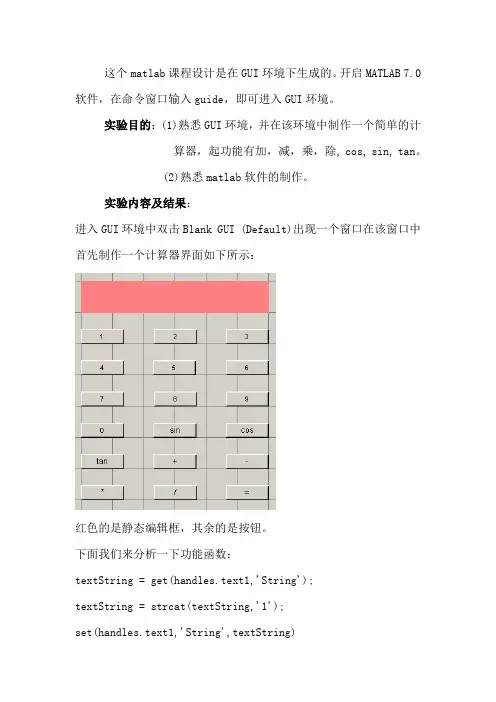
二、源代码function varargout = Calculator(varargin)%Simple Calculator%@Anhui University% Begin initialization code - DO NOT EDITgui_Singleton = 1;gui_State = struct('gui_Name', m, 、、、'gui_Singleton', gui_Singleton, 、、、'gui_OpeningFcn', @Calculator_OpeningFcn, 、、、'gui_OutputFcn', @Calculator_OutputFcn, 、、、'gui_LayoutFcn', [] , 、、、'gui_Callback', []);if nargin && ischar(varargin{1})gui_State、gui_Callback = str2func(varargin{1});endif nargout[varargout{1:nargout}] = gui_mainfcn(gui_State, varargin{:}); elsegui_mainfcn(gui_State, varargin{:});end% End initialization code - DO NOT EDIT% --- Executes just before Calculator is made visible、function Calculator_OpeningFcn(hObject, eventdata, handles, varargin) % This function has no output args, see OutputFcn、% hObject handle to figure% eventdata reserved - to be defined in a future version of MATLAB % handles structure with handles and user data (see GUIDATA)% varargin command line arguments to Calculator (see VARARGIN)% Choose default command line output for Calculatorhandles、output = hObject;% Update handles structureguidata(hObject, handles);% UIWAIT makes Calculator wait for user response (see UIRESUME)% uiwait(handles、figure1);% --- Outputs from this function are returned to the command line、function varargout = Calculator_OutputFcn(hObject, eventdata, handles) % varargout cell array for returning output args (see VARARGOUT);% hObject handle to figure% eventdata reserved - to be defined in a future version of MATLAB% handles structure with handles and user data (see GUIDATA)% Get default command line output from handles structurevarargout{1} = handles、output;% --- Executes on button press in p1、function p1_Callback(hObject, eventdata, handles)% hObject handle to p1 (see GCBO)% eventdata reserved - to be defined in a future version of MATLAB% handles structure with handles and user data (see GUIDATA) textstring=get(handles、text1,'string');textstring=strcat(textstring,'1');set(handles、text1,'string',textstring)% --- Executes on button press in p2、function p2_Callback(hObject, eventdata, handles)% hObject handle to p2 (see GCBO)% eventdata reserved - to be defined in a future version of MATLAB% handles structure with handles and user data (see GUIDATA) textstring=get(handles、text1,'string');textstring=strcat(textstring,'2');set(handles、text1,'string',textstring)% --- Executes on button press in p3、function p3_Callback(hObject, eventdata, handles)% hObject handle to p3 (see GCBO)% eventdata reserved - to be defined in a future version of MATLAB % handles structure with handles and user data (see GUIDATA) textstring=get(handles、text1,'string');textstring=strcat(textstring,'3');set(handles、text1,'string',textstring)% --- Executes on button press in p4、function p4_Callback(hObject, eventdata, handles)% hObject handle to p4 (see GCBO)% eventdata reserved - to be defined in a future version of MATLAB % handles structure with handles and user data (see GUIDATA) textstring=get(handles、text1,'string');textstring=strcat(textstring,'4');set(handles、text1,'string',textstring)% --- Executes on button press in p5、function p5_Callback(hObject, eventdata, handles)% hObject handle to p5 (see GCBO)% eventdata reserved - to be defined in a future version of MATLAB % handles structure with handles and user data (see GUIDATA) textstring=get(handles、text1,'string');textstring=strcat(textstring,'5');set(handles、text1,'string',textstring)% --- Executes on button press in p6、function p6_Callback(hObject, eventdata, handles)% hObject handle to p6 (see GCBO)% eventdata reserved - to be defined in a future version of MATLAB % handles structure with handles and user data (see GUIDATA) textstring=get(handles、text1,'string');textstring=strcat(textstring,'6');set(handles、text1,'string',textstring)% --- Executes on button press in p7、function p7_Callback(hObject, eventdata, handles)% hObject handle to p7 (see GCBO)% eventdata reserved - to be defined in a future version of MATLAB % handles structure with handles and user data (see GUIDATA) textstring=get(handles、text1,'string');textstring=strcat(textstring,'7');set(handles、text1,'string',textstring)% --- Executes on button press in p8、function p8_Callback(hObject, eventdata, handles)% hObject handle to p8 (see GCBO)% eventdata reserved - to be defined in a future version of MATLAB % handles structure with handles and user data (see GUIDATA) textstring=get(handles、text1,'string');textstring=strcat(textstring,'8');set(handles、text1,'string',textstring)% --- Executes on button press in p9、function p9_Callback(hObject, eventdata, handles)% hObject handle to p9 (see GCBO)% eventdata reserved - to be defined in a future version of MATLAB % handles structure with handles and user data (see GUIDATA) textstring=get(handles、text1,'string');textstring=strcat(textstring,'9');set(handles、text1,'string',textstring)% --- Executes on button press in add、function add_Callback(hObject, eventdata, handles)% hObject handle to add (see GCBO)% eventdata reserved - to be defined in a future version of MATLAB % handles structure with handles and user data (see GUIDATA) textstring=get(handles、text1,'string');textstring=strcat(textstring,'+');set(handles、text1,'string',textstring)% --- Executes on button press in p0、function p0_Callback(hObject, eventdata, handles)% hObject handle to p0 (see GCBO)% eventdata reserved - to be defined in a future version of MATLAB % handles structure with handles and user data (see GUIDATA) textstring=get(handles、text1,'string');textstring=strcat(textstring,'0');set(handles、text1,'string',textstring)% --- Executes on button press in sub、function sub_Callback(hObject, eventdata, handles)% hObject handle to sub (see GCBO)% eventdata reserved - to be defined in a future version of MATLAB % handles structure with handles and user data (see GUIDATA) textstring=get(handles、text1,'string');textstring=strcat(textstring,'-');set(handles、text1,'string',textstring)% --- Executes on button press in div、function div_Callback(hObject, eventdata, handles)% hObject handle to div (see GCBO)% eventdata reserved - to be defined in a future version of MATLAB % handles structure with handles and user data (see GUIDATA) textstring=get(handles、text1,'string');textstring=strcat(textstring,'/');set(handles、text1,'string',textstring)% --- Executes on button press in mul、function mul_Callback(hObject, eventdata, handles)% hObject handle to mul (see GCBO)% eventdata reserved - to be defined in a future version of MATLAB % handles structure with handles and user data (see GUIDATA) textstring=get(handles、text1,'string');textstring=strcat(textstring,'*');set(handles、text1,'string',textstring)% --- Executes on button press in denghao、function denghao_Callback(hObject, eventdata, handles)% hObject handle to denghao (see GCBO)% eventdata reserved - to be defined in a future version of MATLAB% handles structure with handles and user data (see GUIDATA) textstring=get(handles、text1,'string');textstring=eval(textstring);set(handles、text1,'string',textstring)% --- Executes on button press in clear、function clear_Callback(hObject, eventdata, handles)% hObject handle to clear (see GCBO)% eventdata reserved - to be defined in a future version of MATLAB % handles structure with handles and user data (see GUIDATA)set(handles、text1,'string','0')%--------------------------------------------------------------------function exit_Callback(hObject, eventdata, handles)% hObject handle to exit (see GCBO)% eventdata reserved - to be defined in a future version of MATLAB % handles structure with handles and user data (see GUIDATA) close(gcf)%--------------------------------------------------------------------function calculate_Callback(hObject, eventdata, handles)% hObject handle to calculate (see GCBO)% eventdata reserved - to be defined in a future version of MATLAB % handles structure with handles and user data (see GUIDATA) textstring=get(handles、text1,'string');textstring=eval(textstring);set(handles、text1,'string',textstring)% --- Executes on button press in point、function point_Callback(hObject, eventdata, handles)% hObject handle to point (see GCBO)% eventdata reserved - to be defined in a future version of MATLAB % handles structure with handles and user data (see GUIDATA) textstring=get(handles、text1,'string');textstring=strcat(textstring,'、');set(handles、text1,'string',textstring)设计功能:1.可进行加减乘除四则运算2.可进行清零,退出等三、界面设计及运行结果1-1、 GUIDE 设计界面1-2、进入程序初始状态1-3、简单的实例测试五、心得及体会通过这次matlab课程设计,让我对matlab有了更深的了解。