
UNIX CLASS PPT CHAPTER 5
- 格式:ppt
- 大小:2.65 MB
- 文档页数:101

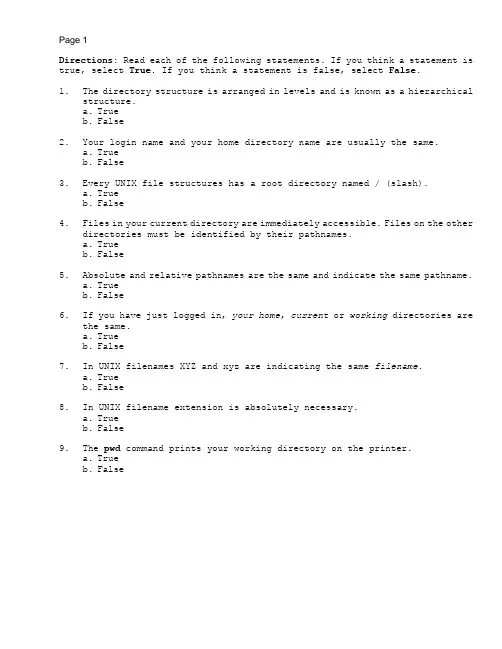
Directions: Read each of the following statements. If you think a statement is true, select True. If you think a statement is false, select False.1. The directory structure is arranged in levels and is known as a hierarchicalstructure.a. Trueb. False2. Your login name and your home directory name are usually the same.a. Trueb. False3. Every UNIX file structures has a root directory named / (slash).a. Trueb. False4. Files in your current directory are immediately accessible. Files on the otherdirectories must be identified by their pathnames.a. Trueb. False5. Absolute and relative pathnames are the same and indicate the same pathname.a. Trueb. False6. If you have just logged in, your home, current or working directories arethe same.a. Trueb. False7. In UNIX filenames XYZ and xyz are indicating the same filename.a. Trueb. False8. In UNIX filename extension is absolutely necessary.a. Trueb. False9. The pwd command prints your working directory on the printer.a. Trueb. False10. The cd command returns you to the root directory.a. Trueb. False11. The invisible files are the files that only the owner can see.a. Trueb. False12. You can use only one command option at a time on the command line.a. Trueb. False13. You can use the vi editor or the cat command to look at the content of a file.a. Trueb. False14. You can use the vi editor or the cat command to create a file.a. Trueb. False15. After the print command is issued, there is no way to cancel the print job.a. Trueb. False16. The rmdir command (with no options) can only remove empty directories.a. Trueb. False17. The / at the beginning of a pathname stands for the root directory.a. Trueb. False18. The name .HIDDEN is an example of a hidden file.a. Trueb. False19. Ý(dot) and .. (dot dot) represent the current and a level higher directoriesrespectively.a. Trueb. False20. To cancel a print job, you only have to turn the printer off.a. Trueb. FalseDirections:Match the following commands to the corresponding descriptions. Place the letter that indicates your answer on the line in front of each command.a. absolute pathname to the file called xyzb. changes the directory to the parent of the current directoryc. lists current directory files including the invisible filesd. sends xyz file to the line printere. deletes the directory called xyzf. displays the content of the file called xyzg. displays the current directory pathnameh. cancels the printing job on the lp1 printeri. confirms the deletion of the xyz file before deleting itj. lists the current directory in long formatk. lists files across the page separated by commasl. changes the current directory to the HOME directorym. removes all subdirectories and files under the current directoryn. shows name of the default printero. shows status of the printing requestsp. sends mail to the user mailbox after completion of the print requestq. prints on a specific (named) printer (Linux)r. displays usage message for the rm command (Linux)s. creates two levels of directories under the current directory(Linux)t. prints the specified title on the banner page (Linux)21. _____ lp xyz22. _____ cat xyz23. _____ rm -i xyz24. _____ /david/xyz25. _____ cancel lp126. _____ ls -l27. _____ cd ..28. _____ ls -a29. _____ rmdir xyz30. _____ pwd31. _____ lpstat -d32. _____ rm --help33. _____ lpr -p filename34. _____ rm -r *35. _____ lpstat36. _____ ls -m37. _____ cd38. _____ mkdir --parent xx/yy39. _____ lpr -T40. _____ lp -m filenameDirections: Select the letter that indicates the best answer for the question.41. The command to show your current directory pathname isa. pcdb. ls -ac. pwdd. lp pwde. ls pwd42. The command to create a directory called xyz isa. mkdir xyzb. mk xyz dirc. md xyzd. dir xyze. MKDIR xyz43. The command to delete a file called xyz with confirmation option isa. del xyzb. rm xyzc. rm -c xyzd. rm -i xyze. rm xyz -i44. If your current directory pathname is /usr/david, the command ls ..a. displays the current directoryb. lists files in the working directoryc. lists files in david directoryd. lists files in the usr directorye. displays invalid command message45. Which of the following commands is not a correct use of the options?a. ls -amFb. ls -a -Cc. lp -tHELLO xyzd. ls ae. all of the above46. Which of the following filenames is not a correct filename?a. XYZ.xyzb. XYZ>> xyzc. Xyzd. X.Y.Ze. all of the above47. If your current directory is /usr/david, the command cd /changes your currentdirectory toa. rootb. usrc. davidd. /usre. none of the above48. The command to print the files XYZ and xyz isa. lp XYZ, xyzb. print XYZ and xyzc. P xyz, XYZd. lp XYZ xyze. lp -2 XYZ49. The command to check the status of your print job isa. lpstat printersb. lpstat jobsc. lpstatd. lp statuse. status printers50. Which one of the following pathnames is considered an absolute pathname?a. absolute/xyzb. /bin/usr/u/se-binc. david/memo/cd. Ý/../xyze. ÝÝ/xyz/xxx/memo51. The command to print a file on a specific printer isa. lp -d filenameb. lp filename printer-namec. lp -d printer-name filenamed. print filename ptr1e. p -d printer-name filename52. The command to obtain the name of the default printer isa. lpstat -db. lpstat printer-namec. lp -dd. print default ptre. printer53. The Linux command to print on a specific (named) printer isa. lpr -d filenameb. lpr filename printer-namec. lpr -p printer-name filenamed. print filename ptr1e. pr -d printer-name filename54. The command to delete a directory and all the subdirectories and files init isa. rm -r directory-nameb. rm directory-namec. rm -all directory-named. rm -sub directory-namee. rm all55. The Linux command to delete a directory and all the subdirectories and filesin it isa. rm --recursive directory-nameb. rm --r directory-namec. rm --all directory-named. rm --sub directory-namee. rm --all56. The Linux command to obtain help screen for the rm command isa. rm --hb. rm --helpc. help rmd. help --rme. rm help57. The command to list a hierarchy of directories isa. ls -R directory -nameb. ls -a directory -namec. ls -all directory -named. ls -hierarchy 3directory -namee. ls directoryÄname all58. The Linux command to list a hierarchy of directories isa. ls --R directory -nameb. ls --a directory -namec. ls --all directory -named. ls --hierarchy directory -namee. ls --recursive directoryÄname59. The command to create 2 levels of directories isa. mkdir -p level-1/level-2b. mkdir -l level-1/level-2c. mkdir -2 level-1/level-2d. mkdir -h level-1/level-2e. mkdir -p level-1 level-260. The Linux command to create 2 levels of directories isa. mkdir --parent level-1/level-2b. mkdir --l level-1/level-2c. mkdir -l level-1/level-2d. mkdir -hierarchy level-1/level-2e. mkdir -p level-1 level-21. True2. True3. True4. True5. False6. True7. False8. False9. False10. False11. False12. False13. True14. True15. False16. True17. True18. True19. True20. False21. d22. f23. i24. a25. h26. j27. b28. c29. e30. g31. n32. r33. q34. m35. o36. k37. l38. s39. t40. p41. c42. a43. d44. d45. d46. b47. a48. d49. c50. b51. c52. a53. c54. a55. a56. b57. a58. e59. a60. a。


