
bloomberg
- 格式:pdf
- 大小:530.37 KB
- 文档页数:6


bloomberg 公式大全
Bloomberg公式大全主要包括了一系列用于查询各种信息的函数,这些函数可以在Excel中使用,帮助用户快速获取金融市场的相关数据。以下是一些常见的Bloomberg公式:
1. BDP:用于查询证券的当前时刻信息。可以查询的信息包括股价、交易所代码、主要交易所、全球行业分类标准(GICS)等。例如,`BDP("700 HK Equity","PRIMARY_EXCHANGE_NAME")`将查询700 HK的主要交易所信息。
2. BDS:用于查询证券的历史数据,包括开盘价、最高价、最低价、收盘价、成交量等。用户可以通过指定日期范围来获取所需的历史数据。
3. BDX:用于查询证券的指数信息,包括指数的成分股、权重、计算方法等。这对于分析和比较不同指数的性能非常有用。
需要注意的是,以上只是Bloomberg公式的一部分示例,实际上还有更多其他功能和用法等待用户去探索。同时,使用Bloomberg公式需要具备一定的金融知识和Excel操作经验,以便更好地理解和应用这些公式。
另外,这些公式可能涉及到金融市场的敏感信息,因此在使用时需要遵守相关法律法规和规定,确保合法合规地进行数据查询和分析。
请注意,以上信息可能会随着时间和软件版本的更新而发生变化,建议在使用前查阅最新的Bloomberg官方文档或相关资料以获取最准确的信息。
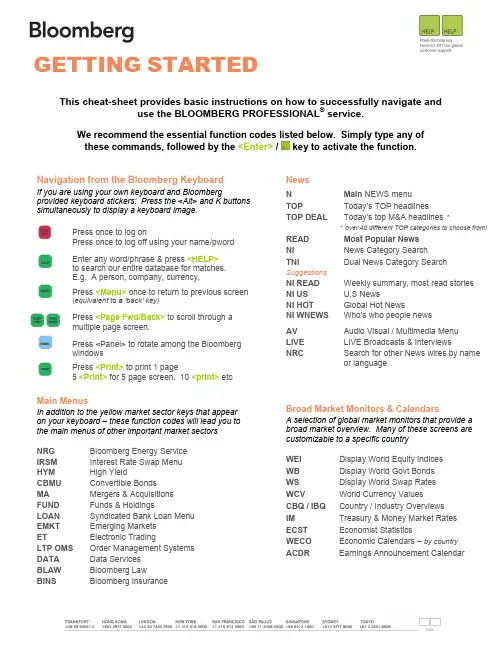
This cheat-sheet provides basic instructions on how to successfully navigate and use the BLOOMBERG PROFESSIONAL® service. We recommend the essential function codes listed below. Simply type any of these commands, followed by the / key to activate the function. GETTING STARTED Navigation from the Bloomberg Keyboard If you are using your own keyboard and Bloomberg provided keyboard stickers: Press the and K buttons simultaneously to display a keyboard image. Press once to log on Press once to log off using your name/pword Enter any word/phrase & press to search our entire database for matches. E.g. A person, company, currency, Press once to return to previous screen (equivalent to a ‘back’ key) Press to scroll through a multiple page screen. Press to rotate among the Bloomberg windows Press to print 1 page 5 for 5 page screen. 10 etc Main Menus In addition to the yellow market sector keys that appear on your keyboard – these function codes will lead you to the main menus of other important market sectors NRG Bloomberg Energy Service IRSM Interest Rate Swap Menu HYM High Yield CBMU Convertible Bonds MA Mergers & Acquisitions FUND Funds & Holdings LOAN Syndicated Bank Loan Menu EMKT Emerging Markets ET Electronic Trading LTP OMS Order Management Systems DATA Data Services BLAW Bloomberg Law BINS Bloomberg Insurance News N Main NEWS menu TOP Today’s TOP headlines TOP DEAL Today’s top M&A headlines * * over 40 different TOP categories to choose from! READ Most Popular News NI News Category Search TNI Dual News Category Search Suggestions NI READ Weekly summary, most read stories NI US U.S News NI HOT Global Hot News NI WNEWS Who’s who people news AV Audio Visual / Multimedia Menu LIVE LIVE Broadcasts & Interviews NRC Search for other News wires by name or language Broad Market Monitors & Calendars A selection of global market monitors that provide a broad market overview. Many of these screens are customizable to a specific country WEI Display World Equity Indices WB Display World Govt Bonds WS Display World Swap Rates WCV World Currency Values CBQ / IBQ Country / Industry Overviews IM Treasury & Money Market Rates ECST Economist Statistics WECO Economic Calendars – by country ACDR Earnings Announcement Calendar Communication Tools Start to communicate with other Bloomberg customers and send to traditional internet e-mail addresses! Simply type the person’s name (or address) and press MSGM Message System Main Menu SPDL Create an address book of your contacts IB Instant Bloomberg. Real-time chat GRAB Type GRAB from any screen to send it s a msg attachment ANY BLOOMBERG ANYWHERESM BERRY Bloomberg for BlackBerry BBFO Voice & Video calls BBSQ Bloomberg Squawk. Finding Information Enter any word(s) or phrase & press to search the entire Bloomberg system for matching information. E.g. A person: Alan Greenspan A company: Microsoft A currency: Euro , Security Analysis Equity E.g. T US Once you have found and entered the ticker for the Equity you wish to analyze – now enter any of these basic function codes DES Company Description CN Company News and Research MCN Most Popular News for this company MGMT Management Structure & Profiles GPO Price Graph (incl Open, High, Low data) GIP Intraday Price Graph PHDC Institutional and Insider Holders ANR Analyst Recommendations EM Earnings Matrix (multiple templates) RV Relative Value – Peer Group Analysis FA Financial Analysis Templates Customization & Shortcuts PDFQ Personal defaults – quick set up PDF Personal Defaults – full set up

Bloomberg使用指南V1
Bloomberg使用指南V1
1: 引言
1.1 目的
本文档旨在提供关于Bloomberg使用的全面指南,帮助用户充分了解和利用Bloomberg平台的各种功能和特点。
1.2 读者对象
本指南适用于所有使用Bloomberg平台的用户,无论是初学者还是有经验的用户。
2: Bloomberg平台简介
2.1 Bloomberg平台概述
Bloomberg是一家提供金融数据、新闻和分析工具的金融服务公司。其平台集成了全球范围内的实时市场数据、分析工具和专业新闻,并提供专业化的金融应用程序。
2.2 Bloomberg平台功能
2.2.1 市场数据 Bloomberg平台提供实时的市场数据,包括股票、债券、商品、外汇等各个资产类别的行情数据。用户可以通过各种维度的过滤器和搜索功能,获取特定的市场数据。
2.2.2 新闻和研究报告
Bloomberg平台提供全球范围内的新闻和研究报告,覆盖各种不同的行业和市场。用户可以根据自己的兴趣和需求,订阅特定的新闻和报告。
2.2.3 数据分析工具
Bloomberg平台提供各种数据分析工具,帮助用户深入研究和分析市场数据。用户可以使用图表工具、回测工具、风险分析工具等,进行数据的可视化和分析。
2.2.4 交易和执行
Bloomberg平台提供交易和执行功能,允许用户进行股票、债券、外汇等各类资产的交易操作。用户可以根据市场情况进行交易决策,并通过Bloomberg平台进行交易执行。
3: Bloomberg平台使用指南
3.1 登录和账户设置
3.1.1 登录Bloomberg平台 用户可以通过Bloomberg提供的登录界面,输入正确的用户名和密码,登录到Bloomberg平台。
3.1.2 账户设置
用户可以根据自己的需求,在Bloomberg平台内进行账户设置。包括个人信息的修改、消息通知的设置等。
3.2 市场数据的获取

世界3大经典财经传媒分析
一、路透公司
一)公司定位与目标
1、路透的定位:信息提供者,路透是首屈一指的环球新闻及资讯服务集团,以其及时、
准确、诚信和公正的报道及引用尖端科技而享誉全球。
对于普通大众,路透是世界上最大的新闻制作和播发机构;
对于世界金融市场的参与者,路透则意味着世界领先的实时信息、市场决策信息的一种
交易系统提供者。
2、路透的目标:令金融市场真正能在互联网上运作。
点击观看大图
二)路透产品构架
路透公司专注经营三个业务范围: Reuters Financial(包括Reuters Information及
Reuters Trading Solutions)、 Reuterspace 及 Instinet。
Reuters Financial包括:
1、路透财经资讯产品(Reuters Information)为全球各地金融市场及新闻媒体提供广
泛的资讯和新闻产品,包括实时的财经数据、Lipper集体投资数据、数字、文字、历史性
及图表分析资料库、新闻、图表、新闻录影带及新闻图片。现时,全球53,500个地区共有
627,000个用户选用路透的资讯及新闻。路透还提供逾960,000种股票、债券、金融工具及40,000家公司的数据。财经资讯来自242个交易所及场外交易市场,以及由5000位使
用路透服务的客户所提供。
2、路透交易系统及解决方案(Reuters Trading Solutions)为金融市场提供全球化方
案及技术,包括企业全面整合方案、市场资讯及数据发布、股票和外汇交易、风险管理以及
交易管理系统。该公司还为客户提供技术和入门网站功能,以便他们向散户供应资讯、数据
及交易技术。这些功能均建基于TIBCO及路透软件。
Instinet是全球最大的电子证券经纪公司为路透公司旗下独立管理之附属机构,其业
务覆盖股票及固定收入市场。该公司每天在全球逾40个市场进行交易,为北美洲、欧洲及