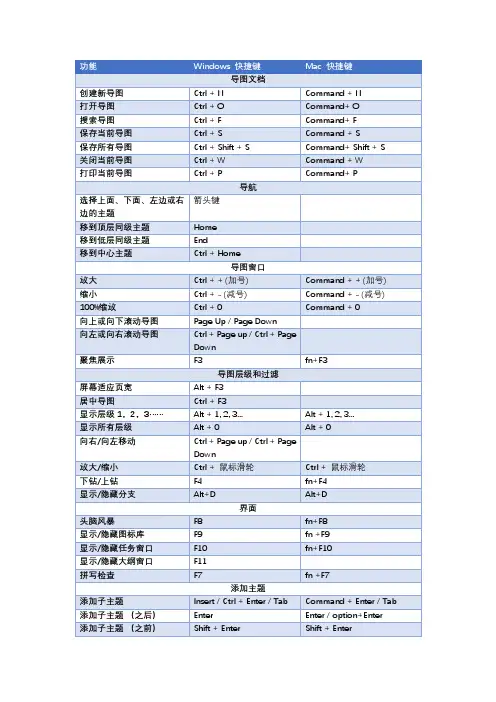
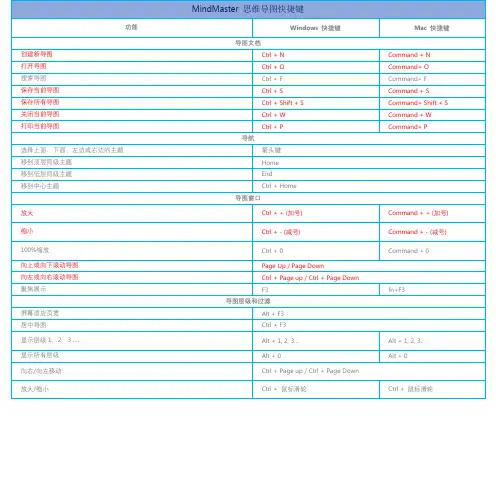
MindManager全部快捷键
- 格式:doc
- 大小:271.00 KB
- 文档页数:20
MindManager全部快捷键Posted by feng on 九16, 2011 in 导图应用, 导图软件, 思维导图| 0 comments下面是PC版MindManager的全部快捷键,如果你MindManager用户,那么请打开帮助文档找到快捷键一章即可查看。
使用的其他软件?我想你可以看看这些:[归档]PersonalBrain全部快捷键[归档]iMindMap全部快捷键[归档]MindMapper全部快捷键[归档]FreeMind全部快捷键[归档]XMind全部快捷键Map Documents[英文原版]Create a new map CTRL+NOpen a map CTRL+OSave the current map*CTRL+SSave as*F12Close current map CTRL+WCTRL+SHIFT+F4 Print Preview CTRL + F2Print the current map CTRL+PMove through list of previously-viewed open maps (forward, backward)ALT+left arrow ALT+right arrow* Workspace maps are automatically saved.NavigatingSelect topic above, below, left orrightArrow keys Select next topic / previous topic TAB/ SHIFT+TABMove to top sibling topic Move to bottom sibling topic HOME ENDViewingMap WindowZoom in CTRL + =Zoom out CTRL + -Fit map to screen CTRL+F5Scroll the map by small steps CTRL+Arrow keysScroll map by large steps (up and down)(right and left)PGUP, PGDN ,CTRL+PGUP, CTRL+PGDNCenter map and collapse all topics CTRL+F3Center object ALT+F3View next map CTRL+F6CTRL+TAB View previous map CTRL+SHIFT+F6CTRL+SHIFT+TAB Map Levels and FilteringFocus on topic F3Show next level of topics CTRL+DShow 1 level SHIFT+ALT+1Show 2 levels SHIFT+ALT+2Show levels 3 through 9SHIFT+ALT+3 …etc (up tolevel 9)Show all levels SHIFT+ALT+. (period)Collapse selected topic SHIFT+ALT+0Collapse entire branch SHIFT+ALT+,Collapse map CTRL+F3Remove filter CTRL+SHIFT+ALT+AShow branch aloneShow othersF4InterfaceShow the Topic Notes window Show or hide the Topic Notes window F11 CTRL+TView next topic note*View previous topic note** from within Notes window CTRL+SHIFT+PGUP CTRL+SHIFT+PGDNShow or hide the task panes CTRL+SHIFT+F1 Expand or collapse Ribbon CTRL + F1Show ALT keys F10 or ALTShow context menu SHIFT+F10Mindjet CatalystALT + QSwitch between CatalystWorkspaces window andMindManager windowTABMove between Workspaces listand Documents listOpen selected document ENTERAdding objectsTopicsAdd subtopic INSERTCTRL+ENTER Add sibling topic ENTERSHIFT+ENTER Add sibling topic (as previoussibling)Insert parent topic CTRL+SHIFT +INSAdd callout topic CTRL+SHIFT+ENTERElementsAdd attachment CTRL+SHIFT+HManage Attachments CTRL+SHIFT + TAdd hyperlink CTRL+KAdd label CTRL+SHIFT+F5Add comments CTRL+F11Add notes CTRL+TAdd boundary CTRL+SHIFT+BAdd icon CTRL+1, CTRL+2 etc.Note: These shortcut keys are defined in theLibrary paneRemove all icons CTRL+0Add priority icon (Priority 1,2,etc.)CTRL+SHIFT+1;CTRL+SHIFT+2; etc.Remove all priorities CTRL+SHIFT+0Add Map Part CTRL+SHIFT+NRefresh Map Part F5Refresh all Map Parts SHIFT+F5Insert date and time CTRL+SHIFT + DEditingUndo the last action CTRL+Z, ALT+Backspace Redo the last action CTRL+YSelectingSelect all topics and elementsSelect all topic notes text (Noteswindow)Select all ink (Notes window)CTRL+ASelect additional topics SHIFT+arrow keysSelect all siblings (below only)(above only)CTRL+SHIFT+A SHIFT+END SHIFT+HOMESelect all siblings and parents CTRL+SHIFT+left / right arrow Select topic, descendants,boundaries and relationshipsSHIFT + F3Select next level of subtopics CTRL+SHIFT+right / left arrow Cut, Copy, Paste and DeleteCopy to the Clipboard CTRL+C, CTRL+INSCopy as hyperlink CTRL+ALT+CCut to the Clipboard CTRL+X, SHIFT+DELETE Paste contents of the Clipboard CTRL+V, SHIFT+INSPaste inside CTRL+SHIFT+ALT+VPaste as next topic (sibling topic)CTRL+ALT+VPaste as callout CTRL+SHIFT+VDelete topic or object DELETECTRL+SHIFT+DELETE Remove selected topic (but keepsubtopics)Topic TextEdit topic text F2Commands in topic text editmode:Enter line break in topic CTRL+ENTER, SHIFT+ENTER Move to beginning of line HOMEMove to beginning of topic text CTRL+HOMEMove to end of topic text CTRL+ ENDSplit topic to create new sibling SHIFT+ALT+Down arrowSHIFT+ALT+Right arrowSplit topic to create newsubtopicSplit topic as multiple topics CTRL + ALT + ENTERSplit topic as multiple subtopics CTRL + ALT + INSFind CTRL + FFind Next ENTERFind Previous SHIFT+ENTEREnter Find text CTRL+GReplace CTRL+HSpelling F7Move TopicsUp one place CTRL+ALT+Up arrowDown one place CTRL+ALT+Down arrow To top CTRL+ALT+HOMETo bottom CTRL+ALT+ENDReset all main topic positions CTRL+ALT+SPACE Balance map CTRL+ALT+B FormattingToggle to bold and back CTRL+BToggle to italics and back CTRL+IToggle to underline and back CTRL+UIncrease font size CTRL+SHIFT+>Decrease font size CTRL+SHIFT+<Strikethrough text CTRL+SHIFT+SClear formatting CTRL+SPACEFill color CTRL+SHIFT+CFont / ink color CTRL+SHIFT+F Using HelpShow Help F1General Windows CommandsClose a menu or dialog box ESCCancel an operation ESCClose MindManager ALT+F4Display Windows Task List CTRL+SHIFT+ESC导图文件[中文译版]创建一个新的导图Ctrl + N打开导图Ctrl + O保存当前的导图*Ctrl + S保存为*F12关闭当前导图Ctrl + WCtrl + Shift + F4打印预览Ctrl + F2打印当前导图Ctrl + P通过以前查看过的开放式导图列表(向前,向后移动)Alt +左箭头Alt +右箭头*工作区导图将自动储存。