批量处理和单个处理word图片大小和比例的宏
- 格式:docx
- 大小:14.89 KB
- 文档页数:4
设定单个图片大小的宏:
Sub 宏5()
Selection.InlineShapes(1).LockAspectRatio = msoFalse '解除纵横
比锁定
Dim h!, w!
h = Selection.InlineShapes(1).Height
w = Selection.InlineShapes(1).Width
Selection.InlineShapes(1).Height = 627 '设置图片高度为627px Selection.InlineShapes(1).Width = 407 '设置图片宽度407px
End Sub
设定单个图片比例的宏:
Sub 宏3()
Selection.InlineShapes(1).LockAspectRatio = msoFalse '解除纵横
比锁定
Dim h!, w!
h = Selection.InlineShapes(1).Height
w = Selection.InlineShapes(1).Width
Selection.InlineShapes(1).Height = h * 1.25 '设置图片高度比例为125%
Selection.InlineShapes(1).Width = w * 0.77 '设置图片宽度比例为77% End Sub
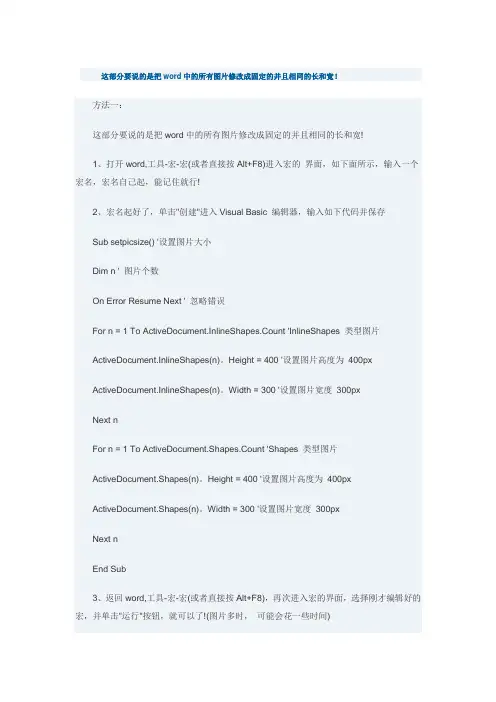
批量设定图片大小的宏:
Sub setpicsize() '设置图片大小
Dim n '图片个数
On Error Resume Next '忽略错误
For n = 1 To ActiveDocument.InlineShapes.Count 'InlineShapes类型图片
ActiveDocument.InlineShapes(n).LockAspectRatio = msoFalse ActiveDocument.InlineShapes(n).Height = 400 '设置图片高度为400px
ActiveDocument.InlineShapes(n).Width = 300 '设置图片宽度300px
Next n
For n = 1 To ActiveDocument.Shapes.Count 'Shapes类型图片Selection.InlineShapes(n).LockAspectRatio = msoFalse ActiveDocument.Shapes(n).Height = 400 '设置图片高度为400px ActiveDocument.Shapes(n).Width = 300 '设置图片宽度300px Next n
End Sub
批量设定图片比例的宏
Sub 宏1()
Dim n '图片个数
Dim picwidth
Dim picheight
On Error Resume Next '忽略错误
For n = 1 To ActiveDocument.InlineShapes.Count 'InlineShapes类型图片
ActiveDocument.InlineShapes(n).LockAspectRatio = msoFalse picheight = ActiveDocument.InlineShapes(n).Height
picwidth = ActiveDocument.InlineShapes(n).Width ActiveDocument.InlineShapes(n).Height = picheight * 1.1 '设置高度为1.1倍
ActiveDocument.InlineShapes(n).Width = picwidth * 1.1 '设置宽度为1.1倍
Next n
For n = 1 To ActiveDocument.Shapes.Count 'Shapes类型图片Selection.InlineShapes(n).LockAspectRatio = msoFalse picheight = ActiveDocument.Shapes(n).Height
picwidth = ActiveDocument.Shapes(n).Width ActiveDocument.Shapes(n).Height = picheight * 1.1 '设置高度为1.1倍
ActiveDocument.Shapes(n).Width = picwidth * 1.1 '设置宽度为1.1倍
Next n
End Sub。