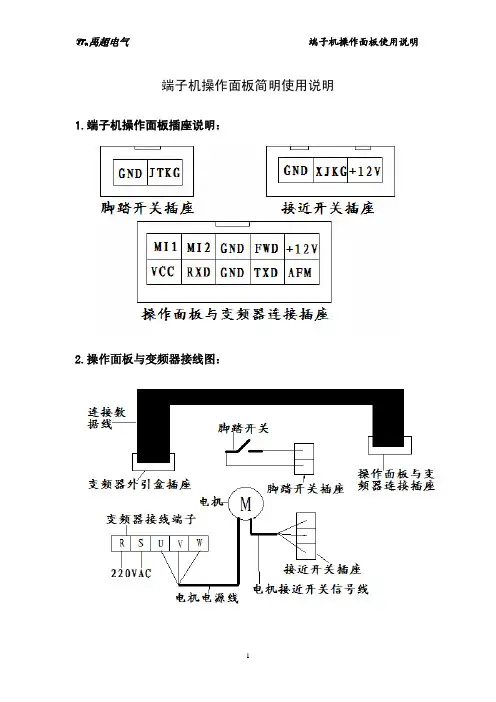
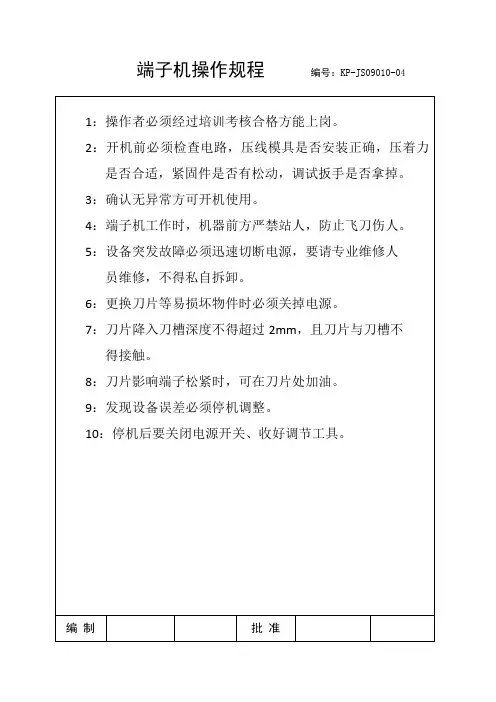
全自动端子机说明书
- 格式:docx
- 大小:944.86 KB
- 文档页数:14
1
1 超静音端子机
使用前注意事项
NOTED BEFORE USE
1:要设置在平稳没有振动的地面或机面,要有充分的散热空间。
To set the ground without vibration, there should be sufficient
heat dissipation space.
2:基本电源为220V交流电,要使用和机器一起提供的专用电源插座。并且使用合格和符合用电要求的插座板。
The power supply is 220V AC, and use the special power socket
provided with the machine. And use qualified and meet the
electrical requirements of the socket board.
3:要使用专用安全合格的插座板,请确认适当的作业温度(0~~40摄氏度)。安全温度的电压。
To use a special safe socket plate, please confirm the
appropriate operating temperature (0~~ 40℃). The voltage of the
safe temperature.
4:长时间不用机器,一定要拔掉电源线的插头,并用防护用具将机器盖好保养等等。 ______________________________________________________________________________________________________________
精品资料 Do not use the machine for a long time. Be sure to unplug the
power cord and cover the machine with protective equipment.
5:不要把机器放在温度较高的地方,或者光线直射的地方。
Do not make the machine in a place with high temperature or
direct light.
6:请勿改造机械,改造控制电路等,会引起滑块落下两次误动作!
Do not modify the machine, the control circuit, and so on, will
cause the slider to fall two missteps.
7:请勿拆下安全装置或者及改变安装位置。
Do not remove the safety device or change the installation
position.
8:使用前机器的安全注意事项才可以工作,为了确保安全,必须接通你所用的插座地线
Use the safety precautions of the machine before you can work.
In order to ensure safety, you must connect to the socket.
9:本机是电线终端上装配端子的专用机械,不适应本机进行其他压力的加工。
This machine is a special machine for assembling terminals on
wire terminals, and it is not suitable for other pressure
processing.
10:本机在调模状态下必须设置成“手动状态”。才可以进行调模。如果调模过程中压力过大,机器卡死不动,应立即关掉电源,并用扳______________________________________________________________________________________________________________
精品资料 手在后面的把轴上调节方可使机器活动。
The machine must be set to "manual state" in modulating
mode.The modulator can be made.If the pressure is too high in
the mold adjustment process, the machine card will not move,
the power should be turned off immediately, and the machine can
be operated by adjusting the shaft on the back of the wrench.
正 视 图Front View
______________________________________________________________________________________________________________
精品资料
后 视 图Back View ______________________________________________________________________________________________________________
精品资料
______________________________________________________________________________________________________________
精品资料 产 品 参 数
Product Parameter
______________________________________________________________________________________________________________
精品资料
控制面板介绍及使用方法
Control panel introduction and use
method
(Attachment)
______________________________________________________________________________________________________________
精品资料 一:控制台操作按钮功能及使用方法:
1: 总电源开关:红色按钮按到最低点在“关”时整机电源被切断此时机器所有活动成静止状态,当按钮“开”的状态下,此时整机将成带电状态,马达开启运转,计时器将有数字显示。
“ Power on-off ” Red button according to the lowest point in
the "off" when the machine power supply is cut off the machine all
activities into a stationary state, when the button "on" state, the
machine will be charged at this time, the motor start running, the timer
will have a digital display.
2: 此按钮为电源照明,按下此按键下照明灯亮起(必须通电状态下),再次按下次按钮照明提示灯将熄灭,开启此照明灯有助于作业时有足够的照明以达到安全的目的。
This button to power supply lighting, press the button under the
lighting light up the current state (required), press the next button
lighting lights will go out again, open the lights help homework often
sufficient lighting in order to achieve the purpose of security.
3:按钮面板上 的“清零键”约3秒钟,此时计数器上的数字归零。 ______________________________________________________________________________________________________________
精品资料 “Reset switch” about 3s,the counter is cleared
按照此键切换手动和自动,绿灯亮:为自动状态,必须用脚踏开关,才可工作。
Press this button to “HAND” and “AUTO” , green light :
For “ AUTO” stat e, must use foot switch, only can work.
红灯亮:禁用脚踏开关,按面板上的的上升、下降键使电机转动,以调模使用。调模时,一定要用手动。
For red light: Do not use the foot switch, press the up and down
button on the panel to make the motor rotate to adjust the mode.
When modulating, the machine must be in manual stated.
4.当按下此键按住此键3秒后进入,n=1,打端子个数,1~20间,任意个数即可,
Press this key for 3seconds, n=1, (from 1~20 any number)
n=x,x即为连打端子的个数,按住此键,设定成功,
n=x,x is Number of terminals
h=0,连打间隔时间。(0~20,参数越大,间隔时间越长)
h=0, h is spacing interval (0~20)
C=0,备用参数,不需修改。Spare parameters, no modification required.