交换机DHCP中继功能的配置
- 格式:docx
- 大小:38.02 KB
- 文档页数:5
交换机DHCP中继功能的配置
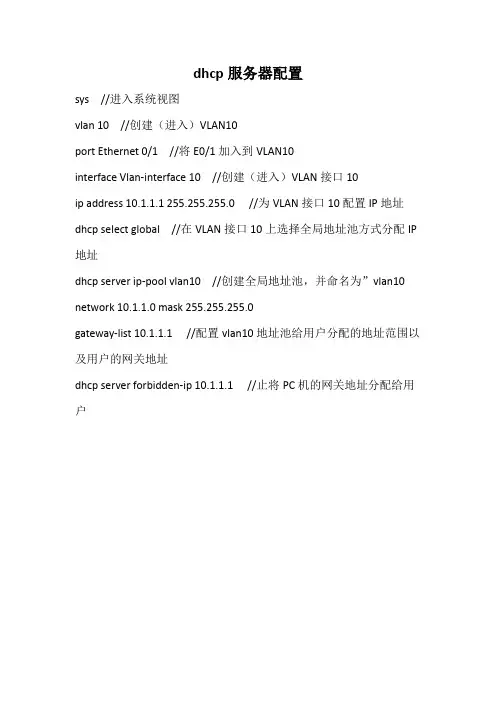
实验、交换机dhcp服务器的配置
一、实验目的
1、介绍dhcp原理;
2、熟练掌握交换机作为dhcp服务器的配置方法;3、了解该功能的广泛应用。
二、应用环境
大型网络一般都采用dhcp协议作为地址分配的方法,需要为网络购置多台dhcp服务器放置在网络的不同位置。为减轻网络管理员和用户的配置负担,我们可以将支持dhcp的交换机配置成dhcp服务器。
三、实验设备
1、dcrs-5650交换机1台(softwareversionisdcrs-5650-28_5.2.1.0)2、pc机1-3台3、console线1根4、直通网线若干
四、实验流形
pc1vlan10五、实验要求
pc2vlan10pc3vlan20
为处于不同vlan的pc机设置dhcp服务器。
在交换机上分割两个基于端口的vlan:vlan10,vlan20。vlan1024ip192.168.10.1/端口成员1~82024布局两个地址池:
poola(network192.168.10.0/24)设备缺省网关dns服务器leaseip地址192.168.10.1192.168.1.18小时192.168.20.1/9~16poolb(network192.168.20.0/24)设备缺省网关dns服务器leaseip地址192.168.20.1192.168.1.11小时其中在vlan10处,因为工作的需要,特地将一台mac地址为00-a0-d1-d1-07-ff的机器分配固定的ip地址192.168.10.88。
六、实验步骤
第一步:交换机全部恢复出厂设置,创建vlan100和vlan200。
switch(config)#
switch(config)#vlan10 switch(config-vlan10)#switchportinterfaceethernet0/0/1-8!给vlan10重新加入端口1-8
settheportethernet0/0/1accessvlan100successfullysettheportethernet0/0/2accessvlan100successfullysettheportethernet0/0/3accessvlan100successfullysettheportethernet0/0/4accessvlan100successfullysettheportethernet0/0/5accessvlan100successfullysettheportethernet0/0/6accessvlan100successfullysettheportethernet0/0/7accessvlan100successfullysettheportethernet0/0/8accessvlan100successfullyswitch(config-vlan10)#exitswitch(config)#vlan20
switch(config-vlan20)#switchportinterfaceethernet0/0/9-16!给vlan20重新加入端口9-16
settheportethernet0/0/9accessvlan200successfullysettheportethernet0/0/10accessvlan200successfullysettheportethernet0/0/11accessvlan200successfullysettheportethernet0/0/12accessvlan200successfullysettheportethernet0/0/13accessvlan200successfullysettheportethernet0/0/14accessvlan200successfullysettheportethernet0/0/15accessvlan200successfullysettheportethernet0/0/16accessvlan200successfullyswitch(config-vlan20)#exitswitch(config)#
第二步:给交换机设置ip地址。
switch(config)#interfacevlan1
switch(config-if-vlan1)#ipaddress192.168.1.1255.255.255.0switch(config-if-vlan1)#noshutdownswitch(config)#interfacevlan10
switch(config-if-vlan10)#ipaddress192.168.10.1255.255.255.0switch(config-if-vlan100)#noshutdown
switch(config)#interfacevlan20
switch(config-if-vlan20)#ipaddress192.168.20.1255.255.255.0switch(config-if-vlan20)#noshutdown
第三步:布局dhcp
switch(config)#servicedhcp!启用dhcpswitch(config)#ipdhcppooltesta!定义地址池
switch(dhcp-testa-config)#network-address192.168.10.024switch(dhcp-testa-config)#lease08 switch(dhcp-testa-config)#default-router192.168.10.1switch(dhcp-testa-config)#dns-server192.168.1.1switch(dhcp-testa-config)#exit
switch(config)#ipdhcppooltestb
switch(dhcp-testb-config)#network-address192.168.20.024switch(dhcp-testb-config)#lease01
switch(dhcp-testb-config)#default-router192.168.20.1switch(dhcp-testb-config)#dns-server192.168.1.1switch(dhcp-testb-config)#exitswitch(config)#第四步:检验实验。
使用“ipconfig/renew”命令在pc的dos命令行中检查是否得到了正确的ip设备pc1pc2pc3位置1-8端口1-8端口9-16端口动作ipconfig/renewipconfig/renewipconfig/renew结果192.168.10.2/24192.168.10.3/24192.168.20.2/24第五步:为特殊的pc配置地址池
switch(config)#ipdhcpexcluded-address192.168.10.77192.168.10.99!预设确定地址池中的不能用作动态分配的地址switch(config)#ipdhcppooltestc
switch(dhcp-testc-config)#host192.168.100.88!手工绑定地址时,分配给指定客户机的用户的ip地址
switch(dhcp-testc-config)#hardware-address00-a0-d1-d1-07-ff!手工分配地址时,选定用户的硬件地址
switch(dhcp-testc-config)#default-router192.168.10.1switch(dhcp-testc-config)#exit第六步:验证实验。
采用“ipconfig/renew”命令在pc的dos命令行中检查与否获得了恰当的ip
设备pc1pc2位置1-8端口1-8端口动作ipconfig/renewipconfig/renew结果192.168.100.88/24192.168.100.3/24pc3
9-16端口ipconfig/renew192.168.200.2/24实验、交换机dhcp中继功能的布局
一、实验目的
1、介绍dhcp原理;
2、熟练掌握交换机dhcp中继的配置方法;3、了解该功能的广泛应用。
二、应用环境 当dhcp客户机和dhcp服务器不在同一个网段时,由dhcp中继传递dhcp报文。增加dhcp中继功能的好处是不必为每个网段都设置dhcp服务器,同一个dhcp服务器可以为很多个子网的客户机提供网络配置参数,即节约了成本又方便了管理。这就是dhcp中继的功能。
三、实验设备
1、dcrs-5650交换机2台(softwareversionisdcrs-5650-28_5.2.1.0)2、pc机1-3台3、console线1根4、直通网线若干
四、实验流形
switchavlan100pc1pc2dhcpserverswitchbvlan10
五、实验建议
在交换机a上划分两个基于端口的vlan:vlan10,vlan100。vlan10410010.1.157.100/24ip192.168.1.1/2端口成员124
交换机a的端口24相连接一台dhcp服务器,服务器的地址为10.1.157.1/24;交换机a的端口2相连接交换机b的24口;
交换机b恢复出场设备,不作任何配置,当成hub来用。
dhcp服务器的地址池中的地址范围为:192.168.1.10/24-192.168.1.100/24.
六、实验步骤
第一步:交换机全部恢复正常出厂设置,建立vlan10和vlan100。
switch(config)#
switch(config)#vlan10
switch(config-vlan10)#switchportinterfaceethernet0/0/1switch(config-vlan10)#exitswitch(config)#vlan100
switch(config-vlan100)#switchportinterfaceethernet0/0/24switch(config-vlan100)#exit第二步:给交换机设置ip地址。
switch(config)#interfacevlan10
switch(config-if-vlan10)#ipaddress192.168.1.1255.255.255.0switch(config-if-vlan10)#noshutdown