
CISCO路由器配置
- 格式:ppt
- 大小:86.00 KB
- 文档页数:7

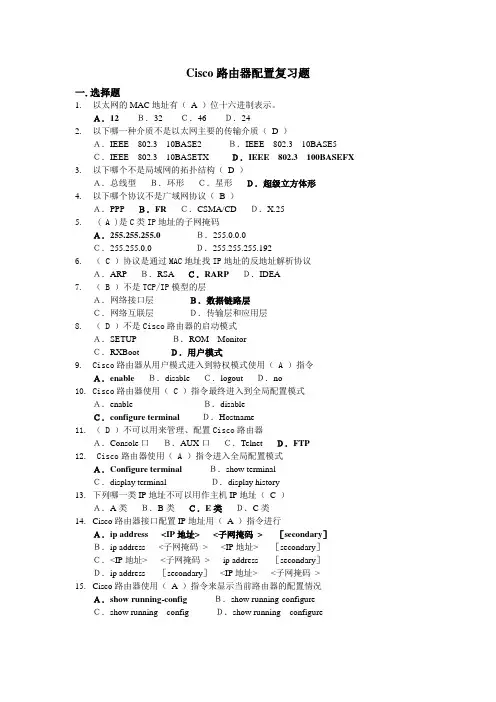
Cisco路由器配置复习题
一.选择题
1. 以太网的MAC地址有( A )位十六进制表示。
A.12 B.32 C.46 D.24
2. 以下哪一种介质不是以太网主要的传输介质( D )
A.IEEE 802.3 10BASE2 B.IEEE 802.3 10BASE5
C.IEEE 802.3 10BASETX D.IEEE 802.3 100BASEFX
3. 以下哪个不是局域网的拓扑结构( D )
A.总线型 B.环形 C.星形 D.超级立方体形
4. 以下哪个协议不是广域网协议( B )
A.PPP B.FR C.CSMA/CD D.X.25
5. ( A )是C类IP地址的子网掩码
A.255.255.255.0 B.255.0.0.0
C.255.255.0.0 D.255.255.255.192
6. ( C )协议是通过MAC地址找IP地址的反地址解析协议
A.ARP B.RSA C.RARP D.IDEA
7. ( B )不是TCP/IP模型的层
A.网络接口层 B.数据链路层
C.网络互联层 D.传输层和应用层
8. ( D )不是Cisco路由器的启动模式
A.SETUP B.ROM Monitor
C.RXBoot D.用户模式
9. Cisco路由器从用户模式进入到特权模式使用( A )指令
A.enable B.disable C.logout D.no
10. Cisco路由器使用( C )指令最终进入到全局配置模式
A.enable B.disable
C.configure terminal D.Hostname
11. ( D )不可以用来管理、配置Cisco路由器
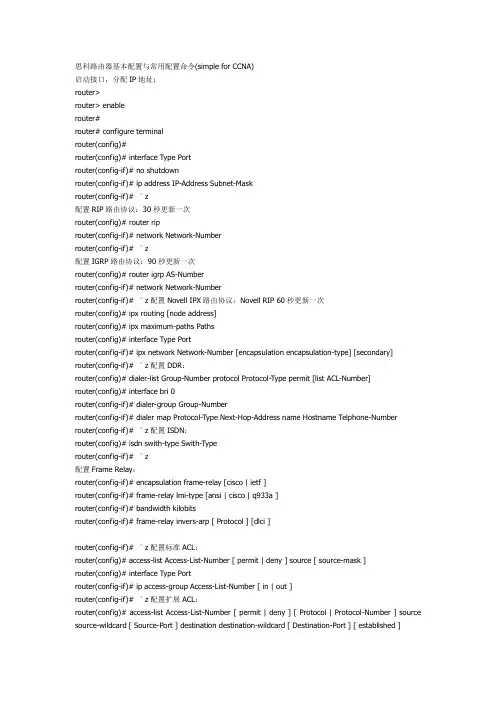
思科路由器基本配置与常用配置命令(simple for CCNA)
启动接口,分配IP地址:
router>
router> enable
router#
router# configure terminal
router(config)#
router(config)# interface Type Port
router(config-if)# no shutdown
router(config-if)# ip address IP-Address Subnet-Mask
router(config-if)# ^z
配置RIP路由协议:30秒更新一次
router(config)# router rip
router(config-if)# network Network-Number
router(config-if)# ^z
配置IGRP路由协议:90秒更新一次
router(config)# router igrp AS-Number
router(config-if)# network Network-Number
router(config-if)# ^z配置Novell IPX路由协议:Novell RIP 60秒更新一次
router(config)# ipx routing [node address]
router(config)# ipx maximum-paths Paths
router(config)# interface Type Port
router(config-if)# ipx network Network-Number [encapsulation encapsulation-type] [secondary]
router(config-if)# ^z配置DDR:
router(config)# dialer-list Group-Number protocol Protocol-Type permit [list ACL-Number]
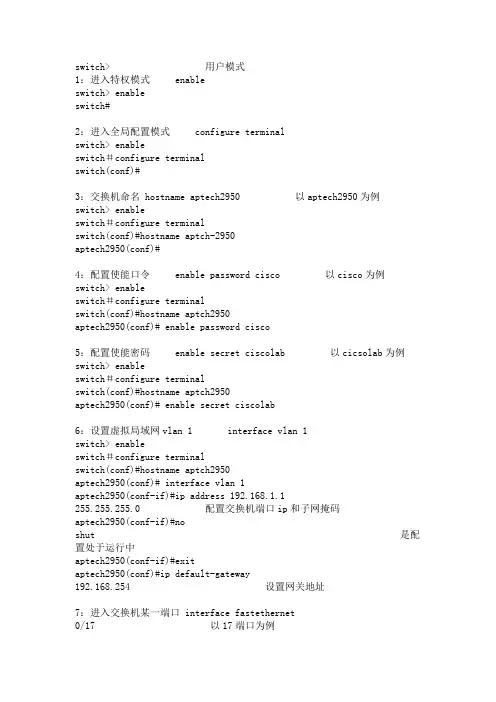
switch> 用户模式
1:进入特权模式 enable
switch> enable
switch#
2:进入全局配置模式 configure terminal
switch> enable
switch#configure terminal
switch(conf)#
3:交换机命名 hostname aptech2950 以aptech2950为例
switch> enable
switch#configure terminal
switch(conf)#hostname aptch-2950
aptech2950(conf)#
4:配置使能口令 enable password cisco 以cisco为例
switch> enable
switch#configure terminal
switch(conf)#hostname aptch2950
aptech2950(conf)# enable password cisco
5:配置使能密码 enable secret ciscolab 以cicsolab为例
switch> enable
switch#configure terminal
switch(conf)#hostname aptch2950
aptech2950(conf)# enable secret ciscolab
6:设置虚拟局域网vlan 1 interface vlan 1
switch> enable
switch#configure terminal
switch(conf)#hostname aptch2950
aptech2950(conf)# interface vlan 1
aptech2950(conf-if)#ip address 192.168.1.1 255.255.255.0 配置交换机端口ip和子网掩码

Cisco路由器基本配置命令(搜集整理)
一、
1.router(config)#router rip 启动rip进程
2.router(conifg-router)#network 172.17.0.0指定rip协议的主网络
3.router(config-router)#passive-interface f0/1把f0/1配置成passive端口
4.router(config-router)#neighbor 172.17.12.67 以单波方式通告rip更新给路由器
5.router(config-if)#ip address 192.168.83.244 255.255.255.0 主ip地址
router(config-if)#ip address 10.33.55.1 255.255.255.0 secondary辅助ip地址
二、
1.router(config-router)#version 2将rip配置成版本2
2.router(config-ip)#ip rip send version 1只发rip 1数据包
router(config-ip)#ip rip receive version 2只接收rip 2数据包
3.router(config-router)#no auto-summary 关闭汇总功能
4.router(config-if)#no ip split-horizon关闭水平分割
5.router#show ip ospf database router 192.168.30.10显示路由器LSA通告
router#show ip ospf database network 192.168.17.18显示网络LSA通告
router#show ip ospf database summary 172.16.121.0显示网络汇总LSA通告