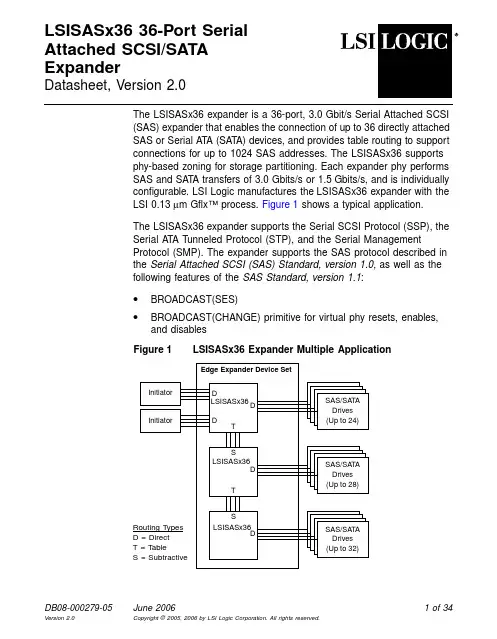
DB08-000279-05June 20061of 34LSISASx3636-Port SerialAttached SCSI/SATAExpanderDatasheet,Version 2.0The LSISASx36expander is a 36-port,3.0Gbit/s Serial Attached SCSI (SAS)expander that enables the connection of up to 36directly attached SAS or Serial A TA (SAT A)devices,and provides table routing to support connections for up to 1024SAS addresses.The LSISASx36supports phy-based zoning for storage partitioning.Each expander phy performs SAS and SAT A transfers of 3.0Gbits/s or 1.5Gbits/s,and is individually configurable.LSI Logic manufactures the LSISASx36expander with the LSI 0.13µm Gflx™process.Figure 1shows a typical application.The LSISASx36expander supports the Serial SCSI Protocol (SSP),the Serial A T A T unneled Protocol (STP),and the Serial Management Protocol (SMP).The expander supports the SAS protocol described in the Serial Attached SCSI (SAS)Standard,version 1.0,as well as the following features of the SAS Standard,version 1.1:•BROADCAST(SES)•BROADCAST(CHANGE)primitive for virtual phy resets,enables,and disables Figure 1LSISASx36Expander Multiple Application Edge Expander Device Set D D T Routing Types D =Direct T =Table S =Subtractive LSISASx36SAS/SAT A Drives (Up to 24)D Initiator Initiator T LSISASx36SAS/SAT A Drives (Up to 28)D S LSISASx36SAS/SAT A Drives (Up to 32)D S•SA TA II Port Selector•Report Manufacturing Information in the format defined by the SASspecification,version1.1•BREAK handling clarifications•ALIGN transmission from expandersThe LSISASx36supports SATA as defined in the Serial ATA:High SpeedSerialized AT Attachment Specification,version2.5,and SATA II.TheLSISASx36also provides a serial GPIO interface that supports theSFF-8485protocol.LSISASx36Expander DescriptionThis section describes the LSISASx36expander,and provides adescription of the Architectural Features,Protocols,and ExampleApplications.Architectural FeaturesThe LSISASx36provides an internal SxP port,an internal SMP targetport,and an internal STP T arget with an Enclosure Management Bridge(EMB).The SxP port can be used as an SSP initiator port,SSP targetport,SMP initiator port,and an STP initiator port.These ports are furtherdiscussed in the Protocols section.An integrated ARM7™-S processor serves a multitude of functions onthe LSISASx36expander.The ARM7-S processor provides theapplication layer for the SxP port,which,with user-customizedfirmwarecan provide enhanced enclosure services management,drivemanagement,self-discovery,and self-configuration.This could,forexample,enable the LSISASx36to query drives using either the SSPinitiator or STP initiator functionality,or to perform self-discovery of theSAS domain using the SMP initiator functionality.The ARM7-S processorcan also function as an internal storage enclosure managementprocessor(SEP),relieving the system of the need and expense of anexternal SEP.2of34LSISASx3636-Port Serial Attached SCSI/SA TA ExpanderThe LSISASx36supports the use of either an internal or an external SEP,which monitors and controls the environmental conditions of the storage enclosure,and can support alarm functions.The ARM7-S processor provides an internal SEP,which can be accessed through either the SSP target port or the STP target port.Access to the external SEP is through either an Inter-IC(I2C)interface or the enhanced parallel port(EPP)interface.The I2C interface and the STP target port are fully backwards-compatible with LSISASx12and LSISASx12A external SEP designs.The EPP interface improves the external processor interface functionality from what is available through the I2C interface.An external SEP that is attached to the EPP can perform any task that the internal SEP can perform.Refer to the Block Diagram Description for more information on these interfaces.The EPP provides added versatility to the LSISASx36.The EPP enables full access to the LSISASx36internal registers and interrupts,and supports debugging access to the LSISASx36.Any task that theARM7-S processor can perform,can also be accomplished through the EPP.The expander supports direct,table,and subtractive routing modes.The LSISASx36routing table provides entries for up to1024SAS addresses. Each phy on the LSISASx36is individually configurable for direct,table, or subtractive routing.The LSISASx36supports both wide and narrow port configurations.Narrow ports have one phy per port.Wide ports have multiple phys per port.The symmetric architecture of the LSISASx36 expander allows any of the LSISASx36phys to be configured into a wide port.Also,the number of phys in a wide port is limited only by the number of phys present on the LSISASx36expander.The LSISASx36supports phy-based zoning,which is a method of dividing a single physical domain into multiple virtual domains,or zones. Devices in a given zone can only access other devices within the same zone.It is permissible for devices to exist in multiple zones.The LSISASx36implements phy-based zoning using a PHY[x]-to-PHY[y] permission table that controls which phys are permitted to form connections.The LSISASx36supports drive spin-up and sequencing control to optimize power usage across large ers can program the time interval between drive spin-ups,as well as the maximum number of drives to simultaneously spin-up.For hot-plug systems,the LSISASx36 LSISASx3636-Port Serial Attached SCSI/SA TA Expander3of34provides a modified arbitration method that spins up hot-plugged drivesimmediately,avoiding delays that could be encountered while otherdrives spin-up.The LSISASx36GPIO module provides108LED pins that can beindividually allocated to provide activity,fault,and status LEDs for eachphy.These signals can also be configured as GPIOs.The LSISASx36also provides8other independent GPIO signals,as well as a serialGPIO interface.The serial GPIO interface supports capabilities definedin the SFF-8485specification.The LSISASx36also supports a vendor-unique SGPIO mode.The LSISASx36provides three I2C interfaces:I2C A,I2C B,and an I2Cinterface to an external SEP.All three I2C interfaces are accessible bythe ARM7-S processor and support general purpose functions,such asconnecting thermostats,fans,or other environmental controls.The I2C Ainterface can also attach the LSISASx36to a serial EEPROM thatcontains device initialization parameters.Designs using a serialEEPROM to store initialization parameters must connect the serialEEPROM to the I2C A interface.The I2C B interface provides a generalpurpose interface.The external SEP I2C interface connects with anexternal SEP through the STP Target and the EMB Bridge.This interfaceis backwards compatible with legacy LSISASx12/LSISASx12A externalSEP interfaces.1ProtocolsThe LSISASx36expander supports SSP,STP,and SMP.SSP is theprotocol used for communicating with SAS devices.The LSISASx36provides SSP initiator and SSP target capabilities through the SxP port.With user-customizedfirmware,the SSP initiator can perform functionssuch as drive management on SAS drives.The SSP target supportscommunication with the internal SEP,or with an external SEP throughthe EPP interface.STP encapsulates the SA T A protocol and allows support of multiple SATAdevices in the SAS domain.Each phy contains an STP bridge,which theLSISASx36uses to communicate with SAT A devices.The SxP portsupports STP initiator functions,and,with user-customizable firmware,1.LSI recommends that new external SEP designs interface through the EPP interface toenable complete access to the new features in the LSISASx36.4of34LSISASx3636-Port Serial Attached SCSI/SA TA Expanderenables the LSISASx36to perform functions such as drive managementon SA TA drives.The STP initiator in the LSISASx36supportsindependent affiliations to multiple STP targets and SATA drives.TheSTP T arget provides an interface to an external SEP.The interface isbackwards-compatible with legacy LSISASx12/LSISASx12A externalSEP interfaces.SMP supports management functions for SAS expanders.TheLSISASx36expander provides an SMP initiator through the SxP port,which can be used to perform functions such as discovery of the SASdomain and to configure routing tables without support from a SAScontroller.The LSISASx36also provides an SMP target capability thatenables initiator devices to communicate with the LSISASx36.Initiatorsuse the SMP target to perform discovery on the LSISASx36.The LSISASx36also supports the SFF-8485protocol.The LSISASx36uses this protocol to communicate drive status to remote locations. Example ApplicationsThe LSISASx36expander offers high performance,high disk driveconnectivity,scalability,andflexibility in various storage environments,and is an attractive alternative to other expensive and complextopologies.The LSISASx36SAS expander is ideal for high availabilityand scalable server clustering environments and front-end storagesubsystems used in clusters,SANs,and NAS environments.LSI SASexpanders are optimal devices for use in data centers and Storage AreaNetworks,leveraging existing SCSI infrastructure for investmentprotection and ease of migration and implementation.The LSISASx36expander also supports phy-based zoning for storage partitioning.The LSISASx36can be used in simple topologies to attach an initiatorto SAS/SATA devices,in edge expander topologies to increase thenumber of accessible devices,or in fault-tolerant path-redundancytopologies to improve system reliability.Cascading multiple LSISASx36expanders enables support of up to1024SAS addresses.Figure2shows a path redundancy application that utilizes dual-ported drives.LSISASx3636-Port Serial Attached SCSI/SA TA Expander5of346of 34LSISASx3636-Port Serial Attached SCSI/SA TA Expander Figure 2LSISASx36Path Redundancy ApplicationFeaturesThis section summarizes the features of the LSISASx36expander by providing feature lists on the High-Level Features ,SSP Initiator and Target Features ,STP Initiator and Target Features ,SMP Initiator and Target Features ,LSISASx36Usability and Flexibility ,and LSISASx36Testing and Reliability .High-Level FeaturesThis subsection describes the expander features.•Supports multiple data rates and auto-negotiation between:–1.5Gbits/s and 3.0Gbits/s SAS – 1.5Gbits/s and 3.0Gbits/s SATA•Supports SSP ,STP ,and SMP Initiator A Initiator BDual-Ported SAS Drives (Up to 28)D D DLSISASx36DDD LSISASx36Domain 1Domain 0Routing T ypesD =DirectT =TableS =Subtractive•Supports the SAS protocol described in the Serial Attached SCSI (SAS)Standard,version1.0,as well as the following features of the SAS Standard,version1.1:–BROADCAST(SES)–BROADCAST(CHANGE)primitive for virtual phy resets,enables, and disables–SA T A II Port Selector–Report Manufacturing Information in the format defined by the SAS version1.1specification–BREAK handling clarifications–ALIGN transmission from expanders•Supports SA T A as defined in the Serial ATA:High Speed SerializedA T Attachment Specification,version2.5•Supports SA T A II including these features:– 3.0Gbits/s SA T A–Staggered spin-up–Hot Plug–Native Command Queuing–Activity and fault indicators per phy–Port Selector(for dual-port drives)•Provides a low-latency connection router to efficiently create and maintain connections•Supports phy-based zoning for storage partitioning•Allows any number of phys to be included in a wide port •Provides three I2C interfaces:I2C A,I2C B,and an I2C interface to an external SEP:–The I2C interface to the external SEP provides a backwards-compatible interface to an optional external SEP–The I2C A interface connects with a serial EEPROM containing initialization parameters for the LSISASx36–All three I2C interfaces can be configured for general purpose use–The ARM7-S processor can access all three I2C interfaces LSISASx3636-Port Serial Attached SCSI/SA TA Expander7of34•Provides configurable drive spin-up sequencing on a per-phy basis•Programmable TX and RX signal polarity for optimization of boardrouting•Provides a scalable interface that supports up to1024SASaddresses through multiple expanders•Offers an advanced LED and GPIO interface that provides serial andparallel GPIO capabilities:–Provides a Serial General Purpose I/O(SGPIO)interface forremote status indications–Provides8independent GPIO signals–Provides108independent LED/GPIO signals that can beconfigured as LEDs or as GPIOs–LEDs support drive activity,fault,and status indicationsSSP Initiator and Target FeaturesThis section describes the SSP features.•Supports SSP data transfers of3.0Gbits/s and1.5Gbits/s•Supports SSP initiator and target functions using the ARM7-Sprocessor or an external processor•Enables user-customized SSP initiator functions,such as drivemanagement:–Permits drive queries to qualify drives that are compatible withthe system–Provides an application layer that enables the implementation ofvendor-unique commands•Supports enclosure management through the SSP Target with theSES protocolSTP Initiator and Target FeaturesThis subsection describes the STP features.•Supports STP data transfers of3.0Gbits/s and1.5Gbits/s•Supports STP initiator and target functions using the ARM7-Sprocessor or an external processor8of34LSISASx3636-Port Serial Attached SCSI/SA TA Expander•Enables user-customized STP initiator functions,such as drivemanagement:–Permits drive queries to qualify drives that are compatible withthe system–Provides an application layer that enables the implementation ofvendor-unique commands•Supports enclosure management through the STP Target with theSES protocol•Provides an external SEP interface that is backwards compatible withthe legacy LSISASx12/LSISASx12A external SEP interfaceSMP Initiator and Target FeaturesThis subsection describes the SMP features.•Supports SMP data transfers of3.0Gbits/s and1.5Gbits/s•Supports SMP initiator and target functions using the ARM7-Sprocessor or an external processor•Provides an SMP initiator that can be used to support operationssuch as self-discovery and self-configuration•Provides an SMP target that can implement SMP functions definedin the SAS standard:–Uses the SMP Report Manufacturer Information frame format asdefined in version1.1of the SAS standard–Decodes SMP frames that are destined for the expander•Implements standard SMP features using the ARM7-S internal ROMcode•Enables the implementation of vendor-unique SMP commands withthe internal ARM7-S processorUsability and FlexibilityThis subsection describes the features that increase the usability andflexibility of the LSISASx36expander.•Offers non-denominational ports:–Allows concurrent connections to SAS and SATA targets–Allows initiator or target connections on a per-phy basisLSISASx3636-Port Serial Attached SCSI/SA TA Expander9of34•ARM®processor provides an application layer for STP,SMP,andSSP initiator and target functions,which permits the development ofvendor-unique commands•ARM processor is supported by the following peripheral modules:–GPIO module–32Kbyte RAM–8Kbyte ROM–Timer Module–Interrupt Handler•Internal ROM code executes on the ARM7-S processor to read aserial EEPROM that contains unique configuration information•The LSISASx36supports multiple initialization methods:–A single serial EEPROM can provide unique configurationinformation for up to four LSISASx36expanders using internalROM code that is executed by the ARM7-S processor–An externalflash memory can store configuration options as wellas initialization code–An Enclosure Management Processor can configure theexpander during initialization•Provides an enhanced parallel port(EPP)interface for high-speedexternal processor access•Provides enclosure management either through the ARM7-Sprocessor or through an external SEP:–Enclosure management is handled through either the SSP targetor STP target–EPP provides access to an external SEP and enables support ofthe same capabilities as the internal ARM7-S processor allowswith user-customizedfirmware–I2C external SEP interface is backwards-compatible withLSISASx12/LSISASx12A legacy external SEP implementationsand enables re-use of previously-developed code•Allowsflexible allocation of routing table entries to the LSISASx36phys•Does not limit the number of phys composing a wideport10of34LSISASx3636-Port Serial Attached SCSI/SA TA Expander•Allows reuse of routing table resources across all of the physcomposing a wideport•Supports multiple routing methodologies:–Supports direct,table,and subtractive routing–Allows per-phy configurable routingTesting and ReliabilityThis subsection describes the testing and reliability features.•Uses proven GigaBlaze®transceivers•Provides ESD protection•Provides latch-up protection•Has a high proportion of power and ground pins•Uses the0.13µm Gflx technology•Offers a debugging interface through either a serial interface or anEPP interface•Supports JT AG testing•Provides an ARM Multi-ICE®interface for debugging the ARMprocessorBlock Diagram DescriptionFigure3provides the block diagram for the LSISASx36expander.Descriptions of the sub-blocks follow thefigure.Figure 3LSISASx36Expander Block Diagram LSISASx36 ExpanderSxP Port: SSP Init/Targ SMP Init STP Init STP Configuration ManagerSEP_SDA SPhynXby4[00]RX/TX[00]Connection Manager and Router Clock/Reset//JT AG PLL SD UART CLKRESET/JTAG Signals SGPIO/LED Control,Spinup/Broadcast ProcessorSMP Target External MemoryControllerAccess Port EPP Multi-ICE ASDA/ASCL BSDA/BSCLGPIO[7:0]AHB Bus RX/TX[01]RX/TX[02]RX/TX[03]RX/TX[04]RX/TX[05]RX/TX[06]RX/TX[07]RX/TX[08]RX/TX[09]RX/TX[10]RX/TX[11]RX/TX[12]RX/TX[13]RX/TX[14]RX/TX[15]RX/TX[16]RX/TX[17]RX/TX[18]RX/TX[19]RX/TX[20]RX/TX[21]RX/TX[22]RX/TX[23]RX/TX[24]RX/TX[25]RX/TX[26]RX/TX[27]RX/TX[28]RX/TX[29]RX/TX[30]RX/TX[31]RX/TX[32]RX/TX[33]RX/TX[34]RX/TX[35]L E D [107:0]/ICEARM7-SInt Control I 2C A I 2C B GPIO SPhynXby4[01]SPhynXby4[03]SPhynXby4[04]SPhynXby4[02]SPhynXby4[05]SPhynXby4[07]SPhynXby4[08]SPhynXby4[06]S I O S i g n a l s Flash/SRAM SEP_SCL Target EMB Bridge (I 2C)8 Kbyte ROM 32 Kbyte RAMConnection Manager and RouterThe connection manager responds to connection requests by schedulingand allocating the connection router path resources.When a link isestablished,the linked phys can communicate and transfer data.Theconnection router routes signals between pairs of phys,or between a phyand an internal port(SSP,STP,or SMP)with minimal latency. SPhynXby4The LSISASx36expander contains9SPhynXby4modules.EachSPhynXby4module contains4SPhynx modules.A SPhynx moduleprovides the SAS/SAT A physical,phy,and link layer functionality for asingle port.The SPhynx modules interface with the connection managerand the connection router to establish connections between ports.EachSPhynx module contains a GigaBlaze core that converts the serialreceive data to a parallel format,and converts the parallel transmit datato a serial format.The SPhynx modules can also function as STP toSA TA bridges.The9SPhynXby4modules on the LSISASx36expanderprovide36independent SAS/SAT A ports.ARM7-S ProcessorThe ARM7-S processor provides enclosure management and extendedSAS SMP functions,and can function as an internal SEP.The processoralso provides the application layer for SSP initiator and target,the SMPinitiator,and the STP initiator.Additionally,the application layer allowsOEMs to customize vendor-unique features that provide a value add totheir systems.An ARM Multi-ICE interface provides debugging access tothe ARM processor.Interrupt Control,GPIO,and I2CThe interrupt control function manages interrupts to the ARM7-Sprocessor.The LSISASx36provides8GPIO signals that can beconfigured for customer use.This block also provides two I2C functions:I2C A and I2C B.Theseinterfaces are controlled by a general purpose API2C core that can bedriven by user-customized code.The ARM processor can access both ofthese interfaces,and both interfaces can be independently configured forcustomer uses,such as connecting sensors for thermostats,fans,orother environmental controls.If designs employ a serial EEPROM tostore initialization parameters,connection to the serial EEPROM must bemade through I2C A.RAM and ROMThe RAM and ROM support the ARM7-S processor.The8Kbtye ROMblock stores non-volatile configuration code for the LSISASx36expander.The ARM7-S processor accesses configuration settings from an externalserial EEPROM.The ROM also stores SMP target applicationfunctionality.In conjunction with the ARM7-S processor,the32Kbyte RAM providesthe application layer for the STP target and other internal ports.SxP PortThe SxP port provides support for the LSISASx36STP initiatorcapabilities,the SMP initiator capabilities,and the SSP initiator andtarget capabilities.The ARM7-S processor provides an application layerthat allows customers to develop applications tofit their requirements.Several examples of possible applications for each of the SxP portcapabilities follow.For example,the SSP initiator could provide drive managementcapabilities to enable the LSISASx36to query SAS drives and determinetheir compatibility with the system.The SSP target supportscommunications with either the ARM7-S processor or an externalprocessor that is configured as an external SEP.The SMP initiator could be used to support LSISASx36self-discoveryand self-configuration functionality.SMP target functionality is supportedseparately by the SMP Target block.The STP initiator could provide drive management capabilities to enablethe expander to query SA T A drives and determine their compatibility withthe system.STP target functionality is supported separately by the STPTarget and EMB Bridge block.SMP TargetThe SMP target supports SMP functions on the LSISASx36expander.This block decodes SMP frames destined to the expander device andperforms the requested operation.In conjunction with the ARM processor,the SMP target also provides generation of SMP response frames. STP Target and EMB BridgeThe STP target provides access either to the internal ARM7-S processorfor enclosure management,or to an external SEP through an EMB bridge.The STP target transfers frames between the LSISASx36and either theARM7-S processor(which is the internal SEP)or the external SEP.The STP to EMB bridge enables communication with an external SEPover an I2C interface,which is backwards compatible with the legacyLSISASx12/LSISASx12A external SEP I2C interface.However,LSIrecommends that new external SEP designs interface through the EPPinterface to enable complete access to the new features in theLSISASx36.The legacy I2C interface does not enable access to all ofthe LSISASx36register space.Access PortThe access port supports two interfaces to the LSISASx36:a serialdebug interface and an enhanced parallel port(EPP)interface.The serialdebug interface is through a UART connection,while the EPP interfaceis through an8-bit bidirectional parallel data bus.Both interfaces can be used for debugging the LSISASx36.The EPPinterface can also support connections to an external SEP and providesfull access to the LSISASx36internal registers and interrupts.Any taskthat the ARM7-S processor can perform,can also be done by an externalprocessor through the EPP interface.External Memory ControllerThe external memory controller supports both SRAM andflashmemories.Theflash and SRAM memories contain user-customizablefirmware and allow for ARM processorfirmware overflow.The externalSEP contains its own memory and does not require external memory.The external memory controller provides a22-bit address bus,an8-bitdata bus,and4chip select signals.The external memory controller alsoprovides parity protection for the data bus.Configuration ManagerThe configuration manager performs broadcast processing and drivespin-up control.The configuration manager also configures the LEDusages and an enhanced SGPIO interface.The LSISASx36provides108signals that can be configured as eitherLEDs or as GPIOs.If these signals are configured as LEDs,there are3LEDs dedicated to each port.The function of each LED signal is set inthe LED control registers.The LEDs support drive activity,fault,andstatus indications.Clock,JTAG,and Reset ControlThis block includes the required logic for testing,clock generation,andreset generation.Signal DescriptionThe following section describes the signals in the LSISASx36expander.Pin listings are available in the“Pinout”section.Serial Port PinsThis section describes the serial port interface signals.Signals prefacedwith an“A”are for the I2C A interface,while signals prefaced with a“B”are for the I2C B interface.If an external serial EEPROM is used to load initialization parameters,itmust be attached to the I2C A interface(ASCL and ASDA).ASCL Input/OutputThis signal provides the clock signal for the I2C A interface.ASDA Input/OutputThis signal provides the data signal for the I2C A interface.BSCL Input/OutputThis signal provides the clock signal for the I2C B interface.BSDA Input/OutputThis signal provides the data signal for the I2C B interface.ISTWI_ADDR[1:0]Input/OutputThese signals determine the I2C bus address for the I2C Aand I2C B modules.When I2C A connects to a serialEEPROM,these signals determine which of the fourpossible boot images the LSISASx36uses duringinitialization.SEP SignalsThis section describes the SEP signals.These signals interface to theSTP T arget and EMB Bridge module.SEP_ERRINT OutputThis active HIGH signal provides the CRC error interruptfor the enclosure management bridge(EMB).SEP_DBINT OutputThis active HIGH signal provides the EMB doorbellinterrupt.SEP_SCL Input/OutputThis signal provides the I2C EMB serial clock signal.SEP_SDA Input/OutputThis signal provides the I2C EMB serial data signal.SEP_OUTRST OutputThis signal indicates that the EMB has been reset.SEP_ADDR[1:0]InputThese signals determine the I2C address for the STPT arget.Access Port SignalsThis section describes the access port signals for the LSISASx36.Thesesignals interface to the Access Port module.The access port module canoperate in either a serial mode or in a parallel mode,as selected by theDBGMODE signal.DBGMODE InputThis signal selects between the serial mode and the par-allel mode.Driving this signal LOW selects the serialmode.Driving this signal HIGH selects the parallel mode. Serial Access Port SignalsThese signals describe the serial access port signals.SDBRX InputThis signal provides the receive data signal for the serialdebugger.SDBTX OutputThis signal provides the transmit data signal for the serialdebugger.Parallel Access Port SignalsThis section describes the enhanced parallel port(EPP)interface signals.EPP_DATA[7:0]Input/OutputThese signals form the enhanced parallel port data bus.EPP_ADDRSTROBE/Input/OutputAsserting this active LOW signal indicates an addressread or write.EPP_DATASTROBE/Input/OutputAsserting this active LOW signal indicates a read or write.EPP_WRITE/Input/OutputAsserting this active LOW signal indicates a write.EPP_INTERRUPT OutputAsserting this signal indicates an interrupt to the host.。