
swftools 软件介绍
- 格式:pptx
- 大小:814.67 KB
- 文档页数:9

使用swf反编译软件编辑flash影片硕思闪客精灵是一款先进的swf反编译软件,它能捕捉、反编译、查看和提取Flash。
最新版的闪客精灵不仅仅是一款swf反编译软件,还是一款swf编辑软件,增加“编辑”功能,可以对swf影片进行修改,替换资源,轻松反编译一个或是多个swf格式文件为fla/flex项目文件和html5文件。
硕思闪客精灵swf反编译软件支持Flash 6,Flash MX 2004,Flash 8,Flash CS3,Flash CS4和Flash CS5。
它能恢复fla/flex项目文件,反编译Flash的所有元素,包括:矢量图,声音,图片,片段,字体,文本,脚本等。
支持动作脚本AS3.0。
使用闪客精灵swf反编译软件的专业版你可以在任意一个Flash中提取您想要的文字、图片、效果等等。
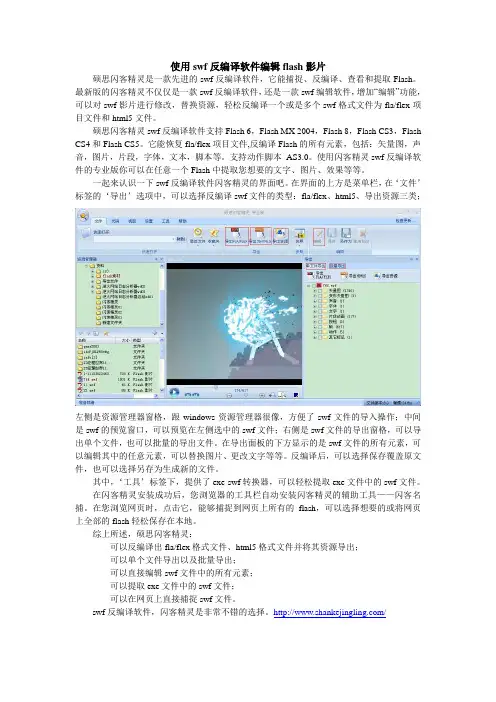
一起来认识一下swf反编译软件闪客精灵的界面吧。
在界面的上方是菜单栏,在‘文件’标签的‘导出’选项中,可以选择反编译swf文件的类型:fla/flex、html5、导出资源三类;左侧是资源管理器窗格,跟windows资源管理器很像,方便了swf文件的导入操作;中间是swf的预览窗口,可以预览在左侧选中的swf文件;右侧是swf文件的导出窗格,可以导出单个文件,也可以批量的导出文件。
在导出面板的下方显示的是swf文件的所有元素,可以编辑其中的任意元素,可以替换图片、更改文字等等。
反编译后,可以选择保存覆盖原文件,也可以选择另存为生成新的文件。
其中,‘工具’标签下,提供了exe-swf转换器,可以轻松提取exe文件中的swf文件。
在闪客精灵安装成功后,您浏览器的工具栏自动安装闪客精灵的辅助工具——闪客名捕。
在您浏览网页时,点击它,能够捕捉到网页上所有的flash,可以选择想要的或将网页上全部的flash轻松保存在本地。
综上所述,硕思闪客精灵:可以反编译出fla/flex格式文件、html5格式文件并将其资源导出;可以单个文件导出以及批量导出;可以直接编辑swf文件中的所有元素;可以提取exe文件中的swf文件;可以在网页上直接捕捉swf文件。

SWFTools 是一组用来处理 Flash 的 swf 文件的工具包,包括:1. 合并工具 swfcombine2. 抽取工具 swfextract3. PDF/JPEG/PNG/AVI/TTF/WAV 到 SWF 的转换工具:pdf2swf, jpeg2swf, png2swf, avi2swf, font2swf, and wav2swf|4. 文本解析工具 swfstrings5. SWF 解析器 swfdump6. SWF 读写库 rfxswflib一个简单的将PDF文档转成SWF的用法:C:\SWFTools\pdf2swf Paper3.pdf -o Paper3.swf -f -T 9pdf2swf man pagepdf2swf -s parametersCurrent GitUsage: /usr/local/swft_git/bin/pdf2swf [-options] file.pdf -o file.swf-h , --help Print short help message and exit-V , --version Print version info and exit-o , --output file.swf Direct output to file.swf. If file.swf contains '%' (file%.swf), then each page goes to a seperate file.-p , --pages range Convert only pages in range with range e.g. 1-20 or 1,4,6,9-11 or-P , --password password Use password for deciphering the pdf.-v , --verbose Be verbose. Use more than one -v for greater effect. -z , --zlib Use Flash 6 (MX) zlib compression.-i , --ignore Allows pdf2swf to change the draw order of the pdf. This may make the generated-j , --jpegquality quality Set quality of embedded jpeg pictures to quality.0 is worst (small), 100 is best (big). (default:85)-s , --set param=value Set a SWF encoder specific parameter. See pdf2swf -s help for more information.-w , --samewindow When converting pdf hyperlinks, don't make the links open a new window.-t , --stop Insert a stop() command in each page.-T , --flashversion num Set Flash Version in the SWF header to num.-F , --fontdir directory Add directory to the font search path.-b , --defaultviewer Link a standard viewer to the swf file.-l , --defaultloader Link a standard preloader to the swf file which will be displayed while the main swf is loading.-B , --viewer filename Link viewer filename to the swf file.-L , --preloader filename Link preloader filename to the swf file.-q , --quiet Suppress normal messages. Use -qq to suppress warnings, also.-S , --shapes Don't use SWF Fonts, but store everything as shape. -f , --fonts Store full fonts in SWF. (Don't reduce to used characters).-G , --flatten Remove as many clip layers from file as possible. -I , --info Don't do actual conversion, just display a list of all pages in the PDF.-Q , --maxtime n Abort conversion after n seconds. Only available on Unix.-s Set a SWF encoder specificPDF Parameters:PDF device global parameters:fontdir=<dir> a directory with additional fontsfont=<filename> an additional font filenamepages=<range> the range of pages to convert (example: pages=1-100,210-) zoom=<dpi> the resultion (default: 72)languagedir=<dir> Add an xpdf language directorymultiply=<times> Render everything at <times> the resolutionpoly2bitmap Convert graphics to bitmapsbitmap Convert everything to bitmapsSWF Parameters:SWF layer options:jpegsubpixels=<pixels> resolution adjustment for jpeg images (same as jpegdpi, but in pixels)ppmsubpixels=<pixels resolution adjustment for lossless images (same as ppmdpi, but in pixels)subpixels=<pixels> shortcut for setting both jpegsubpixels and ppmsubpixelsdrawonlyshapes convert everything to shapes (currently broken) ignoredraworder allow to perform a few optimizations for creating smaller SWFslinksopennewwindow make links open a new browser windowlinktarget target window name of new linkslinkcolor=<color) color of links (format: RRGGBBAA)linknameurl Link buttons will be named like the URL they refer to (handy foriterating through links with actionscript)storeallcharacters don't reduce the fonts to used characters in the output fileenablezlib switch on zlib compression (also done if flashversion>=6)bboxvars store the bounding box of the SWF file in actionscript variablesdots Take care to handle dots correctlyreordertags=0/1 (default: 1) perform some tag optimizations internallinkfunction=<name> when the user clicks a internal link (to a different page) in the converted file, this actionscript function is calledexternallinkfunction=<name> when the user clicks an external link (e.g. http://www.foo.bar/) on the converted file, this actionscript function is called disable_polygon_conversion never convert strokes to polygons (will remove capstyles and joint styles)caplinewidth=<width> the minimum thichness a line needs to have so that capstyles become visible (and are converted)insertstop put an ActionScript "STOP" tag in every frame protect add a "protect" tag to the file, to prevent loading in the Flash editorflashversion=<version> the SWF fileversion (6)framerate=<fps> SWF framerateminlinewidth=<width> convert horizontal/vertical boxes smaller than this width to lines (0.05)simpleviewer Add next/previous buttons to the SWFanimate insert a showframe tag after each placeobject (animate draw order of PDF files)jpegquality=<quality> set compression quality of jpeg imagessplinequality=<value> Set the quality of spline convertion to value (0-100, default: 100).disablelinks Disable links.通过代码将PDF转换成SWF来说,现在比较常用的一种方式就是利用SWFTools工具中的pdf2swf(/)。

硕思闪客之锤详细教程全集一)产品简介闪客之锤是一款全能型的Flash动画制作工具,强大的功能让您更快更容易的制作专业级Flash影片。
它支持设计矢量图,多属性文字编辑,影片剪辑和按钮的创建,补间动画和引导线运动动画,遮罩,流声音和事件声音。
除了使用该程序的矢量图绘图工具外,您还可以导入其他的矢量图格式,包括AI,SVG 和WMF/EMF 来使用。
闪客之锤还提供了专业的动作脚本编辑器,并结合辅助功能,如语法加亮,自动显示成员列表,参数信息和自动完成代码输入,来帮助您轻松的编写动作脚本。
闪客之锤最强大的一个功能是运用智能的运动动画分析和完全的动作脚本支持,来导入*.SWF格式的文件。
所有导入的元素及动作脚本可以被轻松的修改,还可以将影片再导出为SWF格式,保证原来影片的元素和功能毫无损失。
为了制作出更专业的动画,闪客之锤自带了80余款各种样式的生动的动画特效。
您只需轻点几下鼠标,更改几个参数即可完成复杂的动画作品。
此外,还支持多字节语言文字。
(二)命令1、文件新建文件—>新建新建文件(Ctrl+N)单击“新建文件”命令或者按下“Ctrl+N”键即新建一个.sqf文件。
新建窗口单击“新建窗口”命令即再建一个设计窗口。
正在使用的设计窗口也不会被关闭。
打开(Ctrl+O)文件—>打开单击“文件”—>“打开”命令或者按下“Ctrl+O”键即打开一个.sqf文件。
保存(Ctrl+S)文件—>保存单击“文件”—>“保存”命令或者按下“Ctrl+S”键即保存一个.sqf文件。
另存为文件—>另存为单击“文件”—>“另存为”命令即保存一个不同名字的.sqf文件在目录中。
导入文件—>导入单击“文件”—>“导入”命令即导入影片或者图像。
闪客之锤支持导入的影片格式是:.swf 文件,图像格式是:.bmp、.jpg和.jpeg文件。
导入到库文件—>导入到库单击“文件”—>“导入到库”命令即导入一个图像到库面板,也可以导入flash影片(.swf)的所有元素到库面板中。

DoSWF介绍及使用说明目录项目背景 (2)软件主要功能特点 (2)软件使用说明 (3)1主要布局 (3)2修改SWF属性 (3)3加密 (4)3.1严格加密模式 (4)3.2防吸血鬼模块 (4)3.3添加加载进度 (4)4混淆 (4)5添加水印 (5)6更多功能 (6)7授权 (6)8加密级别 (7)常见问题 (7)怎么获取授权码? (7)个人授权和商业授权有什么区别? (7)DoSWF Professional和MINI版本有什么区别? (8)一个注册码能使用多久? (8)注册码失效如何处理? (8)项目背景随着Flash的不断发展,Flash能做的事越来越多了。
从web application到web game,再到SNS application,从动画到交互,从音频播放到视屏,Flash给用户带来的不只是交互体验上的流畅,也不只是听觉到视觉的的享受,更是网络生活的便利。
但是,随着Flash应用的不断增多。
针对Flash的破解软件悄然而生。
这类软件对Flash 应用,轻松破解,或盗取图片,或音频、视频,甚至是代码,使得创作者的劳动成果付诸东流。
DoSWF(Flash SWF Encryption)(以下简称DoSWF)这个项目正是在这样的环境下诞生的,旨在为Flash应用程序提供一个安全、可靠的加密,保护作者的劳动果实,保障作者的合法权益。
软件主要功能特点DoSWF是一款专业的Flash SWF、SWC加密混淆工具,主要功能包括:1.加密对Flash SWF以及SWC文件进行加密。
与其他加密软件不同的是,DoSWF也能对库元素进行加密,从而保证作品中资源的安全。
2.混淆DoSWF支持对Actionscript3.0进行高度的混淆操作,包括字符混淆以及指令。
能有效的对抗当前主流破解软件。
DoSWF内置了一套复杂的检测机制,能比较智能的检测到个环节出现的特殊字段,保障了混淆的精准性。
这是其他同类加密软件无法比拟的。